I ran clean my mac for the first time a couple days ago. ever since then I have been noticing that random apps won't open. I've only found 3 so far but it's a big problem. they are transmission, pixelmator, and activity monitor. now transmission and pixelmator I can redownload but how do I get activity monitor again.

Got a tip for us?
Let us know
Become a MacRumors Supporter for $50/year with no ads, ability to filter front page stories, and private forums.
CleanMyMac cleaned too much
- Thread starter Tom Foolery
- Start date
- Sort by reaction score
You are using an out of date browser. It may not display this or other websites correctly.
You should upgrade or use an alternative browser.
You should upgrade or use an alternative browser.


unfortunately I don't have time machine. however I did repaired disk permissions and it fixed activity monitor.
Hello,
I represent CleanMyMac Support.
The problem with Activity Monitor can be solved by fixing disks permissions, as you already did. It is a known bug and will be fixed in the new release on Friday.
About Transmission and Pixelmator, we have tried to reproduce this, but with no luck. It is the first time we get complains about these programs. I would recommend you to reinstall them and add them to the Ignore List - located under Universal Binaries.
Do not hesitate to write me to sofiux@macpaw.com, and I will be glad to help.
I represent CleanMyMac Support.
The problem with Activity Monitor can be solved by fixing disks permissions, as you already did. It is a known bug and will be fixed in the new release on Friday.
About Transmission and Pixelmator, we have tried to reproduce this, but with no luck. It is the first time we get complains about these programs. I would recommend you to reinstall them and add them to the Ignore List - located under Universal Binaries.
Do not hesitate to write me to sofiux@macpaw.com, and I will be glad to help.
Michaelgtrusa
macrumors 604
desertdemocrat
macrumors newbie
C
I am experiencing similar problems after using Clean My Mac. In addition to the problems listed above, short cuts are not working in Firefox, Safari, Word and Stickies (only apps I have tired to use), and text input is slow, non-responsive, and there are lots of times typing results in no action at all.
Please advise
After using CleanMyMac,
*cannot print - serious problem
*sooooo slow. Many spinning beach balls.
*Some applications disabled.
I should have read this first....
So, other than Time Machine, nothing??
I am experiencing similar problems after using Clean My Mac. In addition to the problems listed above, short cuts are not working in Firefox, Safari, Word and Stickies (only apps I have tired to use), and text input is slow, non-responsive, and there are lots of times typing results in no action at all.
Please advise
CleanMyMac Support
Hi!
I represent MacPaw customer support and we will appreciate if you could help us investigate the issue a bit further, because at this point we could not reproduce the same negative behavior related to typing.
Please let us know what particular input devices you are using (is it an Apple keyboard? Wireless or no?)
Just in case, I'd like to mention that it is recommended to restart your Mac after the very first cleanup, because some of the issues can be just cache-cleanup related. Do that if you did not restart the machine so far.
It would be great if you could write back just here or even better - contact me directly at: greka@macpaw.com
Thanks in advance for your cooperation! We are sure that the problem is resolvable 🙂
Hi!
I represent MacPaw customer support and we will appreciate if you could help us investigate the issue a bit further, because at this point we could not reproduce the same negative behavior related to typing.
Please let us know what particular input devices you are using (is it an Apple keyboard? Wireless or no?)
Just in case, I'd like to mention that it is recommended to restart your Mac after the very first cleanup, because some of the issues can be just cache-cleanup related. Do that if you did not restart the machine so far.
It would be great if you could write back just here or even better - contact me directly at: greka@macpaw.com
Thanks in advance for your cooperation! We are sure that the problem is resolvable 🙂

knew2mack
macrumors regular
Uncertain of what to take away from Clean My Mac
After doing the scan for Clean My Mac, I am now left, as someone who has no idea of what different things even mean.
Caches??
Binary?
System Junk?
Language Files?
Please help!!!!! I am worried that I will remove something that is absolutely needed to run my Macbook.
Thanks
dawn
After doing the scan for Clean My Mac, I am now left, as someone who has no idea of what different things even mean.
Caches??
Binary?
System Junk?
Language Files?
Please help!!!!! I am worried that I will remove something that is absolutely needed to run my Macbook.
Thanks
dawn

GGJstudios
macrumors Westmere
After doing the scan for Clean My Mac, I am now left, as someone who has no idea of what different things even mean.
Caches??
Binary?
System Junk?
Language Files?
Please help!!!!! I am worried that I will remove something that is absolutely needed to run my Macbook.
Thanks
dawn
Really, unless you know what you're doing, you should be careful about what you remove from your system. What, exactly, are you trying to accomplish?

Angelo95210
macrumors 6502a
I just gave a try to this app. For me it doesn't worth it as it is too risky, as we can notice from the above post. I had the same difficulties after install, still having some events reported in the logs. Had to delete some file by hand.
Hello everyone!
I would just like to point out that CleanMyMac works with user applications only and it cannot possibly harm your OS in any way.
The typing issue that was reported in this post is basically a one-time issue at this point, which is why I asked to provide us with more details on the problem if possible. We did not even receive similar requests to our Support address so far. I just stumbled upon this post and we are now really interested in resolving the issue, which has something to do not only with CleanMyMac.
I will appreciate a reply from desertdemocrat 🙂
You can't avoid possible difficulties with any software, but what I know is that we did not have unresolvable issues in CleanMyMac customer support ever.
By the way, even if you don't have a license, you can still contact us at any time at support@macpaw.com
I would just like to point out that CleanMyMac works with user applications only and it cannot possibly harm your OS in any way.
The typing issue that was reported in this post is basically a one-time issue at this point, which is why I asked to provide us with more details on the problem if possible. We did not even receive similar requests to our Support address so far. I just stumbled upon this post and we are now really interested in resolving the issue, which has something to do not only with CleanMyMac.
I will appreciate a reply from desertdemocrat 🙂
You can't avoid possible difficulties with any software, but what I know is that we did not have unresolvable issues in CleanMyMac customer support ever.
By the way, even if you don't have a license, you can still contact us at any time at support@macpaw.com
If CleanMyMac only works with applications, how in the world does it know what can be deleted without knowing the details of the indivdual applications?
I've always avoided applications like CleanMyMac since they tend to remove stuff they shouldn't. If I'm short of space, I'd much rather analyze the issue myself and remove what I know can be removed safely.
I've always avoided applications like CleanMyMac since they tend to remove stuff they shouldn't. If I'm short of space, I'd much rather analyze the issue myself and remove what I know can be removed safely.
GGJstudios
macrumors Westmere
I've always avoided applications like CleanMyMac since they tend to remove stuff they shouldn't. If I'm short of space, I'd much rather analyze the issue myself and remove what I know can be removed safely.
I agree! The only app I've used to save space is Monolingual, which effectively removes languages and architectures I know I'll never need. Beyond that, it's best to leave Mac OS X files alone, unless you know exactly what they're used for and all the effects of removing them.
Hello oldwiz!
It uses a number of algorithms to locate dependent files of applications and it can remove the useless files. Monolingual only removes localizations, but CleanMyMac can also remove the unused code from Universal Binaries and some other useless items, for example, debugging files that were only necessary on application installation.
What I mean is that CleanMyMac does not interfere with any of the files, related to the bootability and functionality of your OS, whereas it can locate all the useless items, related to your apps (basically those are exactly the files that make your Macs slower).
The overwhelming majority of our customers not only experienced increase in free space, but in the overall performance as well.
Of course, Mac OS is a really reliable and bullet-proof thing, so it still works with tons of junk, but how well does it do that?
It uses a number of algorithms to locate dependent files of applications and it can remove the useless files. Monolingual only removes localizations, but CleanMyMac can also remove the unused code from Universal Binaries and some other useless items, for example, debugging files that were only necessary on application installation.
What I mean is that CleanMyMac does not interfere with any of the files, related to the bootability and functionality of your OS, whereas it can locate all the useless items, related to your apps (basically those are exactly the files that make your Macs slower).
The overwhelming majority of our customers not only experienced increase in free space, but in the overall performance as well.
Of course, Mac OS is a really reliable and bullet-proof thing, so it still works with tons of junk, but how well does it do that?
GGJstudios
macrumors Westmere
That's not accurate:Monolingual only removes localizations, but CleanMyMac can also remove the unused code from Universal Binaries
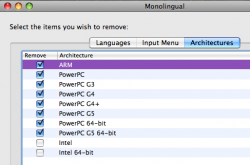
You're right. Sorry I did not check that. I think the last time I used Monolingual, it only worked with localizations. It seems to do its job quite well, but you can do that with CleanMyMac as well + a lot of other useful cleanup features 🙂
In any case, there are quite a lot of apps that do some of the things CleanMyMac does. A lot of them do it really well, no doubt, but using CleanMyMac you can do all of that in one place. However, we have some unique features that are not available in other apps.
In any case, there are quite a lot of apps that do some of the things CleanMyMac does. A lot of them do it really well, no doubt, but using CleanMyMac you can do all of that in one place. However, we have some unique features that are not available in other apps.
GGJstudios
macrumors Westmere
Such as? What can CleanMyMac do that Monolingual can't?...However, we have some unique features that are not available in other apps.
Such as? What can CleanMyMac do that Monolingual can't?
It has a built in Application Remover as well as File Shredder if I remember correctly from the Trial I tried...
GGJstudios
macrumors Westmere
It has a built in Application Remover as well as File Shredder if I remember correctly from the Trial I tried...
Like AppCleaner and AppZapper, the Application Remover doesn't clean up all files left behind by apps. It mostly removes .plist files, which don't take up much space at all. It doesn't remove other Library files left by some apps, which consume much more space than a few tiny plist files. Not worth it, IMO, especially when Monolingual is free.

macpro2000
macrumors 65816
I've used CleanMyMac too and have to say trying to save a couple of GB isn't worth losing stuff on your system.
I knew that you would ask this question - that's why I did not describe those features 🙂))
You will probably be amazed, but CleanMyMac has quite a lot of unique things up its sleeve. It has absolutely new device cleanup capabilities, that allow you to remove any service files from any external devices.
You will probably ask: Why do I need that?
Aha 🙂 For example, my in-car mp3 with USB-support treats ALL the service files as corrupted media files, which causes a lot of confusion in tracks. There is usually a huge number of resource fork files and .DS_Stores in all the folders with your music. Secondly, you will never make your Windows-friend 'faint' when he uses your USB-Stick, because lots of people think that they have a virus when they see Mac OS service files on Windows. Well, it is just a couple of cases where this feature is useful.
Now, Application Removal. Yes, there are some solutions that also do that, but, after an extensive research, we have found out that there were no apps that could analyze packages. This is why CleanMyMac has a very exquisite package analyzer. Most of our users don't even know about that, because it is just a part of Application Uninstaller, but this is what makes this feature MUCH better than in any other apps.
The same story repeats when we deal with leftovers. CleanMyMac does a great job of locating files that are related to the apps you have already trashed before.
Well, I won't comment on some really useful usability features that are not available in other solutions, but if you give CleanMyMac a proper test, you will know what I am on about 🙂 That is related to trash status monitor, automatic device cleanup, etc.
Even with all that said, I am sure that our dev-guys would be able to continue the list a lot further. In general, CleanMyMac does a lot of new things and it does a bunch of 'old' things better and safer.
You will probably be amazed, but CleanMyMac has quite a lot of unique things up its sleeve. It has absolutely new device cleanup capabilities, that allow you to remove any service files from any external devices.
You will probably ask: Why do I need that?
Aha 🙂 For example, my in-car mp3 with USB-support treats ALL the service files as corrupted media files, which causes a lot of confusion in tracks. There is usually a huge number of resource fork files and .DS_Stores in all the folders with your music. Secondly, you will never make your Windows-friend 'faint' when he uses your USB-Stick, because lots of people think that they have a virus when they see Mac OS service files on Windows. Well, it is just a couple of cases where this feature is useful.
Now, Application Removal. Yes, there are some solutions that also do that, but, after an extensive research, we have found out that there were no apps that could analyze packages. This is why CleanMyMac has a very exquisite package analyzer. Most of our users don't even know about that, because it is just a part of Application Uninstaller, but this is what makes this feature MUCH better than in any other apps.
The same story repeats when we deal with leftovers. CleanMyMac does a great job of locating files that are related to the apps you have already trashed before.
Well, I won't comment on some really useful usability features that are not available in other solutions, but if you give CleanMyMac a proper test, you will know what I am on about 🙂 That is related to trash status monitor, automatic device cleanup, etc.
Even with all that said, I am sure that our dev-guys would be able to continue the list a lot further. In general, CleanMyMac does a lot of new things and it does a bunch of 'old' things better and safer.
GGJstudios
macrumors Westmere
That's not an issue, since I don't have problems with that. I know what a virus is and isn't, and my Windows "friends" know that Mac service files are harmless.It has absolutely new device cleanup capabilities, that allow you to remove any service files from any external devices.
And what, exactly, is the benefit of "analyzing" packages, when you still leave leftover files?Now, Application Removal. Yes, there are some solutions that also do that, but, after an extensive research, we have found out that there were no apps that could analyze packages.
No, it doesn't. It does no better than the apps I mentioned, deleting mostly .plist files, and leaving much larger files behind.The same story repeats when we deal with leftovers. CleanMyMac does a great job of locating files that are related to the apps you have already trashed before.
I guess you should just try to uninstall apps that were installed via package files and you will see the answer 🙂
Speaking about Windows users - I did not say about all of them. Believe me, there are A LOT of people that do not understand what those files are and some users tend to think of a virus problems here.
Personally, I started my IT life with Windows and I know a lot about it and about Windows products support. YEAH 🙂
Speaking about Windows users - I did not say about all of them. Believe me, there are A LOT of people that do not understand what those files are and some users tend to think of a virus problems here.
Personally, I started my IT life with Windows and I know a lot about it and about Windows products support. YEAH 🙂