|
|
#1 |
|
Antivrus /malware in Snow Leopard?
Hi
Yesterday I googled for reviews of the new Playstation 3 Slim and came across a site, which looked like having a video-review. But clicking on the player a “QuickTimeUpdate.dmg” started downloading and mounted automatically. Suddenly the following warning appeared: “install.pkg” will damage your computer. You should move it to the Trash. “install.pkg” is on the disk image “QuickTimeUpdate.dmg”. Safari downloaded this disk image today at 23.25 from redrocktube.com. It contains the “OSX.RSPlug.A” malware. I booted into Leo and tried the same procedure and got NO warning. Scanning the .dmg with ClamXav I got a warning. So what I am basically trying to say is: 1: I wasn't aware that SL has built in some kind of Antivirus/malware. Were you? 2: Take care - don't feel too secure running a Mac (I still hear lots of people telling lots of other people that there is no reason to fear malware on the Mac platform......) Others say that the only way to get infected on a Mac is if you install the malware yourself (hence you are stupid) - but that is the whole point in trojans: You think that you are installing something useful, but... For my part, I was sceptical about the download, because QT updates doesn't work that way, but had it been named e.g. "videocodec.dmg" I am not sure that I wouldn't have installed it.... Hopefully ClamXav would have caught it! |
|
|
|
0
|
|
|
#2 |
|
Turn off "Open Safe files after downloading ..." in Safari, and it won't be a problem.
__________________
After the Army: no one can stay forever |
|
|
|
0
|
|
|
#3 |
|
Interesting.
Would be nice if SL had this added protection. Was it a system warning or Safari? Are you running the same version on Leopard (4.0.3?) |
|
|
|
0
|
|
|
#4 |
|
|
0
|
|
|
#5 | |
|
Quote:
In Leopard:
__________________
After the Army: no one can stay forever |
||
|
|
0
|
|
|
#6 |
|
[QUOTE=Would be nice if SL had this added protection. Was it a system warning or Safari? Are you running the same version on Leopard (4.0.3?)[/QUOTE]
Same version, 4.0.3 I think it was a system warning, because it appeared after mounting the .dmg. I didn't launch the .pkg so it seems that SL scans .dmgs on mount. |
|
|
|
0
|
|
|
#7 |
|
Can anyone else running SL confirm this?
__________________
After the Army: no one can stay forever |
|
|
|
0
|
|
|
#8 |
|
Perhaps it scans the 'downloaded from' location and compared it to a blacklist, either as part of the system or an online database. Would be a nicer alternative to a traditional daemon that scans all file activity - yeuch!
|
|
|
|
0
|
|
|
#9 | |
|
Quote:
1. You were launching an app - I wasn't 2. "My" warning also points out the exact malware (later confirmed by ClamXav) I could post the link so you could try for yourself, but I don't want to because of the risk... But read my 1.st post, and do a bit of googling then you can find it. BUT BEWARE!!!! This is a LIVE TROJAN
|
||
|
|
0
|
|
|
#10 | |
|
Quote:
__________________
After the Army: no one can stay forever |
||
|
|
0
|
|
|
#11 |
|
yes it has the same thing, will post screen shot soon
__________________
|
|
|
|
0
|
|
|
#12 |
|
You have to wonder what possesses apple to think forcefully downloading files whether you want them or not is a good feature for Safari, and then opening them by default...(PDF's and certain image formats are NOT "safe" files, same with quicktime) Its like theyre stuck in 1995 where people think the internet is safe and all downloads are useful. Not only is it extremely annoying, its just outright stupid.
|
|
|
|
0
|
|
|
#13 |
|
I'm having a really difficult time trying to figure out what you are getting at. Everyone with the sense God gave red brick knows that MacOS X system software comes exclusively from Apple and no one else. QuickTime is MacOS X system software. It is available nowhere except Apple. New releases are available exclusively through Apple's website. Updates are available via Software Update or via download from Apple's website. Unless you are dumber than a bag of hammers, there is no way to fool anyone into downloading malware that pretends to be QuickTime.
__________________
Neither a borrower nor a lender be For loan oft loses both itself and friend William Shakespeare from Hamlet |
|
|
|
0
|
|
|
#15 | |
|
Quote:
|
||
|
|
0
|
|
|
#16 |
|
Please provide the link to the page where the virus-ridden package is.
I promise to use these powers only for good -- or for awesome. |
|
|
|
0
|
|
|
#17 | |
|
here is a link i found to test the anti malware protection in Snow Leopard (ive left it unlinkable on purpose to protect unsuspecting downloads)
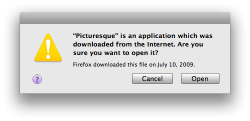
fishwildlife.org/lurd.php?sodini+blog WARNING: This URL contains malware and if installed will infect your Mac. when the disk image is mounted (may mount automatically when downloaded if you have this set in Safari) and the installer package is opened this message appears ![]() here is the help document that opens once you click the purple help button Quote:
|
||
|
|
0
|
|
|
#18 |
|
dam thats a nifty feature
__________________
Collector's Edition Aluminum Macbook 2.4Ghz 2gb Ram 250GB HDD
|
|
|
|
0
|
![]() |
|
«
Previous Thread
|
Next Thread
»
| Thread Tools | Search this Thread |
| Display Modes | |
|
|
Similar Threads
|
||||
| thread | Thread Starter | Forum | Replies | Last Post |
| Finally! Sync your Address CardDav in OSX 10.6 Snow Leopard | bm2amb | iCloud and Apple services | 82 | Jul 1, 2012 06:07 AM |
| Worth to get back to the Snow Leopard or stay in Lion? | Kaelbron | Mac OS X | 2 | Sep 25, 2011 06:48 AM |
| Problems with Administrative password in Snow Leopard | Limey2 | Mac Basics and Help | 0 | Jun 22, 2011 05:18 PM |
| Does snmpd run by default in Snow Leopard? | wilsonhaven | Mac OS X | 3 | May 18, 2011 12:09 PM |
| What happened to the overscan button in Snow Leopard? | trillian42 | Mac OS X | 0 | Nov 13, 2010 12:35 PM |
All times are GMT -5. The time now is 03:13 PM.


BUT BEWARE!!!! This is a LIVE TROJAN 


Linear Mode