|
|||||||
![]() |
|
|
Thread Tools | Search this Thread | Display Modes |
|
|
#1 |
|
QuickTime X Hidden Prefs (Disable the Rounded Corners and more)
To set any of these, go to terminal and enter in the code for whichever preference you want to set. Remember, to reset the setting to its default value, just change the "1" at the end to a "0" (or vice versa).
Disable rounded corners Code:
defaults write com.apple.QuickTimePlayerX MGCinematicWindowDebugForceNoRoundedCorners 1 Code:
defaults write com.apple.QuickTimePlayerX MGUIVisibilityNeverAutoshow 1 Code:
defaults write com.apple.QuickTimePlayerX MGUIVisibilityNeverAutohide 1 Code:
defaults write com.apple.QuickTimePlayerX MGCinematicWindowDebugForceNoTitlebar 1 Code:
defaults write com.apple.QuickTimePlayerX MGPlayMovieOnOpen 1 Code:
defaults write com.apple.QuickTimePlayerX MGEnableCCAndSubtitlesOnOpen 1 Code:
defaults write com.apple.QuickTimePlayerX MGFullScreenExitOnAppSwitch 0 Code:
defaults write com.apple.QuickTimePlayerX MGAllowMultipleSimultaneousRecordings 1 I don't know exactly what these do, or they don't seem to have an effect when I enable them but here you go: Code:
defaults write com.apple.QuickTimePlayerX MGTimeIntervalBeforeShowingLoadingUI defaults write com.apple.QuickTimePlayerX MGUseForkedDecoder defaults write com.apple.QuickTimePlayerX MGEnableMediumQualityAudioRendering defaults write com.apple.QuickTimePlayerX MGDisableQuickTimeX defaults write com.apple.QuickTimePlayerX MGShowFrameworkVersions defaults write com.apple.QuickTimePlayerX MGEnableWWDC2009KeynoteBehavior defaults write com.apple.QuickTimePlayerX MGCinematicWindowUseWindowShapeForRoundedCorners defaults write com.apple.QuickTimePlayerX MGCinematicWindowTitleAlwaysHasActiveAppearance defaults write com.apple.QuickTimePlayerX MGTimelineDisableAudioTrackForVideoMovies defaults write com.apple.QuickTimePlayerX MGTimelineShowSlientRangesWithModifierKey |
|
|
|
0
|
|
|
#2 |
|
Thanks for posting
|
|
|
|
0
|
|
|
#3 |
|
Another working pref
com.apple.QuickTimePlayerX NSRecentDocumentsLimit also works to control or disable (set to 0) the number of recent documents stored.
Why did Apple remove the preferences window from QuickTime Player? It's not like it bugged anyone who didn't look for it. |
|
|
|
0
|
|
|
#4 |
|
I was just about to make a thread to see if anyone knew how to make videos auto-play in QTX. How could this not be a default setting anyway? I just clicked on the video, obviously I want it to play..
Thanks for posting this! Last edited by Ron21; Aug 29, 2009 at 07:21 PM. |
|
|
|
0
|
|
|
#5 |
|
Umm, nevermind. It looked like it worked at first, but now it seems it doesn't. If anyone knows how to control the recent documents menu, please post it.
|
|
|
|
0
|
|
|
#6 |
|
The disabling of rounded corners doesn't SEEM to give you back the pixels that were rounded off... it just squares the corners off, and fills the resulting difference with black UI pixels (not video or other content).
Seems a little pointless! |
|
|
|
0
|
|
|
#7 |
|
Apologies for hijacking the thread, but could anyone tell me why Safari 4.0.3 under Snow Leopard shows me this for the terminal commands above, while Firefox 3.5.2 displays them correctly? I have attached a screenshot. MRoogle
didn't provide any results, but perhaps I didn't search hard enough. Thanks to rorschach for the tip about removing the rounded corners, by the way. |
|
|
|
0
|
|
|
#8 |
|
YEEEEESSSSSSSSSSSSSSSSSSSSSS
![]() ![]() ![]() thanks for autoplay! |
|
|
|
0
|
|
|
#9 | |
|
Quote:
|
||
|
|
0
|
|
|
#10 |
|
thanks for the autoplay tip
is there any way to have it floating always on top? its a shame that such a clean borderless interface can't be always on top |
|
|
|
0
|
|
|
#11 | |
|
Some further searching (this time at Apple's discussion page) shows that others are having some similar problems with fonts. A temporary workaround is to go to Safari>Preferences>Appearance and to change the Fixed-width font. A switch from Courier to Courier New worked for me.
Quote:
|
||
|
|
0
|
|
|
#12 |
|
This is proof to me that Quicktime X is a 1.0 release and they'll try to push out a 2.0 soon.
|
|
|
|
0
|
|
|
#13 |
|
It's disgraceful that you have to use the terminal to alter these basic settings. How come Apple didn't include a preferences panel for QTX?
|
|
|
|
0
|
|
|
#14 |
|
where is the terminal tab? I can't seem to find it
__________________
2009 Mac Mini 2.0 4gb Ram 120gb HD |
|
|
|
0
|
|
|
#15 |
|
Is there a possible way that this could be written as an AppleScript/service so that you could get a pseudo preferences menu within the app?
I'm happy to use terminal to change these things, but I'd like a way to remember the defaults, and to maybe add any more hidden prefs that might be found that I might not want to enable right now. |
|
|
|
0
|
|
|
#16 |
|
I'm glad I did this little Terminal ditty, I like it, a lot.
__________________
went to school and got a degree in rocket appliance |
|
|
|
0
|
|
|
#17 | |
|
Quote:
![]() edit: Finished ![]() So, I saw the various Terminal commands for the QuickTime Player X hidden preferences & thought that there must be a better way to do this. So, I created 2 sets of AppleScripts. One set is to enable the preference & the other set disables the preference (and returns it to the default state). I put up a small website with a guide (and credits) http://web.me.com/celebi23/QuickTimeXScripts/Main.html Special thanks to: http://forums.macrumors.com/showthread.php?t=775514 (rorschach) http://discussions.apple.com/thread....readID=2133815 (janfoeh) http://discussions.apple.com/thread....ageID=10075901 (janfoeh) Last edited by celebi23; Aug 30, 2009 at 02:11 PM. |
||
|
|
0
|
|
|
#18 |
|
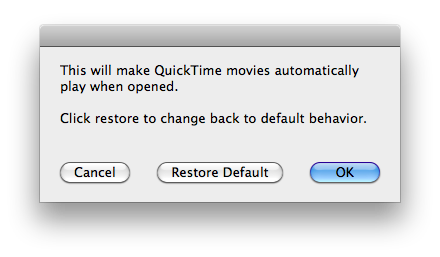
Here's version 2.0 of my QuickTime X Hidden Preferences scripts!
Now with dialogs! ![]() http://web.me.com/celebi23/QuickTimeXScripts/Main.html The site has also been updated with new information & the new DMG to download. The ReadMeFirst.rtf file has been updated. The label color for the "QuickTime Player X Scripts" has been removed. It's not a perfect solution for QuickTime X but, it's an improvement
|
|
|
|
0
|
|
|
#19 |
|
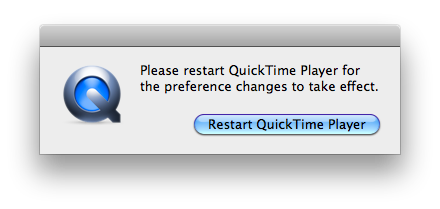
Finished version 2.1. Now you'll see a dialog to restart QuickTime when you select a button (see the previous dialog for an example)
![]() Just follow the steps posted on my site:
See my website for more info http://web.me.com/celebi23/QuickTimeXScripts/Main.html |
|
|
|
0
|
|
|
#20 | |
|
Quote:
__________________
Mac Pro | 27" iMac | 15" MacBook Pro with Retina display | iPhone 5 | iPad 3 | iPad mini
|
||
|
|
0
|
|
|
#21 |
|
How 'bout a 1.1 if it was a fix-release? I don't get it why people seem to love big version numbers...
__________________
what we do in life, echoes in eternity. |
|
|
|
0
|
|
|
#22 |
|
Is there any way to enable the videos to keep playing when you skip to parts of a movie? Its really annoying!
Thanks
|
|
|
|
0
|
|
|
#23 |
|
|
0
|
|
|
#24 |
|
|
0
|
|
|
#25 |
|
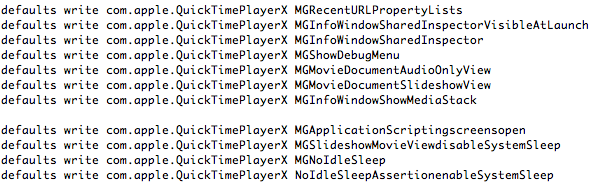
Found some more preferences (I think). Not really sure because nothing appears to change when any of these are activated (except for the MGInfoWindowSharedInspectorVisibleAtLaunch, that shows the inspector window @ launch)
![]() (had to do it this way as I have encountered a bug with Snow Leopard where I can't past large amounts of code & have it show up. Had to use an image for now) |
|
|
|
0
|
![]() |
|
«
Previous Thread
|
Next Thread
»
| Thread Tools | Search this Thread |
| Display Modes | |
|
|
Similar Threads
|
||||
| thread | Thread Starter | Forum | Replies | Last Post |
| fireworks and rounded corners navbar | oposky2006 | Mac Applications and Mac App Store | 0 | Jan 31, 2010 01:00 AM |
| Leopard: one of the rounded corners have gone missing! | Iceduck | Mac OS X | 16 | Jun 6, 2008 03:13 AM |
| Can i make a rectangle with rounded corners in GIMP? | lofight | Mac Applications and Mac App Store | 11 | Nov 2, 2007 07:14 AM |
| Photoshop: Automating Rounded Corners | HiRez | Design and Graphics | 4 | Jan 22, 2007 11:49 PM |
| CSS Rounded Corners | mms | Web Design and Development (archive) | 9 | Aug 2, 2004 02:03 PM |
All times are GMT -5. The time now is 03:04 AM.


Linear Mode