I have an iPhone 16 (not Pro) with IOS 26.1.
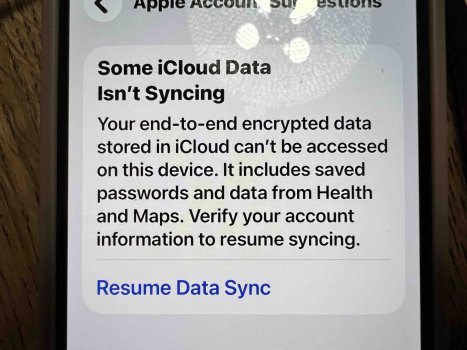
After the 26.1 update I noticed a red dot appearing on the Settings app. When I clicked on it I received the following notification:
Some iCloud Data
Isn't Syncing
When I clicked on it, I received the following notification:
Your end-to-end encrypted data stored in iCloud can't be accessed on this device. It includes saved passwords and data from Health and Maps. Verify your account information to resume syncing.
Resume Data Sync
When I clicked on Resume Data Sync, I received the following notification:
Couldn't Sync iCloud Data
To continue using iCloud to sync your end-to-end encrypted data, you'll need to delete current data stored in iCloud.
Cancel
Delete iCloud Data
I’m afraid if I click on Delete iCloud Data, I’ll permanently delete all my photos as well as all other data on my iPhone.
My iPhone photos are synced to iCloud.
Please review the attached images.
I would like to know how to eliminate the syncing issue and thus the red dot without permanently deleting the photos on my iPhone.
Any help would be greatly appreciated.
Thank you very much!
After the 26.1 update I noticed a red dot appearing on the Settings app. When I clicked on it I received the following notification:
Some iCloud Data
Isn't Syncing
When I clicked on it, I received the following notification:
Your end-to-end encrypted data stored in iCloud can't be accessed on this device. It includes saved passwords and data from Health and Maps. Verify your account information to resume syncing.
Resume Data Sync
When I clicked on Resume Data Sync, I received the following notification:
Couldn't Sync iCloud Data
To continue using iCloud to sync your end-to-end encrypted data, you'll need to delete current data stored in iCloud.
Cancel
Delete iCloud Data
I’m afraid if I click on Delete iCloud Data, I’ll permanently delete all my photos as well as all other data on my iPhone.
My iPhone photos are synced to iCloud.
Please review the attached images.
I would like to know how to eliminate the syncing issue and thus the red dot without permanently deleting the photos on my iPhone.
Any help would be greatly appreciated.
Thank you very much!