Become a MacRumors Supporter for $50/year with no ads, ability to filter front page stories, and private forums.

MacRumors

macrumors bot
Original poster


Since 2023, Apple's newer iPhones have had an 80 percent charge limit for those who want to extend battery lifespan. Charging to 80 percent instead of 100 percent is supposed to put less stress on the battery, improving longevity.

iOS-26-Battery-Glass-Feature.jpg
 
iPhone 16 Pro Max, purchased on day one. I had the 80% limit on for a while, but at some point, about six months ago, my phone wasn't making it through the day. I think there was an iOS update that really hit the battery.

Anyway, after two years:

Maximum capacity: 97%
Cycle count: 491

This us with optimized charging enabled, which may do enough so we don’t need to limit the charge any more.

I see no need to worry about charging to 80% if the battery is going to last this long.
 
Last edited:
I realize that iOS and iPadOS aren't technically the same anymore. But my two devices handle these options differently:

my iPhone 17 Pro gives me an option for 80%, 85%, 90% , 95%, or 100% (no restriction).

My M2 iPad Air (11-inch) only gives me an option for 80% or off.

my work M3 MacBook Pro gives the same options as my iPhone. Is it because the M2 can't be more granular, or is it because iPadOS can't? Does anyone know?

I guess I should look that up.
 
I'm guessing my 97 percent capacity isn't too far off from the battery health readings on iPhones that didn't have the charge limit turned on.
Correct. I've never limited my charge (I charge to 100% nightly) and after 1 year with my 17 Pro my capacity is 96% after 259 charge cycles.

The 80% charge limit offers no value in regards to battery longevity - this has been shown over and over by people who've compared the 80% limit vs. no-limit.

You are giving up 20% of your charge and gaining nothing whatsoever IMHO.
 
iPhone 16 Pro Max. I had the 80% limit on for a while, but at some point, about six months ago, my phone wasn't making it through the day. I think there was an iOS update that really hit the battery.

Anyway, after two years:

Maximum capacity: 97%
Cycle count: 491

I see no need to worry about charging to 80% if the battery is going to last this long.
An update around iOS 26.3 hit my 16 Pro battery, cutting it by several hours, and iOS 27 has done the same but to an even greater extent. My 18 month old phone gets half the battery it used to just 5-6 months ago. If this isn't planned obsolescence, I don't know what is.
 
Sure sounds better than optimised charging that I successfully ran for 6 months (out of 3 1/2 yrs...until it stopped playing along.
 
17 Pro Max, 244 cycle count, 100%
Charge limit mostly on 85%
99% MagSafe Charger
I've head nearly identical results.

17 Pro Max
Charge Limit: 80% (with 100% on a handful of days)
99% MagSafe Charging
Cycle Count: 222
Maximum Capacity: 100%

Been using 80% charge limit since a couple of weeks in and only went to 100% on a handful of vacation days. I have owned the phone since September 2025.

Much better results than I got with just Apple's "Optimized Charging".

I would wager that the Pro Max will fare better than the Pro due to the larger battery less likely to dip down to under 10%,
 
Last edited:
  • Haha
Reactions: NetMage
iPhone 16 PM - 96%, 477 cycles since Sept 2024. Charging always 80% via MagSafe and usually going outside with battery pack attached. Fully discharged - never.
 
  • Like
Reactions: CarAnalogy


Since 2023, Apple's newer iPhones have had an 80 percent charge limit for those who want to extend battery lifespan. Charging to 80 percent instead of 100 percent is supposed to put less stress on the battery, improving longevity.

iOS-26-Battery-Glass-Feature.jpg


For the last three years, I've used that setting on my iPhone. I started with the iPhone 15 Pro Max, then did the iPhone 16 Pro Max, and most recently, the iPhone 17 Pro Max.

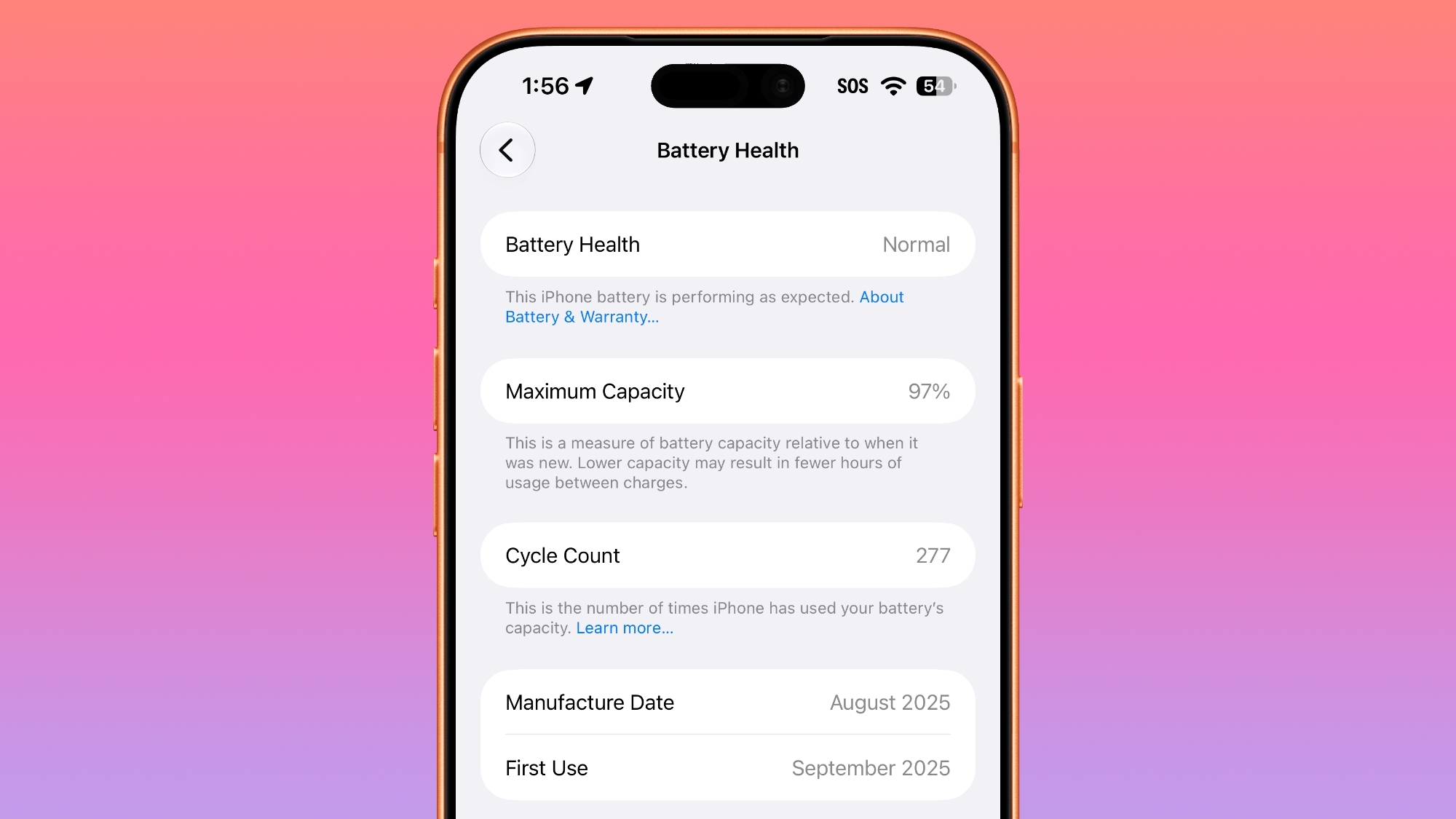
After 12 months at an 80 percent maximum charge, my iPhone 17 Pro Max is at 97 percent maximum capacity with a cycle count of 277.

iphone-17-pro-max-battery-1-year.jpg


Last year, my iPhone 16 Pro Max was at 94 percent capacity after 12 months, and in 2024, my iPhone 15 Pro Max was also at 94 percent capacity.

During the year I tested the iPhone 16 Pro Max, I tried not to let the battery dip below 20 percent. This year, I did the same thing, but I also tried to do more charging over USB-C than Qi2 or MagSafe. I'm not sure if that helped, but 97 percent capacity is the best result I've had yet with the charge limit turned on.

I don't know how my battery result compares to others, but if you've kept yours at 100 percent, you can compare your capacity to mine to see if there's any real difference.

Apple transitioned to aluminum and added vapor chamber cooling with the iPhone 17 Pro Max, and I did think my iPhone spent less time uncomfortably warm than the iPhone 16 Pro Max. It may be that the vapor chamber cooling made the biggest difference and limiting wireless charging didn't matter.

I don't use the iPhone 15 Pro Max or the iPhone 16 Pro Max as my main iPhones anymore, but I do use them daily as test devices. They still have the 80 percent limit turned on, so I can share some longer-term battery results.
  • iPhone 15 Pro Max (36 months) - 88%, 369 cycles
  • iPhone 16 Pro Max (24 months) - 93%, 343 cycles
  • iPhone 17 Pro Max (12 months) - 97%, 277 cycles
Last year, my iPhone 16 Pro Max hit 299 cycles by September 24. This year, I'm only at 277 cycles. It's nearly two weeks later than I usually report results too, so the larger battery meant less charging.

The iPhone 17 Pro Max has a bigger battery and faster charging than the iPhone 16 Pro Max, so an 80 percent charge limit wasn't as difficult to live with as it was in the past. I rarely ran out of battery, though I did still bring a battery pack with me most places. My favorite battery packs right now are the ones with built-in USB-C cables, especially those that can attach to my iPhone magnetically but charge it over USB-C. It's faster charging that's still convenient. I also continue to be a fan of the super-slim battery packs that add little bulk and weight to an iPhone.

For the iPhone 15 Pro Max and iPhone 16 Pro Max, I didn't think sacrificing a fifth of my battery was worth the capacity I ended up with, and that's still mostly the case. I'm guessing my 97 percent capacity isn't too far off from the battery health readings on iPhones that didn't have the charge limit turned on.

As for older devices, my two-year-old iPhone 16 Pro Max only lost 1 percent capacity from 2025 to 2026, and my iPhone 15 Pro Max didn't lose any capacity at all during the year. Both phones had fewer battery cycles (44 and 17, respectively), but they're holding capacity even after sitting dead for short periods of time throughout the year.

The most hands-off way to manage battery health is to use Optimized Battery Charging, since it minimizes time spent at 100 percent battery while still charging to full. Setting an 80 percent limit and then turning it off on days you need 100 percent is also a good compromise that could save you battery capacity over time. Apple has 90 and 95 percent options too, which might be a better choice.

My iPhone 18 Pro Max is already set to 80 percent, so I'll check in again in September 2027. I'm going to stick with USB-C charging when I can, and I'm curious how the even bigger battery will affect longevity and what the 80 percent limit is like day to day.

What's your iPhone battery capacity and cycle count? Share it in the comments below and weigh in on whether you think battery charge limits are worthwhile.

Article Link: Three Years of 80% Charge Limits on iPhone: The Results
"My favorite battery packs right now are the ones with built-in USB-C cables, especially those that can attach to my iPhone magnetically but charge it over USB-C. It's faster charging that's still convenient. I also continue to be a fan of the super-slim battery packs that add little bulk and weight to an iPhone."

Hey Juli! I thought I was the only one that did this! HA I am not alone (5000 mAh Anker ultra slim with small USB C cable) 😀. Excellent article! Thank you!

I do the 80% charge on all my devices. I use AlDente (https://apphousekitchen.com/) to keep my Macs at 60-70% charge (my 2021 MBP is still at 100% health according to Apple (96-98% according to coconutBattery))). I usually end my 1-2 year usage cycle at 100% health on my iPhones/Watches.
 
Last edited:
  • Like
Reactions: reinem85
17PM, launch day purchase, 280 cycles, 100% charge limit, 95% health. I’d rather pay the $100 for replacement battery when needed than cripple my charge limit to 80%. But realistically, I’d likely be upgrading before my battery even hit 80% health anyways.
 
Last edited:
Register on MacRumors! This sidebar will go away, and you'll see fewer ads.