My screen on my Macbook is going, and I have a samsung monitor sitting around. Are they compatible & what type of adapter would I need to get? The current cords for samsung would not fit in my Macbook. Any help?
The oldest video connection for computers that is still around. It is transferring an analog video signal and go up to 2048 × 1536 pixel (QXGA). It is often found on most displays and projectors, sometimes even on TVs.
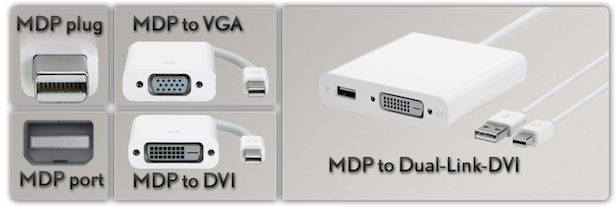
Mini DisplayPort is the current digital standard on all current Macs to transfer video to an external display or TV. It has been introduced in 10/2008 with the release of the Unibody MacBook and MacBook Pros and has gradually been adopted on all other Macs.
MDP is capable of transmitting video, and since 2010, audio too. MDP is a miniaturised version of DisplayPort. It is also license free and can support resolutions of up to 2560 x 1600, which Mini DVI and Micro DVI are not able to do.
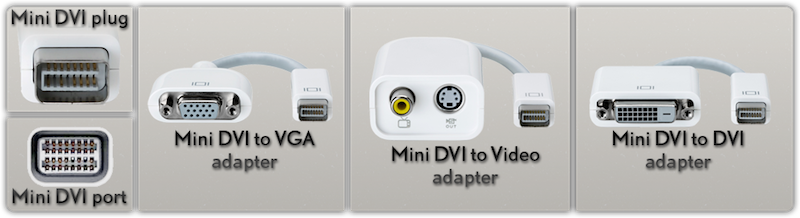
Mini DVI is a digital common interface on the later G4 12" PowerBook, on Intel iMacs till 2009 and on the white and black pre-Unibody MacBooks and on Intel Mac minis before they changed the design to Unibody.
You'll need something which fits into the mini display port and then has a VGA or DVI socket on the end of it, so that you can plug the screen into the adapter.
Or the OP needs something which fits into the Mini DVI port, though I have seen people confusing it with Firewire, or vice versa. Something will fit nonetheless.
What do you mean with "calibrate"? The colour? If so, System Preferences > Displays >> Color >>> Calibrate. You can then calibrate the colour of the internal screen and of the external monitor.
The external Samsung surely has some buttons on the front to allow you some modifications too, take a look at the manual of that monitor.