
PDA

View Full Version : Editing 'Open With...' Contextual Menu


michaelrjohnson
Aug 17, 2005, 09:44 AM
Greetings MR!

While within another thread, a specific question arose several times, but never got addressed before the thread (http://forums.macrumors.com/showthread.php?t=143247) died.

Problem:
If you have the Adobe Creative Suite installed on your machine, and select "Open With..." you will get a rediculously long list of Photoshop mini-apps to open the file with. It's a huge inconvenience having to wade through a whole long list of useless Photoshop .exe's to get to the program I want.
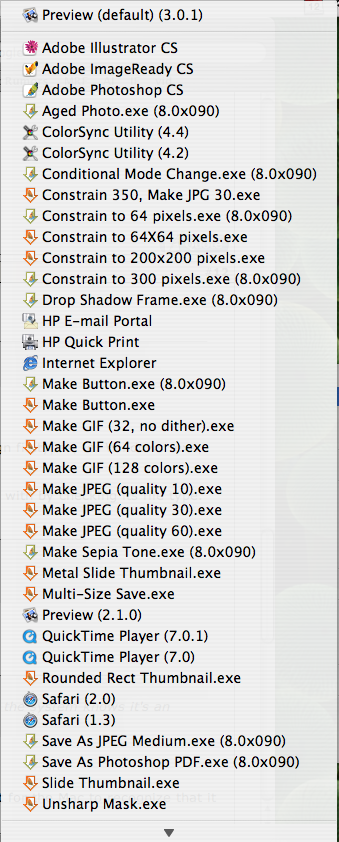
http://forums.macrumors.com/attachment.php?attachmentid=27943
Screenshot courtesy: neocell

Solution?
Is it possible to edit this menu to eliminate those volumes of Photoshop .exe programs? I've never attempted deleting them entirely for fear of how Photoshop may behave. Is it possible just to delete them? How could we exclude them from the 'Open With...' menu?

Any help is much appreciated by myself and many other MR members!


mcmillan
Aug 17, 2005, 12:37 PM
I have the exact same problem, and I can't find a solution :(

Lacero
Aug 17, 2005, 12:39 PM
I find it annoying too. Learned to live with it I guess. You could always archive the .exe and delete the originals.

Heb1228
Aug 17, 2005, 12:49 PM
That is really annoying. I've spent some time trying to figure out how to edit the Open With menu and I haven't found anything either. Let me know if you find anything!

mcmillan
Aug 17, 2005, 01:27 PM
Yeah, the worst part is that it takes a few seconds to load the menu in my Mac Mini.

michaelrjohnson
Aug 18, 2005, 11:06 AM
Based on the replies thus far, this is an issue for many people. Lacero provided the solution to just delete the Photoshop .exe's, as I had mentioned in the original post. However, does anybody have any experience whether or not this adversely affects the performance of Photoshop?

neocell
Aug 18, 2005, 05:50 PM
I don't know about deleting the exe files and it's effects on photoshop but I've found a couple of older apps that allowed you to create contextual menus for applications used, to re-arrange the order, but not to delete the listings (Zingg! (http://www.brockerhoff.net/zingg/), see FAQ for deleting issues). Apparently it has something to do with the system accessing each app's info.plist file see if it should be associated with the file in question see link and quoted text link (http://www.macosxhints.com/article.php?story=2004100508111340).
Authored by: fabrizio on Mon, Oct 11 '04 at 04:51PM
The info in the database are gathered by the System from the Info.plist files stored in each ".app" folder. If you want to modify the database (e.g. you want a specific app no longer be associated to a particular file type in the "Open with..." menu) you have to modify the Info.plist file of that app and then rebuild the LS database. You could either use Panther Cache Cleaner or this terminal command:

/System/Library/Frameworks/ApplicationServices.framework/Frameworks/LaunchServices.framework/Support/lsregister -kill -r -domain local -domain system -domain user
Now, I'm the first to admit that I don't know much about computer operating systems and software underpinnings but I would image that there has got to be someway to work around this so that the 'open with' menus could be changed. Anyone?

michaelrjohnson
Aug 18, 2005, 11:58 PM
I don't know about deleting the exe files and it's effects on photoshop but I've found a couple of older apps that allowed you to create contextual menus for applications used, to re-arrange the order, but not to delete the listings (Zingg! (http://www.brockerhoff.net/zingg/), see FAQ for deleting issues). Apparently it has something to do with the system accessing each app's info.plist file see if it should be associated with the file in question see link and quoted text link (http://www.macosxhints.com/article.php?story=2004100508111340).

Now, I'm the first to admit that I don't know much about computer operating systems and software underpinnings but I would image that there has got to be someway to work around this so that the 'open with' menus could be changed. Anyone?
Thanks neocell! That really went a long way in providing an explanation and initial fix for the issue.

So MacRumors UNIX geeks and code-heads: Is there a more user-friendly option out there?

michaelrjohnson
Aug 19, 2005, 12:12 AM
Well, I think I may have found a solution to this issue. After inspecting how the .exe's were being used, and where they were located, I determined that they are not a crucial part of Photoshop/Illustrator functionality.

The files are located within the directory "Applications/Photoshop CS2/Samples/Droplets/..." The fact that they reside within the samples directory led me to my initial conclusion. What I did, to remove them from the menu, while avoiding deletion was right-click the "Droplets" folder, and select "Create Archive of 'Droplets'...". This compressed all of those applications into a .zip located within the "Samples" directory. As soon as they are not "available" anymore, the "Open With..." menu does not recognize them as options.

I have been able to remove them (with the above method) and re-instate them instantly by unzipping the "Droplets.zip" file. It's a non-destructive method that produces instant results.

Below is my Before and After:

mcmillan
Aug 19, 2005, 12:26 AM
Thank you so much.. you solved your own problem :p ... I'll do the .zip thing tomorrow morning.

michaelrjohnson
Aug 19, 2005, 12:30 AM
Thank you so much.. you solved your own problem :p ... I'll do the .zip thing tomorrow morning.
Thank you :)

It's not often that I can do that, so I'm really glad to be able to share!

Lacero
Aug 19, 2005, 12:37 AM
Yeah, you pretty much came to the same end result like that I suggested on #3.

michaelrjohnson
Aug 19, 2005, 12:39 AM
Yeah, you pretty much came to the same end result like that I suggested on #3.
For some reason it didn't really register then. :o But you're correct. Good work Lacero!

neocell
Aug 19, 2005, 12:59 AM
Thanks to both michaelrjohnson and Lacero for help solving this annoyance

mcmillan
Aug 19, 2005, 12:08 PM
Yeah, you pretty much came to the same end result like that I suggested on #3.
Oh I didn't see that, thank you too then :D

decksnap
Aug 21, 2005, 06:40 PM
Excellent. Best nugget I've scooped up here in weeks. Thanks guys.

mduser63
Aug 21, 2005, 09:04 PM
I don't have this problem, even though I have Photoshop installed. I haven't done anything out of the ordinary, and I certainly haven't modified that samples/droplets folder. I wonder what the difference is.

michaelrjohnson
Aug 21, 2005, 09:42 PM
That is interesting. Perhaps it was an option in the Install that either you or I selected/deselected? I dont' remember my install...

neocell
Aug 21, 2005, 11:15 PM
I don't have this problem, even though I have Photoshop installed. I haven't done anything out of the ordinary, and I certainly haven't modified that samples/droplets folder. I wonder what the difference is.
Do you have the various exe files in your Applications/Photoshop CS2/Samples/Droplets/ folder?