PDA

View Full Version : What video files can iPod touch play?


davidy
May 8, 2008, 07:39 PM
I downloaded a video to iTunes It is in 3pg format and it and plays perfectly in iTunes. However, when I tried to load it into the iPod touch, it stopped with the error message that the touch could not play that type of file. So I used the "Convert Selection for iPod/iPhone" selection in iTunes and converted it to m4p format. Although this was able to load into the touch, it is corrupted to the point of being impossible to view or listen to. How else might I load the 3pg file into the touch, or how else could I convert it into something that is listenable?


thomas769
May 11, 2008, 09:14 AM
Download SUPER convertor it's easily the best conversion software out there and its perfectly free.
And as an added bonus it has a preset iPod conversion option.
Use the original .3gp file and drop it into it.
then move the finished file into iTunes and Hey-Presto it'll be working.


http://www.erightsoft.org/GetFile.php?SUPERsetup.exe

That's from the publisher's site

Hmac
May 11, 2008, 09:22 AM
Download SUPER convertor it's easily the best conversion software out there and its perfectly free.
And as an added bonus it has a preset iPod conversion option.
Use the original .3gp file and drop it into it.
then move the finished file into iTunes and Hey-Presto it'll be working.


http://www.erightsoft.org/GetFile.php?SUPERsetup.exe

That's from the publisher's site


That converter is Windows only, though...right?

DoFoT9
May 11, 2008, 09:34 AM
all ipods, touches, iphones etc. can only play .mp4 or .mov formatted videos. they must be below a cetain bitrate & resolution (ffound on the specs of the ipod itself, apple.com wesbite).

scotty96LSC
May 11, 2008, 10:42 AM
That converter is Windows only, though...right?

Looks like it is windows only.

I converted some videos using iTunes convert and I got the video but not the music. Come to find out certain formatted sound will not convert.
Link (http://docs.info.apple.com/article.html?artnum=302588)

davidy
May 11, 2008, 12:32 PM
Download SUPER convertor it's easily the best conversion software out there and its perfectly free.
And as an added bonus it has a preset iPod conversion option.
Use the original .3gp file and drop it into it.
then move the finished file into iTunes and Hey-Presto it'll be working.


http://www.erightsoft.org/GetFile.php?SUPERsetup.exe

That's from the publisher's site

Can't get your link to connect; error says can't find the server, even though everything else I connect to works okay.

Anyhow, I used http://www.squared5.com/ to convert the file and it works ok.

PowerFullMac
May 11, 2008, 12:58 PM
If you want a mac converter get iSquint.

akm3
May 12, 2008, 12:06 PM
I thought handbrake was the defacto standard to do this.

/edit: I see I'm mistaken. Handbrake does not do what I thought it do'ed.

Ringo-Chan
Apr 16, 2011, 04:20 PM
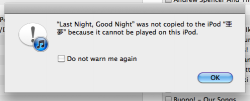
yeah I tried MP4s but it said error "insert name here" cannot be copied because it can not be played on the iPod. why??????????????

AdrianK
Apr 16, 2011, 04:24 PM
yeah I tried MP4s but it said error "insert name here" cannot be copied because it can not be played on the iPod. why??????????????

You're giving us no information to go on. Drag the file in to media info and paste the result please.

Ringo-Chan
Apr 16, 2011, 04:35 PM
You're giving us no information to go on. Drag the file in to media info and paste the result please.

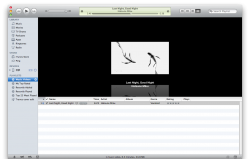
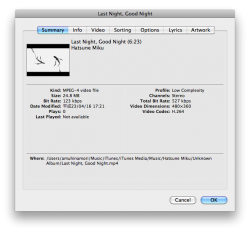
uh like this?
281653

281654

281655

AdrianK
Apr 17, 2011, 02:57 AM
No, that's not quite detailed enough. There's an application called Media Info Mac (http://download.cnet.com/MediaInfo-Mac/3000-2170_4-11386136.html) which will do it, drag the file in, click export, open the file, and paste the result.

Ringo-Chan
Apr 17, 2011, 12:21 PM
No, that's not quite detailed enough. There's an application called Media Info Mac (http://download.cnet.com/MediaInfo-Mac/3000-2170_4-11386136.html) which will do it, drag the file in, click export, open the file, and paste the result.

yeah but I'm not going to pay 2.99 for it

AdrianK
Apr 17, 2011, 01:43 PM
yeah but I'm not going to pay 2.99 for it

Oh, didn't realise that linked back to the app store, you can probably find an old version on Google.

Ringo-Chan
Apr 17, 2011, 05:13 PM
Oh, didn't realise that linked back to the app store, you can probably find an old version on Google.

you mean this app 281810

and i draged in the media and I got this


1
2
3
4
5
6
7
8
9
10
11
12
13
14
15
16
17
18
19
20
21
22
23
24
25
26
27
28
29
30
31
32
33
34
35
36
37
38
39
40
41
42
43
44
45
46
47
48
49
50
* * * MediaInfo Mac 0.7.36.0 file analysis report.
* * * MediaInfo Mac is ©2010 by Diego Massanti - http://mediainfo.massanti.com
* * * MediaInfoLib by Jerome Martinez - http://mediainfo.sourceforge.net
Created on: 平成23/04/17 18:14:27GMT-04:00
Report for file: Last Night, Good Night.mp4

General / Container Stream #1
Total Video Streams for this File.................1
Total Audio Streams for this File.................1
Video Codecs Used.................................AVC
Audio Codecs Used.................................AAC LC
File Format.......................................MPEG-4
Play Time.........................................6mn 22s
Total File Size...................................24.8 MiB
Total Stream BitRate..............................543 Kbps
Title (Tag).......................................Last Night, Good Night
Video Stream #1
Codec (Human Name)................................AVC
Codec (FourCC)....................................avc1
Codec Profile.....................................Baseline@L2.1
Frame Width.......................................480 pixels
Frame Height......................................360 pixels
Frame Rate........................................29.970 fps
Total Frames......................................11475
Display Aspect Ratio..............................4:3
Scan Type.........................................Progressive
Color Space.......................................YUV
Codec Settings (Summary)..........................1 Ref Frames
QF (like Gordian Knot)............................0.080
Codec Settings (CABAC)............................No
Codec Settings (Reference Frames).................1
Video Stream Length...............................6mn 22s 882ms
Video Stream BitRate..............................413 Kbps
Video Stream BitRate Mode.........................VBR
Bit Depth.........................................8 bits
Video Stream Size.................................18.8 MiB (76%)
Video Stream Title................................(C) 2007 Google Inc. v08.13.2007.
Date of Original Encoding.........................UTC 2008-10-10 04:36:28

Audio Stream #1
Codec.............................................AAC
Codec (FourCC)....................................40
Audio Stream Length...............................6mn 22s 873ms
Audio Stream BitRate..............................127 Kbps
Audio Stream BitRate Mode.........................VBR
Number of Audio Channels..........................2
Audio Channel's Positions.........................Front: L R
Sampling Rate.....................................44.1 KHz
Audio Stream Size.................................5.79 MiB (23%)
Audio Stream Title................................(C) 2007 Google Inc. v08.13.2007.
Date of Original Encoding.........................UTC 2008-10-10 04:36:28

AdrianK
Apr 18, 2011, 03:58 AM
Codecs, profiles and bitrates are fine, I really can't see what's wrong with it (any by the look of it, the video originated from YouTube which is iOS compatible so that's no surprise).

I'm guessing there's something up with the container, but I'm not sure how to remux mp4.

funwithamar
Apr 18, 2011, 04:01 AM
download AVplayer app and it'll play all formats :D

Ringo-Chan
Apr 18, 2011, 06:49 PM
Codecs, profiles and bitrates are fine, I really can't see what's wrong with it (any by the look of it, the video originated from YouTube which is iOS compatible so that's no surprise).

I'm guessing there's something up with the container, but I'm not sure how to remux mp4.
but then why won't my ipod play it matte of fact I can't even sync it onto it

Brucewl
Apr 19, 2011, 01:04 AM
Is this video H.264 mp4 video?:confused:

AdrianK
Apr 19, 2011, 01:08 AM
but then why won't my ipod play it matte of fact I can't even sync it onto it

I honestly don't know, that's why I think the container might be corrupt.

Is this video H.264 mp4 video?:confused:

Yes, avc1.

Ringo-Chan
Apr 19, 2011, 06:12 PM
I honestly don't know, that's why I think the container might be corrupt.


Yes, avc1.

anyways thank you for helping :)

Ringo-Chan
Apr 22, 2011, 02:13 PM
download AVplayer app and it'll play all formats :D

ah but it's 2.99 and there is no way my parents would let me buy it

Brucewl
Apr 28, 2011, 10:29 PM
ah but it's 2.99 and there is no way my parents would let me buy it

I remember that Oplayer is free

Feet1stmusic
Aug 25, 2011, 08:48 AM
I am having the exact same problem, i am trying to import flip as mp4's and my iPod and iTunes is saying this video cannot be played on this iPod

----------

I found the problem inside of iTunes there is an option in advanced called created and ipod/iphone version

and then BAM!@@!!

it works!

Kabulcute
Aug 27, 2011, 02:02 AM
I have legally downloaded music and videos from Youtube, and am wondering which types of audio/video files can be read by iPod Touch.

AdrianK
Aug 27, 2011, 03:01 AM
I have legally downloaded music and videos from Youtube, and am wondering which types of audio/video files can be read by iPod Touch.

Anything on YT will play on current gen iOS devices.

Ringo-Chan
Sep 2, 2011, 02:45 PM
I am having the exact same problem, i am trying to import flip as mp4's and my iPod and iTunes is saying this video cannot be played on this iPod

----------

I found the problem inside of iTunes there is an option in advanced called created and ipod/iphone version

and then BAM!@@!!

it works!

Why doesn't it work for me?!

TimMumford86
Nov 21, 2011, 04:41 AM
I am having the exact same problem, i am trying to import flip as mp4's and my iPod and iTunes is saying this video cannot be played on this iPod

----------

I found the problem inside of iTunes there is an option in advanced called created and ipod/iphone version

and then BAM!@@!!

it works!

Wow, so simple and crazy..it just might work...and IT DID! Thank you!!! ( I was experiencing the same issue and error message)...until now!

tucotuti
Nov 21, 2011, 03:31 PM
I have legally downloaded music and videos from Youtube, and am wondering which types of audio/video files can be read by iPod Touch.

I always download videos from youtube (most of them are .flv) and convert them in "Adapter" (http://www.macroplant.com/adapter/), which is free (Win + PC) to .mp4, then I pass it to iTunes and them to the iPhone.

Support from Apple: http://support.apple.com/kb/ht2729#11
"Movies: QuickTime and MPEG-4 movie files that end in ".mov", ".m4v", or ".mp4" and are playable in QuickTime Player."

BrunoWill
Nov 22, 2011, 01:56 AM
MP4, MOV, M4V video with H.264 code, do not above 1280*720 resolution