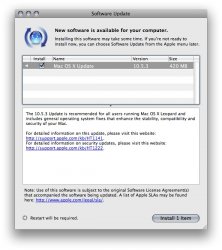
View Full Version : 10.5.3 Is Out!
mediapirate
May 28, 2008, 11:57 AM
It just showed up when I ran an update, applying now.
ergdegdeg
May 28, 2008, 12:01 PM
It's true. Downloading...
xUKHCx
May 28, 2008, 12:02 PM
The 10.5.3 Update is recommended for all users running Mac OS X Leopard and includes general operating system fixes that enhance the stability, compatibility and security of your Mac.
For detailed information on this update, please visit this website: http://support.apple.com/kb/HT1141.
For detailed information on security updates, please visit this website: http://support.apple.com/kb/HT1222.
198Mb on my iMac, I'll wait for the combo update as I have messed with the system quite a lot
pilotkid
May 28, 2008, 12:04 PM
I see it too, 420MB on Macbook Pro. I think I'll wait to install alittle later today, just incase there are some hiccups:D
Lucky736
May 28, 2008, 12:05 PM
Downloading now. 420MB here.
IEatApples
May 28, 2008, 12:05 PM
198Mb on my iMac, I'll wait for the combo update as I have messed with the system quite a lot
I'm getting 420MB on my MacPro :eek:
ergdegdeg
May 28, 2008, 12:06 PM
I see it too, 420MB on Macbook Pro. I think I'll wait to install alittle later today, just incase there are some hiccups:D
Only 198MB on my MacBook Pro. Weird. :D Do you have 10.5.2?
ghall
May 28, 2008, 12:07 PM
420 here on my MacBook Pro. 15 minutes left!!! :D
I hope this update doesn't screw with my theme I've been working on. :(
DJTJ
May 28, 2008, 12:09 PM
420mb on my air w/ 10.5.2 already
...downloading now
Killyp
May 28, 2008, 12:09 PM
Out here too. 198 mb on a 2.2 GHz MBP...
rhett7660
May 28, 2008, 12:09 PM
Yikes... that is freaking huge (420megs). Should these be on the news page?
villanova329
May 28, 2008, 12:10 PM
420MB on my MacBook Air
Povilas
May 28, 2008, 12:10 PM
198Mb on my iMac, I'll wait for the combo update as I have messed with the system quite a lot
It's 420 MB for me.:D
xUKHCx
May 28, 2008, 12:10 PM
I guess the race is on to find any hidden strings for something that might be released next Tuesday / 9th ;)
TheSpecialist
May 28, 2008, 12:11 PM
Great news, hope this fixes the network problems on my school network. Constant dropping out etc.
Eduardo1971
May 28, 2008, 12:12 PM
I will wait for a couple of days and see what problems (if any) you gals/guys find...
Shagrat
May 28, 2008, 12:12 PM
Only 198MB on my MacBook Pro. Weird. :D Do you have 10.5.2?
10.5.2 on Original Core Duo MacBook here and 198MB is MY download size, too...
marold280
May 28, 2008, 12:13 PM
why is it different sizes for different ppl. mine is 198mb and some ppls is 420mb ??? WHY!!!
Mitthrawnuruodo
May 28, 2008, 12:13 PM
Ouh...
420MB on a CD MacBook:
117563
jayhawk11
May 28, 2008, 12:14 PM
420 mb on my 2.2 Santa Rosa MBP. I'll be a guinea pig and see what it breaks/fixes :D
Eraserhead
May 28, 2008, 12:14 PM
420MB for me, damn that is huge.
thekurgan
May 28, 2008, 12:15 PM
Not to be selfish, but I think I'll wait until there are positive reviews before I install this pig. :D
LastZion
May 28, 2008, 12:15 PM
ya 420 for me too! go go go :)
FoxyKaye
May 28, 2008, 12:15 PM
Here's hoping that this is what 10.5.1 should have been.
gnasher729
May 28, 2008, 12:16 PM
This one was always annoying, especially when switching spaces by mistake and switching back immediately:
Resolves an issue in which switching to a different space and returning back to the original space may reorder the application windows with a different active window.
riscy
May 28, 2008, 12:17 PM
420MB on my MB - but like xUKHCx I think I will wait for the combo update.
Trigger2007
May 28, 2008, 12:17 PM
lol as we are all doing it!
420MB on Mac Pro runing 10.5.2
:) and 10 mins to go!!!
syklee26
May 28, 2008, 12:18 PM
things I noticed already:
1. Safari is snappier
2. there is a hidden code of Powerbook G5 Tuesday
3. there is a hidden code for headless mac
karenflower
May 28, 2008, 12:18 PM
Yay! :D 420MB on my 2.16 Macbook. 2 hour download for me. . :rolleyes:
Island Dog
May 28, 2008, 12:19 PM
Installing now. 198mb on the Mac Mini. :)
SpaceMagic
May 28, 2008, 12:19 PM
things I noticed already:
1. Safari is snappier
2. there is a hidden code of Powerbook G5 Tuesday
3. there is a hidden code for headless mac
gosh. and here was me hoping for a PDA...
berkleeboy210
May 28, 2008, 12:20 PM
things I noticed already:
1. Safari is snappier
2. there is a hidden code of Powerbook G5 Tuesday
3. there is a hidden code for headless mac
and i just spotted a Newton 2 as well :D
Darkroom
May 28, 2008, 12:20 PM
I will wait for a couple of days and see what problems (if any) you gals/guys find...
tell me about it... i wonder what this update will break?
someone please post if it still takes 15 zillion years to verify / repair permissions, please and thank you.
Peaceful
May 28, 2008, 12:20 PM
things I noticed already:
1. Safari is snappier
2. there is a hidden code of Powerbook G5 Tuesday
3. there is a hidden code for headless mac
I can't wait for my snappy safari on my headless G5 Powerbook!!
macduke
May 28, 2008, 12:20 PM
I have the latest MBP and mine is 420mb, downloading now.
I hope this fixes the spaces bug with photoshop, the wake from sleep bug, a bug I just had yesterday when it decided to stop recognizing my Apple keyboard, my bluetooth problem where it locks up and doesn't let me turn it off when the mouse drops, the "F" key problem I have with finder not letting me rename files with "F" in them, the garbled graphics error where finder and cover flow looks like its melting, and what else am I missing? I'm new to macs as a regularly used home computer and am having lots of problems, but I still love it. Just hope some of these problems were fixed. Also hoping they will throw in some more multitouch tastiness as a bonus!
bericd
May 28, 2008, 12:20 PM
My Gen1 MBP (2 GHz) reported 198 MB.
I had done a complete re-install a few weeks ago, though....
B.
rhett7660
May 28, 2008, 12:21 PM
there is a hidden code for headless mac
New Mac Mini? Asking....
wizard
May 28, 2008, 12:21 PM
Really I will have to latch on to some free bandwidth for this update, so maybe later today.
As it is I'm wondering if they fixed that 25 year old BSD bug? I find it a bit funny that such a bug could remain in the BSD kernel for so long, obviously it wasn't hurting much.
In any event I really hoping for a bunch of solid fixes, I've only had the current distribution for a couple of months but the one very annoying thing is the issues with finder. Especially its inability to create a new fold where you want it. My system has other wise been pretty stable and that is coming form a Linux user.
Dave
yellow
May 28, 2008, 12:21 PM
Hmm.. no 10.5.3 for Server yet, I see. Soon, I hope? :(
Peaceful
May 28, 2008, 12:22 PM
New Mac Mini? Asking....
He was kidding. Or being sarcastic. Did you not notice the G5 reference?
rhett7660
May 28, 2008, 12:23 PM
He was kidding. Or being sarcastic. Did you not notice the G5 reference?
Doh....... :o
swingerofbirch
May 28, 2008, 12:24 PM
What's the verdict my little mine canaries?
netdog
May 28, 2008, 12:25 PM
I'm noticing that none of your canaries have sung since the download
Achiever
May 28, 2008, 12:26 PM
198Mb on my iMac, I'll wait for the combo update as I have messed with the system quite a lot
What's the advantage of the combo update vs. Software Update?
msmith2112
May 28, 2008, 12:26 PM
I just hope it fixes the Casio Exilim issue.
noaccess
May 28, 2008, 12:26 PM
OMG finally!! :D
198 MB on an iBook G4.
macduke
May 28, 2008, 12:27 PM
Wow my download is going to slow. 2 hours to go on 8mbit cable. Must be getting hammered now.
So I think its interesting that the next iPhone should be coming out in a few weeks and this update came out right before it. Wonder if they added some wireless syncing stuff in there too. Or maybe a way to use the iPhone as a remote or mouse natively. Someone start inspecting the strings!!
HailToTheVictor
May 28, 2008, 12:27 PM
It's a Wednesday? :D
marbles
May 28, 2008, 12:28 PM
any fix on the audio thing at all??............you know, the hiss ,pop ,crackle from the audio out port that affects some headphones and external speakers
liketom
May 28, 2008, 12:29 PM
24 Min to go for my 198Mb just 27 min to go for faster Safari :D
i wonder of any iTunes updates coming soon also mmm
toxicbomber
May 28, 2008, 12:30 PM
He he 420 MB on my white iMac with 1.83 GHz Intel Core Duo Processor running 10.5.2. :D
Povilas
May 28, 2008, 12:30 PM
Installed minute ago and no visible changes. Had no problems before and no problems so far. Very satisfied.
FoxyKaye
May 28, 2008, 12:31 PM
What's the verdict my little mine canaries?
Downloading on a test Leopard partition on a dual-core G5 tower at work (because I've refused to release it on our workstations) - don't have much more on the partition, but I'll let you know if anything godawful happens with the download/reboot etc.
Aravintht
May 28, 2008, 12:31 PM
start up times are longer on MBP!
Digitalclips
May 28, 2008, 12:31 PM
I will wait for a couple of days and see what problems (if any) you gals/guys find...
Make a CCC first!
KindredMAC
May 28, 2008, 12:31 PM
FireFox feels snappier!!!!
YES!
brand
May 28, 2008, 12:31 PM
Just finished installing on a 2.16GHz MBP. Having an OC12 at work is very nice. Took about a minute to download.
[EDIT]
Takes much longer to login after typing in the username and password.
aLoC
May 28, 2008, 12:31 PM
Anything changed in Control Panel?
macduke
May 28, 2008, 12:32 PM
any fix on the audio thing at all??............you know, the hiss ,pop ,crackle from the audio out port that affects some headphones and external speakers
Is that seriously a bug? I just hooked up my speakers to my MBP for the first time a few days ago and thought that I needed to get a new cable or something. The bg hiss is annoying is you have it set on a decent volume and every once in awhile a loud crackle / pop will come out. We've had a lot of storms here in the past few days so I just thought it was reacting to the lightning strikes. Until it was sunny outside...hope this gets fixed then.
Digitalclips
May 28, 2008, 12:32 PM
tell me about it... i wonder what this update will break?
someone please post if it still takes 15 zillion years to verify / repair permissions, please and thank you.
That was fixed on last update!
ghostface147
May 28, 2008, 12:32 PM
any fix on the audio thing at all??............you know, the hiss ,pop ,crackle from the audio out port that affects some headphones and external speakers
This is a hardware issue that can't be fixed via software. Downloading the update now......woohoo.
Trigger2007
May 28, 2008, 12:33 PM
420Mb on my Macbook Pro too
Ouch 840 to download!!!
themoonisdown09
May 28, 2008, 12:33 PM
It's a Wednesday? :D
Memorial Day was Monday, so everything gets pushed back a day this week... like my garbage pickup.
yellow
May 28, 2008, 12:33 PM
Anything changed in Control Panel?
(Pssst! System Preferences)
It broke my settings for Spaces.
marbles
May 28, 2008, 12:34 PM
This is a hardware issue that can't be fixed via software.
from what I've been reading 50 % ish say hardware ...50% saysoftware ....just wondering could solve a lot of folks problems if this update fixes the audio problems
Chicane-UK
May 28, 2008, 12:34 PM
420MB on my iMac C2D... downloading now!
toxicbomber
May 28, 2008, 12:35 PM
Oh god I see Apple has been working really hard. :) At times like this it's grand to be a Mac user. ;)
FoxyKaye
May 28, 2008, 12:36 PM
Hmm.. no 10.5.3 for Server yet, I see. Soon, I hope? :(
No joy here, yet, either. But I'm not sure I want to install it anyhow until I can start seeing what pops up on MR and the Apple forums.
ColinEC
May 28, 2008, 12:36 PM
420MB on my iMac, 198MB on the Mac Mini - installed successfully!
Edit:
Disk Utility still gets all those ACL errors.
aLoC
May 28, 2008, 12:37 PM
(Pssst! System Preferences)
Oops! How did that happen.
Blunk
May 28, 2008, 12:38 PM
420MB for me... MBP 4,1
patsfan83
May 28, 2008, 12:38 PM
It's a Wednesday? :D
Everything gets pushed back a day because of the holiday. :)
macfettish
May 28, 2008, 12:38 PM
Am holding back folks... Am worried that the stuff about Time Machine fixes might mean it's going to mess with the unsupported Airdisk Time Machine operationality? Can't live without it now. Anyone installed it and done a successful Time Machine update?
darthraige
May 28, 2008, 12:39 PM
Woooooooooo! New computer when I get home! :D Love updates!
yellow
May 28, 2008, 12:39 PM
No joy here, yet, either. But I'm not sure I want to install it anyhow until I can start seeing what pops up on MR and the Apple forums.
I've got a nice sandbox server here just waiting to be broken hard. :)
Darkroom
May 28, 2008, 12:39 PM
That was fixed on last update!
are you sure about that?
aLoC
May 28, 2008, 12:39 PM
Is it 198MB for PowerPC, 420 for Intel?
heehee
May 28, 2008, 12:40 PM
I'm back up. 420 megs for my MBP. Application startup time seems shorter.
Mariux.mac
May 28, 2008, 12:40 PM
AVCHD format downloaded from vimeo plays smoother
METOO999
May 28, 2008, 12:40 PM
420 MB on black Macbook C2D 2.0 GHz with 10.5.2...
themoonisdown09
May 28, 2008, 12:40 PM
Everything gets pushed back a day because of the holiday. :)
Is there an echo on this board?
sfh
May 28, 2008, 12:40 PM
Yay should take about 12 hours to dl with the network dropping every five mins. i hope it works to fix the networking issues
Apple Ink
May 28, 2008, 12:43 PM
Mine is 536 MB
Though I hadnt updated to 10.5.2 after doing a format 6 days ago!:D
jhlane27
May 28, 2008, 12:44 PM
10.5.3 has shown up as 198mb for me.
Now if this would just fix the damn screen saver bug I've had for forever, that'd be awesome!! Does anyone else have this problem? I'll wake my computer up, and go to enter my password (correctly obviously), hit enter, and then it blinks and goes right back to the authentication screen? Afterwards, I enter my pw again but now my screen saver will not activate, I have to restart to fix it. Totally not a big deal, but just one of those annoying bugs.
ruckus
May 28, 2008, 12:44 PM
Great news, hope this fixes the network problems on my school network. Constant dropping out etc.
Yeah, i have my connection drop every once in awhile. Hope they fix this.
kornyboy
May 28, 2008, 12:45 PM
Wirelessly posted (iPhone: Mozilla/5.0 (iPhone; U; CPU like Mac OS X; en) AppleWebKit/420.1 (KHTML, like Gecko) Version/3.0 Mobile/4A102 Safari/419.3)
Wow. That is a huge file. Updates on what all the fixes are please.
FoxyKaye
May 28, 2008, 12:45 PM
I've got a nice sandbox server here just waiting to be broken hard. :)
Lucky ducky! Please post back on this thread if anything comes up (or doesn't come up). We've only got the one (as a nonprofit, we're lucky to have it, too), so I generally don't get too trigger happy with updates until they've been out a bit.
rhett7660
May 28, 2008, 12:45 PM
Has anybody been able to find out what this update fixes or adds?
MacGeek7
May 28, 2008, 12:46 PM
Is it 198MB for PowerPC, 420 for Intel?
Nope - I've got 198MB on my C2D MacBook
BRLawyer
May 28, 2008, 12:46 PM
And here I am, looking forward to receiving my new iMac 24", so no 10.5.3 for me (ol' iBook G3 can't take it)...new iMac held at customs for the moment...I want it BEFORE the weekend!!! :(
By the way, if I remember well this is the BIGGEST update ever at 420Mb...am I right?
Chairman Plow
May 28, 2008, 12:46 PM
We'll just give it a spin on the ol' Macbook Pro once I get home.
sk8mash
May 28, 2008, 12:46 PM
Just about to install. Took about 4 minuets to download. Have had no glitches since I got my Mac in December, so i'm not sure what it will fix... :)
ColinEC
May 28, 2008, 12:47 PM
My iMac doesn't feel sluggish after logging in anymore, it also shuts down quickly (I don't see the throbber when shutting down).
Very satisfied with this!
Peace
May 28, 2008, 12:47 PM
Ouh...
420MB on a CD MacBook:
117563
A LOT of hard work went into 10.5.3
Most people will find it a LOT better than previous releases.
N10248
May 28, 2008, 12:48 PM
It hasn't fixed the Finder view settings problem where each folders view settings, icon positions and arrangement order are not saved.
Very annoying
yellow
May 28, 2008, 12:48 PM
Lucky ducky! Please post back on this thread if anything comes up (or doesn't come up). We've only got the one (as a nonprofit, we're lucky to have it, too), so I generally don't get too trigger happy with updates until they've been out a bit.
Can do.
D4F
May 28, 2008, 12:49 PM
Can anybody with a iMac and 8800 do a Cinebench test run and some Core Image benchamrking?
I'm on the road till tuesday so can't test it.
Damn Apple why did you have to realease it when I'm away!!:(
Yaboze
May 28, 2008, 12:49 PM
Any new X3100 drivers? Is there a list of fixes?
JW008
May 28, 2008, 12:50 PM
Is it 198MB for PowerPC, 420 for Intel?
Nope- 198 on my C2D White iMac and 420 on my G4 PowerBook. I wonder what the difference is...especially since it seems to be random.
Sussman
May 28, 2008, 12:50 PM
198 MB for my C2D macbook with 10.5.2 - not sure why for some it is 420 MB
longofest
May 28, 2008, 12:51 PM
This looks like a really solid update. I'm really looking forward to those Time Machine fixes, but I also like the fact that they addressed the iCal security issues as well.
atb12688
May 28, 2008, 12:51 PM
I downloaded and installed the 420 MB update on my new MBP. Anyone know if the Starcraft issue has been resolved?
EDIT: I just tried to run it and the same thing happens. I was really hoping they would fix it this time. Oh well.
JW008
May 28, 2008, 12:51 PM
someone please post if it still takes 15 zillion years to verify / repair permissions, please and thank you.
Took 8 minutes on my C2D White iMac
bdkennedy1
May 28, 2008, 12:51 PM
Holy crap! I wasn't expecting this for 2 more weeks.
BRLawyer
May 28, 2008, 12:51 PM
Can anybody with a iMac and 8800 do a Cinebench test run and some Core Image benchamrking?
I'm on the road till tuesday so can't test it.
Damn Apple why did you have to realease it when I'm away!!:(
Same question here, D4F, especially considering that I am getting my new iMac 24" soon... ;)
Again: ANY NVIDIA DRIVER IMPROVEMENTS?
Cloudsurfer
May 28, 2008, 12:52 PM
10.5.3? O RLY? Does it fix the network bug that was introduced in 10.5.2? The bug that prevents me from playing LAN games in Age of Empires and Age of Mythology?
I guess I'll just have to find out myself.
Lucky736
May 28, 2008, 12:52 PM
Disk Utility, Repairing Permissions now tells you it may take a few minutes to evaluate your file system before it starts repairing. At least people won't freak out anymore. Seems to be a hair faster with regard to disk utility. Dashboard moved a few Widgets up and down a bit, nothing fancy, but the whole system seems more fluid graphically and less lag with regard to going b/t windows in the Finder. Also noticed that an issue where if you tried to use multiple programs accessing the net, ie Safari bringing a page up and running Software Update, Software Update would take forever to search for updates, has been resolved it seems.
Good update so far and these are just surface observations.
Oh, one more thing...... After the update I actually ended up with 300MB more HD space than I had before. :) I guess this update is taking out a bit of trash too. :)
kbmb
May 28, 2008, 12:52 PM
Combo update posted:
http://www.apple.com/support/downloads/macosx1053comboupdate.html
-Kevin
spaceballl
May 28, 2008, 12:52 PM
Woooo! Downloading! I hope Time Capsule is more reliable, 802.1X works, and I get less kernel panics!
Goldmind31
May 28, 2008, 12:53 PM
Downloaded and Install, the restart hanged for some reason for my MBP. After restart boot was longer than usual. Otherwise all systems go with no problems.
xgman
May 28, 2008, 12:54 PM
General
* Fixes a font issue that could result in Helvetica Narrow being used in applications instead of Helvetica.
* Addresses an issue with stuttering video and audio playback in certain USB devices.
* Resolves stability issues with Word of the Day, iTunes Artwork, and Slideshow screen savers.
* Fixes an issue in which certain attached hard drives may not show up in the Finder.
* Addresses an issue with .Mac syncing of Dashboard widgets over multiple Macs that use different screen resolutions.
* Includes additional RAW image support for several cameras.
* Improves the accuracy of the Software Update progress bar indicator.
* Addresses an issue in which Finder may not be available if the computer name is blank in Sharing preferences.
* Improves Active Directory binding and login.
* Eliminates a delay when logging in as an Active Directory user in a .local domain.
* Improves Spotlight searches on a AFP file server volumes.
* Clients can now change their password at the login window when bound to a Mac OS X 10.4 Open Directory server.
* Improves Safari reliability when connecting to the Internet through a Microsoft ISA proxy.
Address Book
* Addresses reliability issues when searching for contacts using built-in search.
* Resolves issues with mapping addresses that contain an ampersand character (&).
AirPort
* Improves 802.1X behavior and reliability.
* Improves reliability when using Time Capsule.
Automator
* Addresses an issue in which some actions may not work with the "Show When Run" option enabled.
* Resolves an issue in which the "New iCal Event" action may not work.
* Resolves an issue that prevents workflows from being saved in the Finder's contextual menu.
* Fixes reliability issues for Automator scripts that search for files by date.
* Resolves an issue that prevents workflows from being saved in the Finder's contextual menu.
* Addresses an issue in which Automator workflows as Finder plugins do not work when the workflow begins with the "Get Selected Finder Items" action.
* Fixes an issue in which the "Copy Files" action does not reliably work when added from Automator’s warning dialog.
iCal
* Addresses potential privacy issues by allowing events to be marked as private.
* Resolves an issue in which the inspector does not show capacity and availability info for conference rooms within a building.
* Addresses an issue in which the current day could appear in the left-most column of the weekly view.
* Addresses reliability issues with meeting alarms, invitations and attachments.
* Resolves issues with reliability when restoring from iCal backups.
* Fixes accuracy issues with auto-completion, availability data and location names.
* Resolves an issue in which iCal may send cancellation notices for events in the past after a calendar is deleted.
* Fixes reliability issues with iCal syncing.
iChat
* Addresses reliability issues with screen sharing.
* Resolves an issue in which saved chat transcripts may reported as "still in use" after opening and closing them in iChat.
* Resolves an issue with group chats not being indexed in Spotlight.
* Only the last 250 messages of an active chat are saved. Fixed to save unlimited number of lines.
* Addresses issues with echo cancellation that may occur on portable Macs.
Mail
* Resolves an issue in which Mail may prevent idle sleep when set to automatically check for new messages every minute.
* Addresses stability issues that may be encountered when dragging large attachments into an email message.
* Fixes an issue that could occur if two compose windows are open when dragging a file to the Mail icon in the Dock.
* Addresses reliability issues when changes are made to a mailbox while offline.
* Resolves wrapping issues that may be found with consecutive spaces in plain text.
* Fixes issues with certain web pages appearing garbled when emailed from Safari.
* Fixes an issue in which the Sent, Drafts, and Outbox mailboxes incorrectly list the "cc" recipients in the "To" column.
* Addresses reliability issues with attachments added to plain text notes.
* Fixes reliability issues with authenticated RSS feeds.
* Resolves an issue in which attaching an alias to an email message may not send the actual file.
Parental Controls
* Addresses reliability issues with application logging and time limits.
* Resolves an issue in which Parental Controls may prevent forced sleep.
* Addresses performance issues with web content filters.
* Fixes an issue with managed accounts in which iChat transcripts may not be created.
* Addresses issues with 4-byte files and whitelist.
Spaces
* Resolves an issue in which switching to a different space and returning back to the original space may reorder the application windows with a different active window.
* Resolves an issue in which activating an application from the Dock switches to a different space, even if there is a window for that application in the current space.
* Fixes an issue in which Command-Tab may incorrectly switch to a new space.
* Addresses reliability issues with Spaces when syncing preferences over .Mac.
Time Machine
* Includes fixes for Time Machine compatibility with Time Capsule.
* Resolves certain issues when backing up a portable Mac that is on battery power.
* Addresses compatibility issues with Aperture 2.
* Addresses reliability issues when performing a full restore from a Time Machine backup.
* Fixes an issue in which certain function keys may be disabled after using Time Machine.
* Fixes a possible alert message that incorrectly states a backup volume does not have enough space.
* Updates Time Machine to reliably restore attachments and messages in Mail.
VoiceOver
* Includes Braille Update 1.0 which enables GW Micro, HandyTech, HIMS, Nippon, and Papenmeier Refreshable Braille displays.
* Addresses an issue with Braille dot 7 and 8 underlining.
* Fixes an issue in which HTML page anchors may be ignored by the VoiceOver cursor.
* Fixes an issue that prevented Hot Spots from being used in text areas.
* Resolves an issue with spell checking in which VoiceOver may only announce the first misspelled word if there are multiple words spelled incorrectly.
PowerFullMac
May 28, 2008, 12:55 PM
After install was done it went to the white Apple boot screen then rebooted, took a bit longer, came up with a blue screen for a bit then it was all fine :)
Typing from freshly updated MacBook now :)
macduke
May 28, 2008, 12:55 PM
Just finished installing and spaces is so snappy now. It actually moves faster. Like I wasn't even expecting it and its just smoother. It works like I always wanted it to also! Photoshop fades in and out beautifully when switching between apps. Before it would turn gray and make some tools not work. Heres to hoping that this is only one of the many fixes on my list that has been addressed!!
netdog
May 28, 2008, 12:57 PM
What makes this confusing for the cautious bystanders is the fact that we might not here from the less fortunate upgraders for days. :D
Makosuke
May 28, 2008, 12:57 PM
Does Apple have a list somewhere of the camera RAW formats OSX now supports? I keep seeing these "several new cameras" in updates, but since my Panasonic isn't (yet, anyway) supported I keep having to just try and open something.
Speaking of which, if it DOES support your camera, does that mean Preview will recognize it's RAW images, or is this specific to iPhoto (and if so, which version)?
H$R
May 28, 2008, 12:58 PM
I just hope it fixes the Casio Exilim issue.
What kind of issue do you have with your Exilim Camera?
(Just curious, because I also have one, but never connect it directly to the Mac. I always use an CardReader to get the pictures off the camera.)
tiagocarraro
May 28, 2008, 12:58 PM
In my macbook, I really hope this will fix that problem with some Wi-Fi hotspots, when you can get a full signal bar, a green "connected" indicator in system preferences, an IP number, but STILL you can't navigate, or connect to any server.
At the sime time, your friends using PCs at your side are online using their notebooks!!!
66217
May 28, 2008, 12:59 PM
What is the advantage of the combo update?
I've seen many hear doing that, and I am curious of the benefits of it.
Thanks,:)
ergdegdeg
May 28, 2008, 12:59 PM
Only thing I noticed so far is that it switched "Adjust display brightness to ambient light" (or whatever it's called) back on :D
tip
May 28, 2008, 12:59 PM
Hmmm, opening the .Mac preferences pane opens a connection to Apple (alerted via LittleSnitch). That's definitely new.
skilgus20
May 28, 2008, 12:59 PM
(Pssst! System Preferences)
It broke my settings for Spaces.
Same here.
PowerFullMac
May 28, 2008, 12:59 PM
Is there really any real risk when updating?
sk8mash
May 28, 2008, 01:00 PM
It seems to show a blue screen every time I boot up...
MoncoZero
May 28, 2008, 01:00 PM
"Includes additional RAW image support for several cameras."
Does anybody know where I can see which cameras are now supported?
michelleke
May 28, 2008, 01:00 PM
OMG finally!! :D
198 MB on an iBook G4.
420mb on my iBook G4 :eek:
Nightkrawler
May 28, 2008, 01:02 PM
is this new? :unsure:
/System/Library/PrivateFrameworks/GoogleContactSync.framework
msmith2112
May 28, 2008, 01:02 PM
What kind of issue do you have with your Exilim Camera?
(Just curious, because I also have one, but never connect it directly to the Mac. I always use an CardReader to get the pictures off the camera.)
It has problems mounting the camera when connected directly. In fact, it may be how the camera has formatted the card, b/c when I take it out and use a reader, it has trouble as well.
About this issue... (http://forums.macosxhints.com/showthread.php?t=81115)
mgsarch
May 28, 2008, 01:02 PM
what a pleasant surprise! safari does seem snappier, booting took 3 tries but on the third it was snappier than usual as well. spaces/expose seem more seamless than usual.
anyone notice the shutdown screen had a blue film (like light blue kernel panic!?) as it rebooted? it looked neat but I was almost expecting a KP because of it.
antoneoh
May 28, 2008, 01:03 PM
Can someone let me know if it fixed any Indesign crashing issues on a PowerPC mac?
aLoC
May 28, 2008, 01:03 PM
Installed ok on 2008 Mac Pro here. Mail/Safari/iTunes/iPhoto/Pages still work.
I'm not sure it's being optimal about what services it starts. It loads something called "Airport Base Station Agent" and I have neither an Airport card nor a base station. I have no wireless network of any kind configured. This may have also been happening with .2, not sure.
FoxyKaye
May 28, 2008, 01:04 PM
Disk Utility, Repairing Permissions now tells you it may take a few minutes to evaluate your file system before it starts repairing. At least people won't freak out anymore. Seems to be a hair faster with regard to disk utility. Dashboard moved a few Widgets up and down a bit, nothing fancy, but the whole system seems more fluid graphically and less lag with regard to going b/t windows in the Finder. Also noticed that an issue where if you tried to use multiple programs accessing the net, ie Safari bringing a page up and running Software Update, Software Update would take forever to search for updates, has been resolved it seems.
Similar experiences here on my dual-core G5 tower test partition. Will install @ home on the ol' iMac G5 tonight (which has definitely not been happy with Leopard to date) and report back.
kbmb
May 28, 2008, 01:06 PM
Installed ok on 2008 Mac Pro here. Mail/Safari/iTunes/iPhoto/Pages still work.
I'm not sure it's being optimal about what services it starts. It loads something called "Airport Base Station Agent" and I have neither an Airport card nor a base station. I have no wireless network of any kind configured. This may have also been happening with .2, not sure.
My Mac Pro 2006 does the same thing with 10.5.2, so I don't think it's anything new. I think it's new since the last Airport Utility update.
-Kevin
ColinEC
May 28, 2008, 01:06 PM
Found this 72KB X11 application under "Utilities" after the update:
http://img501.imageshack.us/img501/9097/picture1ui3.png
BoRegardless
May 28, 2008, 01:06 PM
I will wait for a couple of days and see what problems (if any) you gals/guys find...
More than wait a couple days, I would recommend doing your clones and backups so reversing back to 10.5.2 would be painless. Another external Hard Drive is real cheap insurance.
Reloading an OS and then all the Applications & Utilities and then updates is still an all day job on a new HD, when you have dozens of Applications and Utilities and you document everything, so you hope you only have to do it once, and then keep that master for cloning on a rainy day when something burps.
I've already had some form of unidentifiable corruption that causes Mail & Safari to quit occassionally, so I have an external bootable that will get 10.5.3 today. The internal HD will then get wiped, zerod, and the external OS cloned back in if the external runs fine. Data is already separated on a separate partition & hard drive.
Be safe.
Spades
May 28, 2008, 01:06 PM
"Includes additional RAW image support for several cameras."
Does anybody know where I can see which cameras are now supported?
Found it.
http://support.apple.com/kb/HT1475
liketom
May 28, 2008, 01:08 PM
looks like my time machine backups on my time capsule have gone :(
johan.k
May 28, 2008, 01:10 PM
for 10.5.2 pbg4 1ghz...198mb downloading size... phew...
MoncoZero
May 28, 2008, 01:10 PM
Found it.
http://support.apple.com/kb/HT1475
Thanks, exactly what I was looking for. :D
Edit: But looks as though I will have to wait a little longer for my Canon XSi (EOS 450d) to be supported. Darn.
CJM
May 28, 2008, 01:10 PM
Spaces does seem to have been optimised. This is good.
However, Apple doesn't seem to have fixed the problem I get with Quartz/Core (image? I think) in that the Stix visualizer in iTunes and the Arabesque ScreenSaver give either a gray background or annoying black and white noise.
(my girlfriend's iMac gets it too)
Screeny:
FJ218700
May 28, 2008, 01:10 PM
installed on my PowerBook 1.67.
the update broke my screen-dimming and spaces preferences.
Not looking forawrd to testing airdisk TM backups when I get home.
disk utility is version 11.1 now, still slow though
cmcconkey
May 28, 2008, 01:10 PM
420mb on my PBG4 1.67
198mb on my C2D Aluminum Imac 2.4
Boy I hope this doesn't mess with either. They both work REALLY well.
Christopher
costabunny
May 28, 2008, 01:11 PM
w00t - as always I am having the combo-update download seperately (then I have time to dup the HDD first and can apply it to the Mac Pro too)
536Mb for the Combo - ouch .....
x fingers
aquarajustin
May 28, 2008, 01:11 PM
420MB on my PowerBook G4 12", 198MB on my iMac G5 17". G5 is installing now. Still waiting on the 10.5.3 update for Leopard Server on my Power Mac G4 466MHz. :p
Peaceful
May 28, 2008, 01:12 PM
Found this 72KB X11 application under "Utilities" after the update:
http://img501.imageshack.us/img501/9097/picture1ui3.png
Something's wrong with that. Here's what mine looks like after the the update:
http://www.stocksfam.com/x11.png
mvangent
May 28, 2008, 01:12 PM
I'm going to update in a minute. Hopefully my Time Machine backups on the Time Capsule will stay intact.
I'll let you know.
xgman
May 28, 2008, 01:12 PM
What is the advantage of the combo update?
I've seen many hear doing that, and I am curious of the benefits of it.
Thanks,:)
none, it just works with 10.5/1 or 2 as far as I can tell.
uplusd
May 28, 2008, 01:13 PM
What is the advantage of the combo update?
I've seen many hear doing that, and I am curious of the benefits of it.
Thanks,:)
+1 i want to know as well
BRLawyer
May 28, 2008, 01:13 PM
I will ask again...ANY IMPROVEMENTS ON 8800GS PERFORMANCE for the new iMacs?
Mariux.mac
May 28, 2008, 01:13 PM
new information about permision verify
tico24
May 28, 2008, 01:16 PM
I now can't back up to my USB HDD attached to my airport extreme.
It can't mount the volume.
Matthew Yohe
May 28, 2008, 01:16 PM
Can we stop doing repair permissions people? There is no reason to do so prior to a point release.
Also, just use software update to tell you what update you need. There is no reason to download a combo.
LukeHarrison
May 28, 2008, 01:17 PM
is this new? :unsure:
/System/Library/PrivateFrameworks/GoogleContactSync.framework
Yeah, I think so. I'm still on 10.5.2 and I don't have it.
liketom
May 28, 2008, 01:17 PM
I now can't back up to my USB HDD attached to my airport extreme.
It can't mount the volume.
o dear :( i'm trying to do a backup to my 500gb TC but it is taking forever preparing the image :(
nja247
May 28, 2008, 01:18 PM
Something's wrong with that. Here's what mine looks like after the the update:
http://www.stocksfam.com/x11.png
No nothing wrong with his or yours, it's just you have X11 installed and that's why it looks "correct" and he must not have had X11 installed, thus that's why it looks weird.
Anyhow to the first poster: it did it to me too, I just deleted the shortcut and it's fine.
dalvin200
May 28, 2008, 01:18 PM
198mb on my macbook..
installed ok and now posting from 10.5.3 :)
haven't noticed any differences yet...
ww3proggy
May 28, 2008, 01:19 PM
I too would like to see if the 8800 is any better, especially in iMovie. If someone with an iMac and this card could please help out by replicating the test you see here:
http://www.barefeats.com/imp03.html
There is a link to the file that they imported in this test. I would be grateful if someone could repeat this test after they have the update installed and time how long it takes and post it up. Thank-you!
Jacquesass
May 28, 2008, 01:19 PM
is this new? :unsure:
/System/Library/PrivateFrameworks/GoogleContactSync.framework
It's new - not present on my MBP 2.4 (still on 10.5.2), but is present on my PBG4 .867 (just updated to 10.5.3).
Nice catch - let's hope that it allows Address Book syncing to GMail (and then on to your iPhone)...
kbmb
May 28, 2008, 01:19 PM
o dear :( i'm trying to do a backup to my 500gb TC but it is taking forever preparing the image :(
That's typical after a system update. Take a look at the console logs and see whether backupd is doing a DeepTranversal.
-Kevin
Peaceful
May 28, 2008, 01:19 PM
No nothing wrong with his or yours, it's just you have X11 installed and that's why it looks "correct" and he must not have had X11 installed, thus that's why it looks weird.
Anyhow to the first poster: it did it to me too, I just deleted the shortcut and it's fine.
That's a really weird.
1) X11 is installed by default on Leopard.
2) If it were not installed, there should not be an .app icon at all.
?) Soo...did you guys really not have X11 on 10.5.2? If so, how did you go about not having it?
thunderclap
May 28, 2008, 01:20 PM
Well, the update broke my Logitech mouse. It no longer registers in OS X nor will Boot Camp register it so Windows gets stuc trying to boot. :(
Cloudsurfer
May 28, 2008, 01:20 PM
10.5.3? O RLY? Does it fix the network bug that was introduced in 10.5.2? The bug that prevents me from playing LAN games in Age of Empires and Age of Mythology?
I guess I'll just have to find out myself.
Nope, Apple hasn't fixed the problem. Dammit.
bazzler
May 28, 2008, 01:20 PM
........... can i now play AvP 2 on leopard?
joost538
May 28, 2008, 01:22 PM
is this new? :unsure:
/System/Library/PrivateFrameworks/GoogleContactSync.framework
Wow that is interesting. Don't know if that's new. There is a very obscure way to sync to Yahoo though--open iSync, enable the icon in the menu bar, login to Yahoo and sync from there--I would be really pleased if syncing with Google is now built-in!
tico24
May 28, 2008, 01:23 PM
I now can't back up to my USB HDD attached to my airport extreme.
It can't mount the volume.
To add to this.
I have unmounted the drive from my mac.
Powercycled and reset the airport.
It is now 'preparing' backup and has successfully mounted the sparcebundle to my desktop.
Looks like Apple might not be as evil as I suspected!
ucsdmac
May 28, 2008, 01:23 PM
I now have a (2) next to my computer name..
for example *Computer Name*(2) on the login screen..or if I go to About This mac>> Mor Info.. it also shows *Computer Name*(2)
anyone else?
Derwood
May 28, 2008, 01:24 PM
...C2D BlackBook and CD WhiteBook, both running 10.5.2, both get 198mb.
Now, does this fix my M-Audio driver problem and my not being able to split Logic windows across Spaces?
Fingers crossed...
Derwood
BRLawyer
May 28, 2008, 01:24 PM
That's a really weird.
1) X11 is installed by default on Leopard.
2) If it were not installed, there should not be an .app icon at all.
?) Soo...did you guys really not have X11 on 10.5.2? If so, how did you go about not having it?
No, it's not installed by default, that's why these files appeared like that. X11 is useful for alternative apps like GIMP and a few others...many people don't need it at all.
liketom
May 28, 2008, 01:24 PM
console log say's my TC is not owned by TM - that's why it would not work first time
also - doing a backup now but at 116mb i do not think it's working too well
Hansii
May 28, 2008, 01:24 PM
This one was always annoying, especially when switching spaces by mistake and switching back immediately:
Resolves an issue in which switching to a different space and returning back to the original space may reorder the application windows with a different active window.
This is not fixed in 10.5.3
And installation took over 20 minutes on my MBA, after install the kernel process used 100% o the cpu for five minutes and the CPU shuts off one core more often than before
FoxyKaye
May 28, 2008, 01:24 PM
Wow that is interesting. Don't know if that's new. There is a very obscure way to sync to Yahoo though--open iSync, enable the icon in the menu bar, login to Yahoo and sync from there--I would be really pleased if syncing with Google is now built-in!
I'd be happier OS X did this with Google Calendar, iSync and iCal instead of Address Book, but that would pretty much shut down Spanning Sync, I suppose.
Erwin-Br
May 28, 2008, 01:25 PM
Whoo! 420 MB downloaded in less than 7 minutes! :D
http://www.emptyhouse.net/uploadedimages/snappy.gif
--Erwin
gideondk
May 28, 2008, 01:25 PM
Wow that is interesting. Don't know if that's new. There is a very obscure way to sync to Yahoo though--open iSync, enable the icon in the menu bar, login to Yahoo and sync from there--I would be really pleased if syncing with Google is now built-in!
http://img.skitch.com/20080528-qw4pw2j67askny3xayehcqt8cb.png
It is! :)
tmelvin
May 28, 2008, 01:26 PM
Well, the update broke my Logitech mouse. It no longer registers in OS X nor will Boot Camp register it so Windows gets stuc trying to boot. :(
Ahh Logicrap...the main reason I dropped them years ago...total junk.
terryzx
May 28, 2008, 01:28 PM
Be SURE to BACK IT UP 1st!!!
mrrory
May 28, 2008, 01:29 PM
Does it fix the poor airport signal on the PowerBook G4s???
Edit: 420MB!!!!
liketom
May 28, 2008, 01:29 PM
Panic over - after doing a new backup - Time Machine now remembers my old backups
:cool:
thank F for that
Peaceful
May 28, 2008, 01:30 PM
That's a really weird.
1) X11 is installed by default on Leopard.
2) If it were not installed, there should not be an .app icon at all.
?) Soo...did you guys really not have X11 on 10.5.2? If so, how did you go about not having it?
No, it's not installed by default, that's why these files appeared like that. X11 is useful for alternative apps like GIMP and a few others...many people don't need it at all.
Oh for heaven's sake. YES it is! X11 is installed by default. I've verified this in my own (default) installs, as I need X11 for my work.
I've got external references, too:
http://developer.apple.com/opensource/tools/X11.html
http://forums.macosxhints.com/showthread.php?p=419938#post419938
So my puzzlement continues: How come your X11 installs are borked? (Not that you'll care if you don't use it)
FoxyKaye
May 28, 2008, 01:31 PM
http://img.skitch.com/20080528-qw4pw2j67askny3xayehcqt8cb.png
It is! :)
Not getting it as an option - I am seeing Yahoo and Exchange, however. Do you have Spanning Sync installed? Anyone else on a PPC system see this?
big_malk
May 28, 2008, 01:31 PM
Can anybody with a iMac and 8800 do a Cinebench test run and some Core Image benchamrking?
I'm on the road till tuesday so can't test it.
Damn Apple why did you have to realease it when I'm away!!:(
I'm on a Mac Pro not an iMac, but I've been waiting for this update to improve my 8800 performance. It's not as good as I'd hoped for.
Xbench graphic results...
Quartz
10.5.2 - 215.65
10.5.3 - 202.54
OpenGL
10.5.2 - 161.83
10.5.3 - 138.43
User Interface
10.5.2 - 263.37
10.5.3 - 264.60
I have my screen set to flash on alerts, this is still jittery, which is why I'm saying it's not as improved as I'd hoped for. My X1900 was never jittery like that.
Iroganai
May 28, 2008, 01:31 PM
I don't know how many of you already said this, but ...
Safari seems snappier now ;)
citi
May 28, 2008, 01:32 PM
Can we stop doing repair permissions people? There is no reason to do so prior to a point release.
Also, just use software update to tell you what update you need. There is no reason to download a combo.
Not for people who use protools. The software update always breaks protools. We have to use the combo. Don't ask me why...it's just how it is.
TheSpaz
May 28, 2008, 01:32 PM
Well, VNC is broken now. After restarting, I can't log in via VNC anymore.
FJ218700
May 28, 2008, 01:32 PM
Does it fix the poor airport signal on the PowerBook G4s???
yes, amazingly, after the restart, my PB is now made of plastic.
tico24
May 28, 2008, 01:32 PM
Not getting it as an option - I am seeing Yahoo and Exchange, however. Do you have Spanning Sync installed? Anyone else on a PPC system see this?
I'm not on a PPC but I have never used spanning sync on this mac.
Its there and my contacts have sync'd with google.
distortedloop
May 28, 2008, 01:33 PM
Can we stop doing repair permissions people? There is no reason to do so prior to a point release.
Also, just use software update to tell you what update you need. There is no reason to download a combo.
There's no reason not to, either.
The supposed advantage for all those asking, is that the Combo update combines all the previous updates/patches/fixes/etc into one package.
It's probably originally intended for those who may have skipped a previous update for one reason or another, and this saves them from having to apply all prior updates before proceeding with this one.
The reason many, including myself, choose to use the Combo update instead of the smaller one is that bandwidth/download speed isn't a concern for us, and there are Mac pundits who suggest that the combo updater just makes sure that everything is the most current file in case you somehow missed one along the way.
No harm in doing it, probably no advantage (for most) either.
EDIT:
Not for people who use protools. The software update always breaks protools. We have to use the combo. Don't ask me why...it's just how it is.
Or as citi points out, apparently protool users need it. I have pro and never noticed one way or another, but as I said, I generally do combo updates anyways.
Peaceful
May 28, 2008, 01:33 PM
Not getting it as an option - I am seeing Yahoo and Exchange, however. Do you have Spanning Sync installed? Anyone else on a PPC system see this?
I'm on an intel system, and I don't have the "Synchronize with Google" option on 10.5.3 (???)
tmelvin
May 28, 2008, 01:34 PM
I just updated my C2D White MB, and now my coffee maker won't start? :eek:
LOL!!!!!
Eric S.
May 28, 2008, 01:34 PM
The real question is, will this update turn the Psystar box into a brick as many people have predicted?
ibrainch
May 28, 2008, 01:34 PM
Has that always been there? Does that allow me to sync my home address book and work outlook???
johan.k
May 28, 2008, 01:35 PM
still downloading... btw, wtf with my pb's speaker... argh!!!
Nightkrawler
May 28, 2008, 01:35 PM
Not getting it as an option - I am seeing Yahoo and Exchange, however. Do you have Spanning Sync installed? Anyone else on a PPC system see this?
im on intel, never had Spanning Sync installed.
Dimwhit
May 28, 2008, 01:35 PM
Oh for heaven's sake. YES it is! X11 is installed by default. I've verified this in my own (default) installs, as I need X11 for my work.
I've got external references, too:
http://developer.apple.com/opensource/tools/X11.html
http://forums.macosxhints.com/showthread.php?p=419938#post419938
So my puzzlement continues: How come your X11 installs are borked? (Not that you'll care if you don't use it)
If you customize the install off the DVD (like many, many of us do, to take out other languages, unneeded print drivers, etc.), you can choose to not install X11. It's an option that is checked by default but is easily not installed.
nick9191
May 28, 2008, 01:35 PM
420mb on a Santa MB here.
nando2323
May 28, 2008, 01:35 PM
The real question is, will this update turn the Psystar box into a brick as many people have predicted?
Now here's a meaningful post. Let's see what happens hehe.
nagromme
May 28, 2008, 01:35 PM
The AirPort fixes are welcome. I've been loving Time Machine and Time Capsule for backups, but simply as a WiFi base station I've been frustrated at times. Connection before this update was stable with full bars once connnected... except around 3-5am when brief outages might occur (not a huge deal but odd). However, GETTING connected after waking was unreliable. Hopefully those behaviors are fixed by this update. If not, it may be interference and out of my control.
Other than that, I've only experienced one of the bugs on Apple's list:
"Resolves an issue in which activating an application from the Dock switches to a different space, even if there is a window for that application in the current space."
That did annoy me.
someone please post if it still takes 15 zillion years to verify / repair permissions, please and thank you.
If you have to fix permissions, which is not an expected regular procedure in OS X anymore... then wouldn't you rather they solve whatever problem creates that need? :) I don't care how slow it is--I don't want to have to do it at ALL. (And I haven't--but if you have, often enough to care about the speed, then that's a sign of something not right.)
BRLawyer
May 28, 2008, 01:35 PM
Oh for heaven's sake. YES it is! X11 is installed by default. I've verified this in my own (default) installs, as I need X11 for my work.
I've got external references, too:
http://developer.apple.com/opensource/tools/X11.html
http://forums.macosxhints.com/showthread.php?p=419938#post419938
So my puzzlement continues: How come your X11 installs are borked? (Not that you'll care if you don't use it)
Let me rephrase this: X11 is installed by default, but you CAN choose not to install it when you first install Leopard. I did that so X11 did NOT exist in my computer.
chrisgeleven
May 28, 2008, 01:36 PM
http://img.skitch.com/20080528-qw4pw2j67askny3xayehcqt8cb.png
It is! :)
That is so awesome. I have got to try this as soon as I get home. I would do it now remotely, but applying updates remotely (especially a 400mb+ one) is something I rather not do.
Fulgham
May 28, 2008, 01:36 PM
Yeah, i have my connection drop every once in awhile. Hope they fix this.
... I haven't really experienced the dropouts on my MBP.... until i tried to download this updated... i got to 114/198 MB and my airport dropped right off... I messed around for 15 minutes until i finally got pissed off and ran a 50ft CAT5 to my CPU...
I love :apple: ... i hope this is my only bad experience and the update ensures this never happens again!
D4F
May 28, 2008, 01:37 PM
I'm on a Mac Pro not an iMac, but I've been waiting for this update to improve my 8800 performance. It's not as good as I'd hoped for.
Xbench graphic results...
Quartz
10.5.2 - 215.65
10.5.3 - 202.54
OpenGL
10.5.2 - 161.83
10.5.3 - 138.43
User Interface
10.5.2 - 263.37
10.5.3 - 264.60
I have my screen set to flash on alerts, this is still jittery, which is why I'm saying it's not as improved as I'd hoped for. My X1900 was never jittery like that.
Which Cinebench are you using? those numbers seem odd.
Is that the 10.5 ?
There was a issue with the older Cinebench and Leopard.
Open GL should be in the area of +/- 5500/6700 with 10.5.2 using 2600/8800
Hansii
May 28, 2008, 01:38 PM
Whoo! 420 MB downloaded in less than 7 minutes! :D
http://www.emptyhouse.net/uploadedimages/snappy.gif
--Erwin
I downloaded it in a little over a minute, the power of a 100MBit line.
But now the Kernel process is locked at 100% and the CPU shuts off one of its cores so the computer is pretty much useless. Is it possible to uninstall this update? If not I might have to reinstall the OS
BRLawyer
May 28, 2008, 01:39 PM
Which Cinebench are you using? those numbers seem odd.
Is that the 10.5 ?
There was a issue with the older Cinebench and Leopard.
Open GL should be in the area of +/- 5500/6700 with 10.5.2 using 2600/8800
He used XBench, not Cinebench...:rolleyes:
twoodcc
May 28, 2008, 01:40 PM
downloading now
vansouza
May 28, 2008, 01:40 PM
Well, the update broke my Logitech mouse. It no longer registers in OS X nor will Boot Camp register it so Windows gets stuc trying to boot. :(
Same here with new logitech nano mouse on MB; I am going to try to uninstall the Logi software and see if I can use the mouse in some kind of generic mode.
bericd
May 28, 2008, 01:40 PM
Not getting it as an option - I am seeing Yahoo and Exchange, however. Do you have Spanning Sync installed? Anyone else on a PPC system see this?
I didn't get this as an option. I had the 198 MB update, so maybe there was somrthing missing....
gehrbox
May 28, 2008, 01:42 PM
I didn't get this as an option. I had the 198 MB update, so maybe there was somrthing missing....
I have a Mini with the 198MB update and I have the Google, Exchange, Yahoo and .MAc synch options.
tico24
May 28, 2008, 01:43 PM
Now here's a meaningful post. Let's see what happens hehe.
Except its not. Those boxes have the updates turned off so they won't be able to install 10.5.3
Matthew Yohe
May 28, 2008, 01:44 PM
There's no reason not to, either.
The supposed advantage for all those asking, is that the Combo update combines all the previous updates/patches/fixes/etc into one package.
It's probably originally intended for those who may have skipped a previous update for one reason or another, and this saves them from having to apply all prior updates before proceeding with this one.
The reason many, including myself, choose to use the Combo update instead of the smaller one is that bandwidth/download speed isn't a concern for us, and there are Mac pundits who suggest that the combo updater just makes sure that everything is the most current file in case you somehow missed one along the way.
No harm in doing it, probably no advantage (for most) either.
EDIT:
Or as citi points out, apparently protool users need it. I have pro and never noticed one way or another, but as I said, I generally do combo updates anyways.
In all of that text, you still have not provided a reason for repairing permissions.
You also aren't getting anything "more" out of the combo update.
A reason not to? It's a waste of time. Repair permissions is a troubleshooting tool and yet is not even mentioned in the 10.5.3 troubleshooting documents.
As for Pro Tools, usually people who use third party pro apps should not be updating a point release until given the go from that third party. Often Digidesign has to release a patch to even be compatible anyway.
Again, repairing permissions, and downloading an update outside of what Software Update recommends is not recommended.
D4F
May 28, 2008, 01:44 PM
He used XBench, not Cinebench...:rolleyes:
:D:o:p
Waiting for somebody with Cinebench then :D
Altho those numbers worrie me a bit...
mrrory
May 28, 2008, 01:45 PM
yes, amazingly, after the restart, my PB is now made of plastic.
That's cool then, maybe when I restart mine and it becomes plastic, it will fix the dent where it got dropped.
FoxyKaye
May 28, 2008, 01:45 PM
I'm on an intel system, and I don't have the "Synchronize with Google" option on 10.5.3 (???)
im on intel, never had Spanning Sync installed.
Curiouser and curiouser. Suggestions anyone? Doing a 'Net search for "googlecontactssync.framework" doesn't turn up anything, and there's no mention of this at either Google or Apple (yet). You'd think that this would be somewhat newsworthy.
pdpardue
May 28, 2008, 01:46 PM
it's taking forever to download and install!
bacaramac
May 28, 2008, 01:47 PM
Does anyone know the following (I am at work so cannot verify right now): Can you back-up a Time Capsule using Time Machine with the TM updates? I keep all my movies on TC and use it as a Network drive for ATV. I have an external drive for my back-ups, but as of 10.5.2 you cannot back-up the actual TC disk using TM.
holo2015
May 28, 2008, 01:48 PM
looks like the iphone and ipod touch are now device icons for the network view.
I could have sworn i saw the iphone in the leopard betas, but it was absent from the final.
Matthew Yohe
May 28, 2008, 01:48 PM
I didn't get this as an option. I had the 198 MB update, so maybe there was somrthing missing....
Well, I can tell you that it is not a result of only using the 198 MB update as I installed the 420MB update on two machines and neither got that preference pane in address book, yet the files did show up in private frameworks.
inkswamp
May 28, 2008, 01:49 PM
Remember, if you're on a wireless connection, you can always do the "download only" option so you can install afterward without fear of being interrupted. When you're in software update's interface, go to the "update" menu and select "download only." Then when you install, it will install from the local disk.
I'm downloading it now with the hopes that Apple has fixed the Active Directory plug-in. Please... please... PLEASE... that's all I ask. :D
blindzero
May 28, 2008, 01:49 PM
198MB for MBP 2.2GHZ C2D running 10.5.2
adr1974
May 28, 2008, 01:49 PM
anyone having any issues with time machine indexing after installing update? mine is indexing, but is stuck at 37% and hasn't budged in a while...
zorinlynx
May 28, 2008, 01:49 PM
Support for more RAW camera formats was listed as a new feature, but my new Canon Rebel XSi was not among them.
DAMN YOU APPLE!
11800506
May 28, 2008, 01:49 PM
420mb for my 2.4 iMac with 10.5.2
Ryanr14
May 28, 2008, 01:49 PM
Is there really any real risk when updating?
Not with the new Time Machine!! haha
My update went fine, everything is running smooth! go ahead and jump in
tico24
May 28, 2008, 01:50 PM
looks like the iphone and ipod touch are now device icons for the network view.
I could have sworn i saw the iphone in the leopard betas, but it was absent from the final.
Any chance the new iphone has an icon!?
Alloye
May 28, 2008, 01:52 PM
198MB Download
2 Reboots
0 Problems
Subjectively, my wireless connection seems to have less lag on both Internet and LAN access. :)
chrisgeleven
May 28, 2008, 01:52 PM
Google Contact sync is official
http://googlemac.blogspot.com/2008/05/mac-os-x-1053-sync-google-contacts.html
condor
May 28, 2008, 01:52 PM
This just posted on the Google Mac blog
http://googlemac.blogspot.com/2008/05/mac-os-x-1053-sync-google-contacts.html
vohdoun
May 28, 2008, 01:52 PM
Anyone know what this is...
Fixed video corruption issue with 30″ displays, One of the fixes.
If it's related to the famous green and blue dancing pixels issue thats plagued the web for years.
Can anyone confirm what this is from the list...
nick9191
May 28, 2008, 01:52 PM
It feels slower to be brutally honest.
TheSpaz
May 28, 2008, 01:52 PM
Seriously guys, can anyone else log in via VNC after the update?
Tosser
May 28, 2008, 01:53 PM
198GB Download
2 Reboots
0 Problems
That's a tad more than I wish to use for an update.
FoxyKaye
May 28, 2008, 01:54 PM
Found it on the Google Blog:
http://googlemac.blogspot.com/2008/05/mac-os-x-1053-sync-google-contacts.html
Which of course begs the question, can someone email the framework file and manually install it on a system without an iPhone?
Matthew Yohe
May 28, 2008, 01:56 PM
Found it on the Google Blog:
http://googlemac.blogspot.com/2008/05/mac-os-x-1053-sync-google-contacts.html
Which of course begs the question, can someone email the framework file and manually install it on a system without an iPhone?
Ah, makes sense. I don't have my phone syncing with this machine.
cms2
May 28, 2008, 01:56 PM
Can anybody report if Safari feels "much snappier?" I refuse to install an update until I hear if Safari feels snappier or not. :p :D
spyz88
May 28, 2008, 01:56 PM
It's new - not present on my MBP 2.4 (still on 10.5.2), but is present on my PBG4 .867 (just updated to 10.5.3).
Nice catch - let's hope that it allows Address Book syncing to GMail (and then on to your iPhone)...
If you open Address Book -> Prefs -> General, was that sync with Google always there or no?
riversky
May 28, 2008, 01:57 PM
It feels slower to be brutally honest.
What exactly feels slower?
PhilipOrr
May 28, 2008, 01:57 PM
Deric Horn from Apple says in his Twitter post:
DericHorn 10.5.3 available now. (iPhone developers take note) about 2 hours ago from web
It's the iPhone developers that I was interested in. Will any iPhone developer work in the yet to be released iSDK only run on 10.5.3. or is it that the AppStore needs the new iTunes and 10.5.3. WWDC will, I'm sure, be very interesting.
chrisgeleven
May 28, 2008, 01:59 PM
Found it on the Google Blog:
http://googlemac.blogspot.com/2008/05/mac-os-x-1053-sync-google-contacts.html
Which of course begs the question, can someone email the framework file and manually install it on a system without an iPhone?
I wonder if that is the catch, you need an iPhone to enable it? I won't be able to tell until I get home and apply 10.5.3.
If so, that kinda stinks (not getting an iPhone until December). That better not be true!
decimortis
May 28, 2008, 02:00 PM
Can anybody report if Safari feels "much snappier?" I refuse to install an update until I hear if Safari feels snappier or not. :p :D
the pr0n definitely feels spankier.
dennarda
May 28, 2008, 02:01 PM
Seems to fix the weird expose and spaces issues with MS Office Products.
dr_lha
May 28, 2008, 02:02 PM
Seriously guys, can anyone else log in via VNC after the update?
Yes, seems to work fine. What VNC are you using? Apple built in or something else?
Shadow
May 28, 2008, 02:02 PM
It feels slower to be brutally honest.
I totally disagree, 10.5.3 has made everything much faster.
grooveattack
May 28, 2008, 02:03 PM
people calm down. there is no noticeable difference. its all background updates nothing thats going to make you mac go 10x faster or make safari 'snappier' what ever that means. its a good solid update that wont bust your mac but wont change your life either.
Dimwhit
May 28, 2008, 02:04 PM
Wow, the combo update is a HUGE 536MB. Let's see how long this takes me on a 1.5mb connection...
PhilipOrr
May 28, 2008, 02:04 PM
In case anyone want to see the original Twitter feed
http://twitter.com/DericHorn
TheSpaz
May 28, 2008, 02:04 PM
I started the update from work over VNC and now I can't log back in after I clicked restart. Then, I logged via SSH and did a sudo reboot. Do you think maybe I restarted while the System was still updating?
dennarda
May 28, 2008, 02:04 PM
Seems to fix the weird expose and spaces issues with MS Office Products.
Adobe Creative Suite issues with Spaces also fixed!
FoxyKaye
May 28, 2008, 02:04 PM
I wonder if that is the catch, you need an iPhone to enable it? I won't be able to tell until I get home and apply 10.5.3.
If so, that kinda stinks (not getting an iPhone until December). That better not be true!
I think it probably is - we'll have to get some of the iPhone folks with 10.5.3 and multiple machines to experiment with switching their phone sync between boxes and see if the framework file and/or the option to Google Contact sync disappears and re-appears. Even if the framework file is manually installed, it might need a "trigger" to operate from iTunes, being the presence of an active iPhone sync.
This definitely opens up a world of experimentation, though, since IIRC, iTunes doesn't "forget" what devices are synced with machines - it governs this via the device itself. So, if a friend syncs his/her iPhone with my home Mac once, will it forever enable this option since my Mac won't know that they're never going to sync their iPhone with it again?
Until then, one word: "Khaaaaaaaaaaaaaaaaaaaaaaan!"
vohdoun
May 28, 2008, 02:04 PM
It feels slower to be brutally honest.
Of course thats going to happen. Every major update wipes the boot up cache. After 2 - 5 restarts that varies from machine to machine will restore the boot time back to normal as it builds up the cache.
Jakeblu
May 28, 2008, 02:05 PM
198mb for my iMac & 480mb for my macbook. Downloaded and installed with seemingly no problems
cms2
May 28, 2008, 02:06 PM
people calm down. there is no noticeable difference. its all background updates nothing thats going to make you mac go 10x faster or make safari 'snappier' what ever that means. its a good solid update that wont bust your mac but wont change your life either.
Just speaking for myself.. the snappier safari comment was a joke... every time one of these comes out someone always posts that safari "feels snappier." You know... placebo effect. ;)
Gasu E.
May 28, 2008, 02:06 PM
It feels slower to be brutally honest.
But YOU were actually brutally honest very quickly...?:confused:
Kilamite
May 28, 2008, 02:07 PM
198MB on my SR MacBook Pro.
Let's hope this fixes more than what Apple listed.
vBulletin® v3.8.6, Copyright ©2000-2012, Jelsoft Enterprises Ltd.