View Full Version : ATI Radeon 4890 Compatibility List
doccelo
Oct 10, 2009, 04:37 PM
I've been lurking for far too long...so here goes my first post!
So I've read through the whole of Cindori's thread titled "Ultimate Thread: 4890 in Mac Pro (http://forums.macrumors.com/showthread.php?t=713428)", trying to figure out exactly which Radeon 4890 would be a compatible and reliable solution for flashing to work on Snow Leopard 10.6.1, Mac Pro 1,1.
To my disappointment, I'm more confused now than I was when I first started reading the thread. :confused: Why? Because cards have gone through revisions and what was working then, now no longer works or has problems. Example: Sapphire cards seem to be what to look for since that was what Cindori used, but "newer" Sapphire cards, even though they may look like reference cards, don't seem to work; older XFX cards worked (and only ZDFC from what I understand), but newer revisions no longer work, etc, etc.
So I thought I would start a thread where we could compile a list of confirmed working cards for those of us wishing to enter the realm of flashed PC cards in our Macs.
By the way, thanks to Cindori, nektas et al for all the delicious information on getting a great card into a Mac Pro without the price gouging from :apple:!! :D
A quick recap for those too lazy (or without enough time) to read through that entire thread (please correct me if I misunderstood or have provided incorrect information, thanks):
1) Flashing will only work on REFERENCE CARDS (and only some reference cards for that matter), NOT overclocked or modified cards (NOTE: This may no longer be true, see "confirmed working" below).
2) Dual DVI seems to work fine under Snowy (10.6.1), but your mileage may vary on older versions of Leopard depending on the card you are using.
3) Older versions of Sapphire and XFX seem to work, but newer revisions are being problematic. I read one instance of success with an HIS card...Diamond did not seem to work for that person (so he tried a HIS and it worked).
Again, there are different models out there and different revisions, but I am unsure which exactly have been confirmed working (thus why I want to start compiling a list here).
So, to start, here are some things I found...
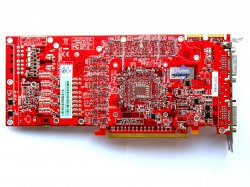
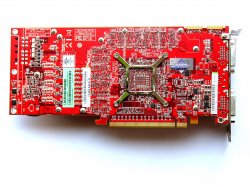
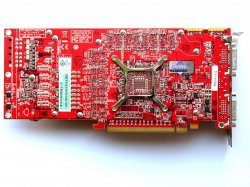
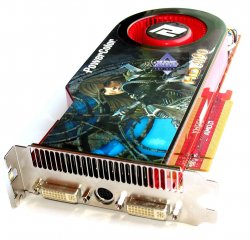
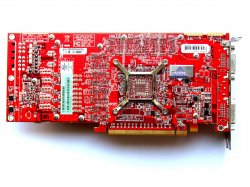
What a reference ATI Radeon 4890 looks like without the cooling (taken from http://ixbtlabs.com/articles3/video/rv790-2-p1.html):
FRONT
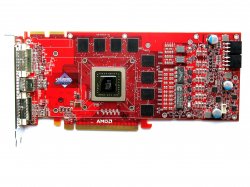
198337
BACK
198338
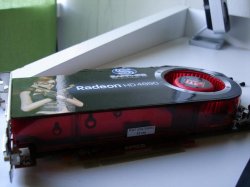
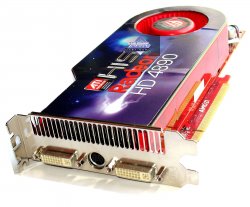
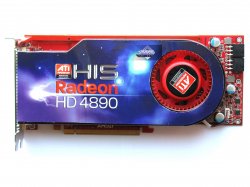
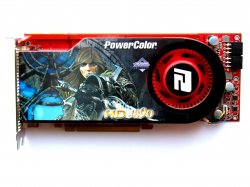
And Cindori's card (with cooler):
198331
In order for this list to be comprehensive, please provide the following information if possible.
Maker: Sapphire, XFX, HIS, etc
Model#: HD-489A-ZDFC, 100269HDMI, etc
Full Product Name: SAPPHIRE 100269HDMI Radeon HD 4890 1GB 256-bit GDDR5 PCI Express 2.0 x16 HDCP Ready CrossFire Supported Video Card - Retail
Item #: N82E16814102852, N82E16814150359, etc
Core Clock: 850MHz, 880MHz, 900MHz, etc
Memory Clock: 900MHz, 950MHz, 975MHz, etc
Output: 2 DVIs and 1 S-Video, 1 DVI and 1 HDMI, etc
Link:
Any other identifying information that would help someone looking to get (or avoid) a card, such as PICTURES, PART #, REVISION #, or anything else you may think of.
--------------------------------------------------------------------------------
Updated: 11/27/09
CONFIRMED WORKING
1) Sapphire Radeon 1GB (normal model, not overclock or such)
ATI RADEON HD4890 1G GDDR5 PCI-E DUAL DVI/TVO
SKU#: 21150-00
P/N 102-B79002-00-AT
--Cindori: Original post here (http://forums.macrumors.com/showthread.php?t=713428).
1a) Sapphire NEW EDITION
Success reported but with a few caveats. READ THIS POST (http://forums.macrumors.com/showpost.php?p=8734335&postcount=65) BEFORE BUYING! (thanks mfka for the writeup and Peloche for the ROM and others who contributed). Only tested and confirmed working for Qimonda chipset. Read the post to find out more. Seems that Hynix chipset also works.
Success reported here (http://forums.macrumors.com/showpost.php?p=8847462&postcount=103).
2) POWERCOLOR PLUS AX4890 1GBD5-UH Radeon HD 4890 1GB 256-bit GDDR5 PCI Express 2.0 x16 CrossFire Supported Video Card - OC Edition - Retail Link (http://www.newegg.com/Product/Product.aspx?Item=N82E16814131152) (deactivated...again)
--Tutor: Works under SL flashed
--SuperSpiker: Success reported here (http://forums.macrumors.com/showthread.php?t=713428&page=32).
3) MSI R4890-T2D1G OC Radeon HD 4890 1GB 256-bit GDDR5 PCI Express 2.0 x16 HDCP Ready CrossFire Supported Video Card - OC Edition - Retail Link (http://www.newegg.com/Product/Product.aspx?Item=N82E16814127427) (discontinued)
--Success reported here (http://forums.macrumors.com/showthread.php?p=8137917#post8137917) and here (http://forums.macrumors.com/showpost.php?p=8746270&postcount=70).
4) XFX Black Edition
Success was reported here (http://forums.macrumors.com/showpost.php?p=8203756&postcount=82)
Note: Requires modified ROM to remove screen shakes
5) XFX ZDFC
Success was reported here (http://forums.macrumors.com/showpost.php?p=8151032&postcount=39)
But also a Fail report here (http://forums.macrumors.com/showpost.php?p=8243668&postcount=88)
(the power was not the issue)
6) Sapphire HD 4890 Toxic Vapor-X OC 1 gb (Actually a Sapphire TOXIC with Vapor-X cooling)
Success reported here (http://forums.macrumors.com/showthread.php?p=8550205#post8550205).
7) HIS H489F1GP Radeon HD 4890 1GB 256-bit GDDR5 PCI Express 2.0 x16 HDCP Ready CrossFire Supported Video Card - Retail Link (http://www.newegg.com/Product/Product.aspx?Item=N82E16814161276&cm_re=HIS_4890-_-14-161-276-_-Product). (Deactivated/Discontinued on Newegg...check back often as it seems to come back into stock every once in a while)
Success reported here (http://forums.macrumors.com/showpost.php?p=8434956&postcount=109), here (http://forums.macrumors.com/showpost.php?p=8677394&postcount=53), and here (http://forums.macrumors.com/showpost.php?p=8690912&postcount=55). Also here (http://forums.macrumors.com/showpost.php?p=8738507&postcount=68) (issues with tearing on 30" when two monitors hooked up...anyone else with this issue?) and here (http://forums.macrumors.com/showpost.php?p=8751456&postcount=77). And yet another success here (http://forums.macrumors.com/showpost.php?p=8821388&postcount=138).
Both red PCB (with 6 and 6 pin power) and blue PCB (with 8 and 6 power) cards have been confirmed working.
In case you need it, here (http://forums.macrumors.com/showpost.php?p=8698337&postcount=887) is the stock (original) ROM (thanks Treksdot)
8) XFX Radeon 4890 1.0 GB DDR5 XXX (HD-489A-ZDDC)
Success reported here (http://forums.macrumors.com/showpost.php?p=8655262&postcount=818). (Used injector method) and here (http://forums.macrumors.com/showpost.php?p=8792996&postcount=1238) (flashed with ATI Tool)
9) XFX 489A-ZDF7 stock
Success reported here (http://forums.macrumors.com/showpost.php?p=8657397&postcount=828).
"used the overclock package...not good results, the fan was running hard at ALL TIMES and was very loud...
I reverted to the normal package... SILENCE almost as if using the stock card, the fan runs great during game play."
DOES NOT WORK
1) No overclocked or modified cards have been reported to work fully . One report of Powercolor OC Edition working (see #2 above, Tutor and SuperStriker) as well as an MSI T2D1G-OC (see Rominator #3 above)
There was one instance of a XFX TOXIC card working but with problems (see #6 above).
2) Vapor-X OC
Failure reported here (http://forums.macrumors.com/showpost.php?p=8546765&postcount=558)
3) Diamond 4890 (A4890PE51G)
Failure reported here (http://forums.macrumors.com/showpost.php?p=8434956&postcount=109).
4) Newer versions of XFX ZDFC
Failure reported here (http://forums.macrumors.com/showpost.php?p=8649419&postcount=34), here (http://forums.macrumors.com/showpost.php?p=8243668&postcount=88) and many other places.
Other Resources:
http://macprogpu.wikidot.com/aticards Thanks peskaa!
QE CI Exotic Package 10.6.2 (http://files.netkas.org/QE_CI_Exotic%20patch%2010.6.2.pkg) - Thanks Netkas!
--------------------------------------------------------------------------------------
And finally, a little disclaimer: I AM NOT RESPONSIBLE FOR ANY DAMAGE TO YOUR MAC, YOUR WALLET, YOUR HOUSE, YOURSELF, OR ANYTHING OTHER THAN MYSELF. I'm only trying to compile a list to help out those looking for a compatible card, but I cannot guarantee these findings or that they will work for YOU. Thanks, please come again :p
Cindori
Oct 10, 2009, 05:11 PM
Success with XFX Black Edition was reported here (http://forums.macrumors.com/showpost.php?p=8203756&postcount=82)
Note: Requires modified ROM to remove screen shakes
Success with XFX ZDFC was reported here (http://forums.macrumors.com/showpost.php?p=8151032&postcount=39)
But also a Fail report here (http://forums.macrumors.com/showpost.php?p=8243668&postcount=88)
(the power was not the issue)
Success with an MSI of unknown model was reported here (http://forums.macrumors.com/showpost.php?p=8137917&postcount=15)
Fail with Vapor-X OC reported here (http://forums.macrumors.com/showpost.php?p=8546765&postcount=558)
Success with Toxic reported here (http://forums.macrumors.com/showpost.php?p=8550205&postcount=566)
Note: He says Vapor-X but he's got a Toxic. And there's that blank screen shiet...
further information then model name, currently unavailable ;)
This is to my knowledge every card that has been tested on this board.
conclusion? get a sapphire ;)
doccelo
Oct 10, 2009, 05:23 PM
Thanks Cindori for the additional info.
Also, I've found some reference pics. I'll make a few different posts as I'm only allowed 5 attachments per post (or so it seems).
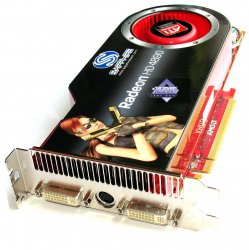
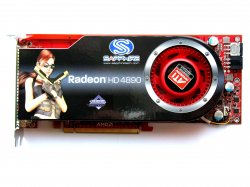
EDIT 10/10/09: These are just pictures of reference cards from different manufacturers. THEY ARE NOT CONFIRMED WORKING YET (except maybe for the Sapphire, which is identical to Cindori's card originally posted in his thread "Ultimate Thread: 4890 in Mac Pro"). For a complete list of working, non-working, and not yet tested cards please refer to the first post of this thread as I will be updating it as people post their successes and failures with certain cards. As a matter of fact, read every post here, on Cindori's thread, and everywhere else you can find info. This will decrease (read: not eliminate) your chances of getting a card that will not work.
SAPPHIRE
198340
198341
198342
doccelo
Oct 10, 2009, 05:25 PM
EDIT 10/10/09: These are just pictures of reference cards from different manufacturers. THEY ARE NOT CONFIRMED WORKING YET (except maybe for the Sapphire, which is identical to Cindori's card originally posted in his thread "Ultimate Thread: 4890 in Mac Pro"). For a complete list of working, non-working, and not yet tested cards please refer to the first post of this thread as I will be updating it as people post their successes and failures with certain cards. As a matter of fact, read every post here, on Cindori's thread, and everywhere else you can find info. This will decrease (read: not eliminate) your chances of getting a card that will not work.
HIS
198344
198345
198346
doccelo
Oct 10, 2009, 05:27 PM
EDIT 10/10/09: These are just pictures of reference cards from different manufacturers. THEY ARE NOT CONFIRMED WORKING YET (except maybe for the Sapphire, which is identical to Cindori's card originally posted in his thread "Ultimate Thread: 4890 in Mac Pro"). For a complete list of working, non-working, and not yet tested cards please refer to the first post of this thread as I will be updating it as people post their successes and failures with certain cards. As a matter of fact, read every post here, on Cindori's thread, and everywhere else you can find info. This will decrease (read: not eliminate) your chances of getting a card that will not work.
POWERCOLOR
198347
198348
198349
Cindori
Oct 10, 2009, 05:54 PM
are those confirmed to work? or are you just posting pictures :confused:
doccelo
Oct 10, 2009, 06:17 PM
I'm just posting pictures of what reference cards look like from each maker. These HAVE NOT been confirmed to work, but they are reference cards and *should* work. The only one that has been confirmed to work from the above pictures is the Sapphire, which is identical to your card Cindori (correct me if I'm wrong).
Tutor
Oct 10, 2009, 08:42 PM
Clean up
The Rominator
Oct 10, 2009, 09:15 PM
The MSI I did is the R4890-T2D1G-OC
UltraNEO*
Oct 10, 2009, 09:38 PM
I'm just posting pictures of what reference cards look like from each maker. These HAVE NOT been confirmed to work, but they are reference cards and *should* work. The only one that has been confirmed to work from the above pictures is the Sapphire, which is identical to your card Cindori (correct me if I'm wrong).
I would advise you return to the picture posts and post some comment about the photos of the cards you've posted, cause there's always a chance some noob will come read this thread and think "oh.. it works" goes away buy the card(s) and discover "crap! doesn't work" then post complains here...
feel me?
doccelo
Oct 10, 2009, 09:46 PM
Sounds like a good idea!
:eek:Newbies:eek:
wally4u
Oct 11, 2009, 03:21 AM
Hi doccelo, I was actually tinking of doing a thread like this for the 4870 series as well.
Would you mind expanding this to those cards as well?
What i'm looking for (if possible) is a card I can flash and run without natit.
wally4u
Oct 11, 2009, 05:03 AM
Here is a list I looked up of common 4870 gfx cards available here in NL.
XFX
XFX Radeon HD 4870 1GB DDR5 Standard
SKU: HD-487A-ZDFC, EAN: 0778656047365, Rad. HD4870, 1GB, PCI-e, 2x DVI DL, HDMI
XFX Radeon HD 4870 512 MB DDR5
SKU: HD-487A-YWFC, EAN: 0778656049444, Rad. HD4870, 512MB, PCI-e, HDTV, TV
XFX HD4870 1024MB DDR5 PCI-E
SKU: HD-487A-ZWFL, EAN: 0778656049451, Rad. HD4870, 1GB, PCI-e, 2x DVI DL
XFX Radeon HD 4870 1GB DDR5 Standard
SKU: HD-487A-ZDFC, EAN: 0778656047365, Rad. HD4870, 1GB, PCI-e, 2x DVI DL, HDMI
XFX Radeon HD4870 1.0GB DDR5 XXX
SKU: HD-487A-ZHDC, EAN: 0778656048447, Rad. HD4870, 1GB, PCI-e, 2x DVI DL, HDTV
XFX Radeon HD4870 1.0 GB DDR5
SKU: HD-487A-ZHFC, EAN: 0778656049185, Rad. HD4870, 1GB, PCI-e, 2x DVI DL, HDTV
XFX Radeon HD 4870 512MB DDR5 Standard
SKU: HD-487A-YDFC, EAN: 0778656047358, Rad. HD4870, 512MB, PCI-e, 2x DVI DL, HDMI
XFX HD4870 512 MB
SKU: HD-487A-YHDC, EAN: 0778656048546, Rad. HD4870, 512MB, PCI-e, DVI DL, HDTV
SAPPHIRE
Sapphire VAPOR-X HD 4870 2GB GDDR5 PCI-E
SKU: 11133-17-20R, EAN: 4895106244689, Rad. HD4870, 2GB, PCI-e, DVI, HDMI, VGA
Sapphire VAPOR-X HD 4870 1GB GDDR5 PCI-E
SKU: 11133-16-20R, EAN: 4895106244672, Rad. HD4870, 1GB, PCI-e, DVI, HDMI, VGA
Sapphire HD 4870 1G GDDR5 PCI-E QP
SKU: 11133-19-20R, EAN: 4895106247123, Rad. HD4870, 1GB, PCI-e, 2x DVI DL, TV
Sapphire Toxic HD 4870 1GB GDDR5 PCI-E
SKU: 11133-14-10, 11133-14-10R, 11133-14-20, 11133-14-20R, EAN: 4895106243248, Rad. HD4870, 1GB, PCI-e, 2x DVI DL, TV
Sapphire HD 4870 512MB GDDR5 PCI-E
SKU: 11133-03-20R, EAN: 4895106240162, Rad. HD4870, 512MB, PCI-e, 2x DVI DL, TV
Sapphire HD 4870 1GB GDDR5 PCI-E
SKU: 11133-04, 11133-04-20R, 21133-04-2, EAN: 4895106239241, 4895106240186, Rad. HD4870, 1GB, PCI-e, 2x DVI, TV
Sapphire TOXIC Radeon HD 4870 512 MB GDDR5 PCI-E
SKU: 11133-06, 11133-06-20R, 11133-06-40R, EAN: 4895106240360, Rad. HD4870, 512MB, PCI-e
CLUB3D
Club3D HD 4870 1024MB GDDR5
SKU: CGAX-48724DDC, EAN: 8717249405825, Rad. HD4870, 1GB, PCI-e, 2x DVI, HDMI, HDTV
Club3D HD 4870 1024MB GDDR5 Overclocked Edition
SKU: CGAX-48724DDO, EAN: 8717249405504, Rad. HD4870, 1GB, PCI-e, 2x DVI DL, TV
Club3D HD 4870 512MB GDDR5 Overclocked Edition
SKU: CGAX-4872DDO, EAN: 8717249405351, Rad. HD4870, 512MB, PCI-e, 2x DVI DL, TV
peskaa
Oct 11, 2009, 10:07 AM
I have a Wiki running for exactly this purpose: http://macprogpu.wikidot.com/ - why not just create a 4890 section in there? It will look a lot neater, and be easier to find info than a massive forum thread ;)
Cindori
Oct 11, 2009, 11:30 AM
or..lets..farm posts and get avatars? :cool:
doccelo
Oct 11, 2009, 11:43 AM
Hi doccelo, I was actually tinking of doing a thread like this for the 4870 series as well.
Would you mind expanding this to those cards as well?
What i'm looking for (if possible) is a card I can flash and run without natit.
I think it would be a great idea to do a similar thread for the 4870! I'm just not sure if mixing both cards in this thread would be beneficial as it might create confusion. I'm willing to do it if that's what people want, so I'll wait to hear back from the community in regards to this before I update the first post with 4870 cards.
doccelo
Oct 11, 2009, 11:47 AM
I have a Wiki running for exactly this purpose: http://macprogpu.wikidot.com/ - why not just create a 4890 section in there? It will look a lot neater, and be easier to find info than a massive forum thread ;)
I say we keep both updated. I'll appreciate the extra help. Pretty soon there will lots of info here and I may miss something. If you (or anyone for that matter) would go through this thread every so often and pull any info from here and update the wiki that would be great!
wally4u
Oct 11, 2009, 12:34 PM
I think it would be a great idea to do a similar thread for the 4870! I'm just not sure if mixing both cards in this thread would be beneficial as it might create confusion. I'm willing to do it if that's what people want, so I'll wait to hear back from the community in regards to this before I update the first post with 4870 cards.
I'll start a secondary thread with only the 4870 cards.
peskaa
Oct 11, 2009, 01:07 PM
I say we keep both updated. I'll appreciate the extra help. Pretty soon there will lots of info here and I may miss something. If you (or anyone for that matter) would go through this thread every so often and pull any info from here and update the wiki that would be great!
I can, yes. The Wiki is open for anybody to edit, so hopefully it wouldn't just be me ;) The threads are useful for actually discussing/hunting down bugs etc.
wally4u
Oct 11, 2009, 02:41 PM
Might be a weird question but will the flashed 4890 card work without any software modifications (kexts/natit etc)
Cindori
Oct 11, 2009, 02:59 PM
the device id does not exist in OSX, so it must be added into a plist. this is called the QE_CI pkg. since the plist is overwritten in almost all osx updates, you need a new QE_CI pkg by every update.
otherwise you wont get quartz extreme / core image. basically no 3d.
wally4u
Oct 11, 2009, 03:12 PM
So 2D will work but no QE with every 10.6.x update. understood.
So a "safe" boot will work. Trying to figure out what the best route would be for gaming in Bootcamp (vista 64bit) and hassle free OSX experiance.
Also do the flashed cards also have the "grey boot" issue (from what I understood from the other threads, no, correct)?
Actually is there an IRC channel where I can ask this stuff as well.
Cindori
Oct 11, 2009, 03:34 PM
So 2D will work but no QE with every 10.6.x update. understood.
So a "safe" boot will work. Trying to figure out what the best route would be for gaming in Bootcamp (vista 64bit) and hassle free OSX experiance.
Also do the flashed cards also have the "grey boot" issue (from what I understood from the other threads, no, correct)?
Actually is there an IRC channel where I can ask this stuff as well.
yes you will be able to boot after a new patch
grey boot issue? if you mean boot screen, yes you get that with flashed card
an IRC channel is a good idea. if someone would host it, i'd be happy to hang around.
doccelo
Oct 11, 2009, 10:36 PM
The MSI I did is the R4890-T2D1G-OC
Hey Rominator, could you give more details on which card exactly that is because I couldn't find those identifying numbers/letters anywhere. There are two on Newegg, is it either of those?
The Rominator
Oct 12, 2009, 12:51 AM
It appears that the 4890 is going same route as the 4870.
Cheaper cards with cheaper fans.
The card I have has been discontinued.
http://www.newegg.com/Product/Product.aspx?Item=N82E16814127427
doccelo
Oct 12, 2009, 09:12 AM
It appears that the 4890 is going same route as the 4870.
Cheaper cards with cheaper fans.
The card I have has been discontinued.
http://www.newegg.com/Product/Product.aspx?Item=N82E16814127427
Thanks Rominator. I've updated the OP.
doccelo
Oct 13, 2009, 11:57 AM
To everyone who has a 4890, or tried to flash one, please post your results (either success or failure, knowing both helps tremendously). Your feedback will greatly help the community. Many thanks.
netkas
Oct 13, 2009, 03:50 PM
anyone knows if two 4890 or two 4870 works fine in macpro ?
SuperSpiker
Oct 13, 2009, 05:35 PM
Just wanted to say THANKS for starting this thread. I was having a hell of a time going through the ultimate 4890 thread trying to determine which card(s) work.
Based on information from this thread I just purchased:
POWERCOLOR PLUS AX4890 1GBD5-UH Radeon HD 4890 1GB 256-bit GDDR5 PCI Express 2.0 x16 CrossFire Supported Video Card - OC Edition - Retail
from Newegg: http://www.newegg.com/Product/Product.aspx?Item=N82E16814131152
Thanks for helping me purchase with confidence.
I'll post again with my experience.
:):):)
UltraNEO*
Oct 13, 2009, 05:54 PM
I have a Wiki running for exactly this purpose: http://macprogpu.wikidot.com/ - why not just create a 4890 section in there? It will look a lot neater, and be easier to find info than a massive forum thread ;)
Umm... Until you've posted that URL and users like me read this thread. I didn't know about your little site or it's existent, nor does it show up when google searched. Is it even enlisted on various search engines with keywords, search phrases etc?
http://static.ultraneo.com/macrumors/MPvideocards-20091013-235221.jpg
peskaa
Oct 14, 2009, 03:23 AM
Umm... Until you've posted that URL and users like me read this thread. I didn't know about your little site or it's existent, nor does it show up when google searched. Is it even enlisted on various search engines with keywords, search phrases etc?
http://static.ultraneo.com/macrumors/MPvideocards-20091013-235221.jpg
Not expecting much are you? The Wiki is new, and is currently aimed at MR users. Once it is fully fleshed out, and with a comprehensive set of information then perhaps its Google ranking can be sorted out. Bear in mind that, y'know, I have a day job and many other things to be doing?
Caterham
Oct 14, 2009, 04:21 AM
Come on Peskaa, pull your finger out old bean :p
doccelo
Oct 15, 2009, 07:14 PM
OP Updated
doccelo
Oct 15, 2009, 10:52 PM
I just bought this card (http://www.newegg.com/Product/Product.aspx?Item=N82E16814161276). I should have it Monday and will report back if it works.
ekwipt
Oct 16, 2009, 05:05 AM
I know it's not happening yet but it would be nice if everyone posted what ports are working, ie, Dual DVI etc, etc
doccelo
Oct 17, 2009, 01:25 PM
OP Updated
Tutor
Oct 17, 2009, 08:34 PM
Clean up
ekwipt
Oct 17, 2009, 11:28 PM
Two flashed POWERCOLOR PLUS AX4890 1GBD5-UH Radeon HD 4890 1GB 256-bit GDDR5 PCI Express 2.0 x16 CrossFire Supported Video Cards - OC Edition - Retail http://www.newegg.com/Product/Produc...82E16814131152 work fine in my self-upgraded 3.2 Ghz 2009 8-core MacPro, using the FSP PSU http://www.newegg.com/Product/Product.aspx?Item=N82E16817104054 to power them. Thanks for your contributions, web site, threads and posts on video cards - You're a wealth of information.
:eek: Photos :D
Redneck1089
Oct 18, 2009, 05:08 PM
If someone could respond fast, that would be great. I only have an hour left to buy a Sapphire 4890 VaporX. Will this card work? Doesn't appear to be the toxic version.
http://www.memoryexpress.com/Products/PID-MX25722(ME).aspx
doccelo
Oct 18, 2009, 05:23 PM
If someone could respond fast, that would be great. I only have an hour left to buy a Sapphire 4890 VaporX. Will this card work? Doesn't appear to be the toxic version.
http://www.memoryexpress.com/Products/PID-MX25722(ME).aspx
It doesn't appear to be a reference card and so I would venture to guess it probably will NOT work. Many have tried Vapor X cards and reported back that they DO NOT work. I have not seen any success reports with this card yet... If you get it and try it, please remember to post back here with your results.
Redneck1089
Oct 18, 2009, 10:08 PM
Thanks for the reply. I didn't get it. I currently have the Mac edition of the 4870, but thought that the extra VRAM and slightly better performance of the 4890 might come in handy for future games. I'm having trouble find a card that will work with all this flashing business, though.
Redneck1089
Oct 18, 2009, 10:34 PM
I'm still thinking of doing this, however, I haven't been able to find any of the exact cards on the list. The latest card I'm looking at is this MSI 4890 Cyclone. Not sure if it will, though. Here's the link: http://www.memoryexpress.com/Products/PID-MX25640(ME).aspx
Can someone please give me advice?
Treksdot
Oct 19, 2009, 01:29 AM
Redneck1089 here's a couple of cards that are on the confirmed working list. Thinking of getting the HIS one myself if I can't get this current XFX one to work.
http://www.newegg.com/Product/Product.aspx?Item=N82E16814161276
http://www.newegg.com/Product/Product.aspx?Item=N82E16814131167
Maury
Oct 20, 2009, 04:47 PM
It seems there are several versions of the Sapphire with the Vapor cooler. I see the names "Toxic" and "OC", and if I am interpreting it correctly, the OC does not work but the Toxic does? But when I read about the Toxic, it seems this is just the Vapor with factory OC, so it shouldn't work?
I think there is a version of the Sapphire and Vapor with no OC, and it should work. Right? If so, does anyone know what they call this particular model?
Maury
doccelo
Oct 20, 2009, 05:40 PM
It seems there are several versions of the Sapphire with the Vapor cooler. I see the names "Toxic" and "OC", and if I am interpreting it correctly, the OC does not work but the Toxic does? But when I read about the Toxic, it seems this is just the Vapor with factory OC, so it shouldn't work?
I think there is a version of the Sapphire and Vapor with no OC, and it should work. Right? If so, does anyone know what they call this particular model?
Maury
Sometimes the manufacturer may make slight modifications to the card which will have negative consequences for us Mac Pro users, and we won't know for sure which cards work until more people report back with their experiences. We can do all the guessing we want, but until there are reports for a SPECIFIC card we won't know if it will actually work. Some cards that should work, don't. And as you noticed, some cards that shouldn't work, do.
doccelo
Oct 20, 2009, 07:06 PM
Would a moderator please sticky this so I don't have to keep bumping it up every time I update the list.
Many thanks
Mark Booth
Oct 20, 2009, 08:06 PM
Is this the same PowerColor card as the deactivated (no longer available) one listed in several posts in this thread from NewEgg:
http://www.amazon.com/PowerColor-Radeon-Graphics-AX4890-1GBD5/dp/B002J29CLA/ref=sr_1_4?ie=UTF8&s=electronics&qid=1256086172&sr=8-4
It looks like it's the same card to me, but I want to be sure before spending $200.
Lastly, I know this question is probably already answered in the Ultimate thread for the 4890 but... Will OpenCL be supported via the 4890? I know Apple only officially supports OpenCL via the 4850 and 4870. But will manually updating the QE_CI package add support for OpenCL?
OpenCL is my main concern. I don't use my Mac Pro 1,1 for gaming and I never use it on the PC side (Bootcamp). I am a photographer and the most CPU/graphics intensive app I run is Aperture. I am confident a forthcoming version of Aperture will take advantage of OpenCL. If a flashed 4890 doesn't work with OpenCL, there's not really any point in upgrading my video card. Unless, of course, I get the 4870.
Thanks for any and all help!
Mark
doccelo
Oct 20, 2009, 08:34 PM
Is this the same PowerColor card as the deactivated (no longer available) one listed in several posts in this thread from NewEgg:
http://www.amazon.com/PowerColor-Radeon-Graphics-AX4890-1GBD5/dp/B002J29CLA/ref=sr_1_4?ie=UTF8&s=electronics&qid=1256086172&sr=8-4
It looks like it's the same card to me, but I want to be sure before spending $200.
Lastly, I know this question is probably already answered in the Ultimate thread for the 4890 but... Will OpenCL be supported via the 4890? I know Apple only officially supports OpenCL via the 4850 and 4870. But will manually updating the QE_CI package add support for OpenCL?
OpenCL is my main concern. I don't use my Mac Pro 1,1 for gaming and I never use it on the PC side (Bootcamp). I am a photographer and the most CPU/graphics intensive app I run is Aperture. I am confident a forthcoming version of Aperture will take advantage of OpenCL. If a flashed 4890 doesn't work with OpenCL, there's not really any point in upgrading my video card. Unless, of course, I get the 4870.
Thanks for any and all help!
Mark
Doesn't look like the same card to me! It has a different cooler, and may likely have different components. The 4890 is essentially the 4870 (thus why the drivers for it work) so if the 4870 supports it, then the 4890 should also support it. In Snow Leopard you will get dual DVI, Quartz Extreme, Core Image, and OpenCL using the 4890 cards. See here (http://netkas.org/?p=164).
Mark Booth
Oct 20, 2009, 10:12 PM
doccelo, Did you have any luck with this card:
http://www.newegg.com/Product/Product.aspx?Item=N82E16814161276&cm_re=HIS_4890-_-14-161-276-_-Product
I believe that's the one you ordered. Right?
I saw the mentioned in the big thread by someone else that had success with that exact card but his card had a blue PC board instead of red like the one you got. We know HIS works... waiting to find out about yours.
Two other things please....
1) Big thank yous to all of you super geeks (I mean that in the most favorable way) for working so hard to help so many others have fast cards for less money!!!!!
2) The Mac Pro 1,1 currently has a X1900 card in slot #1. I assume I can use the one power cable from that card with a 4890, right? So, I'd only need to order one more power cable from ATI?
This stuff is all very confusing, particularly with manufacturers changing specs/boards in mid-stream! I can get a Apple-brand 4870 for $321 delivered and, frankly, I'm tempted to do that. But saving $100 is saving $100.
And that makes me ask one more question (sorry)... Will a flashed 4890 work as seamlessly in my Mac Pro 1,1 as a genuine Apple 4870? By that, I mean, are there ANY limitations to using a flashed 4890?
I've read the entire 4890 thread from start to finish and, frankly, the discussion is all about getting the different injector/flash methods to work and not really about what features you give up if you use a flashed PC card in a Mac.
Still a bit confused. Sorry!
Mark
doccelo
Oct 20, 2009, 10:47 PM
doccelo, Did you have any luck with this card:
http://www.newegg.com/Product/Product.aspx?Item=N82E16814161276&cm_re=HIS_4890-_-14-161-276-_-Product
I believe that's the one you ordered. Right?
I saw the mentioned in the big thread by someone else that had success with that exact card but his card had a blue PC board instead of red like the one you got. We know HIS works... waiting to find out about yours.
Two other things please....
1) Big thank yous to all of you super geeks (I mean that in the most favorable way) for working so hard to help so many others have fast cards for less money!!!!!
2) The Mac Pro 1,1 currently has a X1900 card in slot #1. I assume I can use the one power cable from that card with a 4890, right? So, I'd only need to order one more power cable from ATI?
This stuff is all very confusing, particularly with manufacturers changing specs/boards in mid-stream! I can get a Apple-brand 4870 for $321 delivered and, frankly, I'm tempted to do that. But saving $100 is saving $100.
And that makes me ask one more question (sorry)... Will a flashed 4890 work as seamlessly in my Mac Pro 1,1 as a genuine Apple 4870? By that, I mean, are there ANY limitations to using a flashed 4890?
I've read the entire 4890 thread from start to finish and, frankly, the discussion is all about getting the different injector/flash methods to work and not really about what features you give up if you use a flashed PC card in a Mac.
Still a bit confused. Sorry!
Mark
I'll let you know when my ATI cables come in if my card works. I'm pretty confident it will. It appears you would only need one more cable. Not only are you saving money, but you are also getting a better card. The one feature people were having issues with was not being able to use dual DVI (that is, having two monitors hooked up)...but that issue is now resolved in Snow Leopard (as far as I know). Also, with an update of the OS, you may need to update the "ATY_init.kext" since the 4890 is not inherently a Mac card (the 4870 is). If you were to get a PC 4870, and flash it for use with a Mac, you wouldn't need to worry about it again because it's a card that is offered by Apple. It's very easy to update the kext because all you need to do is basically identity the 4890 card. Other than that, you should lose no features.
Mark Booth
Oct 20, 2009, 11:28 PM
Thanks doccelo!!
Please forgive my ignorance but I thought there were some features you lose on flashed 4870 and 4890 cards?! I see references to HDMI not working and audio not working. Are those just referring to PC 4890 cards that have HDMI ports, etc.?
And, for clarification... If I decided to get a 4870 card instead and flash it, that card would be 100% identical (compatibility wise) as using the genuine Apple 4870 card?? I now the Apple card has one DVI and one MiniDisplay port and the PC/flashed card would have two DVI ports. But, other than that, everything about using the flashed 4870 would be exactly the same as using Apple's card?
BTW, I noticed you linked barefeats.com in a previous message. The site owner, RobArt Morgan is a good friend of mine. In fact, my wife and I are driving up to his place on Friday for a visit.
Thank you again for taking the time to answer questions from noobs (to this whole graphics card flashing thing).
Mark
Cindori
Oct 21, 2009, 12:23 AM
HDMI and audio is for cards with HDMI ports.
a pc 4870 is identical to an apple card. the 4890 requires a modified plist to get 3d. lol helping robart morgans friend :D
Treksdot
Oct 21, 2009, 12:48 AM
Another confirmation for the HIS H489F1GP as a working card. There seems to be multiple versions of this card out there. Myself and another person received the model with a dark blue PCB and 6/8 pin connectors.(Works just fine with x2 6 pin cables.) Both of us managed to get the card working using the Normal flash package in the other thread. For those interested this is the card: http://www.newegg.com/Product/Product.aspx?Item=N82E16814161276
Mark Booth
Oct 21, 2009, 02:24 AM
HDMI and audio is for cards with HDMI ports.
a pc 4870 is identical to an apple card. the 4890 requires a modified plist to get 3d. lol helping robart morgans friend :D
Thanks Cindori!! To save on cost, and to eliminate the need to do the modified plist each time a new OS revision comes out, I decided to get a 512MB 4870. Please see my message in the big big big 4870 thread.
Thanks again!
Mark
doccelo
Oct 22, 2009, 08:22 PM
Ok, so my ATI cables finally came in today. In my excitement, I totally forgot to back up the ROM on my card. So I was a bit nervous when I went to restart, and was anxiously waiting for that gray apple screen to show up.
Alas, success! I'm typing from it now.
This (http://www.newegg.com/Product/Product.aspx?Item=N82E16814161276) is the exact card. So now we have confirmation that both cards being shipped from Newegg (the blue PCB with 8 and 6 pin power and the red PCB with 6 and 6 pin power (mine) are both confirmed working!
HIS H489F1GP Radeon HD 4890 1GB 256-bit GDDR5 PCI Express 2.0 x16 HDCP Ready CrossFire Supported Video Card - Retail (http://www.newegg.com/Product/Product.aspx?Item=N82E16814161276)
Here is a screen grab of the OpenGL bench.
199922
doccelo
Oct 24, 2009, 12:16 PM
I've posted a thread here (http://forums.macrumors.com/showthread.php?p=8699772#post8699772) regarding the Accelero Twin Turbo aftermarket cooler and problems with insufficient power being delivered to the fans via the card. If you are thinking about getting one, this is something to consider. Just a heads up...
nachtliche
Oct 24, 2009, 08:27 PM
Alas, success! I'm typing from it now.
This (http://www.newegg.com/Product/Product.aspx?Item=N82E16814161276) is the exact card. So now we have confirmation that both cards being shipped from Newegg (the blue PCB with 8 and 6 pin power and the red PCB with 6 and 6 pin power (mine) are both confirmed working!
HIS H489F1GP Radeon HD 4890 1GB 256-bit GDDR5 PCI Express 2.0 x16 HDCP Ready CrossFire Supported Video Card - Retail (http://www.newegg.com/Product/Product.aspx?Item=N82E16814161276)
Thanks so much for testing and vouching for a card currently available. I've been reading so many posts here it gets confusing. I also have a Mac Quad 1.1 and am researching to get a game card.
I have a question, do you get a power connector error message in mac OSX? Or does everything work peachy, including grey mac bootloader at startup? This is what I'm going for, and would appreciate the info as I plan to order this card.
Also could you tell me if the fan on this card is loud during average non-gaming use? thanks so much.
doccelo
Oct 25, 2009, 12:22 AM
Thanks so much for testing and vouching for a card currently available. I've been reading so many posts here it gets confusing. I also have a Mac Quad 1.1 and am researching to get a game card.
I have a question, do you get a power connector error message in mac OSX? Or does everything work peachy, including grey mac bootloader at startup? This is what I'm going for, and would appreciate the info as I plan to order this card.
Also could you tell me if the fan on this card is loud during average non-gaming use? thanks so much.
That was the intention of this thread when I started it...to let people know exactly which cards work and which to avoid. I'm glad it has helped you. I do not get a power connector error message in OS X. Everything does indeed work peachy, including grey boot screen. The stock card does get pretty loud around 50% fan. The more you go up, the louder it gets and pretty much sounds like a jet engine inside my Mac. At idle it is practically silent though. I put an Accelero Twin Turbo on mine, and not only is it SILENT even during heavy gaming, it also brought my temperatures down tremendously.
Hope that helps in your decision...and enjoy that card! I went from a 7300GT to this, and I'm in gaming heaven!
nachtliche
Oct 25, 2009, 11:48 AM
After further though I think I want a 4870 for maximum compatibility, which should function always without any modifications to OSX. Sadly it appears the 4870 compatibility list thread is dead. All confirmed working cards are not available to buy. And it appears some are confirmed problematic.. so it's quite a risk to take a guess at one. Maybe someone here can help, or help update that thread. Anyone know a working 4870 you can buy? preferably with both DVI outputs working.
http://forums.macrumors.com/showthread.php?t=668710
pranic
Oct 26, 2009, 04:40 PM
I have the XFX Radeon HD 4890 and flashed with the standard (not overclocked) ROM and Cindori's 4890 Flash.app with some success.
The card is the XFX Radeon HD 4890 Revision 5.4
Model #: HD-489A-ZDFC
http://www.newegg.com/Product/Product.aspx?Item=N82E16814150359
I have the MacPro1,1.
I did experience the "your power cable..." warning upon boot when I didn't have an LCD plugged into the 4890 (and had two LCDs on the old Geforce 7300).
I have the 2 ATI cables running from the motherboard to the 4890, which is in slot 1. Slot 4 contains the Geforce 7300.
Other issues/symptoms that I've experienced (not in any particular order, and have happened somewhat regularly), are as follows:
- if only booting with the 4890, the apple boot screen comes up and looks proper. About 10 seconds into the boot process, red vertical lines and weirdness ensues (screen shot attached). It continues to look bad, and the OS runs slowly.
- This message appears in the syslog:
Oct 23 09:45:43 [82] kCGErrorIllegalArgument: _CGXMapShmemInternal : Invalid shared memory id
Oct 23 09:47:42 [82] kCGErrorIllegalArgument: CGXMoveWindowListToWorkspace: invalid window id: 175
Oct 23 09:47:45 [82] kCGErrorIllegalArgument: CGXMoveWindowListToWorkspace: invalid window id: 177
Oct 23 09:47:52 [82] kCGErrorIllegalArgument: _CGXMapShmemInternal : Invalid shared memory id
Oct 23 09:48:37 [82] kCGErrorIllegalArgument: _CGXMapShmemInternal : Invalid shared memory id
Oct 23 09:50:07 [82] Display 0x2b283412: MappedDisplay Unit 2; ColorProfile "DELL 2007WFP"
Oct 23 09:50:12 [82] kCGErrorCannotComplete: CGXPostNotificationInternal : Time out waiting for reply from "loginwindow" for notification type 109 (CID 0x6703, PID 52)
- If you boot up with two monitors plugged into the GeForce 7300, then the system boots up with those monitors intact and working as expected. If you plug another monitor into the 4890, the GUI becomes frozen, and all monitors turn blue for minutes (haven't timed it, but it's annoying). Eventually, they'll all come back, but the one plugged into the 4890 was not displaying a clear screen -- instead, it had lots of artifacts on it.
I saw another post today, that suggests that there might not be enough power in the system for the video card to be happy, so I will remove some hard drives (I have all 4 bays filled), and might remove the GeForce 7300. Will report back.
Cindori
Oct 26, 2009, 04:50 PM
power warning has nothing to do with power - its because of a incompatible rom
incompatible rom is also causing lines and errors
zdfc 5.4 is not compatible with the roms currently out there
see my thread and rominators posts on last pages for info to create your own rom
doccelo
Oct 26, 2009, 05:29 PM
@pranic
I'm not sure if you're referring to one of my posts when you say: "I saw another post today, that suggests that there might not be enough power in the system for the video card to be happy."
If you are, that post was referring to hooking up an aftermarket cooler (specifically the Accelero Twin Turbo) to the card instead of directly to the drive bay molex connectors. It had nothing to do with the system not providing enough power to the card itself....just to clear things up for others reading this. I hope you can get your ROM issues worked out so I can add another success story to the list! Good luck with it...
Treksdot
Oct 27, 2009, 03:26 PM
Pranic you're experiencing the same problems I did when I tried to get my ZDFC card to work. It's been revisioned out of compatibility and so it just will not work. Get yourself one of the HIS 4890 cards that have been linked previously and be stupidly happy with it.
doccelo
Oct 27, 2009, 06:35 PM
Pranic you're experiencing the same problems I did when I tried to get my ZDFC card to work. It's been revisioned out of compatibility and so it just will not work. Get yourself one of the HIS 4890 cards that have been linked previously and be stupidly happy with it.
I agree with ^^^. If you can, return that card and save yourself the headache and just pick up the HIS card.
mfka
Oct 30, 2009, 02:29 PM
Peloche made possible to run Saphire New Edition with
two methods (run it with injectors or flashing rom).
All you need to run your card is here.
If you ordered Sapphire like Cindori has (red one)
it is very likely that you will get one of these (New Edition).
Thanks to Peloche, now there is ROM written for this card,
meaning it is possible to flash.
Again this is tested only on cards with Qimonda chipsets
(peloche’s card and mine). However there is speculations
that flash method might work on Hynix chipset as well.
If you are willing to take that risk in the name of science
we might discover something, it is up to you.
As you probably already know, you will need 2 power
cables to run this beast. There is already listed where
to purchase those cables in US so here is where to find
them in Europe; http://www.applemacparts.co.uk/store/advanced_search_result.php?keywords=nvidia+cable&x=0&y=0
Note that they are called NVidia cables but they are
the same, Peloche bought them at this place and
he’s using them.
Instructions here are for Os X 10.6.1
Mac Pro and Sapphire Radeon HD 4890 New Edition
equipped with Qimonda memories chipsets.
http://www.skylabshop.cz/shop_gallery/290575_0a_3.jpg
Sapphire Radeon HD 4890 New Edition
should have this P/N and SKU#
http://img81.imageshack.us/img81/6350/d2c4306.jpg
To flash your Sapphire New Edition:
1 Download Cindori ATI flashing tool
here --> http://forums.macrumors.com/showthread.php?t=811768
2 Download ROM that Peloche made exclusively for Sapphire New Edition (Qimonda chipsets)
here --> 201355
3 Run Cindori ATI flashing tool and follow instructions
4 If you previously did injector method, remove ATY_Init and Natit
which are in System/Library/Extensions/, if not, skip this step and proceed to step 5.
5 Install QE_Ci from Cindori ATI flashing tool
6 Reboot
-------------------------------------------------------------------------------------
To run card with injectors!
Important: Note that you might get the card with Hynix
memory chipset instead of Qimonda, if that is the case
this method will not work for you!
How to check which memory chipset is on your card!
Well i don’t know any other way than by removing
shield with cooling system.
Red pointers are showing chips you need to look at.
Card without shield/cooler looks like this;
http://img145.imageshack.us/img145/6130/dsc0050ro.jpg
What you'll have to do:
1 - Check memory chipset of the card
Hynix memory present on your card -> Yes -> sorry we can't help you
Qimonda memory present on your card -> Yes -> go to step 2 and follow up to step 11
2 - download kexthelper
here --> http://web.mac.com/v1.42ghz/Kext_Hel...elper%20b7.zip (http://web.mac.com/v1.42ghz/Kext_Helper/Software_files/Kext%20Helper%20b7.zip)
3 - download QE_Ci_Exotic_cards_10.6.1.pkg
here --> http://is.gd/39wWt
4 - Unzip attached archive.zip and you'll have 2 files ATY.Init.kext and Natit.kext
5 - Click twice on kext helper,
6 - Drag and drop the two files (ATY.Init.kext and Natit.kext) in kext helper window
7 - Enter your administrator password and hit return.
8 - Double click on QE_Ci_Exotic_cards_10.6.1.pkg and follow instructions
9 - Reboot, no, no, Xfingers and reboot
10 - Good luck at reboot
11 - When all steps are completed, rebooted, and everything run normaly,
you can check if QE_CI is activated by downloading this demo for example:
http://www.apple.com/downloads/macos...rdracing2.html
If this game works you are ok with QE_CI
Good luck!
Both methods you are doing at your own risk!
None of those guys including me are responsible
if something goes wrong.
-----------------------------------------------------------------------------
Here under is Archive (containing 2 files ATY.Init.kext and Natit.kext)
which you’ll need in step 4 and after
pranic
Oct 30, 2009, 05:04 PM
Just wanted to thank everyone for their contributions to this thread, and all the hard work that has gone into this effort.
I've ordered the HIS 4890 and RMAed the XFX. XFX has horrible customer service. They might respond promptly, but with really improper English and very bad "solutions". I'd recommend steering clear.
Pranic you're experiencing the same problems I did when I tried to get my ZDFC card to work. It's been revisioned out of compatibility and so it just will not work. Get yourself one of the HIS 4890
cards that have been linked previously and be stupidly happy with it.
= bluntman =
Oct 30, 2009, 07:04 PM
Should I upgrade or shouldn't I???
So tempting!
Redneck1089
Oct 31, 2009, 01:36 PM
I can confirm that another His 4890 is working! Treksdot helped me get this thing working.
I have a few problems. I couldn't get Natit to work so I had to do everything through windows with Treksdot holding my hand. After a few hours we were able to boot into OS X.
I am experiencing a problem with screen tearing with dual monitors, however. When I have both my Apple 30 inch and 20 inch monitors plugged in I get screen tearing on my 30". When I unplug the 20" the tearing goes away completely.
Does anyone know what I can do to fix the screen tearing problem? I tried reflashing with Cindori's new tool with both the normal and the overclocked ROM's, but unfortunately that didn't solve the problem.
Cindori
Nov 2, 2009, 05:56 AM
Newegg is back on stock with the Powercolor from main post.
sadd3j
Nov 2, 2009, 08:49 AM
Another success with Rominator's card (#3 in the main post)
MSI R4890-T2D1G OC Radeon HD 4890 1GB 256-bit GDDR5 PCI Express 2.0 x16 HDCP Ready CrossFire Supported Video Card - OC Edition
Had problems getting Natit to work, not sure if I ever fully resolved it, but details in the Ultimate Thread: 4890 in Mac Pro (http://forums.macrumors.com/showpost.php?p=8745393&postcount=1116)
= bluntman =
Nov 2, 2009, 01:37 PM
Another success with Rominator's card (#3 in the main post)
MSI R4890-T2D1G OC Radeon HD 4890 1GB 256-bit GDDR5 PCI Express 2.0 x16 HDCP Ready CrossFire Supported Video Card - OC Edition
Had problems getting Natit to work, not sure if I ever fully resolved it, but details in the Ultimate Thread: 4890 in Mac Pro (http://forums.macrumors.com/showpost.php?p=8745393&postcount=1116)
What is the issue with the fan? Is it running at 100% all of the time or is it just inherently louder than the fan on your previous card? I hope you won't have any further power issues when you connect your two optical drives. Please keep us posted - like you my MP also has two optical drives and four hard drives, if everything works out for you then I might take the plunge as well.
sadd3j
Nov 2, 2009, 01:41 PM
What is the issue with the fan? Is it running at 100% all of the time or is it just inherently louder than the fan on your previous card?
Not running 100%, just inherently louder than the 2600XT which was basically silent. If you're looking into it (and since you're in the GTA), I'll assume you know where to go to get one, otherwise PM me and I can let you know. There's a half dozen cards scattered around.
doccelo
Nov 2, 2009, 04:40 PM
I can confirm that another His 4890 is working! Treksdot helped me get this thing working.
I have a few problems. I couldn't get Natit to work so I had to do everything through windows with Treksdot holding my hand. After a few hours we were able to boot into OS X.
I am experiencing a problem with screen tearing with dual monitors, however. When I have both my Apple 30 inch and 20 inch monitors plugged in I get screen tearing on my 30". When I unplug the 20" the tearing goes away completely.
Does anyone know what I can do to fix the screen tearing problem? I tried reflashing with Cindori's new tool with both the normal and the overclocked ROM's, but unfortunately that didn't solve the problem.
This is the first I heard about problems with the HIS card. Let's try to get this thing figured out. I don't have a 30" to test with, but others who do and also have the HIS card please report back.
Also, thanks to everyone for your contributions so far. The compatibility list is growing and more people seem to be getting better cards into their Mac Pros. Keep the reports coming! :D
Redneck1089
Nov 2, 2009, 05:04 PM
It's the first I've heard about the problem too. Everyone else with the HIS card seems to be loving theirs. Someone just posted I think on page 44 or 45 of the Ultimate thread saying that they're running three screen and are experiencing no tearing issues whatsoever. I don't know what's gone wrong with mine. :(
Anyways, thank you everyone for helping me thus far. I just hope we can get this problem solved.
This is the first I heard about problems with the HIS card. Let's try to get this thing figured out. I don't have a 30" to test with, but others who do and also have the HIS card please report back.
Also, thanks to everyone for your contributions so far. The compatibility list is growing and more people seem to be getting better cards into their Mac Pros. Keep the reports coming! :D
mfka
Nov 2, 2009, 05:08 PM
This is the first I heard about problems with the HIS card. Let's try to get this thing figured out. I don't have a 30" to test with, but others who do and also have the HIS card please report back.
Also, thanks to everyone for your contributions so far. The compatibility list is growing and more people seem to be getting better cards into their Mac Pros. Keep the reports coming! :D
Doccelo,
You did not put Sapphire New Edition as a working one and yet
there is installed 3 cards of a kind and are working perfectly.
Cheers!
doccelo
Nov 2, 2009, 08:30 PM
Doccelo,
You did not put Sapphire New Edition as a working one and yet
there is installed 3 cards of a kind and are working perfectly.
Cheers!
Actually I did, at 5:29PM. :p
Maybe you are viewing a cached page? Or maybe you didn't see it...it's labeled 1a) since 1) was for the original Sapphire.
Anyway, thanks for keeping me on my toes.
pranic
Nov 3, 2009, 02:06 AM
I just wanted to report another success with the HIS H489F1GP.
mfka
Nov 3, 2009, 05:19 AM
Actually I did, at 5:29PM. :p
Maybe you are viewing a cached page? Or maybe you didn't see it...it's labeled 1a) since 1) was for the original Sapphire.
Anyway, thanks for keeping me on my toes.
Ha, sorry, it was cached page then since i was checking for that. :)
BTW, in my opinion Sapphire New Edition is best buy card at the
moment for mac pro users.
77seriesiii
Nov 3, 2009, 04:32 PM
Another confirmation for the HIS H489F1GP as a working card. There seems to be multiple versions of this card out there. Myself and another person received the model with a dark blue PCB and 6/8 pin connectors.(Works just fine with x2 6 pin cables.) Both of us managed to get the card working using the Normal flash package in the other thread. For those interested this is the card: http://www.newegg.com/Product/Product.aspx?Item=N82E16814161276
Treksdot, am I reading this right that instead of using an 8 pin you simply connected/used two 6 pin connectors and the HIS card works? I'm asking as I have a HIS in my hands and it has one 6 pin and one 8 pin and want to work the electricity correctly before I do something stupid.
thanks
Redneck1089
Nov 4, 2009, 03:41 PM
Treksdot, am I reading this right that instead of using an 8 pin you simply connected/used two 6 pin connectors and the HIS card works? I'm asking as I have a HIS in my hands and it has one 6 pin and one 8 pin and want to work the electricity correctly before I do something stupid.
thanks
It will work fine. Go ahead and plug it in using the two 6 pin connectors.
= bluntman =
Nov 5, 2009, 09:53 AM
Unfortunately, I don't think I will be doing this mod.
Just for the heck of it, I tried calling Apple Canada to try to order a couple of power cables. I gave them the part number mentioned in the Ultimate thread, but after two days of being bounced back and forth between the Genius Bar and Applecare, no one was able to help me. Ultimately, Applecare didn't and said that I had to buy a new 4870 - I told them that I bought a second-hand 4870 and that the seller didn't include the cables.
The cables aren't what broke the deal for me since I can get those on eBay.
What broke the deal was that the 4890 cards have two DVI ports and I have a 24" LED ACD which has a minidisplay port. From what I have seen there is no inexpensive DVI to minidisplay port adapter/converter on the market. :(
Cindori
Nov 5, 2009, 10:17 AM
Actually a Apple GT 120 (with MD port) + a PC 4890 is cheaper then the Apple 4870. But I'm hearing ya, go get the Apple one.
Treksdot
Nov 5, 2009, 02:45 PM
I just wanted to report another success with the HIS H489F1GP.
And are you being stupidly happy with it?
streetwise-
Nov 8, 2009, 07:14 AM
XFX XXX 4890 appears to be working fine after flashing. I love you Cindori! I guess now I'll have to donate you some $$$ =)
Cindori
Nov 8, 2009, 08:24 AM
Thank you streetwise. I really appreciate your appreciation.
If I get myself enough donation, Im gonna get a developers account @ apple
I am working on improving ati flashing tool, even if Im not speaking much about it. I don't really know when I will release a new version, it depends on how much I want to add.
Altimeter88
Nov 9, 2009, 08:11 PM
So I was the first person to provide a ROM from an Apple 8800GT card so people here could flash their PC version cards when they first came out a while back. At that time it was pretty straight forward with no ROM changes, simply flash pretty much any 8800gt with the new ROM and it worked.
Now that I am wanting to upgrade the 8800gt in my 2006 Mac Pro to a 4870 or 4890 it seems like its a bit more complex. Yes I know there is no 4890 apple ROM so it has taken a bit of tweaking and coding to get this working in the first place so I thank you for your time in that regard.
So I am looking at getting the Sapphire "new version" or whatever from NewEgg mainly because of the extra HDMI and Display Ports:
http://www.newegg.com/Product/Product.aspx?Item=N82E16814102852
Quesions:
-Does the display port even work on this card because if it does not, I don't see a benefit over the HIS with dual DVI because of the extra steps involved in getting the Sapphire working.
-Has anyone else ordered this card from NewEgg and received the Hynix memory chipset that is NOT compatible as indicated in the thread? NewEgg is a popular place for these cards so I thought I would just throw that out there just to see. I would hate to get the card, tear it apart and find the Hynix chips and then have to try and send it back.
-Do you foresee problems when updating software ie: going from 10.6.1 to 10.6.2? Like do you think flashing the 4890 will be a constant thing every time Apple releases a software update? Just something to consider if I end up selling the Mac Pro, I am sure the new owner would like to know this.
mfka
Nov 10, 2009, 08:45 AM
-Does the display port even work on this card because if it does not, I don't see a benefit over the HIS with dual DVI because of the extra steps involved in getting the Sapphire working.
I’m not sure what are you asking here? You mean like does DVI port works?
If that is so, yes it does work. I think Rominator tried HDMI in windows and
reported as a working too.
I would hate to get the card, tear it apart and find the Hynix chips and then have to try and send it back.
That should not be the problem anymore, as far as i understood there is
2 successfully flashed cards with Hynix chipset. That leads to conclusion
that there is no difference between Qimonda and Hynix chipsets.
-Do you foresee problems when updating software ie: going from 10.6.1 to 10.6.2? Like do you think flashing the 4890 will be a constant thing every time Apple releases a software update? Just something to consider if I end up selling the Mac Pro, I am sure the new owner would like to know this.
You don’t need to flash your card every time new update comes out but
simply install QE_CI Exotic cards package after every update.
Cindori
Nov 10, 2009, 09:17 AM
I’m not sure what are you asking here? You mean like does DVI port works?
If that is so, yes it does work..
lol, displayport:
http://en.wikipedia.org/wiki/DisplayPort
i dont think anyone has tried pc card with DP yet.
hdmi is no problem, exactly same data as DVI, just another connector
on all flashed cards, 2nd port is always single link though.
You don’t need to flash your card every time new update comes out but
simply install QE_CI Exotic cards package after every update.
correct
don't see a benefit over the HIS with dual DVI because of the extra steps involved in getting the Sapphire working.
there are no extra steps.
these are the steps for every 4890 in the world:
http://forums.macrumors.com/showthread.php?t=713428
ASSUMING there already is a ROM made for the card. (which there is for sapphire new version)
mfka
Nov 10, 2009, 09:47 AM
Originally Posted by mfka
I’m not sure what are you asking here? You mean like does DVI port works?
If that is so, yes it does work..
lol, displayport:
http://en.wikipedia.org/wiki/DisplayPort
Haha, i really did missed that! :D
BTW, QE_CI_Exotic patch 10.6.2 is out, check netkas.org! ;)
Altimeter88
Nov 10, 2009, 03:44 PM
Thanks for the help guys. I ordered the Sapphire card from Newegg from the link in my previous post and will report back on the flashing after I get it.
doccelo
Nov 10, 2009, 04:03 PM
I've included a direct link in the first post to the QE CI Exotic 10.6.2 package in case anyone is having a hard time finding it on Netkas' site.
dkonkel
Nov 12, 2009, 10:33 AM
It looks like the version of the HIS everyone reported success with was model# H489F1GP which has been deactivated by NewEgg. I've already ordered the new one (H489FN1GH), anyone used it yet or did I just opt to be the first guinea pig?
I just received my new MacPro which has the GeForce 120 currently installed.
UPDATE: nevermind, looks like I may have purchased what people are calling the "blue" version with just different power connectors. (as far as I can tell)
Peloche
Nov 12, 2009, 11:00 AM
It looks like the version of the HIS everyone reported success with was model# H489F1GP which has been deactivated by NewEgg. I've already ordered the new one (H489FN1GH), anyone used it yet or did I just opt to be the first guinea pig?
I just received my new MacPro which has the GeForce 120 currently installed.
UPDATE: nevermind, looks like I may have purchased what people are calling the "blue" version with just different power connectors. (as far as I can tell)
Hi dkonkel,
Please backup your original rom before any mod on it (and post it if you like a customized EFIROM).
AnimeFunTv
Nov 13, 2009, 04:54 PM
You mark down a success for a Sapphire Vapor-X 1GB GDDR5 DVI/VGA/HDMI/DP
Link 1 (http://forums.macrumors.com/showpost.php?p=8808121&postcount=1299)
doccelo
Nov 13, 2009, 05:00 PM
You mark down a success for a Sapphire Vapor-X 1GB GDDR5 DVI/VGA/HDMI/DP
Link 1 (http://forums.macrumors.com/showpost.php?p=8808121&postcount=1299)
Thanks for reporting in!
Yorb
Nov 13, 2009, 08:33 PM
I just bought a Sapphire 4890 (new edition, I guess - the casing has rounded corners and it's got a blue board), and my existing card is an ATI (2600 HD XT). Unfortunately I ALSO see that my 4890 has the Hynix memory chipset.
Does this mean I'm SOL? I need to flash from Windows or something, right? I tried using Natit and it just gives me a black screen. I can't even boot into the windows side. My monitor never wakes up when I boot.
I'm going to keep reading these forums and trying things, and will keep you updated if I get it working, but I just thought I'd put out a feeler to see if anyone has gotten this setup work. Thanks.
doccelo
Nov 13, 2009, 08:42 PM
I just bought a Sapphire 4890 (new edition, I guess - the casing has rounded corners and it's got a blue board), and my existing card is an ATI (2600 HD XT). Unfortunately I ALSO see that my 4890 has the Hynix memory chipset.
Does this mean I'm SOL? I need to flash from Windows or something, right? I tried using Natit and it just gives me a black screen. I can't even boot into the windows side. My monitor never wakes up when I boot.
I'm going to keep reading these forums and trying things, and will keep you updated if I get it working, but I just thought I'd put out a feeler to see if anyone has gotten this setup work. Thanks.
Actually no. Some have reported success with Hynix chipsets. Read the posts I linked to in my first, original, post. Good luck with it.
Yorb
Nov 13, 2009, 09:18 PM
Actually no. Some have reported success with Hynix chipsets. Read the posts I linked to in my first, original, post. Good luck with it.
Thanks for the hope! :) Yeah I've seen the Hynix success stories, but from what I can tell they're mostly flashing success stories. My problem is I can't flash since I have to have my 2600 in to boot.
Scenarios i've tried so far:
- 2600 in slot 1, 4890 out - boots normally (this is normal situation)
- 2600 in slot 1, 4890 in slot 2 - kernel panic on gray apple screen on OS X side, boots normally in windows side (at which point I can hot-swap the DVI cable to the 4890 and run things fine in windows!)
- 4890 in slot 1, 2600 in slot 2 - monitor never wakes on boot, either sits there (presumably KP'd) or restarts continually (chime every few seconds). i've tried holding opt and blindly trying to boot in windows, nada.
- 4890 in slot 1, 2600 out - monitor stays black, see above.
This is with Natit installed via Cindori's ATI Flasher util.
Right now i'm thinking maybe I need to use a boot-key or boot-CD to boot in DOS or something and flash it that way? with Peloche's new edition ROM? Ideas? Thanks again, tremendously awesome having this kinda help here. :)
EDIT: working now, for the most part. see my success here: http://forums.macrumors.com/showpost.php?p=8813922&postcount=1309
John.Doe
Nov 15, 2009, 07:22 AM
Hey guys,
after spending some time with reading the threads concerning the Radeon HD 4890, I decided to try it myself. First the important information:
Maker: PowerColor
Model#: AX4890 1GBD5-UH
Full Product Name: PowerColor HD4890 Plus (Retail, 2x DVI, TV-Out) -> that's the product name which was used by the vendor here in Germany where i ordered the card
Item#: JCXOUA (Alternate, details: see URL below)
Core Clock: 900MHz
Memory Clock: 1000MHz
Output: 2 DVIs and 1 S-Video
Link: Link to Alternate (Germany) (http://www.alternate.de/html/product/Grafikkarten_ATI_Radeon_HD4000/PowerColor/HD4890_Plus/359074/?tn=HARDWARE&l1=Grafik&l2=PCIe-Karten+ATI&l3=Radeon+HD4000), Link to PowerColor (http://www.powercolor.com/de/products_features.asp?ProductID=5335), Link to Newegg (according to the Model#) (http://www.newegg.com/Product/Product.aspx?Item=N82E16814131152)
The interesting thing about the card I received: it looks like the one kronoss received from newegg (pictures in his thread (http://forums.macrumors.com/showthread.php?t=815275)). First thing i thought "Damn, they sent me the wrong card!". Also according to the pictures on the website of PowerColor it's a PCS or PCS+-version of that card, but not a Plus. The backside of my card says "AX4890 1GBD5-UH" and also the box says "Plus". The difference to the box on PowerColors' website (http://www.powercolor.com/de/bigpic.asp?p=http://www.powercolor.com/Global/images/assets/PCIE_HD4800_4890_1GB_GDDR5_plus/PSD/image_a_xs.jpg) is the sticker you also find on kronoss' picture (Professional Cooling System, left below DUAL DVI / HDMI). But this all are points I realized AFTER flashing a wrong ROM ;)
Thank goodness I made a copy of the original ROM (didn't found anyone in Powertech's database) with GPU-Z. After the flashing process the Mac didn't boot and stopped with a red light stating a fail of CPU B on the mainboard. So I called a friend of mine telling him that we have to "repair" my broken HD4890. To make the long story short: after flashing a self-made ROM (big thanks to Peloche for his beautiful mindmap/guide creating custom EFI-ROMs) via a DOS boot-disc and with a PCI-card in the PC, the Mac booted in the usual way with grey apple-screen. In the end I installed the QE_CI-Package for 10.6.2 and everything is fine now :) Works perfect under Mac OS and also in BootCamp. As second power source I use an ATI-cable (had one of these in the box of the Mac 8800GT, which is broken since a month now), got no error messages up to now ("Power cable not connected correctly" or something else). The only annoying thing is the cooler. Under heavy load he makes noise. It's acceptable, but it could be much lower. Unfortunately it seems impossible to mount a Accelero Twin Turbo, because of the condensators right to the big heatsink. Any suggestion for an alternate cooler would be nice :)
In the end I want to thank all those people who contributed their hard work in order to get 48xx-cards working on our beloved Mac Pro :D
As attachement I submit the original ROM (RV790PC) and the modified EFI-ROM (EFIROMFX).
MD5Sums:
RV790PC.bin: 9944bce9c7e633d240298311e99cc805
EFIROMFX.rom: 5896e871127e8855be2fa2d26f2fc195
RV790PC.bin.zip: c2ebc7e7e218d14c541b6efa1167ba82
EFIROMFX.rom.zip: e188fbb119627fa8b34e6d12ce4f6f4b
Peloche
Nov 15, 2009, 08:33 AM
Hey guys,
after spending some time with reading the threads concerning the Radeon HD 4890, I decided to try it myself. First the important information:
Maker: PowerColor
Model#: AX4890 1GBD5-UH
Full Product Name: PowerColor HD4890 Plus (Retail, 2x DVI, TV-Out) -> that's the product name which was used by the vendor here in Germany where i ordered the card
Item#: JCXOUA (Alternate, details: see URL below)
Core Clock: 900MHz
Memory Clock: 1000MHz
Output: 2 DVIs and 1 S-Video
Link: Link to Alternate (Germany) (http://www.alternate.de/html/product/Grafikkarten_ATI_Radeon_HD4000/PowerColor/HD4890_Plus/359074/?tn=HARDWARE&l1=Grafik&l2=PCIe-Karten+ATI&l3=Radeon+HD4000), Link to PowerColor (http://www.powercolor.com/de/products_features.asp?ProductID=5335), http://www.jdoqocy.com/image-3160356-10521304Link to Newegg (according to the Model#) (http://www.jdoqocy.com/click-3160356-10521304?URL=http%3A%2F%2Fwww.newegg.com%2FProduct%2FProduct.aspx%3FItem%3DN82E16814131152)
The interesting thing about the card I received: it looks like the one kronoss received from newegg (pictures in his thread (http://forums.macrumors.com/showthread.php?t=815275)). First thing i thought "Damn, they sent me the wrong card!". Also according to the pictures on the website of PowerColor it's a PCS or PCS+-version of that card, but not a Plus. The backside of my card says "AX4890 1GBD5-UH" and also the box says "Plus". The difference to the box on PowerColors' website (http://www.powercolor.com/de/bigpic.asp?p=http://www.powercolor.com/Global/images/assets/PCIE_HD4800_4890_1GB_GDDR5_plus/PSD/image_a_xs.jpg) is the sticker you also find on kronoss' picture (Professional Cooling System, left below DUAL DVI / HDMI). But this all are points I realized AFTER flashing a wrong ROM ;)
Thank goodness I made a copy of the original ROM (didn't found anyone in Powertech's database) with GPU-Z. After the flashing process the Mac didn't boot and stopped with a red light stating a fail of CPU B on the mainboard. So I called a friend of mine telling him that we have to "repair" my broken HD4890. To make the long story short: after flashing a self-made ROM (big thanks to Peloche for his beautiful mindmap/guide creating custom EFI-ROMs) via a DOS boot-disc and with a PCI-card in the PC, the Mac booted in the usual way with grey apple-screen. In the end I installed the QE_CI-Package for 10.6.2 and everything is fine now :) Works perfect under Mac OS and also in BootCamp. As second power source I use an ATI-cable (had one of these in the box of the Mac 8800GT, which is broken since a month now), got no error messages up to now ("Power cable not connected correctly" or something else). The only annoying thing is the cooler. Under heavy load he makes noise. It's acceptable, but it could be much lower. Unfortunately it seems impossible to mount a Accelero Twin Turbo, because of the condensators right to the big heatsink. Any suggestion for an alternate cooler would be nice :)
In the end I want to thank all those people who contributed their hard work in order to get 48xx-cards working on our beloved Mac Pro :D
As attachement I submit the original ROM (RV790PC) and the modified EFI-ROM (EFIROMFX).
MD5Sums:
RV790PC.bin: 9944bce9c7e633d240298311e99cc805
EFIROMFX.rom: 5896e871127e8855be2fa2d26f2fc195
RV790PC.bin.zip: c2ebc7e7e218d14c541b6efa1167ba82
EFIROMFX.rom.zip: e188fbb119627fa8b34e6d12ce4f6f4b
Congrats John,
Infact it's an OC one, isn't it ? and many thanks for your report it'll help others.
And again thanks to Netkas (netkas.org), pipomolo42 and The Rominator for their work to develop the technology to make an EFIROM, Cindori for his great tool ATI Flashing Tool, and all people like you John who report, because without feedback progress is very low :)
Enjoy your GPU
doccelo
Nov 16, 2009, 09:22 PM
Thanks for the updates. Keep them coming in!
Mackilroy
Nov 19, 2009, 10:44 AM
If anyone's looking to pick up the HIS 4890 (http://www.newegg.com/Product/Product.aspx?Item=N82E16814161276), now would be the time as they're back in stock. They're ridiculously easy to flash for OS X. :)
Trudel
Nov 20, 2009, 06:43 AM
Hi everyone!
I successfully flashed my new Sapphire Radeon HD 4890 1GB. I followed the instructions from mfka on page 3 of this thread and it worked like a charm. :)
If there are any other people from germany who would also like to get this card and flash it, here is what I got:
Bought the card here: http://www.mindfactory.de/product_info.php/info/p619402_1024MB-Sapphire-Radeon-HD4890-GDDR5-PCIe.html
I got the cable (only needed one, I already had one from my X1900XT) from a friend who works at the Apple reseller mStore. He said that any mStore would order the cable for you if you ask. It was actually specified as a cable for the nVidia Quadro FX 4500, but it turned out to be exactly same as the one I had from my X1900XT.
mStore:http://www.mstore.de/
Useful specs:
- mac pro 1,1 with OSX 10.6.1
- Model: HD4890 1G GDDR5 PCI-E HDMI/DVI-I/DP
- PN: 288-1E115-D20SA
- SKU: 11150-11-20R
- RoHS: A093800028080
Additional feedback: Before ordering I tried to find out wether the card I wanted to order would have Hynix or Qimonda ram on it. I contacted Sapphire support and sent them the PN and SKU numbers from the retailers website. They replied that they needed the RoHS number to determine this. The RoHS number is printed on the box, so a retailer who has the card in stock should be able to give you the number and you can ask Sapphire support before ordering. :)
Btw, you don't have to remove the cooling unit to determine the ram manufacturer! I could clearly see the Qimonda-logo on the ram chip on the bottom right of the picture mfka posted.
Many thanks to everyone who contributed to this noble cause :), especially Cindori (donation on the way) for his flash-app and Peloche for the working rom! :D
mfka
Nov 20, 2009, 06:59 AM
Congrats Trudel! ;)
As i said before, Sapphire NE seems to be best buy GPU for :apple:. :D
supercooled
Nov 22, 2009, 04:15 PM
If anyone's looking to pick up the HIS 4890 (http://www.newegg.com/Product/Product.aspx?Item=N82E16814161276), now would be the time as they're back in stock. They're ridiculously easy to flash for OS X. :)
I'm looking at the Sapphire HD 4890 equipped with HDMI. Did anyone successfully get it to work with the HDMI in terms of say plugging in an HDMI device like a gaming console and using 3rd party software to record the input?
http://www.canadacomputers.com/index.php?do=ShowProduct&cmd=pd&pid=025645&cid=VDC.243.272
One crucial thing I forgot to ask is; will this work in Windows as well without incident? I'm thinking about picking this card up strictly to play Windows games in native or through CrossOver.
Any cautions against this?
kbonnel
Nov 22, 2009, 10:05 PM
Hi, sorry I am confused. You want to plug in a gaming console into the HDMI of the 4890? Can you do that? I didn't realize some video cards accept input. (that would be kinda cool).
As far as flashing the Sapphire to work in OSX, Yes it works fine. Just a couple of posts up is a success story, and in the larger ultimate there there are a few people (including myself) who are using this adapter.
NOTE: I am not sure if the HDMI port works on the sapphire, as this is not an option in the Apple 4870 video card, which is a major factor in the ROM/Driver for the 4890. It may work in Windows though. (I used my flashed 4890 in Windows all the time to play games, works great!!!)
K
I'm looking at the Sapphire HD 4890 equipped with HDMI. Did anyone successfully get it to work with the HDMI in terms of say plugging in an HDMI device like a gaming console and using 3rd party software to record the input?
http://www.canadacomputers.com/index.php?do=ShowProduct&cmd=pd&pid=025645&cid=VDC.243.272
One crucial thing I forgot to ask is; will this work in Windows as well without incident? I'm thinking about picking this card up strictly to play Windows games in native or through CrossOver.
Any cautions against this?
supercooled
Nov 24, 2009, 09:37 AM
Hi, sorry I am confused. You want to plug in a gaming console into the HDMI of the 4890? Can you do that? I didn't realize some video cards accept input. (that would be kinda cool).
As far as flashing the Sapphire to work in OSX, Yes it works fine. Just a couple of posts up is a success story, and in the larger ultimate there there are a few people (including myself) who are using this adapter.
NOTE: I am not sure if the HDMI port works on the sapphire, as this is not an option in the Apple 4870 video card, which is a major factor in the ROM/Driver for the 4890. It may work in Windows though. (I used my flashed 4890 in Windows all the time to play games, works great!!!)
K
Thanks for the reply. In terms of the HDMI port, is it an outty? So I take it you plug a male to male cable to use an HDMI display like an LCD TV. That would mean this card is capable of 3 displays :D
Cindori
Nov 24, 2009, 10:23 AM
no, I believe you can only have 2 displays at the same time
kbonnel
Nov 24, 2009, 10:51 AM
no, I believe you can only have 2 displays at the same time
That is my understanding as well, and I believe the HDMI does not work in OSX since the drivers were never setup to use HDMI (Apple's 4870 card only had DVI and MDP, so no HDMI functionality). I assume it works in Windows though.
K
Cindori
Nov 24, 2009, 10:57 AM
hdmi = dvi
and dual dvi works in snow leopard
supercooled
Nov 24, 2009, 10:58 AM
How come the picture shows two HDMIs and one DVI?
EDIT: I think it's HDMI, Display Port and DVI.
djulz
Nov 24, 2009, 03:23 PM
Hi, I have a little problem flashing my sapphire 4890 and did the mistake to loose the original Rom.
HD4890 1GB GDDR5 (21150-00-20R)
PN:288-1E115-00SA / SKU#21150-00 (written on the card)
http://www.sapphireitaly.com/content/view/610/73/
http://www.sapphiretech.com/presenta...000101&pid=219
On the Box its displayed SKU-21150-00-20R
Has anyone backuped this Rom?
Thanx!
Cindori
Nov 24, 2009, 03:47 PM
why that question is pointless:
your card does not work with the roms in the rom pkg (that is meant for that model), hence you probably have some variaton in your card. any rom that people upload will, if they had a succesful flash, not be the original rom of your card.
for the 2nd time, try reflash with original from from pkg and use injector. if it works with the original rom and injector / or windows, you have other issues.
shesmu
Nov 25, 2009, 01:13 PM
Successfully flashed HIS 4890 (H489F1GP) on 1st gen Mac Pro, OS 10.6.2.
Exact card specs: http://www.hisdigital.com/un/product2-435.shtml
Natit didn't work (black screen on OSX startup), so I've used Winflash (http://www.techpowerup.com/downloads/Utilities/BIOS_Flashing/ATI/). Also had to install the QE_CI patch from ATI Flashing Tool. After this everything seems to work fine.
Great thanks to authors!
Cindori
Nov 25, 2009, 02:24 PM
did you use ati flashing tool 1.2?
Mackilroy
Nov 25, 2009, 02:54 PM
That looks identical to my card, shesmu. Same box, too. Though I had an NVIDIA card that I could use while flashing the 4890, so I didn't need Natit.
shesmu
Nov 28, 2009, 10:34 AM
did you use ati flashing tool 1.2?
Yes, 1.2.
TheSpaz
Nov 30, 2009, 10:39 PM
I have success too!
XFX ATI Radeon HD 4890 1GB
Mac Pro (first gen 1,1)
Piece of cake!
supercooled
Dec 1, 2009, 12:29 AM
I think I've run out of borrowed time. My computer will no longer show any image after it boots. Unbeknownst to me, it started to do this about a month ago but I thought nothing of it because the 2600XT card I got since day 1 never really performed flawlessly but consulting these forums, other people also exhibited similar issues. Well, about a month ago, booting up the machine and getting an image was very touch and go. I changed it from one 16x PCIE to another, thinking it was some mythological voodoo that made my machine temperamental. Today, despite how many times I've hard boot the machine or slot swapping, I get no image whatsoever.
So my question is: if I pick up a new card, am I able to flash it? i.e plug in the new card and edit what needs editing, reboot and voila.
Mackilroy
Dec 1, 2009, 01:00 AM
I have success too!
XFX ATI Radeon HD 4890 1GB
Mac Pro (first gen 1,1)
Piece of cake!
Nice! What are you going to do with the 4870?
TheSpaz
Dec 1, 2009, 07:15 AM
Nice! What are you going to do with the 4870?
I don't know.
velaperamo
Dec 3, 2009, 04:26 AM
Hi,
I´m newbie. I have a mac pro 2x2.8 Quad-Core with 10.5.8 os X and 8800 GT. I´d like to put Ati 4890 and buyed this Sapphire (Overclock edition) to flash it. This is a valid/compatible graphic card or not ?
I have only a few days for return this.
Sorry again for my english.
Thanks a lot
chrash
Dec 4, 2009, 09:15 PM
I posted in the Ultimate 4890 thread, but figured I'd leave a note here as well. I managed to get a Diamond 4890 (model A4890PE51G) working in my Mac Pro (1,1). I've seen one report about it not working, but everything went smoothly for me. The card appears to be a stock ATI reference board. I flashed the card with the HIS image from Cindori's rom collection using my Windows XP bootcamp parition. My understanding is that the HIS rom is from a reference board as well, so I am not anticipating any problems. If someone would like to make a mac modified version of the Diamond rom that I saved a copy of, let me know. Photo of the card/box:
robmac
Dec 5, 2009, 09:16 PM
I picked up a XFX Radeon HD 4890 ZSFR today at Best Buy to replace my GTX 285 Mac Edition. The 285 has been a disappointment, and underperforms in OS X.
I'm going to be backing up the ROM in a few minutes and flashing it. I'll write back here after I've got it working (or run into problems). Some others have gotten this card working in another thread, so I'm thinking I should be able to do the same tonight.
TheSpaz
Dec 6, 2009, 12:11 AM
I picked up a XFX Radeon HD 4890 ZSFR today at Best Buy to replace my GTX 285 Mac Edition. The 285 has been a disappointment, and underperforms in OS X.
I'm going to be backing up the ROM in a few minutes and flashing it. I'll write back here after I've got it working (or run into problems). Some others have gotten this card working in another thread, so I'm thinking I should be able to do the same tonight.
That's the one I had. I got shadow glitches when I played Modern Warfare 2 in Windows Vista. I hope you have good luck with it. I returned mine.
robmac
Dec 6, 2009, 01:20 AM
That's the one I had. I got shadow glitches when I played Modern Warfare 2 in Windows Vista. I hope you have good luck with it. I returned mine.
Just a few minutes ago I got an EFI flash to work on it. I'm getting some screen flickering/ horizontal lines in OS X now, which I'm working on fixing.
If it doesn't work out, I'll just reflash with the original ROM and return it. I think it may just take a little more time to get working smoothly..
EDIT: After re-applying the 10.6.2 Combo update, and then re-doing the QE_CI patch, it now works perfectly as far as I can tell. Framerates are DOUBLE my GTX 285 for Mac in OS X.
So, in summary, this works:
Best Buy's XFX Radeon HD 4890 ZSFR V1.6 "Made in China" (all this info is available on the outside of the box) ~$200.00 USD
Flashed using the attached ROM. I had to do the flash in windows for some reason, but it may have been a glitch with my computer.. your mileage may very in succeeding to flash inside OS X using the ATI Flashing Tool. I also had to re-patch 10.6.2 using the Combo update, but again, your mileage may vary. If you have flickering horizontal lines, the re-patch of 10.6.2 will fix it.
Both the original and the EFI rom are included in my zip attachment.
skinsfreak88
Dec 25, 2009, 03:51 PM
i got the XFX HD-489X-ZSFR from best buy and it works perfect. ran everything straight from the ati flashing tool. only issue was i got a kernal error while finishing the QE_CI but after reboot everything worked fine.
aller
Jan 2, 2010, 08:50 AM
No dice for me so far with the XFX HD-489X-ZSFR v3.1 from Best Buy in a 1,1 Mac Pro.
ATI Flashing Tool on the Mac side claims success (in about 3 seconds) in flashing with robmac's ROM, but the ROM isn't changing. QE_CI install causes a kernel panic, and I actually had to reload the 10.6.2 combo update to stop kernel panics on reboot.
I then tried to pop the card into a PC and flash with the ATI command line tool. Robmac's ROM then seemed to "stick". The QE_CI install worked successfully with this ROM. On reboot, the XFX card becomes my primary display. However, after a couple of minutes of use I get lots of horizontal lines and other artifacts, and then the display stops responding. Time to experiment with building a ROM...
Cindori
Jan 2, 2010, 09:36 AM
yeap ATI Flashing tool seems to be incompatible with that card for some reason.
Steadyson
Jan 6, 2010, 02:13 AM
Hello ! I have received my XFX 4890 yesterday.
Can you say me if it's compatible with a MacPro ?
Model : HD-489X-ZS
Part : HD-489X-ZSFC
The memory is Qimonda...
I receive my MacPro on next month..
Here's some pictures :
http://img340.imageshack.us/img340/7097/dscf0001sz.jpg
http://img696.imageshack.us/img696/9821/dscf0002w.jpg
Thanks
Ikyo
Feb 7, 2010, 05:42 PM
Aller did you try any of the other ROM's posted for that card that are supposed to work?
downset
Apr 11, 2010, 11:57 AM
hello,
i have read every single post on this forum concerning the ati 4890 and i think i can make the firmware myself if the card works in the mac pro.
However its getting harder and harder to find an original brand model, since they all started making special OC, Vapor, whatever versions of the reference model.
I have seen a few cards on sites like ebay that look like this and have no brand, besides AMD.
http://static2.imgrdc.com/composant/images/produits/xl/ATIHD4870-512PCIE.jpg
am i correct to think this will be the original reference model, and i should have no problem getting this to work?
thanks for any comments.
Mackilroy
Apr 11, 2010, 01:10 PM
Just because the card looks like that doesn't mean it'll work. Not even variations of one card by the same company are guaranteed to work. However, if you dump your ROM and figure out how to write a new one – or kindly ask one of the people here who know how to write one (not me!) – you should be okay.
martva
Sep 12, 2011, 04:46 AM
Does any one have succesfully flashed the XFX HD-489X-ZSFC v3.1 card?
In the chart I found a ZSFR version and it was flashed with the rom13 file. Can this version be used with the ZSFC card?
I've scrolled through tons of threads, but was unable to find anything yet.
Someone?
vBulletin® v3.8.6, Copyright ©2000-2012, Jelsoft Enterprises Ltd.