|
|
#1 |
|
Subler and no sound on Apple TV?
I'm having problem with an MKV file. The file plays perfectly fine on VLC but will not play with sound on my Apple TV.
I used Subler to convert it to an M4V file for playback on my apple tv but it results in no sound. Anyone have any ideas on what could be the problem and how to fix it? |
|
|
|
0
|
|
|
#2 |
|
you'll need to give us specific information about the file in question. at the moment you have given no relevant information, thus impossible to offer any advice at all.
at least tell us what audio tracks the file has. or even better, provide a screenshot of the file opened in subler. |
|
|
|
0
|
|
|
#3 |
|
Most likely you have two or more audio tracks in your M4V file with both selected as "Enabled."
Open the file back up in Subler and uncheck all but the main audio track. Unchecking won't remove the track from the file but tells the AppleTV which track is the default. Having two ore more defaults confuses the AppleTV. The other possibility is like the poster below specifies - your device (like a TV) might not support 5.1 sound. Then use sublers feature to down mix another track to AAC. If doing so make sure only one of the tracks is selected.
__________________
16GB iPhone 4; 2.4 GHZ C2D iMac 4GB Ram; 32GB iPad2; AppleTV2 |
|
|
|
0
|
|
|
#4 |
|
it is possible the file only has 5.1 surround, and your TV, or whatever is attached to the aTV can't handle that audio.
|
|
|
|
0
|
|
|
#5 |
|
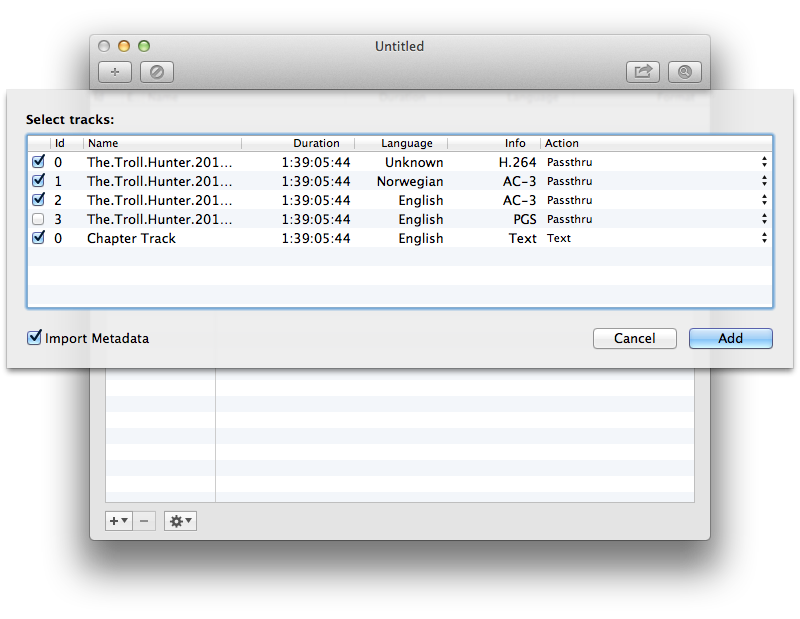
Sorry. Here is a screen shot:
![]() I'm looking to make the Norweigan track and Subtitle track the default. I'm also getting an error at the end of the conversion saying that it couldn't mux the subtitle track. I converted the subtitles to 3gpp txt and the error goes away but when i go to play the file and select english subtitles it doesn't play anything (and still no sound). Last edited by DaGrandMastah; Nov 5, 2012 at 10:56 AM. |
|
|
|
0
|
|
|
#6 |
|
You NEED to have an AAC stereo track for the Apple TV to recognize that AC-3 track. The same will apply to the second AC-3 track you have there. Then you need to checkmark the main AAC track that you want to play by default and uncheck the rest.
As for the subtitles not showing up, check what "group" it's in. It should be on 2 by default, but make sure that the audio tracks aren't using this group or else you'll have conflicts. |
|
|
|
0
|
|
|
#7 |
|
__________________
17" MacBook Pro, 2.66 GHz, 8GB RAM; AppleTV 3; iPad 2, 32GB; 2TB Time Capsule (RIP 9/12); AEBS w 1TB Seagate HDD; AE; 65" Mits DLP, Sony STR-DB1070 AVR
Last edited by mic j; Nov 5, 2012 at 11:15 AM. Reason: updated after viewing the above post. |
|
|
|
0
|
|
|
#8 | |
|
Quote:
Last edited by DaGrandMastah; Nov 5, 2012 at 11:57 AM. |
||
|
|
0
|
|
|
#9 |
|
Ok so I finally got the audio working by using this guide:
http://www.iphonelife.com/blog/87/co...one-–-part-iii The only thing I'm still having a problem with is getting the subtitle track working. Still having a problem with no text appearing. |
|
|
|
0
|
|
|
#10 | |
|
Quote:
__________________
17" MacBook Pro, 2.66 GHz, 8GB RAM; AppleTV 3; iPad 2, 32GB; 2TB Time Capsule (RIP 9/12); AEBS w 1TB Seagate HDD; AE; 65" Mits DLP, Sony STR-DB1070 AVR
|
||
|
|
0
|
|
|
#11 | |
|
Quote:
You'll need to a.) 1, convert it to VobSub 2, OCR it OR b.) find an already-OCR'ed track in any of the online subtitle repositories - just make sure it's correctly synchronized. For the former, you may want to check out post #22 and #23 at http://forums.macrumors.com/showthread.php?t=1469630 |
||
|
|
0
|
|
|
#12 |
|
Good to know. I had an issue and realized it was an AC3 audio track not working for my speakers/TV and all correctly ripped AAC would work fine.
|
|
|
|
0
|
|
|
#13 | |
|
Quote:
__________________
16GB iPhone 4; 2.4 GHZ C2D iMac 4GB Ram; 32GB iPad2; AppleTV2 |
||
|
|
0
|
![]() |
|
«
Previous Thread
|
Next Thread
»
| Thread Tools | Search this Thread |
| Display Modes | |
|
|
All times are GMT -5. The time now is 03:37 AM.


17" MacBook Pro, 2.66 GHz, 8GB RAM; 
Linear Mode