|
|||||||
![]() |
|
|
Thread Tools | Search this Thread | Display Modes |
|
|
#1 |
|
Why does always Preview reopen with every image saved?
Every time I download an image, the image pops up in "Preview", even after i've already quit. This never used to happen and I don't recall changing any settings recently. I cannot find any menus in preview to disable auto-reopen and this popup is driving me INSANE!! I am downloading loads of images for a project. Please HELP!

|
|
|
|
0
|
|
|
#2 |
|
It's an annoying feature of Lion and Mountain Lion. I've found that you just have to 'X' out of the photo's before quitting the application so that they don't open with the app the next time.
|
|
|
|
0
|
|
|
#3 |
|
Thanks for the reply...but this did not happen to me until a few days ago. I've had this macbook for almost 2 years and I download images daily. This makes no sense. Is there anyway to just get rid of preview altogether?
|
|
|
|
0
|
|
|
#4 |
|
Get rid of Preview? Well yes you can delete it from your computer, but I wouldn't recommend that. But you could change the app associations for photos so that they open with another program if you wanted.
|
|
|
|
0
|
|
|
#5 |
|
No, preview is part of the system, so you can't just get rid of it.
__________________
After the Army: no one can stay forever |
|
|
|
0
|
|
|
#6 | |
|
Quote:
I have been searching forums and menus for a few hours and cannot find an answer. This can't be common for every user on the planet? It's a ridiculous thing and annoying as hell. It makes no sense, especially that this is a new thing to me. Someone in mac world must know how to disable this. Sadly, I'm afraid of getting the familiar apple answer regarding this kind of kink: that's just the way it is, so suck it up LOL. Arrrg. |
||
|
|
0
|
|
|
#7 |
|
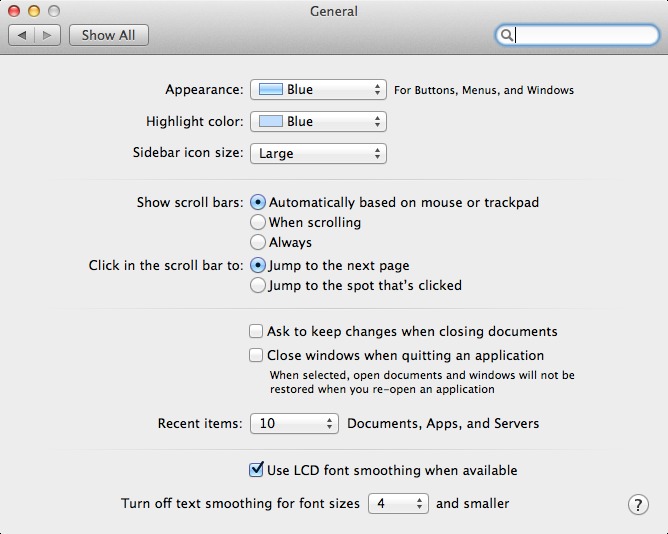
There is a setting under Mountain Lion, but it appears to be global to all apps.
|
|
|
|
0
|
|
|
#8 | |
|
Quote:
If you're using a different browser, please tell us what it is. They may have a similar setting, but it varies by browser and version. |
||
|
|
0
|
|
|
#9 | ||
|
Quote:
---------- Quote:
|
|||
|
|
0
|
|
|
#10 |
|
Which version?
Try googling search terms: chrome auto open Top search result: http://support.google.com/chrome/bin...n&answer=95759 |
|
|
|
0
|
|
|
#11 |
|
Also you can set file handling preferences in Chrome, that might be where the problem is.
|
|
|
|
0
|
![]() |
|
«
Previous Thread
|
Next Thread
»
| Thread Tools | Search this Thread |
| Display Modes | |
|
|
All times are GMT -5. The time now is 07:18 PM.


Linear Mode