|
|
#1 |
|
Your Geektool scripts (II)
Here's the continuation of the first Geektool thread.
|
|
|
|
0
|
|
|
#2 |
|
I would like to point out unlike the prior thread, there is no longer a need to put all your geektool questions, issues, and scripts in a single thread. Now with the UI Customization forum, members are free to create new geektool threads as they deem necessary
|
|
|
|
0
|
|
|
#3 |
|
Well, I'll start the thread off with a couple of useful scripts I have found, I think they may have originally come from here.
The first is to check if a service is online: Code:
#######Server Checker#########
HOST=DNS.NAME.GOES.HERE
PING=`ping -q -c 1 $HOST`
if [[ $? -eq 0 ]] ; then
TIME=`echo $PING |tail -1 | cut -d/ -f 5`
echo $HOST is Online
else
echo $HOST is Offline
fi
Code:
########EXTERNAL IP###########
echo ""
NET1=`lynx -dump http://checkip.dyndns.org | cut -d : -f 2`
echo External: $NET1
########INTERNAL IP###########
echo ""
NET2=`ifconfig | grep "inet" | grep -v 127.0.0.1 | grep -v inet6 |grep -v 192.168.48.1 | grep -v 192.168.183.1 | awk '{print $2}'`
echo Internal: $NET2
|
|
|
|
0
|
|
|
#4 |
|
I would appreciate some help here. I've been using this horizontal calendar script, which I love, but it somehow is automatically coloring the current date in red, but I'd like to change that to a different color. Any help?
Code:
echo `cal`" " | sed "s/[^0-9]$(date +%e | sed s'/ //')\([^0-9]\)/ $(date +%e | sed 's/ *\([0-9]*\)/[31m\1[0m/')\1/" | sed s'/ $//' | sed s'/Su Mo Tu We Th Fr Sa//g' | sed s'/ / \ • /g' | sed s'/\([a-z]\)[ ]\ ./\1/g' | sed s'/\•[ ]*\•/ /'| sed s"/$/ $(date +%A)/"
__________________
The Bearded Nerd 13" MacBook Pro; 64GB iPod touch "It's a real burn, being right so often." NoiseTrade.com/Walker |
|
|
|
0
|
|
|
#5 | |
|
Quote:
__________________
"It's quite an experience to hold the hand of someone as they move from living to dead." "Times are looking grim these days, holding on to everything, it's hard to draw the line" |
||
|
|
0
|
|
|
#6 |
|
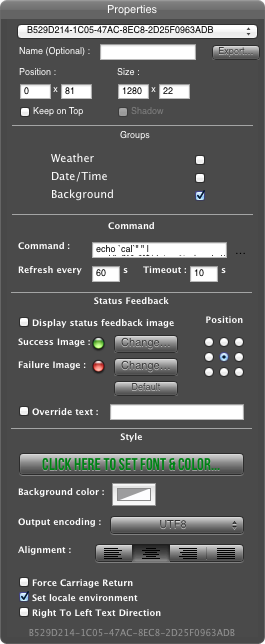
Nothing that I can see. The Font color in GeekTool affects only the rest of the days, but there's not a separate script for the colored day and nothing I can identify that would change that color.
This is what the window looks like (with the entire script being what I copy/pasted before): jW
__________________
The Bearded Nerd 13" MacBook Pro; 64GB iPod touch "It's a real burn, being right so often." NoiseTrade.com/Walker |
|
|
|
0
|
|
|
#7 | |
|
Quote:
__________________
"It's quite an experience to hold the hand of someone as they move from living to dead." "Times are looking grim these days, holding on to everything, it's hard to draw the line" |
||
|
|
0
|
|
|
#8 | |
|
Quote:
You can check by first giving the Geeklet you can see a name (besides the random string) and then moving it up or down by 100. Then you'll see the other Geeklet left behind. You can then rename that one, change its color, and move the other one back into place. It's the "date +%e" inside one of the sed statements that shows today's date is being replaced with a space. Darryl |
||
|
|
0
|
|
|
#9 |
|
The color is defined in the second line of your script
sed "s/[^0-9]$(date +%e | sed s'/ //')\([^0-9]\)/ $(date +%e | sed 's/ *\([0-9]*\)/[31m\1[0m/')\1/" | Just change the number 31 to change the color as follows: 30 - black 31 - red 32 - green 33 - yellow 34 - blue 35 - magenta 36 - cyan 37 - white |
|
|
|
0
|
|
|
#10 | |
|
Quote:
jW
__________________
The Bearded Nerd 13" MacBook Pro; 64GB iPod touch "It's a real burn, being right so often." NoiseTrade.com/Walker |
||
|
|
0
|
|
|
#11 |
|
I modified this script from itunes to use Spotify form the process list everything works but the Player position I receive from Spotify is very accurate and Returns 12 Decimal places
Code:
get player position --> 294.496002197266 Thanks The Script Code:
tell application "System Events" set myList to (name of every process) end tell if myList contains "Spotify" then tell application "Spotify" try set trackname to name of current track set artistname to artist of current track set albumname to album of current track set timetofinish to player position set hourstofinish to timetofinish div 3600 set secondstofinish to timetofinish mod 3600 set minutostofinish to secondstofinish div 60 set secondstofinish to secondstofinish mod 60 if hourstofinish < 10 then set hourstofinish to "0" & hourstofinish if minutostofinish < 10 then set minutostofinish to "0" & minutostofinish if secondstofinish < 10 then set secondstofinish to "0" & secondstofinish if hourstofinish = "00" then set timetofinish to (minutostofinish as text) & ":" & secondstofinish else set timetofinish to (hourstofinish as text) & ":" & minutostofinish & ":" & secondstofinish end if if player state is paused then set output to artistname & trackname & return & albumname & return & "" & timetofinish else set output to artistname & " - " & trackname & return & albumname & return & timetofinish end if on error set timetofinish to "No song playing" end try end tell else set output to "Offline" end if Code:
tell application "System Events"
get name of every process
--> {"loginwindow", "SystemUIServer", "Dock", "Finder", "ProFire Agent", "AirPort Base Station Agent", "DiskLed", "iTunesHelper", "Cinch", "smcFanControl", "Battery Health", "Twitter", "GeekTool Helper", "Yahoo! Widgets", "System Events", "Yahoo! Widgets", "AppleSpell", "mdworker", "GeekTool", "Image Events", "Spotify", "quicklookd", "Google Chrome", "Google Chrome Helper", "Google Chrome Helper", "Google Chrome Helper", "Mail", "AppleScript Editor", "osascript"}
end tell
tell application "Spotify"
get name of current track
--> "Stream Of Consciousness"
get artist of current track
--> "Dream Theater"
get album of current track
--> "Train of Thought"
get player position
--> 294.496002197266
get player state
--> playing
end tell
Result:
"Dream Theater - Stream Of Consciousness
Train of Thought
04:54.496002197266"

|
|
|
|
0
|
![]() |
|
«
Previous Thread
|
Next Thread
»
| Thread Tools | Search this Thread |
| Display Modes | |
|
|
All times are GMT -5. The time now is 10:41 PM.


Linear Mode