|
|
#1 |
|
How are your iMac replacements?
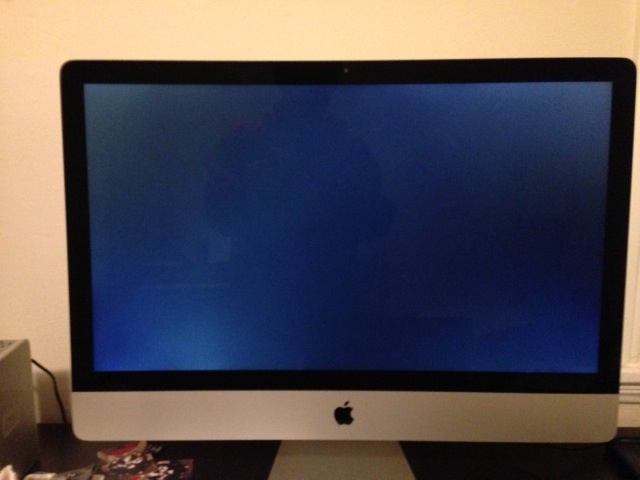
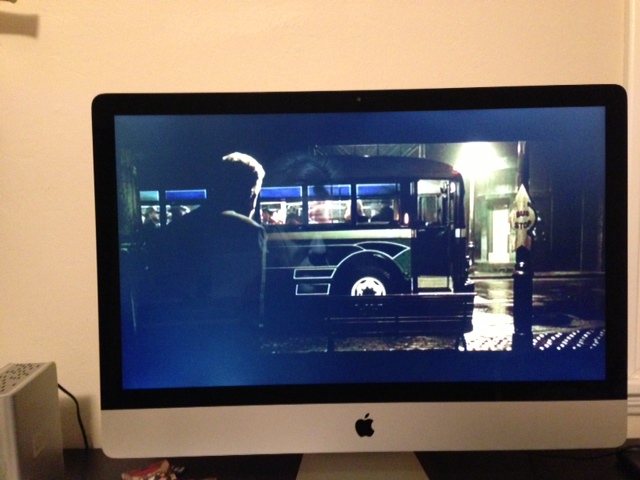
So my first iMac 27 inch late 2012 has weird fan noises issues it sounds like a fridge at times now apple sends me a replacement. I got this https://twitter.com/edryhilario/stat.../photo/1/large Are you kidding me?? What should I do guys should I keep this? This really really bad apple should be looking at this machines more before the ship them in. Wtf
Last edited by edry.hilario; Dec 31, 2012 at 06:07 PM. |
|
|
|
0
|
|
|
#2 | |
|
Quote:
How is the fan on the new one? |
||
|
|
0
|
|
|
#3 |
|
the fan is fine perfect on the new one, but now the screen on the replacement just has tons of backlight issues and the first one i got is not like this. This really really sucks
|
|
|
|
0
|
|
|
#4 |
|
Looks pretty normal to me for this sort of IPS panel with max backlight (I'm guessing). I wouldn't bother getting a replacement.
Black viewing angles are just poor on this new iMac, and that's just the way it is. Turn your backlight up, and move left and right in front of your screen when it's black. You'll see the bleed disappear when it's directly in front of you. Shame. My 2009 27" iMac was leagues better in this regard. |
|
|
|
0
|
|
|
#5 | |
|
Quote:
|
||
|
|
0
|
|
|
#6 |
|
They all have a little bleed from what I've seen. The last several iMacs all have some uneven backlight bleed, as do other monitors of this caliber.
I would keep it. Its not like you sit there and stare in the dark at a black screen with full brightness dialed up. Once you start using the computer you will not notice these subtle things.
__________________
2012 13" MBA 1.8GHz i5, 8GB, 256GB SSD iPhone 5 32GB
|
|
|
|
0
|
|
|
#7 | |
|
Quote:
|
||
|
|
0
|
|
|
#8 | |
|
Quote:
In other words just look at the left side compared to the right side in the picture. Last edited by edry.hilario; Jan 1, 2013 at 10:47 AM. |
||
|
|
0
|
|
|
#9 |
|
It's a shame you can't walk into an Apple store and have them pop the good display onto the otherwise flawless unit.
|
|
|
|
0
|
|
|
#10 |
|
yes about that, i contacted them and asked if they can swap the screen between machines, they said they wouldnt do it because "they like to put bran new parts into machines" which is bs because the screen from my first imac is totally fine idk wtf i wish they could have just swap them. now i have to wait probably three more weeks so i can get a replacement and hope that replacement isnt bad either which at this phase... idk know what to do.
|
|
|
|
0
|
|
|
#11 | |
|
Quote:
|
||
|
|
0
|
|
|
#12 |
|
I once was very badly let down by a major supplier.
What I did is obtain a copy of their complaints procedure and follow it to the letter, knowing their staff would not....and kept a record of that. My last step was to identify the director responsible for complaints, and their direct e-mail address. I sent a very reasonable and polite letter by recorded post and e-mail to that director, and overtly copied it to various consumer media bodies and regulatory agencies. It took approximately 6 hours from pressing send on the e-mail for all my problems to disappear, and they even waived my bill. |
|
|
|
2
|
|
|
#13 |
|
I've been struggling with this issue too. My 27" iMac's display has fairly bad backlight bleeding, especially on the left side of the screen, pretty similar to what's in your picture. It's really quite obvious when you're sitting right at my desk, about 2 feet away from the screen. The backlight bleeding falls off quite a bit if you stand further back (around 5 feet from the screen), but there's still an ugly blotch at the left-bottom edge, kinda like yours. What distance are people judging backlight bleeding issues from?
I've read various opinions about whether this is normal or not. Honestly it doesn't bother me in most day-to-day use. I don't really watch movies on my iMac, which would be the case that would bother me the most. So it really only shows up when I game, which isn't too frequent. I've been having a hard time deciding if it's worth going through the replacement process. What was the replacement process like? Is it a big hassle? Do they send you a new unit or is it refurbished? It does seem like some folks on here have panels without issues. I've played the replacement game and replacements never guarantee success. So there's a part of me that's not eager to get into that cycle... but then again.. |

|
|
|
0
|
|
|
#14 | |
|
Quote:
|
||
|
|
0
|
|
|
#15 | |
|
Quote:
|
||
|
|
0
|
|
|
#16 |
|
here's my imac's screen at half.. the light bleed from the corners is pretty acceptable to my eyes.. and i think that might actually not be backlight bleeding bc it goes away at certain angles. what really bothers me is the bleed at the left side of the bottom edge, which diffuses up a light cloud about 4-5 inches upwards. The next pic is around half brightness.
![]() this creates some ugliness in dark scenes.. mainly for movies and gaming.. in normal "desktop" use, i rarely notice it.. again, in the next picture, ignore the corner brightness, i don't find that to be an issue at most angles.. This pic I believe is at full brightness. ![]() Most of the time I'm satisfied with the screen. I don't do too much gaming on my iMac.. and I don't watch any movies other than YouTube on it... so.. to me this bothers me more because I paid so much for this computer. I feel like I've also seen much worse examples of bleed on this forum and don't want to make too big an issue out of it.. thoughts on my panel? Last edited by kidwei; Jan 1, 2013 at 09:21 PM. Reason: smaller photos |
|
|
|
0
|
|
|
#17 |
|
The peanut gallery seems to agree that my panel is pretty bad.. looks like I'll be sending this guy back for an exchange.
More details and pics at this thread: http://forums.macrumors.com/showthread.php?t=1518094 so.. edry.hilario - it seems another return feels like the right move for you.. guess we're in the same boat |
|
|
|
0
|
|
|
#18 | |
|
Quote:
|
||
|
|
0
|
|
|
#19 |
|
kidwei if you move directly in front of the bleed areas do they disappear at all? It's hard to say from your pictures, really...
First thoughts are yes that looks bad in that bottom middle-left area. The corner bleeding is (unfortunately) 100% normal when sitting facing the center of the display at a relatively normal distance. I bet the bleed in the left/right corners mostly disappears when you sit directly in front of that corner? |
|
|
|
0
|
|
|
#20 | |
|
Quote:
|
||
|
|
0
|
|
|
#21 | |
|
Quote:
|
||
|
|
0
|
|
|
#22 |
|
The 27" panels have been the same since the first 27" LED panels used, they are the same LG panels!! Some will have less backlight bleed and yellow tint issues then others. You may have got a really good example last time but you were lucky. Unless you have extremely bad bleed issues or yellow tinting i would not exchange it. Mine has minor backlight bleed but zero yellow issues, i am more then happy with it.
__________________
2012 27" iMac with 680mx | 2011 13" MBA 128gb | iPhone 4 32gb | Nexus 7 16gb | Nexus 4 on Carbon and Trinity. |
|
|
|
0
|
|
|
#23 | |
|
Quote:
i'm really on the fence still about returning mine.. but i have a bad feeling that mine is bad... I just posted another pic on this thread we're both on.. http://forums.macrumors.com/showthre...1#post16589011 |
||
|
|
0
|
|
|
#24 |
|
hang in there and just reorder another one...i went threw 3 acer netbooks (when they first came out) until i finally got one i liked (first ones harddrive made strange clicking,second one had horrible left edge light bleed,third one was great)...ya ya what was i thinking buying a acer ;-) long since sold...
|
|
|
|
0
|
|
|
#25 | |
|
Quote:
|
||
|
|
0
|
![]() |
|
«
Previous Thread
|
Next Thread
»
| Thread Tools | Search this Thread |
| Display Modes | |
|
|
All times are GMT -5. The time now is 08:32 AM.


55-11


Linear Mode