|
|
#1 |
|
Do Not Disturb On Outside of Designated Time
Hello and Happy New Year,
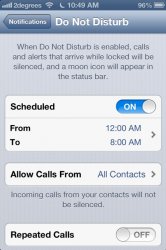
I am in Japan so it is 2013, and I am finding that my iOS devices (iPhone 4 and iPad 2) are showing "Do Not Disturb" even though it is outside of the time I set for them. Not sure if this is related to the new year. Reloading the devices does not help and the software is up-to-date. Anybody else seeing this issue?
__________________
Mac Mini 2.5 GHz - 8GB RAM - Intel Corei5 - Lion 10.7.2 with Thunderbolt Display 32 Gb iPhone 4 iPad2 64gb wifi | Gentoo: 3.0.6-gentoo AMD E-350
|
|
|
|
0
|
|
|
#2 |
|
A friend of mine in Australia mentioned that same thing as well. Showed a screenshot on FB of the DND moon in the status bar, yet it was outside of the designated time frame.
Its not 2013 here yet, but before it gets here I'll try to setup DND on my iPhone.
__________________
2013 13" Retina MacBook Pro | 32GB iPhone 4S | 32GB iPad (3rd gen) | TV16GB Samsung GS4 | 16GB Nexus 4 | 16GB Nexus 7 |
|
|
|
0
|
|
|
#3 |
|
Thanks for the reply. Glad to know I am not alone with this issue
![]() Digging around for an answer now.
__________________
Mac Mini 2.5 GHz - 8GB RAM - Intel Corei5 - Lion 10.7.2 with Thunderbolt Display 32 Gb iPhone 4 iPad2 64gb wifi | Gentoo: 3.0.6-gentoo AMD E-350
|
|
|
|
0
|
|
|
#4 |
|
You guys might have the DND on/off switch confused with the DND scheduled in notifications.
You can have DND scheduled in notifications while still having DND turned off in settings. If you do this DND will happen during the scheduled times you set up. If you turn on DND in the general settings DND is on until you turn it off. If you have DND in general settings turned on the DND schedule won't work since DND is already on. |
|
|
|
0
|
|
|
#5 | |
|
Quote:
|
||
|
|
0
|
|
|
#6 | |
|
Quote:
|
||
|
|
0
|
|
|
#7 |
|
Same thing here. I scheduled it to automatically turn on from 12AM to 8AM. It's 1PM here and it thinks it's still in the range!
Apple doesn't know how time works.
|
|
|
|
0
|
|
|
#8 |
|
__________________
MacBook Pro 15" 2.4GHz i5 iPhone 4S 32GB iPad 3rd Gen 16GB Wi-Fi
|
|
|
|
0
|
|
|
#9 |
|
Same thing here
I fixed it by turning scheduling of DND off, then back on |
|
|
|
0
|
|
|
#10 |
|
I checked it a little bit ago, same issue everyone else is having. DND is kicking in before the scheduled window.
__________________
2013 13" Retina MacBook Pro | 32GB iPhone 4S | 32GB iPad (3rd gen) | TV16GB Samsung GS4 | 16GB Nexus 4 | 16GB Nexus 7 |
|
|
|
0
|
|
|
#11 |
|
Same issue in Spain, on both my iPhone and my iPad.
|
|
|
|
0
|
|
|
#12 |
|
same here, brooklyn, ny. turning it off then back on has NOT fixed it...
__________________
mbp@10.8.3 • 4S@6.1.1JB |
|
|
|
0
|
|
|
#13 |
|
Same for me, looks like a 2013 bug.
__________________
iPhone 5 32GB iPad mini 16GB TV 3
|
|
|
|
0
|
|
|
#14 |
|
Same issue here in Beijing. Second day in a row - even after I turned off and then back on.
__________________
MacBook Air 13" 256 GB | iPad 32GB 3G (3rd Generation | iPhone 5 64GB
|
|
|
|
0
|
|
|
#15 |
|
There seems to be a lengthy discussion of this going on here:
http://forums.macrumors.com/showthre...post&t=1517623 This bug happened to me today too.
__________________
"Don't bother trying to join the Bureau of Alcohol, Tobacco and Firearms. It turns out they're apparently against all three." — Wiley |
|
|
|
0
|
|
|
#16 |
|
I had the same issue on my iPhone 5 and iPad 2 this morning (2nd Jan GMT ).
My DND was scheduled to shut off at 7am this morning on both devices however, when I checked them both at 9, the half moon crescent was still showing and DND was still on???? I just switched the feature Off & then back on (scheduled) and it seemed to resolve it. |
|
|
|
0
|
|
|
#17 |
|
Same here.
Last night the wifes iPhone 3Gs wouldn't enter DND, and this morning my iPhone 4 wouldn't exit DND. Yet another epic software fail Apple. When are these going to stop? |
|
|
|
0
|
|
|
#18 | |
|
Quote:
http://forums.macrumors.com/showthre...1517623&page=8 post 187 |
||
|
|
0
|
|
|
#19 | |
|
Quote:
__________________
Homemade Interocitor,iPhone 5 32GB Black & Slate, iPod Touch 4th and 5th Gen, iPad 1st gen, iPhone 4, Two Apple TV's, -- 21.5-inch: 3.2GHz Intel Core i3 iMac. |
||
|
|
0
|
|
|
#20 |
|
has anyone been to an apple store with this issue? Mine is sitting with do not disturb on but set to go off 6 house ago. Wonder if I take it in and complain they will swap it for a new/refurb phone. Mine has some chips in the band so looking for an excuse to change it
__________________
32GB black iPhone 5 on 6.0 64GB WiFi only iPad2 on 6.0 |
|
|
|
0
|
|
|
#21 |
|
The issue didn't happen to me yesterday, but did happen to me this morning. It's kind of weird.
I have my DND scheduled to shut off at 6:45 AM EST. However when I woke up around 8 AM this morning, I noticed that my DND was still on, turned off scheduled and will be using it manually until a fix comes. |
|
|
|
0
|
|
|
#22 | |
|
Quote:
__________________
Mac Mini i5 - iPad 2 - iPhone 4 |
||
|
|
0
|
|
|
#23 |
|
Just manually turn it off then go to "notifications" and verify the automated time that you already had set...that fixes it.
|
|
|
|
0
|
|
|
#24 |
|
Its a bug. I turned my iPad on to see the same thing!
__________________
WWDC 2013 Predictions |
|
|
|
0
|
|
|
#25 |
|
Mod Note: Discussion continues here: iOS 6's 'Do Not Disturb' Not Shutting Off Automatically on New Year's Day
|
|
|
|
0
|
![]() |
|
«
Previous Thread
|
Next Thread
»
| Thread Tools | Search this Thread |
| Display Modes | |
|
|
All times are GMT -5. The time now is 05:10 PM.


Mac Mini 2.5 GHz - 8GB RAM - Intel Corei5 - Lion 10.7.2 with Thunderbolt Display 


Linear Mode