|
|||||||
![]() |
|
|
Thread Tools | Search this Thread | Display Modes |
|
|
#1 |
|
Can I overheat my MacBook Air if I close its lid and use external monitor?
Hello ALL!
I am very new in Mac World, comming from many years in Linux-on-ThinkPads World. (My main reason to switch is no time for maintenance and need for Unix!) Anyway, I started to use my MacBook Air with an external monitor and with closed lid (clamp-shell mode?). Then, a colleague warn me that this way I may cause overheating. My machine should be quite good (i7, 4GB, 256SSD), but I am doing excesive data analysis. So, my question is: Is my colleague right? Should I leave lid open? If closed, I should never do demanding stuff? Many thanks! PM |
|
|
|
1
|
|
|
#2 | ||
|
Quote:
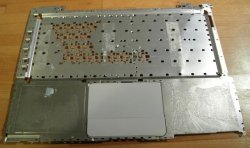
Heat radiates in all directions and dissipates through the aluminum body. While clamshell mode or using a keyboard covering slightly inhibits dissipation, it's not enough to cause problems or raise temps more than a few degrees, since the primary cooling is through the vents. There has never been any air intake or exhaust vents through the keyboard on any Mac notebook. For all Mac notebooks except the MBP-Retina, both intake and exhaust has always been through the vents in the rear near the hinge. The new MBP-Retina has intake vents along the sides at the bottom and exhaust through the rear vents, near the hinge. Learn about the fans in your Mac Quote:
|
|||
|
|
4
|
|
|
#3 |
|
Ah, ya beat me GGJ
__________________
lotsa "stuff"![]() ![]() God Bless Steven P Jobs! Thanks for the ride |
|
|
|
0
|
|
|
#4 | |
|
Quote:
For example, if you close the lid, use an external monitor and place it on a radiator.
__________________
"Nobody ever reads these things so I can write anything. I'd eat bananas every day if they were crunchy." |
||
|
|
2
|
|
|
#5 |
|
Many thanks GGJstudios! Your post is convincing and calming!
iSee, it's not nice to make fun with poor souls and ignorants ![]() P Last edited by lexicaller; Feb 9, 2013 at 06:40 AM. |
|
|
|
0
|
|
|
#6 | |
|
Quote:
Image source: https://secure.flickr.com/photos/342...57612409546653 Last edited by Intell; Feb 8, 2013 at 03:54 PM. |
||
|
|
3
|
|
|
#7 |
|
So, then, what should I do?!?
|
|
|
|
0
|
|
|
#8 |
|
|
0
|
|
|
#9 |
|
|
1
|
|
|
#10 |
|
Unless you have a non-unibody Macbook, you're fine. Use it as you see fit.
No hacks are needed. Just plug in an external monitor, mouse, and keyboard and it'll wake up. This is how it's been since the 1990's and Apple laptops.
__________________
Last edited by Intell; Yesterday at 11:50 AM. |
|
|
|
3
|
|
|
#11 |
|
Don't be confused by the back and forth here - it is COMPLETELY safe, and an expected use of the Air. I do it all the time, and have for years.
|
|
|
|
0
|
|
|
#12 | |
|
Quote:
http://support.apple.com/kb/HT3131?v...S&locale=en_US |
||
|
|
0
|
|
|
#13 | |
|
Quote:
And if it's because you don't want to use the built-in monitor as your primary, that's fine. Just change the primary monitor to the external in your System Prefs, and that way your dock and menu bar show up on the larger monitor. But that way you still have the built-in display to hold an extra window or two. |
||
|
|
0
|
|
|
#14 |
|
Apple does that because you cannot access the keyboard, and you cannot see the screen, so the computer is not useable. To keep the MacBook awake you don't need any hack, just plug in any old USB keyboard and monitor.
|
|
|
|
0
|
|
|
#15 | |
|
Quote:
__________________
I have a dream that one day iOS users, Android users, and Windows Phone users will be able to sit down together at a table of brotherhood. Follow me on Twitter |
||
|
|
4
|
|
|
#16 | ||
|
Quote:
Quote:
You say that "the computer is not useable," but that is only because Apple has designed it in such a way. My old windows laptops were never unuseable just because the lid was closed - same goes for my Macbook with the caffiene app installed. |
|||
|
|
0
|
|
|
#17 |
|
|
0
|
|
|
#18 | |
|
Quote:
So, it could suggest that operating with the lid closed can indeed cause your Mac to overheat. But it could also suggest that the people who said that don't know what they're talking about. |
||
|
|
0
|
|
|
#19 | |
|
Quote:
|
||
|
|
0
|
|
|
#20 |
|
You're unable to overheat any modern computer. It will automatically turn off if the temperature gets too high.
__________________
iMac 21.5" 2011 (2.5GHz i5 + 12GB DDR3) Late-2008 Macbook Unibody (2GHz + 4GB DDR3 + Intel 320 SSD) iPhone 5 16GB iPad Mini 16GB WiFi iPad 2 16GB WiFi + a lot of old Apple stuff |
|
|
|
0
|
|
|
#21 |
|
|
0
|
|
|
#22 | |
|
Quote:
You should use clamshell mode whenever you need or want to without worry. There is no venting through your keyboard. |
||
|
|
1
|
|
|
#23 | |
|
Quote:
__________________
Last edited by Intell; Yesterday at 11:50 AM. |
||
|
|
2
|
|
|
#24 | ||
|
Quote:
Learn about the fans in your Mac Quote:
Last edited by GGJstudios; Feb 11, 2013 at 09:32 AM. |
|||
|
|
0
|
|
|
#25 | |
|
Quote:
__________________
Last edited by Intell; Yesterday at 11:50 AM. |
||
|
|
2
|
![]() |
|
«
Previous Thread
|
Next Thread
»
| Thread Tools | Search this Thread |
| Display Modes | |
|
|
All times are GMT -5. The time now is 11:31 AM.


"stuff"

Linear Mode