

|
|||||||
![]() |
|
|
Thread Tools | Search this Thread | Display Modes |
|
|
#1 | |
|
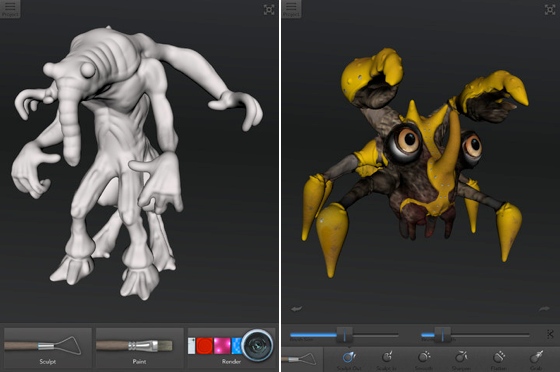
Design, Paint and Print Monsters With Autodesk's '123D Creature'
![]() Autodesk recently released a new iPad app for novice 3D modelers, 123D Creature, which allows creators to use gesture controls to mold monsters out of virtual clay. ![]() Quote:
Article Link: Design, Paint and Print Monsters With Autodesk's '123D Creature' |
||
|
|
0
|
|
|
#2 |
|
Autodesk must love the App Store. They've got so many (excellent) apps on there now, just goes to show how much of a difference the App Store does make.
__________________
27" iMac, i7 3.4GHz, 16GB RAM 13" MBP 2.66 GHz, 8GB RAM 3rd Gen iPad 64 GB Wifi+4G, iOS 5.1 iPhone 5 32 GB, iOS 6.0 Mac Mini 2.00 GHz, 2GB RAM |
|
|
|
3
|
|
|
#3 |
|
This basically just looks like the creature editor from Spore, which, incidentally, was about the only fun part of that game, in my opinion.
|
|
|
|
3
|
|
|
#4 |
|
What a monster!! :O #ballin
|
|
|
|
1
|
|
|
#5 |
|
Wow! This is what 3D modelling should be like
__________________
Sent from my iPod Shuffle |
|
|
|
0
|
|
|
#6 |
|
I bought it already no second thoughts
also, that big black gap at the end of the video is very unprofessional |
|
|
|
0
|
|
|
#7 |
|
now just do this for revit.
__________________
if everyone's thinking alike, then someone is not thinking
|
|
|
|
0
|
|
|
#8 |
|
come to think of it, pixologic & the other guys that made argento, are seriously left behind
|
|
|
|
0
|
|
|
#9 |
|
Spore definitely wasn't the one to invent that. I remember playing with Z-brush circa the year 2000 and it had a feature very much like this app.
|
|
|
|
0
|
|
|
#10 | |
|
Quote:
Note that Autodesk has some nice free apps in the MAS: https://itunes.apple.com/us/artist/a...95089690?mt=12 |
||
|
|
0
|
|
|
#11 |
|
So after a novice modeler creates a creature in his/her iPad, what will he/she do with it?
|
|
|
|
0
|
|
|
#12 |
|
Nothing you cant export them to anything
__________________
MacBook Pro 15" none retina 16gb ram, 32GB Ipad2 3g, Samsung Galaxy S3 |
|
|
|
0
|
|
|
#13 |
|
You can export to OBJ which will get you into any other 3D app, or you can export to a 3D printer. This info from the link in the article. Where did you get yours?
Last edited by mw360; Feb 15, 2013 at 08:45 AM. |
|
|
|
3
|
|
|
#14 |
|
I've had great fun playing with this app. There are, however, a few little issues that I have with it.
First off, the app doesn't do a good job of identifying the ground plane, let alone allow you to change it. This isn't that big a deal, until you get around to trying to use the rendering engine, where the ground plane is visible with shadows. You can end up with some funny results... |
|
|
|
0
|
|
|
#15 |
|
Too bad AutoCAD for Mac is a horrible program that causes constant crashes and operating issues! If they can't fix their flagship program, how will they convince anyone to use their other programs?!?
|
|
|
|
0
|
![]() |
|
«
Previous Thread
|
Next Thread
»
| Thread Tools | Search this Thread |
| Display Modes | |
|
|
All times are GMT -5. The time now is 10:44 PM.


27" iMac, i7 3.4GHz, 16GB RAM


Linear Mode
