
Got a tip for us?
Let us know
Become a MacRumors Supporter for $50/year with no ads, ability to filter front page stories, and private forums.
Dual Monitors on a mini
- Thread starter Choctaw
- Start date
- Sort by reaction score
You are using an out of date browser. It may not display this or other websites correctly.
You should upgrade or use an alternative browser.
You should upgrade or use an alternative browser.


simsaladimbamba
Guest
Yep, it has two video outputs (MDP and HDMI).
from http://www.apple.com/macmini/specs.htmlGraphics and video support
NVIDIA GeForce 320M graphics processor with 256MB of DDR3 SDRAM shared with main memory4
Mini DisplayPort with support for up to 2560-by-1600 resolution
HDMI port with support for up to 1920-by-1200 resolution
DVI output using HDMI to DVI Adapter (included)
VGA output using Mini DisplayPort to VGA Adapter (sold separately)
Support for extended desktop and video mirroring across both ports

MacForScience
macrumors 6502
Can you use two monitors on a mac mini?
Thanks
Yes, I currently utilize such a setup for one of my systems and it is very nice.
Cheers
simsaladimbamba
Guest
I'm presuming that the OP was referring to the current model (2010) only.
And?
I'm presuming that the OP was referring to the current model (2010) only.
Both the 2009 and 2010 Mac Minis support two displays. The 2009 Mini has a Mini-DVI and Mini-DisplayPort, and the 2010 Mini has Mini-DisplayPort and HDMI.
I've ran my 2009 Mac Mini with two displays for over a year and with three via a USB-Video adapter for the last four months. No problems - Works great. In both cases, you just have to have the right combination of DVI/HDMI adapters to support your monitors.

MultiFinder17
macrumors 68030

For those that are using both displays, do you notice any lag or heat issues?
None at all.
dolphin842
macrumors 65816
For those that are using both displays, do you notice any lag or heat issues?
No lag, no heat, but the GUI (minimizing windows, invoking Expose, etc.) often runs at a lower framerate. Nothing that impacts productivity, just a nitpicky thing.
Stan Mikulenka
macrumors 6502


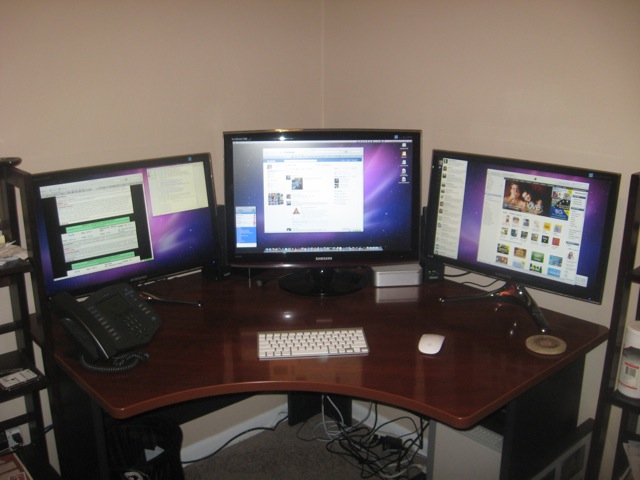
mikeemedia
macrumors newbie
Please Post Wiring Information
Will everyone who just posted their beautiful monitor set up please follow up with what wiring components you used specifically? There is a lot of debate over the best types, and I'm trying to determine that now. Thank you.
Will everyone who just posted their beautiful monitor set up please follow up with what wiring components you used specifically? There is a lot of debate over the best types, and I'm trying to determine that now. Thank you.

I have two 20" Apple Displays, which are both DVI. I used the HDMI > DVI adaptor that comes in the box with the mini, and I bought the Apple MiniDisplayPort > DVI adaptor for the Thunderbolt port.Will everyone who just posted their beautiful monitor set up please follow up with what wiring components you used specifically? There is a lot of debate over the best types, and I'm trying to determine that now. Thank you.
Works brilliantly. No effort or lag in driving two monitors, even though we all know that the Intel 4000 is made of cheese and string, can't even draw with crayons on a stamp, and will crumble to dust at the mention of the word 3D.

NewbieCanada
macrumors 68030
Unfortunately OSX's implementation of multiple monitors isn't as intuitive as Microsoft Window's implementation. So if you are used to multiple monitor usage in Windows, you will be disappointed.
I've worked with multiple monitors for years, first on Windows, now on Mac. You plug them in, they work, subject, of course, to the limitations of ports and display adaptor. I don't see one system's implementation as more intuitive than the others.
MultiFinder17
macrumors 68030
Will everyone who just posted their beautiful monitor set up please follow up with what wiring components you used specifically? There is a lot of debate over the best types, and I'm trying to determine that now. Thank you.
Mine are both hooked in via DVI. The Cinema Display uses an Apple MiniDP->DVI adapter and the cable built into the display, while the Dell uses a Monoprice MiniDVI->DVI adapter with a Monoprice DVI cable. They both have been working wonderfully for several years now.
When I use a dual monitor setup, I like to work with identical monitors side by side. It looks like 1920-by-1200 or under is the screen resolution to look for. Then you will need at least 1 adapter, depending on the connection type.
For this type of identical paired setup, what is a popular monitor choice?
For this type of identical paired setup, what is a popular monitor choice?

Quick question for those of you running dual setups. I've heard that when running dual setups on all Apple computers if you try to full screen watch a movie on 1 the other screen goes black and there isn't any way around this? True or not true?
You mean back to normal size?
Yes that is true when I run dual monitor setup on my MBP.
Not sure on the Mini but I would like to know as well.