|
|
#1 |
|
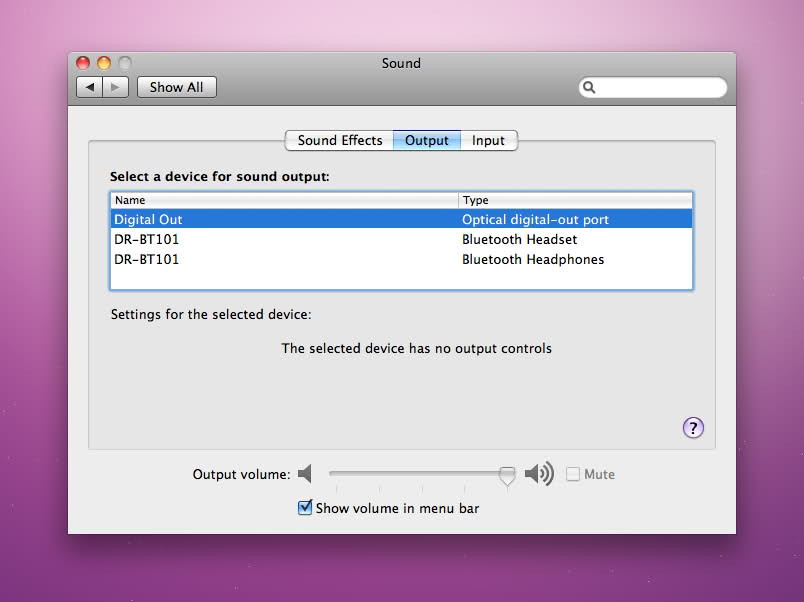
When I turn my iMac on the computer chimes, but after the operating system loads, the internal speakers will not work. Headphones (wireless and wired) work, but when I unplug any external sound device, no sound will play. When I try to turn up/down the volume through my keyboard, this is what I get:
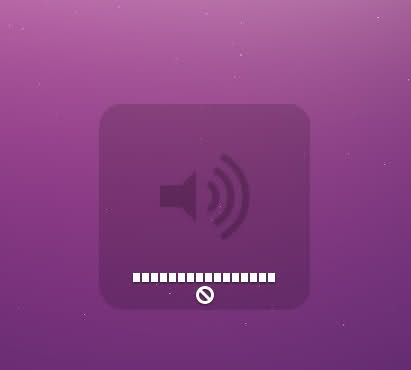
![]() Computer specs: Model: White 24" CPU: 2.16 GHz C2D Ram: 4GB OS: 10.6.7 Any ideas? Thank you. |
|
|
|
0
|
|
|
#2 | |
|
Quote:
__________________
iMac 27" Core i7 3.4GHz, 16GB RAM, 2GB GPU, 120GB SSD+4TB HD, Bowers & Wilkins 685, Nuforce HDP, OS X 10.8.3; iPad 3 Wi-Fi+4G 64GB; iPhone 5 White 32GB. |
||
|
|
0
|
|
|
#3 |
|
Is there a red light coming out of the audio out port?
If so plug and pull the TRS (3.5mm) connector of your headphones until it disappears.
__________________
This is not
|
|
|
|
0
|
|
|
#4 |
|
|
0
|
|
|
#5 |
|
Yep, this can happen as well, since the digital and analog sound connections are together...
__________________
iMac 27" Core i7 3.4GHz, 16GB RAM, 2GB GPU, 120GB SSD+4TB HD, Bowers & Wilkins 685, Nuforce HDP, OS X 10.8.3; iPad 3 Wi-Fi+4G 64GB; iPhone 5 White 32GB. |
|
|
|
0
|
|
|
#6 | |
|
Quote:
http://www.mac-forums.com/forums/app...em-solved.html Or here: https://discussions.apple.com/thread...art=0&tstart=0
__________________
iMac 27" Core i7 3.4GHz, 16GB RAM, 2GB GPU, 120GB SSD+4TB HD, Bowers & Wilkins 685, Nuforce HDP, OS X 10.8.3; iPad 3 Wi-Fi+4G 64GB; iPhone 5 White 32GB. |
||
|
|
0
|
|
|
#7 | ||
|
Quote:
![]() No red light. Quote:
|
|||
|
|
0
|
|
|
#8 |
|
Look directly into the hole. It's not very bright. Turn off all the lights and put your hand right behind the hole and see if you can see anything on your hand.
Yes, there's supposed to be a switch that disengages. You could try a toothpick if you're brave. Or you could take it to the Apple store. |
|
|
|
0
|
|
|
#9 | |
|
I used a paperclip. It works fine now. So glad I don't have to go into the Apple store.
Quote:
|
||
|
|
0
|
|
|
#10 | |
|
Quote:
Have you tried using a different headphone jack? I had that same issue with my mac. Tried plugging/unplugging the headphone jack and it always stayed in mute mode. And all I did was use a different headphone jack and resolved it. Hope this little piece of information works out for you. |
||
|
|
0
|
|
|
#11 |
|
Had exactly this issue on a 2009 27"iMac, nothing was working until I simply blew into the headphone jack. Might work for others...?
__________________
27" iMac, 2.8 GHz i7, 4GB RAM, 1TB HD MBP C2D 2.33, 3gb, 15", 120gb iPhone 3G |
|
|
|
0
|
![]() |
|
«
Previous Thread
|
Next Thread
»
| Thread Tools | Search this Thread |
| Display Modes | |
|
|
Similar Threads
|
||||
| thread | Thread Starter | Forum | Replies | Last Post |
| Top speaker of my iPhone not working, please help! | Astin | iPhone Tips, Help and Troubleshooting | 8 | Jan 17, 2011 04:43 PM |
| iphone internal speaker not working after screen replacement | lavaghman | iPhone Tips, Help and Troubleshooting | 0 | Oct 16, 2010 01:03 AM |
| Right internal speaker not working | eivinden | MacBook Pro | 16 | Jul 8, 2010 10:04 PM |
| Two problems with XP- Internal speakers not working and internet trouble | Amplifyed | Windows, Linux & others on the Mac | 8 | Jun 8, 2009 07:08 PM |
| internal speakers not working | morleyc | MacBook | 3 | Apr 16, 2009 05:34 PM |
All times are GMT -5. The time now is 05:00 AM.


Linear Mode