Last week I made two decently big changes to my new mini ... I installed a BootCamp partition and installed new RAM. Now, in the past week, I've had two kernel panics. Is it more likely this is from the RAM or the partition?

Got a tip for us?
Let us know
Become a MacRumors Supporter for $50/year with no ads, ability to filter front page stories, and private forums.
Kernel panics ... cause?
- Thread starter silentbob007
- Start date
- Sort by reaction score
You are using an out of date browser. It may not display this or other websites correctly.
You should upgrade or use an alternative browser.
You should upgrade or use an alternative browser.

simsaladimbamba
Guest
Post the kernel panic report you get to see upon restart.
About "You need to restart your computer" (kernel panic) messages
Resolving Kernel Panics
Mac OS X: How to log a kernel panic
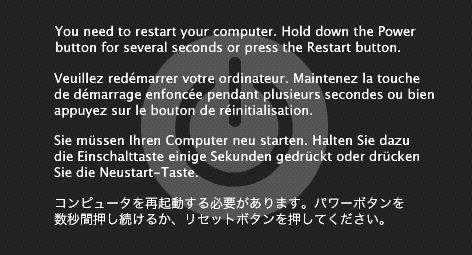
The cause is more likely to be the RAM. Maybe tell us what exact RAM you have.
About "You need to restart your computer" (kernel panic) messages
Resolving Kernel Panics
Mac OS X: How to log a kernel panic
The cause is more likely to be the RAM. Maybe tell us what exact RAM you have.

It is not your partition. It should be your new ram.
Test it with memtest86+ for atleast 10 passes. (10 hours)
If your ram is really bad it should give a error in the first passes.
That way you know for sure if your ram is defect. Use the bootcd version of memtest86+.
Test it with memtest86+ for atleast 10 passes. (10 hours)
If your ram is really bad it should give a error in the first passes.
That way you know for sure if your ram is defect. Use the bootcd version of memtest86+.
Last edited:

You can also try running memtest+. Errors will eventually show up. Then return those modules as they're clearly faulty!
that does not need to be truth - I had imac original 4GB module, added another from iceberg and problem occured... tryed another iceberg, no change, then swapped apple original for another iceberg and since then, 18 months without any problem... my conclusion, some modules work together, some not

dasx
macrumors 65816
that does not need to be truth - I had imac original 4GB module, added another from iceberg and problem occured... tryed another iceberg, no change, then swapped apple original for another iceberg and since then, 18 months without any problem... my conclusion, some modules work together, some not
My point still makes sense. Those modules are faulty!
My point still makes sense. Those modules are faulty!
Nope, they may be OK - only does not work with apple ones... in my case, those from apple (original in imac) were problematic, when switched for iceberg, everything went ok...
dasx
macrumors 65816
Nope, they may be OK - only does not work with apple ones... in my case, those from apple (original in imac) were problematic, when switched for iceberg, everything went ok...
You should've gone to Apple and have them replace them then.

thekev
macrumors 604
Whenever you install new ram, the first thing you should do is test it. Single user utilities are preferable, as they tend to test a greater portion of ram. Whatever the test, run it at least 5 cycles. If any errors arise, RMA the memory. Test replacement ram too. RAM is extremely cheap these days, so I get the feeling that quality control may have slipped somewhat.
Whenever you install new ram, the first thing you should do is test it. Single user utilities are preferable, as they tend to test a greater portion of ram. Whatever the test, run it at least 5 cycles. If any errors arise, RMA the memory. Test replacement ram too. RAM is extremely cheap these days, so I get the feeling that quality control may have slipped somewhat.
Well, it is better to do atleast 10 cycles.
I have read that people had weird problems and and the errors showed up in the 9th cycle. After replacing the ram, no more weird problems and ram tested good.
thekev
macrumors 604
Well, it is better to do atleast 10 cycles.
I have read that people had weird problems and and the errors showed up in the 9th cycle. After replacing the ram, no more weird problems and ram tested good.
We can argue over how many. There's no real magic number to it. You're slightly more likely to turn up an error if you run it 100 cycles. In most cases errors capable of causing kernel panics turn up early enough. I just suggest setting it for a number of cycles and letting it run overnight.
You should've gone to Apple and have them replace them then.
I did so... they took original apple ram, gave me another iceberg module and since then, it works like calendar😀
We can argue over how many. There's no real magic number to it. You're slightly more likely to turn up an error if you run it 100 cycles. In most cases errors capable of causing kernel panics turn up early enough. I just suggest setting it for a number of cycles and letting it run overnight.
Just search the internet. Memtest86+ stays a synthetic test...
More than 15 has no use.