I'm considering purchasing an ipad mini mainly for daily media consumption, but I was also wondering how plausible it is to use note taking apps such as Notability or Penultimate on the ipad mini given it's size. I was considering purchasing a full-sized ipad, but I prefer 7 inch tablets and the mini's size. I know that Notability has a zoom feature which could be helpful in taking notes. I am an engineering college student, so the majority of my notes are handwritten. Any help would be appreciated. Thanks!


Got a tip for us?
Let us know
Become a MacRumors Supporter for $50/year with no ads, ability to filter front page stories, and private forums.
iPad mini iPad Mini for college note taking?
- Thread starter firemonk09
- Start date
- Sort by reaction score
You are using an out of date browser. It may not display this or other websites correctly.
You should upgrade or use an alternative browser.
You should upgrade or use an alternative browser.

Bigger screens help for note taking. I've got. Galaxy note 2 and the stylus is great but the screen is too small, the mini isn't much better (and my phone actually has a Wacom digitizer)

I bought a mini mainly for reading PDFs (mostly journal articles, book scans) for school and I also bought a stylus (from Applydea). I've got Penultimate and some other scribble and note taking apps, but I don't use any of them to take notes, I feel I can write much faster and have the luxury of space with a regular physical notebook, so I take handwritten notes in class, then I transcribe them into Evernote, which is great because I can tag and title the notes and they're synchronised to all my computers (and best of all, they're saved to the "cloud" so I'll never lose them). That's my process, I might not be taking advantage of the power of the tablet but it works really well for me.

If I were you, I'd consider the Bamboo Paper or the standard Paper apps with the stylus, makes note taking a hell of a lot quicker.

Yes. Use it all the time. It's much better than the larger iPads due to he thin it it.
Find a stylus that you like and a good app. I use uPad but some like note taker hd and notes plus.
The best way is to use the zoom mode for accurate handwriting. It's takes a bit to get use to but after a few pages you'll have the controls down.
Don't listen to the poster about having a Wacom stylus or whatever. He's on android. It has nothing to do with iOS and its capabilities. Plenty of great apps our there got what you want to do and the mini is the perfect device for it. I use to use my 3 before I bought the mini. Now it's only the mini for notes.
----------
It's such a small market I would be surprised if a developer took the time to actually make a decent app to take notes(kind of ironic given its name) on. It's android and we're talking iOS here. If you don't have a mini how do you know? You don't/can't have a informed opinion on something you've never tried.
Find a stylus that you like and a good app. I use uPad but some like note taker hd and notes plus.
The best way is to use the zoom mode for accurate handwriting. It's takes a bit to get use to but after a few pages you'll have the controls down.
Don't listen to the poster about having a Wacom stylus or whatever. He's on android. It has nothing to do with iOS and its capabilities. Plenty of great apps our there got what you want to do and the mini is the perfect device for it. I use to use my 3 before I bought the mini. Now it's only the mini for notes.
----------
Bigger screens help for note taking. I've got. Galaxy note 2 and the stylus is great but the screen is too small, the mini isn't much better (and my phone actually has a Wacom digitizer)
It's such a small market I would be surprised if a developer took the time to actually make a decent app to take notes(kind of ironic given its name) on. It's android and we're talking iOS here. If you don't have a mini how do you know? You don't/can't have a informed opinion on something you've never tried.

I take some light notes on my mini but generally speaking I think there are other tools out there that are superior. That is while people can do use the iPad for note taking that doesn't mean its the best thing for such tasks.but I was also wondering how plausible it is to use note taking apps such as Notability or Penultimate on the ipad mini given it's size.
I type faster then I write so a keyboard works better for me, but after that the old fashioned pen and paper. I have Penultimate and had a stylus with my iPad and found it to lacking. precision.
Personally, if you're taking lots of notes for college, I'd look towards something that can be used without getting in the way, i.e., take notes without thinking or causing issues. If the iPad can do this, then go for it, but for me that wasn't the case.
There is a slight learning curve for sure. You're changing the way you've taken notes your entire life. I will agree that a keyboard is quicker. It's the bulk of dragging around another piece(even though they're light).
You can't take accurate notes with penultimate. It's a great app and has great recognition but you have to write so large that even on my 3 it want great. Notes become scattered over dozens of pages that should be on maybe 2.
The key is to get one that has a zoom function. This is where the learning curve starts. Learning that you have to but a space button and sometimes drag the zoom box to a point on the page But once you've got it down I find it just as fast as a pen&paper or keyboard. Again, that's me. I'm a big fan of uPad. I own most of the major ones and I find this one to be the best.
You can't take accurate notes with penultimate. It's a great app and has great recognition but you have to write so large that even on my 3 it want great. Notes become scattered over dozens of pages that should be on maybe 2.
The key is to get one that has a zoom function. This is where the learning curve starts. Learning that you have to but a space button and sometimes drag the zoom box to a point on the page But once you've got it down I find it just as fast as a pen&paper or keyboard. Again, that's me. I'm a big fan of uPad. I own most of the major ones and I find this one to be the best.
I use the Mini for notes at college every week. I use Noteshelf app or Pages. The Mini works great for me for taking notes and as my lecture notes/papers are also put online so I can open them in iBooks as PDFs. Of course, I could still do this on my iPad 3 but now I do it all on a lighter smaller device. Go for it!
Edit: Noteshelf app allows drawing and typed input. After using many, I feel like it works the best...for me.
Edit: Noteshelf app allows drawing and typed input. After using many, I feel like it works the best...for me.
Last edited:

Yes. Use it all the time. It's much better than the larger iPads due to he thin it it.
Find a stylus that you like and a good app. I use uPad but some like note taker hd and notes plus.
The best way is to use the zoom mode for accurate handwriting. It's takes a bit to get use to but after a few pages you'll have the controls down.
Don't listen to the poster about having a Wacom stylus or whatever. He's on android. It has nothing to do with iOS and its capabilities. Plenty of great apps our there got what you want to do and the mini is the perfect device for it. I use to use my 3 before I bought the mini. Now it's only the mini for notes.
----------
It's such a small market I would be surprised if a developer took the time to actually make a decent app to take notes(kind of ironic given its name) on. It's android and we're talking iOS here. If you don't have a mini how do you know? You don't/can't have a informed opinion on something you've never tried.
His post had nothing to do with Android vs iOS or Note 2 vs Mini. He was stating that larger screens help with a stylus. Relax. No ones attacking your precious multi billion dollar company.
His post had nothing to do with Android vs iOS or Note 2 vs Mini. He was stating that larger screens help with a stylus. Relax. No ones attacking your precious multi billion dollar company.
Yes and no. He did say that larger screens help with note taking but he also answered the OP's question that he couldn't see the mini(the product the OP is asking about) being "much better" than his Note2. Throwing out that it even has a Wacom board. That's just complete false. It's obvious he doesn't own a mini and therefore can't have a informed opinion on how note taking is on one. Did I say he was attacking Apple? No, I simply put the facts straight. If someone were to ask me how is note taking on the note2 I couldn't say it would be good or bad. I haven't used one long enough or in that scenario to make a honest assessment.
Unless you can find an app with palm rejection, you will be frustrated. I find holding my hand off a piece of paper when writing is fatiguing.

Install Pages and enjoy. Typing on a small screened tablet isn't nearly as troublesome as some people like to make out and Pages is a solid app as long as you're just doing notes and need only basic formatting rather than the more complex features like referencing.
I can't imagine using any ipad for serious note taking unless you have some sort of physical keyboard. Now, if it's just for jotting a few thing down, it should be fine and have done it myself with great results.
I use my iPad 1 for note taking in lectures without problems, and when I go back after the holidays I shall use my new Nexus 7 for the same purpose. It's not much hassle at all.
Unless you can find an app with palm rejection, you will be frustrated. I find holding my hand off a piece of paper when writing is fatiguing.
I use uPad. Works great.
Attachments
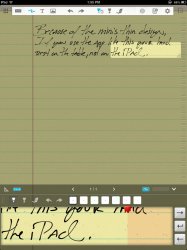
I find the small screens difficult to work with (Nexus 7 and Mini) if you are writing by hand. I prefer the iPad, but it's no big deal really, as long as you have an app with zoom features. Unfortunately, Android apps (in my opinion) are somewhat less robust. My favorite app in iOS is Goodnotes, and my favorite stylus is the Pogo Sketch Pro.
As for taking notes, with an external keyboard, assuming you can touch type, you'll be fine with an iPhone. I often take notes on my iPhone this way while reading on my iPad.
As for taking notes, with an external keyboard, assuming you can touch type, you'll be fine with an iPhone. I often take notes on my iPhone this way while reading on my iPad.

I tried using an iPad 2 (when they were first released) to take notes in a few classes in college, and I found it difficult and annoying. I used uPad and Evernote as well as Pages, but I found that I was always fighting to keep up with the lecture.
Writing was difficult since palm protection in certain apps never worked well for me. It would probably be good for writing down notes to study on your own time, but if you're taking down notes during class, it's probably too difficult to keep up.
I also tried typing down notes, but this was also annoying, because I would make lots of mistakes since you don't have the touch feedback of a physical keyboard.
I ended up selling my iPad 2 and MacBook Pro and instead purchasing a MacBook Air.
Writing was difficult since palm protection in certain apps never worked well for me. It would probably be good for writing down notes to study on your own time, but if you're taking down notes during class, it's probably too difficult to keep up.
I also tried typing down notes, but this was also annoying, because I would make lots of mistakes since you don't have the touch feedback of a physical keyboard.
I ended up selling my iPad 2 and MacBook Pro and instead purchasing a MacBook Air.
Internaut
macrumors 65816
I can type pretty fast on an iOS keyboard (and when using Swiftkey on Android devices), but for taking lecture notes, I think a keyboard would be better.
Alternatively, if your handwriting is neat enough for machine reading, have you considered something like a Livescribe pen?
Alternatively, if your handwriting is neat enough for machine reading, have you considered something like a Livescribe pen?
Why? What is the difference between Pages and Word if you are using an external keyboard? In my experience, the external keyboard is actually a better experience than the Macbook Air's keyboard.I tried using an iPad 2 (when they were first released) to take notes in a few classes in college, and I found it difficult and annoying. I used uPad and Evernote as well as Pages, but I found that I was always fighting to keep up with the lecture.
And yet, I have used it for a couple of years for lectures, talks, meetings, etc. Again, the zoom box is the key. Most apps have it these days, but my favorite one is GoodNotes. Have you tried one with a zoom box?Writing was difficult since palm protection in certain apps never worked well for me. It would probably be good for writing down notes to study on your own time, but if you're taking down notes during class, it's probably too difficult to keep up.
Indeed. The external keyboard (I use mine with the Incase Origami Workstation) is helpful in this regard. You'll get about twice the battery life as a Macbook Air, you can read in portrait mode, and you can handwrite as well, so I find it much more flexible on campus. If you have digitized all of your textbooks, you basically have an entire library, all of your handwritten notebooks, and all of your papers in your man bag (the iPad + stylus + keyboard + workstation).I also tried typing down notes, but this was also annoying, because I would make lots of mistakes since you don't have the touch feedback of a physical keyboard.
Common decent stylus:
http://www.patentlyapple.com/patently-apple/2012/12/apple-invents-advanced-active-stylus-to-work-with-idevices.html
... can't get here soon enough. I wore out my Targus a while ago, and haven't bothered to replace it.
I really want a decent stylus!
http://www.patentlyapple.com/patently-apple/2012/12/apple-invents-advanced-active-stylus-to-work-with-idevices.html
... can't get here soon enough. I wore out my Targus a while ago, and haven't bothered to replace it.
I really want a decent stylus!
Why? What is the difference between Pages and Word if you are using an external keyboard? In my experience, the external keyboard is actually a better experience than the Macbook Air's keyboard.
And yet, I have used it for a couple of years for lectures, talks, meetings, etc. Again, the zoom box is the key. Most apps have it these days, but my favorite one is GoodNotes. Have you tried one with a zoom box?
Indeed. The external keyboard (I use mine with the Incase Origami Workstation) is helpful in this regard. You'll get about twice the battery life as a Macbook Air, you can read in portrait mode, and you can handwrite as well, so I find it much more flexible on campus. If you have digitized all of your textbooks, you basically have an entire library, all of your handwritten notebooks, and all of your papers in your man bag (the iPad + stylus + keyboard + workstation).
Agreed.
THe zoom box is the key and like my pic in the above posting, since the mini is so thin you can rest your wrist on the table. For me I like this as I have gotten so use to taking notes this way I can move around on the sheet to add sub notes when I want to with ease. The extra screen on the mini vs the full size iPad helps with this. I'm not taking up screen space for my wrist and this is why the mini IMO is the perfect note taking tool.
I don't understand. If you position the zoom box at the bottom of the tablet on the iPad, your wrist doesn't take up screen space either. What is this extra screen?Agreed.
The extra screen on the mini vs the full size iPad helps with this. I'm not taking up screen space for my wrist and this is why the mini IMO is the perfect note taking tool.
Register on MacRumors! This sidebar will go away, and you'll see fewer ads.