Register FAQ/Rules Forum Spy Search Today's Posts Mark Forums Read

Welcome to the Mac Forums forums. Please read the FAQ if you have questions. Register to participate.

 
Go Back   Mac Forums > iPhone and iPod Touch Forums > iPhone Forums > iPhone
TouchArcade.com - iPhone Game Reviews and News

Reply
 
Thread Tools Search this Thread  
Old Jul 13, 2008, 11:03 PM   #51
animenick65
macrumors 6502
 
Join Date: Sep 2006
I'm only getting 362 kbps on my 3g iPhone. Not sure why.
animenick65 is offline   Reply With Quote
Old Jul 13, 2008, 11:34 PM   #52
ibelite
macrumors newbie
 
Join Date: Jul 2004
Unhappy 25 kbps :(

I am from Brooklyn NY...and for some reason on my 3G phone i get SLOW speeds, 25kbps...or 0.02MBps,,, vs 1.14 Mbps WTF!!!

Anyone here from Brooklyn experience slow 3G?

Also...when i am on Edge i have 5 bars, when i am on 3G I have 1 bar, can anyone explain?
ibelite is offline   Reply With Quote
Old Jul 14, 2008, 12:29 AM   #53
cdd543
macrumors regular
 
Join Date: Oct 2006
Location: Denver to Nashville and now back to Denver:)
try http://www.dslreports.com/mspeed
I get between 500-600kbps consistently on a good 3g signal here in Nashville, TN.
Use the larger file sizes for an accurate result.
__________________
MacBook Pro Unibody.
White iPhone!
cdd543 is offline   Reply With Quote
Old Jul 14, 2008, 12:42 AM   #54
dlamin517
macrumors 6502
 
Join Date: Jul 2008
testmyiphone.com doesnt work for me. when i click start test it loads and then it doesnt give me a result
dlamin517 is offline   Reply With Quote
Old Jul 14, 2008, 12:43 AM   #55
dlamin517
macrumors 6502
 
Join Date: Jul 2008
Quote:
Originally Posted by ibelite View Post
I am from Brooklyn NY...and for some reason on my 3G phone i get SLOW speeds, 25kbps...or 0.02MBps,,, vs 1.14 Mbps WTF!!!

Anyone here from Brooklyn experience slow 3G?

Also...when i am on Edge i have 5 bars, when i am on 3G I have 1 bar, can anyone explain?
same here but i live in cali
dlamin517 is offline   Reply With Quote
Old Jul 14, 2008, 01:04 AM   #56
jecapaga
macrumors Demi-God
 
jecapaga's Avatar
 
Join Date: Jul 2007
Location: Southern California
I'm getting just under 500kbps. The strange part is I'm getting that both when my phone shows barely one bar and when I'm elsewhere where I had full bars. I just assumed the speed would increase at least some when the reception bars were full.
jecapaga is offline   Reply With Quote
Old Jul 14, 2008, 05:04 PM   #57
nevesis
macrumors regular
 
Join Date: Jun 2007
Here in lower westchester county, NY I am getting a 0.02mbps on 3G, and the same on Edge.

Edge allows me full bars of service, and 3G gives me about one or two.

Its absolutely abysmal. I am on the phone with AT&T right now trying to figure out why.
nevesis is offline   Reply With Quote
Old Jul 14, 2008, 05:54 PM   #58
naftalim
macrumors 6502
 
Join Date: Sep 2007
Location: Vancouver, BC
u are gonna have to provide screen shots of the test to back you up, this is no where near what most people are getting with 3G (mine is 1.47MBS

Quote:
Originally Posted by Eric Lewis View Post
6.89 Mbps (6894 kbps / 842 kb/s)
__________________
Switched 9/2007
iMac 27" i5, Apple TV, iPhone 3Gs
naftalim is offline   Reply With Quote
Old Jul 14, 2008, 05:55 PM   #59
naftalim
macrumors 6502
 
Join Date: Sep 2007
Location: Vancouver, BC
I did it a few times till it said that the test file was too small and loaded a larger test. At these speeds it needs to use a larger sample.


Quote:
Originally Posted by dlamin517 View Post
testmyiphone.com doesnt work for me. when i click start test it loads and then it doesnt give me a result
__________________
Switched 9/2007
iMac 27" i5, Apple TV, iPhone 3Gs
naftalim is offline   Reply With Quote
Old Jul 14, 2008, 06:24 PM   #60
naftalim
macrumors 6502
 
Join Date: Sep 2007
Location: Vancouver, BC
Wow, our 3G here in North America must be crippled/capped badly. As you can see most of the North Americans get between 1.2 -1.6 Mbps


Quote:
Originally Posted by Phatzer View Post
Just tested 3G three times at the services at A605/A1, Peterborough, UK. I got 4.9mbps, 2.0mbps and 4.9mbps. Checked speed, loaded BBC news page in under 10 seconds.
__________________
Switched 9/2007
iMac 27" i5, Apple TV, iPhone 3Gs
naftalim is offline   Reply With Quote
Old Jul 15, 2008, 10:26 AM   #61
Poeticashes
macrumors member
 
Join Date: Jun 2008
0.1-0.3 mbps...that's with full 3G service in the Apple Store...I was getting terrible results and thought it may have been my phone. An Apple Store employee's original iPhone beat my phone loading both L.A. Times and NY Times.com.

Also ran the test on 1 or 2 of their phones and it comes up the same...

(I am in Wash DC/Baltimore area)
__________________
17" uBMP 3.06 ghz 4GB RAM 500 7200 RPM, iPhone 3GS 32 gb black, Luxo iMac, iPod Touch, iPhone 3G 16 gb black.
Poeticashes is offline   Reply With Quote
Old Jul 15, 2008, 11:06 AM   #62
mjones77
Thread Starter
macrumors newbie
 
Join Date: Jul 2008
Took a nose dive today

mjones77 is offline   Reply With Quote
Old Jul 15, 2008, 11:14 AM   #63
michaelmaxwell2
macrumors regular
 
Join Date: Jul 2008
Quote:
Originally Posted by ibelite View Post
I am from Brooklyn NY...and for some reason on my 3G phone i get SLOW speeds, 25kbps...or 0.02MBps,,, vs 1.14 Mbps WTF!!!

Anyone here from Brooklyn experience slow 3G?

Also...when i am on Edge i have 5 bars, when i am on 3G I have 1 bar, can anyone explain?
Well I was playing with it in a store in bk and the thing wont get 3g it stayed on edge.
__________________
512mb ipod shuffle (broken)
8gb iphone (stolen)
16gb WHITE iphone 3g
michaelmaxwell2 is offline   Reply With Quote
Old Jul 18, 2008, 03:25 PM   #64
mjones77
Thread Starter
macrumors newbie
 
Join Date: Jul 2008
Been getting around this all day today in north miami-dade from http://testmyiphone.com


But then I get upto delray beach and can't break 700kbps


Both had 4 bars of 3G. Must be the level of usage in the area.
mjones77 is offline   Reply With Quote
Old Jul 19, 2008, 07:08 PM   #65
newyorksole
macrumors 6502a
 
Join Date: Apr 2008
Location: LongIsland/NYC
I am in a strong 3G area and in my house I got 419 kbps using 3G.. not so good is it?
newyorksole is offline   Reply With Quote
Old Jul 19, 2008, 08:13 PM   #66
elistan
macrumors regular
 
Join Date: Jun 2007
Location: Dallas, TX
I played around with some 3G demos at a couple different Apple stores near me. The first store only had one bar of 3G signal, and got about 0.1 to 0.2 mbps - about the same as my EDGE iPhone. The second store had four bars of signal, and got 1.2 mbps.

Both tests were through testmyiphone.
elistan is offline   Reply With Quote
Old Jul 19, 2008, 08:17 PM   #67
slabbius
macrumors member
 
Join Date: Aug 2006
In the orlando area I got 1.41 Mbps in my apartment, where typically, it would struggle to hold an EDGE connection
__________________
15" 2.33GHz MBP, 2GB RAM, 120GB HD
15" 2.53Ghz MBP, 4GB RAM, 320GB HD
8GB 2G iPhone
40GB ATV
I know, how to use question marks?
slabbius is offline   Reply With Quote
Old Jul 19, 2008, 11:37 PM   #68
ivtecDOu
macrumors 6502
 
Join Date: May 2008
Location: mass
didnt work
__________________
black 8 gig 3g
pwned 8 gig first gen iphone- 4 other ipods

Last edited by ivtecDOu : Jul 24, 2008 at 11:02 AM.
ivtecDOu is offline   Reply With Quote
Old Jul 24, 2008, 11:06 AM   #69
ivtecDOu
macrumors 6502
 
Join Date: May 2008
Location: mass
got this on edge even though it says 3g or wifi it was on edge

__________________
black 8 gig 3g
pwned 8 gig first gen iphone- 4 other ipods
ivtecDOu is offline   Reply With Quote
Old Jul 24, 2008, 11:26 AM   #70
sanPietro98
macrumors 6502
 
Join Date: May 2008
Location: 28.416834,-81.581214
How Accurate?

How accurate are these speed testers? And which one works best? I'm in South Jersey, and I ran speed tests (using 3G) on three different sites:

www.inetworktest.com --> 572 kbps
www.iphonespeedtest.com --> 428 kbps
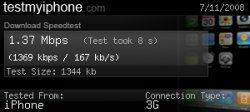
www.testmyiphone.com --> 1135 kbps (1.14 Mbps)

It seems that testmyiphone.com uses a much bigger data transfer. So could the difference in speed be attributable to the initial TCP connection time? In other words, does it take a long time to connect, but once connected it is pretty fast?
__________________
"Don't Blink. Blink and you're dead. Don't turn your back. Don't look away. And don't blink. Good Luck."
sanPietro98 is offline   Reply With Quote
Old Jul 24, 2008, 11:57 AM   #71
Mad Mac Maniac
macrumors 6502a
 
Mad Mac Maniac's Avatar
 
Join Date: Oct 2007
So far I have only been getting sub 500kbps speeds.... on 3g...

I've been getting similar results for wifi.

So my questions is this. Is it the testing websites? Is it a defect in my iphone? Is it an at&t 3g problem?

I sure hope this gets better..
Mad Mac Maniac is offline   Reply With Quote
Old Jul 24, 2008, 12:50 PM   #72
pugnut
macrumors 6502
 
Join Date: Jul 2007
Test

Click image for larger version

Name:	photo.jpg
Views:	8
Size:	49.8 KB
ID:	126131
pugnut is offline   Reply With Quote
Old Jul 24, 2008, 01:32 PM   #73
lewisd23
macrumors newbie
 
Join Date: Jul 2008
First off I want to let you know that I am the creator and owner of testmyiphone.com and I'm going to answer a few of these concerns that some of you seem to have.

First off the problem where the test would not take you to the results page has been fixed, as far as we can tell, I changed a few things this morning and I have not had the problem at all since I made the changes this morning, so I'm pretty sure that problem has been fixed.

The problem ivtecDOu had a few posts up where gave him a wifi like result even though he is connected on edge. This is caused by the unique key that we use for each test. When a speedtest is taken it is given a 12 digit key to identify the test, some times what happens is that key is already in use so when you are taken too the results it pull the results from the first test with that key. We are working on a fix for this, and it will be up real soon. This does not happen often though, only about once for every 1000 tests taken. Its just really annoying when it does happen and I will fix it.

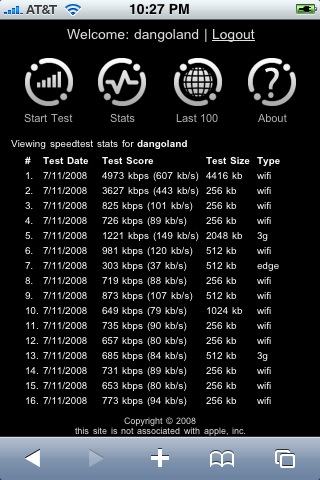
sanPietro98 asked how accurate are these speedtest sites. I can say that they can be very accurate. But sadly most aren't that great, and give inaccurate results because the testing method they use is quite bad. For example any speedtest site that uses a image to test the speed of your connection will always be inaccurate for 2 reasons. 1. The test file size stays the same, no matter if your connection is 512kbps, or 10mbps. and 2. Images can and do get cached by the browser so the second time you run the test you could be pulling the image used from the cache of the browser not from the sites server.

Our speedtest works in the same way a desktop level speedtest does, but is designed to be light weight for the iphone. It is very similar to the way the testmy.net speedtest works to be able to give the user a 6 - 8 second speedtest.

Every time you take a speedtest at testmyiphone.com it does a small 256kb test, then we do some stuff to determine the larger test that needs to be run so you can get a accurate test up to a max file size of 10mb. By doing this we can give you the most accurate results, of any iphone speedtest.

Our speedtest server is located in Montreal Canada, we will be moving to server in Dallas, Tx very soon. Once we do that users on the west coast will have much more consistent results, and users in other countries will also see better results as we will have better international carriers.
lewisd23 is offline   Reply With Quote
Old Jul 24, 2008, 01:46 PM   #74
sanPietro98
macrumors 6502
 
Join Date: May 2008
Location: 28.416834,-81.581214
Quote:
Originally Posted by lewisd23 View Post
I can say that they can be very accurate. But sadly most aren't that great, and give inaccurate results because the testing method they use is quite bad. For example any speedtest site that uses a image to test the speed of your connection will always be inaccurate for 2 reasons. 1. The test file size stays the same, no matter if your connection is 512kbps, or 10mbps. and 2. Images can and do get cached by the browser so the second time you run the test you could be pulling the image used from the cache of the browser not from the sites server.

Our speedtest works in the same way a desktop level speedtest does, but is designed to be light weight for the iphone. It is very similar to the way the testmy.net speedtest works to be able to give the user a 6 - 8 second speedtest.
That was very helpful. Thank you for responding. And thanks for making your site.
__________________
"Don't Blink. Blink and you're dead. Don't turn your back. Don't look away. And don't blink. Good Luck."
sanPietro98 is offline   Reply With Quote
Old Jul 24, 2008, 01:46 PM   #75
thechidz
Banned
 
Join Date: Jul 2007
Location: New York City
check out my speeds in my sig. that was from an aircard though, taking my sim out and using it on my MBP
thechidz is offline   Reply With Quote

Reply

Mac Forums > iPhone and iPod Touch Forums > iPhone Forums > iPhone

Thread Tools Search this Thread
Search this Thread:

Advanced Search
Display Modes

Posting Rules
You may not post new threads
You may not post replies
You may not post attachments
You may not edit your posts

vB code is On
Smilies are On
[IMG] code is On
HTML code is Off
Forum Jump


All times are GMT -5. The time now is 09:30 PM.

Mac News | Mac Rumors | iPhone Game Reviews | iPhone Apps

Powered by vBulletin® Version 3.6.10
Copyright ©2000 - 2009, Jelsoft Enterprises Ltd.
Copyright 2002-2009, MacRumors.com, LLC