This thread was created to help maximize the potential of your iPhone's battery. If you read something you disagree with, disagree. If you wish to have something added to this original post, please comment and state what information should be added. I take no responsibility if you damage your iPhone by doing something mentioned in this thread.
Please don't flame.
Rated Battery Life
3Gs vs. 3G Battery Test: http://crave.cnet.co.uk/mobiles/0,39029453,49302814-4,00.htm
(3GS up to 45% better than 3G, despite Apple's claims)
iPhone 4
Talk Time - 3G 7 hours / EDGE 14 hours
Web Browsing - 3G 6 hours / WiFi 10 hours
Video Playback - 10 hours
Audio Playback - 40 hours
Standby Time - 300 hours
iPhone 3Gs
Talk Time - 3G 5 hours / EDGE 12 hours
Web Browsing - 3G 5 hours / WiFi 9 hours
Video Playback - 10 hours
Audio Playback - 30 hours
Standby Time - 300 hours
iPhone 3G
Talk Time - 3G 5 hours / EDGE 10 hours
Web Browsing - 3G 5 hours / WiFi 6 hours
Video Playback - 7 hours
Audio Playback - 24 hours
Standby Time - 300 hours
iPhone
Talk Time - EDGE 8 hours
Web Browsing - WiFi 6 hours
Video Playback - 7 hours
Audio Playback - 24 hours
Standby Time - 250 hours
Power Saving Tips
#1 - Always go to the home screen before putting your iPhone in standby mode. If you are running an App and hit the Sleep/Wake button to turn the screen off, the application will still be running in the background and can severely drain your battery.
#2 - Disable 3G on long calls (Ex: business calls, calling your cable company, or calling ATT Customer Service 😛). Call quality on EDGE is quite good compared to 3G.
#3 - If your apartment / house has a weak 3G signal, definitely turn off 3G until you leave your home. My apartment has a very weak 3G signal. The phone switches networks constantly if I have 3G enabled, which murders my battery. I use EDGE while I'm at home w/ WiFi for data. When I leave my home, I turn on 3G.
#4 - Enable WiFi in your apartment / house when WiFi is available. Use WiFi instead of 3G or EDGE for web browsing. WiFi is (with a strong signal) faster than 3G or EDGE. WiFi also uses significantly less battery power than any cellular network.
#5 - If you only use WiFi hotspots, keep WiFi disabled. Enable WiFi when you enter a hotspot.
#6 - If you don't need GPS, disable Location Services. When Location Services is enabled, your GPS antenna is activated. The GPS antenna will continue to drain battery life, even if you aren't using an application that needs Location Services.
#7 - Disable Push notifications, unless needed. It is estimated that your battery life will decrease by 20% (about an hour) with Push enabled. Increasing your fetch interval to an hour or above will also increase battery life.
#8 - Disable Bluetooth if you have no Bluetooth devices (duh). If you're like me and use Bluetooth in your car, I would just leave Bluetooth ON for convenience so you don't have to enable Bluetooth every time you go for a drive. More trouble than it's worth.
#9 - Using App Store programs may HEAVILY decrease battery life. Games (especially 3D) are notorious for killing your battery. Don't be surprised to get 2 - 3 hour usage statistics while gaming.
#10 - Enable Auto Brightness
#11 - If you have no service at all, use Airplane mode. With no service, your phone will constantly look for a signal, which kills your battery very quickly. Airplane Mode will let you use your phone, but you won't be able to dial or receive calls.
#12 - Make sure Auto-Lock is set @ 1 minute.
#13 - If you mainly use your phone for talking / texting / email / gaming, using EDGE will offer a similar experience, but your battery life will increase significantly.
Web Browsing: 3G vs. EDGE vs. WiFi
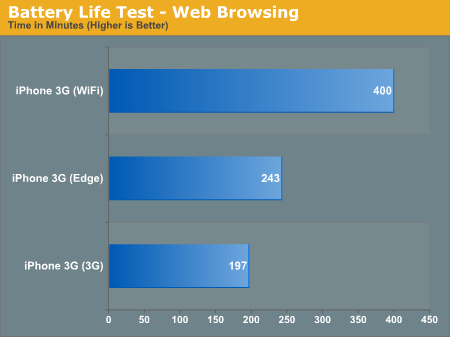
This graph demonstrates why it doesn't make sense to use EDGE for web browsing vs. 3G or WiFi. Realize that 3G is usually at least 2X as fast as EDGE, but you don't get 2X the battery life by switching to EDGE. You get more production done with 3G enabled, in less time, therefore saving battery life compared to browsing with EDGE .
Graph shows usage statistics (100% Battery Life > 0% Battery Life)

3G vs. EDGE Browsing Explained (using the iPhone 3G)
(Web Pages Accessed Are Theoretical)
3G Enabled Web Browsing = 197 Minutes (Before battery is depleted) | 394 Web Pages Accessed
3G Disabled (EDGE) Web Browsing = 243 Minutes (Before battery is depleted) | 243 Web Pages Accessed
The numbers above are based on the assumption that it takes 1 minute to fully load a web page using EDGE and 30 seconds to fully load a web page using 3G. (Based off of Apple's claim that 3G is 2x as fast as EDGE, which seems to hold up in real world tests)
As you can see, enabling 3G will allow you to load about 60% more web pages per charge cycle than with EDGE enabled, even though using EDGE conserves battery life.
iPhone Charging
Initial Charge (a few theories out there, I felt this is the safest route to go)
#1 - Buy the iPhone. Do not use the iPhone.
#2 - Initially charge your iPhone with the wall charger for 3 hours. (Do not use your phone)
#3 - Once fully charged, let the iPhone's battery fully drain. (You can use your phone)
#4 - Keep the iPhone off for 2 hours.
#5 - Fully charge your iPhone and allow the battery to rest in the fully charged state for two hours. (You may use your iPhone during this time as long as the iPhone is plugged in)
#6 - Repeat step's #3/#4 a maximum of three times if you feel your battery indicator is inaccurate.
Everyday Charging
#1 - Charge your iPhone throughout the day when available. Charge EVERY night, regardless of charge level. This will keep your battery active, which is healthy for the iPhone's battery.
#2 - Use a wall charger or car charger w/ rated output 5V 1A. Computer chargers might not charge when the computer is in standby mode.
#3 - You cannot overcharge your iPhone. You don't need to disconnect the iPhone from the charger after it's done charging. Once fully charged, the iPhone will run strictly off of AC power and will not damage the battery.
#4 - Every two months, make sure you fully charge and fully drain the battery, in one cycle. This calibrates your battery indicator. If you fail to do this, your indicator will become inaccurate. Calibrating your battery does not improve battery life.
#5 - If you ever need to store your iPhone for any reason, make sure your battery is stored @ roughly 50% and in a cool environment.
#6 - Always charge your iPhone out of its case (assuming you can easily remove the case). Charging your iPhone inside your case will make the iPhone hotter, which is bad for the battery.
#7 - Charge your iPhone in a cool location. Charging your iPhone in a cool environment has a tremendous impact on your battery's lifespan. The colder the location you use to charge, the more charging cycles you can complete without your battery deteriorating. Avoid charging in direct sunlight. DO NOT PUT PUT YOUR IPHONE IN THE FREEZER! 🙂
#8 - Use properly rated chargers. Using chargers that are not properly rated will have a huge impact on your battery's lifespan. Make sure your car charger has the same rating as the official Apple charger. The official Apple wall charger is rated as follows:
Input: 100 240V ~ 50/60 Hz 1.0A
Output: 5V 1A
Heat vs. State of Charge vs. iPhone Battery
"The speed by which lithium-ion ages is governed by temperature and state-of-charge. Figure 1 illustrates the capacity loss as a function of these two parameters." - Battery University
This graph shows long-term storage. (Ex: You buy a new iPhone and need to store your old one as a backup)
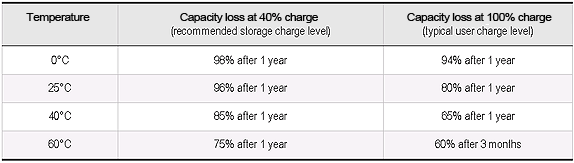
Your iPhone's battery doesn't like to be stored @ 100% charge. Storing your iPhone @ 40% charge is recommended. Storing your phone when it's fully charged, in a hot environment, will SEVERELY shorten the battery's lifespan. Keep this in mind when storing your laptop battery, as well.
More information can be found here:
http://www.batteryuniversity.com/parttwo-34.htm
http://www.apple.com/batteries/iphone.html
http://www.apple.com/batteries/
iPhone 3G Battery Tests:

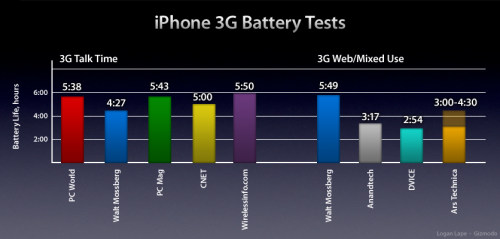
Articles Testing The iPhone 3G's Battery Life
http://www.anandtech.com/gadgets/showdoc.aspx?i=3358&p=18
http://gizmodo.com/5025309/round-up-nine-iphone-3g-battery-life-test-results
Setting Your iPhone As New (Without erasing App Store data or game saves)
There have been reports that resetting specific settings on your iPhone will help restore battery life. Worth a shot if you have seen a decline in usage per charge cycle.
As Posted by ThaSpaz here: https://forums.macrumors.com/threads/761046/
*** Warning: Do not hit Erase all Content and Settings *** Guess what that does
Go to Settings>General>Reset>Reset all Settings
I have selected "Reset all Settings" and Here are my findings. Enjoy!
#1 - It reset my home screen icon positions
#2 - It reset my network settings
#3 - Did not remove my Safari bookmarks
#4 - Mail settings stayed
#5 - iPod settings are back to default
#6 - Store sign-in settings reset. I am signed out.
#7 - Backlight is back to 50%
#8 - All General settings are back to default
#9 - Wallpaper is still intact
#10 - Sounds have been set to default.
#11 - Notes are still intact
#12 - Photos are still intact
#13 - SMS message conversations unchanged
#14 - Phone favorites unchanged
#15 - Third party app settings remain untouched (I'm still logged into Twitterrific and all my settings are the same)
Testing For Defective Batteries
As for defective batteries. First and foremost, charge from the wall. I tried charging my iPhone from my iMac and had a 20% charge the next morning. I'm not saying you can't successfully charge from your computer, but to diagnose a problem, I would give the wall charger a shot.
#1 - Reset your iPhone. (To perform a soft reset, press and hold the iPhones Sleep/Wake button and the Home button for several seconds, or until you see the Apple logo on the screen)
#2 - Fully charge your battery.
#3 - Fully drain the battery.
#4 - Fully charge, again.
#5 - At this point, your battery indicator should be more accurate.
#6 - If your battery is still really weak, head to the Apple Store to potentially exchange your iPhone. (1 year warranty)
Defective Batteries Past Warranty Coverage
- Apple isn't required to replace your phone due to battery issues (after 1 year). However, there are occasions where Apple will replace your phone past its warranty. My father was having issues with his battery after his warranty expired. He went to the Genius bar and they replaced his phone without hassle. This was an original iPhone. YMMV.
Battery Extenders
Mophie Juice Pack for iPhone 3G & 3GS - https://www.amazon.com/dp/B001E42QB...iveASIN=B001E42QBW&adid=0X0JD5X6AKPKYNMY96MC&
Tekkeon MP1200 iPhone Battery/iPhone Sleeve - https://www.amazon.com/dp/B001NJ09H...iveASIN=B001NJ09HG&adid=1GE8WEM6R6M2CKZJ06XH&
Please don't flame.
Rated Battery Life
3Gs vs. 3G Battery Test: http://crave.cnet.co.uk/mobiles/0,39029453,49302814-4,00.htm
(3GS up to 45% better than 3G, despite Apple's claims)
iPhone 4
Talk Time - 3G 7 hours / EDGE 14 hours
Web Browsing - 3G 6 hours / WiFi 10 hours
Video Playback - 10 hours
Audio Playback - 40 hours
Standby Time - 300 hours
iPhone 3Gs
Talk Time - 3G 5 hours / EDGE 12 hours
Web Browsing - 3G 5 hours / WiFi 9 hours
Video Playback - 10 hours
Audio Playback - 30 hours
Standby Time - 300 hours
iPhone 3G
Talk Time - 3G 5 hours / EDGE 10 hours
Web Browsing - 3G 5 hours / WiFi 6 hours
Video Playback - 7 hours
Audio Playback - 24 hours
Standby Time - 300 hours
iPhone
Talk Time - EDGE 8 hours
Web Browsing - WiFi 6 hours
Video Playback - 7 hours
Audio Playback - 24 hours
Standby Time - 250 hours
Power Saving Tips
#1 - Always go to the home screen before putting your iPhone in standby mode. If you are running an App and hit the Sleep/Wake button to turn the screen off, the application will still be running in the background and can severely drain your battery.
#2 - Disable 3G on long calls (Ex: business calls, calling your cable company, or calling ATT Customer Service 😛). Call quality on EDGE is quite good compared to 3G.
#3 - If your apartment / house has a weak 3G signal, definitely turn off 3G until you leave your home. My apartment has a very weak 3G signal. The phone switches networks constantly if I have 3G enabled, which murders my battery. I use EDGE while I'm at home w/ WiFi for data. When I leave my home, I turn on 3G.
#4 - Enable WiFi in your apartment / house when WiFi is available. Use WiFi instead of 3G or EDGE for web browsing. WiFi is (with a strong signal) faster than 3G or EDGE. WiFi also uses significantly less battery power than any cellular network.
#5 - If you only use WiFi hotspots, keep WiFi disabled. Enable WiFi when you enter a hotspot.
#6 - If you don't need GPS, disable Location Services. When Location Services is enabled, your GPS antenna is activated. The GPS antenna will continue to drain battery life, even if you aren't using an application that needs Location Services.
#7 - Disable Push notifications, unless needed. It is estimated that your battery life will decrease by 20% (about an hour) with Push enabled. Increasing your fetch interval to an hour or above will also increase battery life.
#8 - Disable Bluetooth if you have no Bluetooth devices (duh). If you're like me and use Bluetooth in your car, I would just leave Bluetooth ON for convenience so you don't have to enable Bluetooth every time you go for a drive. More trouble than it's worth.
#9 - Using App Store programs may HEAVILY decrease battery life. Games (especially 3D) are notorious for killing your battery. Don't be surprised to get 2 - 3 hour usage statistics while gaming.
#10 - Enable Auto Brightness
#11 - If you have no service at all, use Airplane mode. With no service, your phone will constantly look for a signal, which kills your battery very quickly. Airplane Mode will let you use your phone, but you won't be able to dial or receive calls.
#12 - Make sure Auto-Lock is set @ 1 minute.
#13 - If you mainly use your phone for talking / texting / email / gaming, using EDGE will offer a similar experience, but your battery life will increase significantly.
Web Browsing: 3G vs. EDGE vs. WiFi
This graph demonstrates why it doesn't make sense to use EDGE for web browsing vs. 3G or WiFi. Realize that 3G is usually at least 2X as fast as EDGE, but you don't get 2X the battery life by switching to EDGE. You get more production done with 3G enabled, in less time, therefore saving battery life compared to browsing with EDGE .
Graph shows usage statistics (100% Battery Life > 0% Battery Life)
3G vs. EDGE Browsing Explained (using the iPhone 3G)
(Web Pages Accessed Are Theoretical)
3G Enabled Web Browsing = 197 Minutes (Before battery is depleted) | 394 Web Pages Accessed
3G Disabled (EDGE) Web Browsing = 243 Minutes (Before battery is depleted) | 243 Web Pages Accessed
The numbers above are based on the assumption that it takes 1 minute to fully load a web page using EDGE and 30 seconds to fully load a web page using 3G. (Based off of Apple's claim that 3G is 2x as fast as EDGE, which seems to hold up in real world tests)
As you can see, enabling 3G will allow you to load about 60% more web pages per charge cycle than with EDGE enabled, even though using EDGE conserves battery life.
iPhone Charging
Initial Charge (a few theories out there, I felt this is the safest route to go)
#1 - Buy the iPhone. Do not use the iPhone.
#2 - Initially charge your iPhone with the wall charger for 3 hours. (Do not use your phone)
#3 - Once fully charged, let the iPhone's battery fully drain. (You can use your phone)
#4 - Keep the iPhone off for 2 hours.
#5 - Fully charge your iPhone and allow the battery to rest in the fully charged state for two hours. (You may use your iPhone during this time as long as the iPhone is plugged in)
#6 - Repeat step's #3/#4 a maximum of three times if you feel your battery indicator is inaccurate.
Everyday Charging
#1 - Charge your iPhone throughout the day when available. Charge EVERY night, regardless of charge level. This will keep your battery active, which is healthy for the iPhone's battery.
#2 - Use a wall charger or car charger w/ rated output 5V 1A. Computer chargers might not charge when the computer is in standby mode.
#3 - You cannot overcharge your iPhone. You don't need to disconnect the iPhone from the charger after it's done charging. Once fully charged, the iPhone will run strictly off of AC power and will not damage the battery.
#4 - Every two months, make sure you fully charge and fully drain the battery, in one cycle. This calibrates your battery indicator. If you fail to do this, your indicator will become inaccurate. Calibrating your battery does not improve battery life.
#5 - If you ever need to store your iPhone for any reason, make sure your battery is stored @ roughly 50% and in a cool environment.
#6 - Always charge your iPhone out of its case (assuming you can easily remove the case). Charging your iPhone inside your case will make the iPhone hotter, which is bad for the battery.
#7 - Charge your iPhone in a cool location. Charging your iPhone in a cool environment has a tremendous impact on your battery's lifespan. The colder the location you use to charge, the more charging cycles you can complete without your battery deteriorating. Avoid charging in direct sunlight. DO NOT PUT PUT YOUR IPHONE IN THE FREEZER! 🙂
#8 - Use properly rated chargers. Using chargers that are not properly rated will have a huge impact on your battery's lifespan. Make sure your car charger has the same rating as the official Apple charger. The official Apple wall charger is rated as follows:
Input: 100 240V ~ 50/60 Hz 1.0A
Output: 5V 1A
Heat vs. State of Charge vs. iPhone Battery
"The speed by which lithium-ion ages is governed by temperature and state-of-charge. Figure 1 illustrates the capacity loss as a function of these two parameters." - Battery University
This graph shows long-term storage. (Ex: You buy a new iPhone and need to store your old one as a backup)
Your iPhone's battery doesn't like to be stored @ 100% charge. Storing your iPhone @ 40% charge is recommended. Storing your phone when it's fully charged, in a hot environment, will SEVERELY shorten the battery's lifespan. Keep this in mind when storing your laptop battery, as well.
More information can be found here:
http://www.batteryuniversity.com/parttwo-34.htm
http://www.apple.com/batteries/iphone.html
http://www.apple.com/batteries/
iPhone 3G Battery Tests:
Articles Testing The iPhone 3G's Battery Life
http://www.anandtech.com/gadgets/showdoc.aspx?i=3358&p=18
http://gizmodo.com/5025309/round-up-nine-iphone-3g-battery-life-test-results
Setting Your iPhone As New (Without erasing App Store data or game saves)
There have been reports that resetting specific settings on your iPhone will help restore battery life. Worth a shot if you have seen a decline in usage per charge cycle.
As Posted by ThaSpaz here: https://forums.macrumors.com/threads/761046/
*** Warning: Do not hit Erase all Content and Settings *** Guess what that does
Go to Settings>General>Reset>Reset all Settings
I have selected "Reset all Settings" and Here are my findings. Enjoy!
#1 - It reset my home screen icon positions
#2 - It reset my network settings
#3 - Did not remove my Safari bookmarks
#4 - Mail settings stayed
#5 - iPod settings are back to default
#6 - Store sign-in settings reset. I am signed out.
#7 - Backlight is back to 50%
#8 - All General settings are back to default
#9 - Wallpaper is still intact
#10 - Sounds have been set to default.
#11 - Notes are still intact
#12 - Photos are still intact
#13 - SMS message conversations unchanged
#14 - Phone favorites unchanged
#15 - Third party app settings remain untouched (I'm still logged into Twitterrific and all my settings are the same)
Testing For Defective Batteries
As for defective batteries. First and foremost, charge from the wall. I tried charging my iPhone from my iMac and had a 20% charge the next morning. I'm not saying you can't successfully charge from your computer, but to diagnose a problem, I would give the wall charger a shot.
#1 - Reset your iPhone. (To perform a soft reset, press and hold the iPhones Sleep/Wake button and the Home button for several seconds, or until you see the Apple logo on the screen)
#2 - Fully charge your battery.
#3 - Fully drain the battery.
#4 - Fully charge, again.
#5 - At this point, your battery indicator should be more accurate.
#6 - If your battery is still really weak, head to the Apple Store to potentially exchange your iPhone. (1 year warranty)
Defective Batteries Past Warranty Coverage
- Apple isn't required to replace your phone due to battery issues (after 1 year). However, there are occasions where Apple will replace your phone past its warranty. My father was having issues with his battery after his warranty expired. He went to the Genius bar and they replaced his phone without hassle. This was an original iPhone. YMMV.
Battery Extenders
Mophie Juice Pack for iPhone 3G & 3GS - https://www.amazon.com/dp/B001E42QB...iveASIN=B001E42QBW&adid=0X0JD5X6AKPKYNMY96MC&
Tekkeon MP1200 iPhone Battery/iPhone Sleeve - https://www.amazon.com/dp/B001NJ09H...iveASIN=B001NJ09HG&adid=1GE8WEM6R6M2CKZJ06XH&
As an Amazon Associate, MacRumors earns a commission from qualifying purchases made through links in this post.