

After doing some research for the past few hours there might still be chance for the 2011 macbook pros to get the features that require bluetooth 4.0 / LE
As it turns out the 2011 MacBook Pro can use the same Airport/Bluetooth card as the mid 2012 Macbook pro and its user replaceable so by replacing the 2011 macbook pro Airport/Bluetooth card you should have the ability to use Handoff/continuity
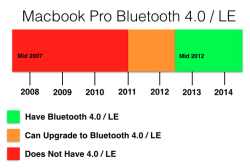
after replacing your bluetooth card with a bluetooth LE/4 card
make sure the bluetooth card is BCM94331PCIEBT4CAX
if it docent have the C then its a bluetooth 2 card which wouldn't work
do the following
1. on your desktop press command+shift+g
2. type: /system/library/extensions/
3. find: IO80211Family.kext in the extensions folder and copy it to your desktop
4. on the new copy show package contents > Contents > PlugIns > AirPortBrcm4360.kext > show package contents > Contents > MacOS > open AirPortBrcm4360 with 0xED
5. Text search Mac- it should be followed by a number
6. type the below code in terminal this will show your board id example early 2011 macbook pro is Mac-94245B3640C91C81
7. replace the first number in your kext with the number u get in terminal
8. save it
9. go to terminal and paste:
10. delete the original IO80211Family.kext in system>library>extensions
11. restart
12. your wifi will not be working after restart
13. use kextdrop to install the modified kext
14. restart
15. your wifi should start working again after installing the kext and restarting
16. go to system preferences > general and there should be an option to enable handoff
these are the exact steps i did with OS X Yosemite gold master candidate on a 13 inch early 2011 macbook pro and got handoff working with my iPhone 5s running iOS 8.0.2
EDIT
Thanks to Dokterdok who have created an activation tool (based on instructions compiled by UncleSchnitty) which is available on Github
The tool is designed to activate Continuity by doing a compatibility check, creating backups of original System drivers, and disabling a Mac-model blacklist in the Bluetooth code that prevents Continuity from working on ineligible Macs. From there, it also whitelists Mac board-ids within the Wi-Fi code to get the feature working.
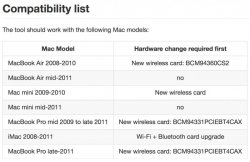
Tool Link
Article link
As it turns out the 2011 MacBook Pro can use the same Airport/Bluetooth card as the mid 2012 Macbook pro and its user replaceable so by replacing the 2011 macbook pro Airport/Bluetooth card you should have the ability to use Handoff/continuity
after replacing your bluetooth card with a bluetooth LE/4 card
make sure the bluetooth card is BCM94331PCIEBT4CAX
if it docent have the C then its a bluetooth 2 card which wouldn't work
do the following
1. on your desktop press command+shift+g
2. type: /system/library/extensions/
3. find: IO80211Family.kext in the extensions folder and copy it to your desktop
4. on the new copy show package contents > Contents > PlugIns > AirPortBrcm4360.kext > show package contents > Contents > MacOS > open AirPortBrcm4360 with 0xED
5. Text search Mac- it should be followed by a number
6. type the below code in terminal this will show your board id example early 2011 macbook pro is Mac-94245B3640C91C81
Code:
ioreg -l | grep "board-id" | awk -F\" '{print $4}'8. save it
9. go to terminal and paste:
Code:
sudo nvram boot-args="kext-dev-mode=1"11. restart
12. your wifi will not be working after restart
13. use kextdrop to install the modified kext
14. restart
15. your wifi should start working again after installing the kext and restarting
16. go to system preferences > general and there should be an option to enable handoff
these are the exact steps i did with OS X Yosemite gold master candidate on a 13 inch early 2011 macbook pro and got handoff working with my iPhone 5s running iOS 8.0.2
EDIT
Thanks to Dokterdok who have created an activation tool (based on instructions compiled by UncleSchnitty) which is available on Github
The tool is designed to activate Continuity by doing a compatibility check, creating backups of original System drivers, and disabling a Mac-model blacklist in the Bluetooth code that prevents Continuity from working on ineligible Macs. From there, it also whitelists Mac board-ids within the Wi-Fi code to get the feature working.
Tool Link
Article link
Last edited:


