

Got a tip for us?
Let us know
Become a MacRumors Supporter for $50/year with no ads, ability to filter front page stories, and private forums.
How Old Is Your Main Router?
- Thread starter drrich2
- Start date
- Sort by reaction score
You are using an out of date browser. It may not display this or other websites correctly.
You should upgrade or use an alternative browser.
You should upgrade or use an alternative browser.


uacd
macrumors 68000
Maybe that’s because I am using cheap routers. Your Mesh system is far out of what I would love to spend on a router, as well as my house isn’t too big, so most of the possible additional coverage is not needed. Not that I am greedy but I mean if I actually needed that coverage I would have gotten something beefier, but for my small house it would have been overkill. With that said, your system might work great because it is a more premium and better built product.I am not sure I agree with the 4 year limit as mentioned above. I have TP-Link Deco XE75 running in AP mode hooked up to a PFsense router/FW since it was released in 2022, and it is running flawlessly. Just my observation. Your mileage might vary.
I’ve had TP Link in the past and it cost smth like 30 or 40$. Probably for its price it was OK. It started doing crazy stuff as soon as 4K content appeared on the web. I was thinking about newer TP Link (Archer series) but read few comments that they have same issues as my old one - cannot make that up. So currently choosing if it is going to be Asus, Tenda or smth else

VictorKurgan
macrumors newbie
funny enough mine is about 30 minutes old. after upgrading the cable system this week, my old modem and router both stopped functioning, thought it was an actual outage but turned out my equipment was no longer compatible, so I swapped both of the devices and back up and running as of 15 minutes ago.
The ironic part of this is that TP-Links rarely live to 4 years old and just start randomly annoying owners with random resets or WiFi dropouts. The coverage area of their routers is a pure joke.
I'm just running the one TP-Link AXE75, and was borderline shocked when it connected okay (on the 2.4-GHz spectrum) with the little wireless solar-powered security camera I put on a post against our backyard fence (I think over a hundred feet away). I use it to let me check on a pile of rubble along some trees. I put out some chopped up apples and enjoyed an opossum visitor.Maybe that’s because I am using cheap routers.
I was quite pleased I didn't need to buy a separate (probably outdoor) node to do that.
How old were they?my old modem and router both stopped functioning, thought it was an actual outage but turned out my equipment was no longer compatible

_timo_redux_
macrumors 68020

code-m
macrumors 601
Why a loser? I use the free modem and router my ISP provides and my bill is low in comparison. I don’t game so for what my requirements are it’s ample fast.I'm one of those losers using the rented router/modem from Xfinity 🙁

schneeland
macrumors 6502
code-m
macrumors 601
I had this prior model but when I went Fibre internet, my modem/router went into slumber.FritzBox 7690. I bought it last year on eBay (luckily, there's a pretty good supply of basically new devices over here).
View attachment 2626492

VisceralRealist
macrumors 6502a
Why a loser? I use the free modem and router my ISP provides and my bill is low in comparison. I don’t game so for what my requirements are it’s ample fast.
I didn't really mean that seriously, just that this is a tech enthusiast forum, and most tech nerds are probably going to have their own equipment. But the Xfinity Gateway is more than enough for me in my small apartment. If I had my own house and was building a home network, I'm sure I would have my own router and modem. But there just isn't a need for that for me right now.
I run pfSense on a miniature desktop with my fiber connection. Works great and is regularly updated automatically.

edubfromktown
macrumors 65816
I have a Firewalla Gold "router"/firewall that connects to a Arris DOCSIS SURFboard modem (via Ethernet) which connects to the ISP's coaxial handoff.
johnrlaporta
macrumors regular
The last gen AirPort Extreme is still my main router.
ISP supplied router is about 5 years old but I just use it a modem and wired router. WiFi is handled by a TP Link Deco WiFi 6E mesh system which is around 3 years old at this point, which in turn replaced an older WiFi 5 mesh system also from TP Link. No complaints so far. Also have a couple TP link Ethernet switches so I can wire the most important devices (desktop, consoles and Apple TV) and use wired backhaul for the mesh system. Nothing fancy but has been stable!


code-m
macrumors 601
I have been a tech enthusiast for decades, had a combination of owning my own modem/routers to also having them rent free. There is no shame in saving money especially in 2026 😅I didn't really mean that seriously, just that this is a tech enthusiast forum, and most tech nerds are probably going to have their own equipment. But the Xfinity Gateway is more than enough for me in my small apartment. If I had my own house and was building a home network, I'm sure I would have my own router and modem. But there just isn't a need for that for me right now.

AlixSPQR
macrumors 65816
I’m using the 5th generation of AirPort Time Capsule (2013). I don’t use it for backups.

jakey rolling
macrumors 65816
Hardware-wise, router is ancient but still well supported. Running pfSense on a circa-2015 Dell mini-PC that had been slated for retirement at my work. Originally ran with a 4-port gigabit ethernet adapter and then recently updated that to a two-port 10G adapter when my fibre service got upgraded.
enrincon89
macrumors regular
elvisimprsntr
macrumors 65816
Enterprise level hardware doesn’t need to cost a lot from evilBay
Used Protectli Vault appliance $100
Used Engenius WiFi 6 AP $50
pfsense CE $0
Knowing you are in complete control, will have lifetime firmware updates and security patches, and no government backdoors. Priceless.
Used Protectli Vault appliance $100
Used Engenius WiFi 6 AP $50
pfsense CE $0
Knowing you are in complete control, will have lifetime firmware updates and security patches, and no government backdoors. Priceless.

racerhomie
macrumors 6502a
I used Eero stuff for a few years but got frustrated by the lack of options despite the good reliability. I didn't like a lot of the consumer stuff because it was unreliable so I ended up with a Unifi UDM-SE and a few AP's. Despite needing to run a few wires, it's been a great setup the last couple years.

josehill
macrumors member
It's not for everyone, but if you're reasonably technical, and you have an old router that is no longer supported with security updates, you might consider installing an open source alternative firmware, like OpenWRT. Otherwise, I recommend getting a new(er) router that is early in its life cycle.

eyoungren
macrumors Nehalem
Unfortunately my ISP (Cox Communications) charges for modems. Even worse, they consolidated at some point and you can't get separate units from them anymore. It's one of those combo modem/router devices. They offer additional services through that combo device that I don't want either.Why a loser? I use the free modem and router my ISP provides and my bill is low in comparison. I don’t game so for what my requirements are it’s ample fast.
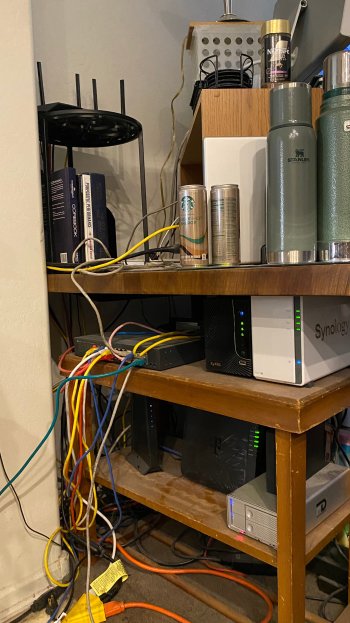
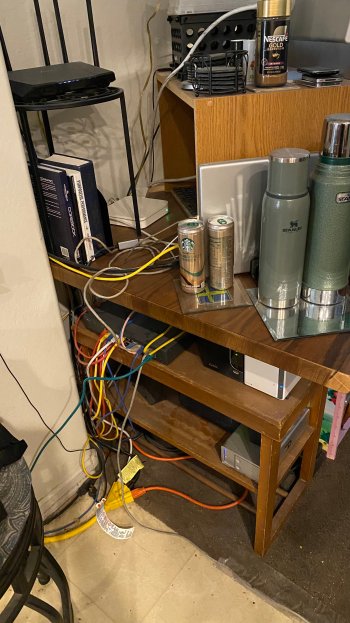
I started with Cox in 2004 and they have always charged for modems and routers. So, I'm saving by using my own equipment. Of course, I'm not a typical customer though…not too many people are using a 24-port switch.
Register on MacRumors! This sidebar will go away, and you'll see fewer ads.