|
|
#1 |
|
10.8 All the Little Things!
In honor of the "10.7 All the Little Things!" thread on the Lion forum, I'd like to start one for Mountain Lion!
So talk about small details, little things that don't really get mentioned anywhere. Even the slightest change from Lion deserves to be noticed! I heard someone say that the Devices list in the Finder sidebar can now be moved back to the top, for example.
__________________
Sent from my iPod Shuffle |
|
|
|
18
|
|
|
#2 |
|
In Messages if you click the notifications bubble you can reply to an incoming message from it. Hoping that comes to iOS...
|
|
|
|
20
|
|
|
#3 |
|
I heard in a video on youtube that it's going to be a software update, somebody know about that?
__________________
2011 13" Macbook Pro Core i5 | iPad 2 32gb Wi-fi | iPod Touch 4G | iPhone 4s 16gb
|
|
|
|
-32
|
|
|
#4 |
|
Some new "Slideshows" for Screen Savers. They are pretty neat.
__________________
500GB Macbook Pro 2007 (OS X Mountain Lion) 16GB iPhone 4 (iOS 6) 16GB iPhone 5 (iOS 6) 32GB iPad 2 (iOS 6)
|
|
|
|
11
|
|
|
#5 |
|
I'm not 100% sure that this wasn't in Safari 5.1 but you can add the address book to the bookmarks bar (I have links to Facebook for each contact for example).
|
|
|
|
1
|
|
|
#6 |
|
I know I've said several times today about the ability to move devices (or shared) to the top of the finder sidebar (finally!)
Also searching within Launchpad, instant filtering.
__________________
27" iMac, 15" MacBook Pro 2.2GHz i7 2011, iPhone 5 16GB - iPad 1/2/3/Mini - 24" Cinema Display, Apple Magic Mouse, Trackpad, Time Machine, Apple TV, | Check out my flickr | |
|
|
|
14
|
|
|
#7 |
|
In QuickLook, there's now a share button, includes Email, Message and one more thing I can't remember (not Twitter though).
Another thing I found is that using Messages, you can send files over, with no restrictions to certain types of files nor to size (for example, I was able to send the Messages beta dmg to myself over iMessage. It was pretty fast as well). |
|
|
|
7
|
|
|
#8 |
|
My favourite 'little thing' is probably that safari tabs now sync with iOS via iCloud.
|
|
|
|
38
|
|
|
#9 |
|
OMG, awesome!
__________________
27" iMac, i7 3.4GHz, 16GB RAM 13" MBP 2.66 GHz, 8GB RAM 3rd Gen iPad 64 GB Wifi+4G, iOS 5.1 iPhone 5 32 GB, iOS 6.0 Mac Mini 2.00 GHz, 2GB RAM |
|
|
|
11
|
|
|
#10 |
|
|
6
|
|
|
#11 |
|
|
3
|
|
|
#12 |
|
Yes, Tabs and Document sync aren't enabled yet.
|
|
|
|
6
|
|
|
#13 |
|
how would that work tho? if i have different tabs on 3 different devices open how will it decide which ones to sync or will each device end up with like 9 tabs
__________________
'13 MacBook Pro Retina 2.5 GHz '13 MacBook Pro 2.54 GHz, C2D, 128GB SSD iPhone 5 (white & silver), 16GB iPad 3 white, 32 GB, Wifi+Cellular Apple TV 3
|
|
|
|
3
|
|
|
#14 |
|
The second device will already be loading the tabs you had open on the first by the time you put the first one down, I would hope anyway.
|
|
|
|
1
|
|
|
#15 |
|
I've been wondering how the two finger left swipe will work for Notification Center while Safari is in the foreground. Right now the two finger swipe is to go forward a page.
|
|
|
|
4
|
|
|
#16 |
|
|
10
|
|
|
#17 |
|
General
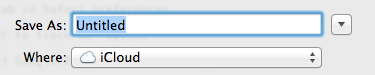
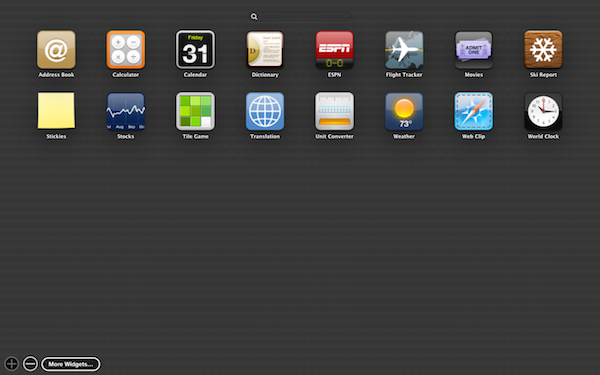
-Option to save directly to iCloud from Save dialog in TextEdit (and presumably any app that supports iCloud document syncing) ![]() -When a document that is using Versions is changed, the "Edited" in the titlebar of the document pulsates blue for a few seconds. -"Duplicate" now has a keyboard shortcut: Cmd-Shift-S. When you select Duplicate, a copy of the current document pops out and the titlebar becomes an editable text field, allowing you to enter a new name, hit enter, and be done. ![]() -Option to show the Displays menu item "Never," "Always," or "Automatically" (presumably only when you have a second display connected) Safari -New "Passwords" tab in Safari preferences -"Tell websites not to track me" option -Option to turn off Google/Bing/Yahoo search suggestions ![]() -Websites can provide notifications in Notification Center ![]() -"Display images when the page opens" option (default is obviously checked) -Several sharing options when right-clicking on an image on a page: Email, Message, Twitter, AirDrop, and Flickr -Ability to rename bookmarks directly in the Bookmarks Bar ![]() Finder -New "Share" submenu when right-clicking on a file: Email, Message, AirDrop Dashboard -The widgets bar along the bottom for adding new widgets has been replaced with a Launchpad-style picker - including the ability to search. ![]() QuickTime X -Controls remain hidden when the movie is paused

__________________
MacBook Air 13-inch (Mid 2012), iPhone 5 |
|
|
|
46
|
|
|
#18 | |
|
Quote:
|
||
|
|
77
|
|
|
#19 |
|
Some of these aren't "little things", but most are:
http://www.cultofmac.com/147043/30-n...minutes-video/
__________________
15" MacBook Pro; iPhone 4S |
|
|
|
2
|
|
|
#20 |
|
Oh, the thrill of it all...
__________________
An Ultra Fast Mac Is...My Favorite |
|
|
|
4
|
|
|
#21 |
|
The new tabs in Safari look like the tabs on the iPad's version of Mobile Safari.
You can launch Notification Center via a circle with a black dot inside of it, in the menu bar on the far right corner. Launchpad icons are smaller Location Services are disabled by default. You'll have to reenable them in order to turn on Find My Mac in the iCloud settings.
__________________
Failure is not an option, it comes bundled with Windows; Mid-2011 11" MacBook Air 128GB SSD,4 GB RAM; 16GB iPhone 4 Original iPad 32 GB 64 GB iPad 2 Apple TV
|
|
|
|
6
|
|
|
#22 |
|
Awesome thread.
|
|
|
|
9
|
|
|
#23 |
|
I hope people can be kind enough to post screen shots for us.
Particularly that Safari iPad tab new look, it sounds very interesting. Changing over to the Chrome-styled URL address bar is exactly, in my opinion.
|
|
|
|
5
|
|
|
#24 |
|
You can search google right from the safari URL bar. About time!
|
|
|
|
25
|
|
|
#25 |
|
Does finder still have that ugly gray icons in ML? Or is it color again like SL?
|
|
|
|
9
|
![]() |
|
«
Previous Thread
|
Next Thread
»
| Thread Tools | Search this Thread |
| Display Modes | |
|
|
Similar Threads
|
||||
| thread | Thread Starter | Forum | Replies | Last Post |
| iOS 5: All the Little Things (Undocumented Features) | Star-fire | iOS 5 and earlier | 390 | Apr 26, 2013 04:21 PM |
| 10.7 All the Little Things! | inkhead | Mac OS X 10.7 Lion | 1819 | Jul 19, 2012 04:42 AM |
| iOS 5 - All the little things | hellomoto4 | iPhone | 474 | Oct 10, 2011 06:47 AM |
| Mac OS X 10.8 Nyan Cat | Vasileios | Wasteland | 6 | Jul 22, 2011 08:45 AM |
| The Phenomenal MacBook Air - Post the little things you like/dislike about it | Jobsian | MacBook Air | 54 | Nov 1, 2009 03:31 PM |
All times are GMT -5. The time now is 12:33 PM.


2011 13" Macbook Pro Core i5 | iPad 2 32gb Wi-fi | iPod Touch 4G | iPhone 4s 16gb 


Particularly that Safari iPad tab new look, it sounds very interesting. Changing over to the Chrome-styled URL address bar is exactly, in my opinion.
Linear Mode