|
|
#1 |
|
macbook, matte screen installed
please do not try this at home.
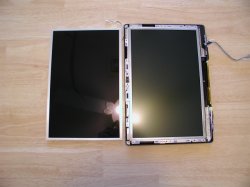
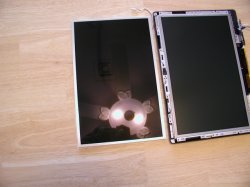
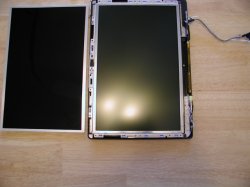
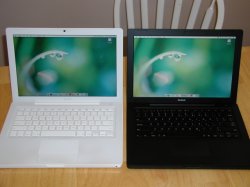
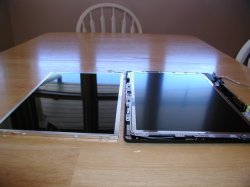
got a deal on a black macbook core duo with a broken screen, and thought it a good time to try finding a replacement without the glare. i'm not a fan of the glossy screens. first impression is great, as it's really bright, amazing colors, and so on. but i find using one all day, every day, gets old with the reflection/glare. so, i fix computers and deal almost entirely with windows systems. i had worked on several sony laptops with 13.3" 1280x800 panels that looked really nice, and found something similar through a wholesale supplier to try with my broken blackbook. toshiba and matsu****a joined forces about 4 years ago to produce lcd panels, and supply most of the sony panels. home page is HERE. the panel i received is missing part of the model sticker, and i am still waiting for an email back from TM to try and clarify the specific panel i used. what i have so far is LTD133E OR B, and then a torn edge. a second sticker near the bottom of the panel has NRL75-DEXKA11A K6B06T7 0118. neither seem to bring up results in google at the moment. TM's current product lineup doesn't have any matte finish 13.3" panels listed, so that is no help. also sent an email to my supplier looking for additional info on model, or what model of sony laptop this panel was intended for. so, sorry on slim details right now. i will update this when i receive more information. i can tell you this panel was an exact replacement, cables, screws, etc, and no modification was necessary to install the panel. i would also point out that i repair 2-10 laptops per week, can take powerbooks/ibooks apart from memory, and found this macbook to be one of the trickiest laptops to take apart i have ever encountered. you must take the screen completely off the laptop even though there are guides showing only the lcd panel/covers being removed. trust me. you have been warned. tried to take pictures that showed the difference in the panels. first shot was side by side with a reflection. 2-4 were taken with the ceiling fan/light on to show the difference in the screen finish. not a good camera, but you get the point.
__________________
KATE: RISC architecture is gonna change everything. DADE: Yeah. RISC is good. Try Folding, all the cool kids are doing it... Last edited by 4JNA; Jan 7, 2007 at 04:57 PM. |
|
|
|
1
|
|
|
#2 |
|
more pics
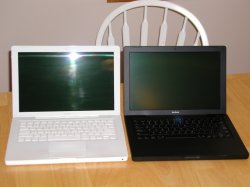
couple more pics with the macbook back together and turned on.
everything works the same. calibration, brightness control, photo booth flash, etc. seems very bright when side by side with a customers whitebook. overall, very happy with the results. the matte finish seems to match the finish of the blackbook better than the glossy. again, more details when i get them. peace out.
__________________
KATE: RISC architecture is gonna change everything. DADE: Yeah. RISC is good. Try Folding, all the cool kids are doing it... |
|
|
|
1
|
|
|
#3 |
|
Pretty neat.
|
|
|
|
0
|
|
|
#4 |
|
sweet
|
|
|
|
0
|
|
|
#5 |
|
Since TM supplies Sony with their LCDs, and we all know how great Sony Vaio LCDs are, is there a display made by them that would suit the 15" MBP?
|
|
|
|
0
|
|
|
#6 |
|
I'm hoping it'll be an option come MWSF...I can dream...
|
|
|
|
0
|
|
|
#7 |
|
Well done, this is great, the matte screen option on a MacBook would be great. Apple would defo sell more.
__________________
http://www.geekanoids.co.uk Latest Mac News & Reviews. http://www.youtube.com/davomrmac My YouTube Channel. http://www.geekpouch.co.uk iPhone 3G, iPod touch & other iPod Pouches. |
|
|
|
0
|
|
|
#8 |
|
Yeah I don't see why Apple doesn't offer the option for Matte Screen. Maybe it's because it will force people who hate glossy to buy the MBP! haha i figured it out.
|
|
|
|
0
|
|
|
#9 |
|
Maybe because I haven't owned a glossy notebook until the Macbook but I definitely like it better than the matte display on my old Vaio.
__________________
+++++++++++++++++++++++++++++++++++++++++++++++++ . |
|
|
|
0
|
|
|
#10 |
|
awesome dude.. wow you can really tell the difference between two screens..
|
|
|
|
0
|
|
|
#11 |
|
Looks very good. I originally did order a mb, but then cancelled my order, and got a mbp. Glossy screen was one of many reasons why i cancelled. Surely though, getting that new screen, and fitting it, you may as well just get a mbp?
|
|
|
|
0
|
|
|
#12 | |
|
Quote:
i have less in this machine (2.0 CD, 2gb, 80gb, superdrive, matte) than the $999 base model blackbook at the refurb store. seemed like a good deal to me.
__________________
KATE: RISC architecture is gonna change everything. DADE: Yeah. RISC is good. Try Folding, all the cool kids are doing it... |
||
|
|
0
|
|
|
#13 |
|
Sorry, i did read the post, but forgot, i kinda did mean you, but also other people maybe wanting to do this in the future. Out of curiousity, how much would an upgrade like that cost? a - to diy, b - to be done by a professional.
|
|
|
|
0
|
|
|
#14 | |
|
Quote:
B - quick search on google for macbook lcd repair shows $375-$395, plus shipping, and a couple day turn around. that was not a fun repair, and i can see why they charge so much.
__________________
KATE: RISC architecture is gonna change everything. DADE: Yeah. RISC is good. Try Folding, all the cool kids are doing it... |
||
|
|
0
|
|
|
#15 |
|
I looked at the DIY and it looks like a pain.
I would just sell the broken LCD notebook and put in an additional $400 (the cost it would repair the LCD) towards a refurb/new notebook. The matte Blackbook does look unique though.
__________________
+++++++++++++++++++++++++++++++++++++++++++++++++ . |
|
|
|
0
|
|
|
#16 |
|
Wow, can't believe I missed this one - awesome mod!
|
|
|
|
0
|
|
|
#17 | |
|
well, that was a waste of an email...
most helpful response received from TMDisplay: Quote:
__________________
KATE: RISC architecture is gonna change everything. DADE: Yeah. RISC is good. Try Folding, all the cool kids are doing it... |
||
|
|
0
|
|
|
#18 | |
|
Quote:
|
||
|
|
0
|
|
|
#19 |
|
|
0
|
|
|
#20 | |
|
Quote:
Excellent mod, but if it's that difficult, of no use to most. Just have to big the bullet and get the lowest price matte finish MBP. I sure hope Apple never pulls the matte finish from the MBP line, that would make me pay for the swap no matter how much it costs. |
||
|
|
0
|
|
|
#21 |
|
Would you mind sharing you source? I have been looking for the past couple weeks and no one seems to stock the matte finish at a reasonable price.
|
|
|
|
0
|
|
|
#22 |
|
__________________
primalman |
|
|
|
0
|
|
|
#23 |
|
There are ways to get exact panel information in windows. Let me see if I can find what the app is called.
|
|
|
|
0
|
|
|
#24 |
|
Came in better glossy.
|
|
|
|
0
|
|
|
#25 |
|
4JNA,
Is this the display you purchased? I found it listed on the Toshiba Matsu****a Display Technology website. Type Name LTD133EX2Z Feature WXGA,LVDS,High Luminance Applications for Mobile Notebook PCs Product Status custom product ex. Screen Size 33.7cm (13.3inch) Number of Pixels((W)x(H)) 1280pixel x800pixel Pixel Pitch((W)x(H)) 0.224mm x0.224mm Aspect Ratio 16:10 Pixel Density 113ppi Active Area((W)x(H)) 286.1mm x178.8mm Pixel Arrangement Stripe Display Mode ACTIVE MATRIX, TRANSMISSIVE ,TN ,Norm .White(Posi) Device Type p-Si Surface Treatment Glare, Hardcoat Number of Colors 262,144color Contrast Ratio 250:1(min.) Luminance(typ) 250cd/m2 Reflectance Ratio(typ) Response Time(typ) Response Time(max) (Rizetime)50ms ,(Falltime)50ms Viewing Angle(typ) Viewing direction(CR Peak) 6 o'clock Supply Voltage(typ) 3.3V Power Consumption(typ) 4.9W Interface LVDS Number of Gray Level 64 Dimensional Outline ((W)x(H)x(D))(typ) 299.0mm x195.0mm x5.2mm Weight(typ) 320g Backlight FLx1 Backlight Lifetime Operating Ambient Temperature 0 50 Storage Temperature -20 60 Datasheet RoHS OK Remarks Wide aspect ratio, High Luminance(250cd/m2)
__________________
11" MBA 1.6/4/128 • 27" iMac i5 2.8 GHz • 27" iMac i5 2.66 GHz • BMB C2D 2.0 GHz • 32GB iPad 3G • 16GB iPhone 4 illegitimis non carborundum |
|
|
|
0
|
![]() |
|
«
Previous Thread
|
Next Thread
»
| Thread Tools | Search this Thread |
| Display Modes | |
|
|
Similar Threads
|
||||
| thread | Thread Starter | Forum | Replies | Last Post |
| Dark ring appearing on MB screen | tirion | MacBook | 15 | Feb 16, 2013 05:42 AM |
| Screen of death when installing Lion. Can't boot anymore. | hyperipod | Mac OS X 10.7 Lion | 11 | Oct 13, 2011 03:14 AM |
| Connecting MBA to iMac for screen sharing? | codeoverride | MacBook Air | 0 | Aug 8, 2011 10:03 AM |
| Mini with matte display or iMac? | self | iMac | 8 | Jul 31, 2011 01:41 AM |
| Which resolution 15" Macbook Pro screen did you go with? Are you happy with it? | rceee | MacBook Pro | 22 | Apr 21, 2011 09:35 PM |
All times are GMT -5. The time now is 12:40 PM.


Linear Mode