
Become a MacRumors Supporter for $50/year with no ads, ability to filter front page stories, and private forums.

theorist9

macrumors 601
Original poster
I'm planning to write a book (fiction, so there will be lots of dialog), and my results thus far with Apple's Dictation software have been mixed. And I don't like that it shuts off if you pause your speech for >= 30 seconds.

Anything that works better? I'm looking for something that is locally-installed, rather than cloud-based.

The gold standard used to be the Nuance product (currently called Dragon Professional). But that requires I drop $600 for the software, and either buy a PC or use it with Parallels (apparently this works, even though it's not supported for ARM: https://dashedyellowline.com/2024/01/18/dragon-on-apple-silicon-works/)

One thing I have noticed is that Dictation on my M1 Pro MBP running Tahoe works somewhat better than Dictation on my 2019 i9 iMac running Sequoia. The former is a bit more accurate, and better able to keep up with me when I speak rapidly. I don't know how much of that is better software vs. the faster processor vs. the difference in microphone*. [*On my iMac, I'm using the mic in my Anker C200 vidcam.]

EDIT 2:

I've since done extensive testing of dictation apps. I've divided them into two categories: Those I've run locally, and those I've run cloud-based (I say "run" rather than "are", since several are both).

I explored both because I use both a 2019 i9 iMac for my desktop work, and an M1 Pro MacBook Pro for my mobile work

Practically speaking, the iMac can only use cloud–based apps: While models from two of the two best–known packages that are available for local installation (OpenAI's Whisper, and NVIDIA's Parakeet) can be run on an Intel Mac, both transcribe so slowly that neither is practical—though Parakeet V3 (V2 can't run on an Intel Mac, but V3 can) is less egregiously slow than Whisper V3 Turbo.

Thus I focused the cloud-based testing on my iMac. The results should be computer–agnostic, since the dictation is being processed in the cloud. Indeed, I did test Spokenly's cloud-based implementation with both my iMac and M1 Pro MBP, and found nearly the same results when using the same model.

The one small difference I saw may be due to the microphone, since these programs can be mic-sensitive in subtle ways. [On my iMac, I used the Anker PowerConfC200 webcam, while on the MBP I used the BOYA CM-40 boom mic.]

For instance, one of my tests was to see if the program could correctly transcribe the plural possessive in the following sentence: "On many superhero teams, the heroes' costumes are each a different color." On one program, it gave hero's with the mic on my MBP (a mistake), but heroes' with the BOYA boom mic.

And the local testing was mostly done using my M1 MBP.

Overall, I found the cloud-based apps are superior to the locally-installed ones for both speed and capability. One striking difference is that many of the cloud-based apps are able to recognize spoken passages in fiction and thus surround them with quotation marks. By contrast, none of the locally-installed apps are able to do that. In addition, the cloud-based apps generally have much more capability to accept voice commands for formatting and punctuation than the locally-installed apps.

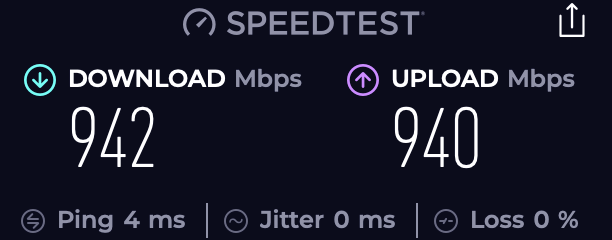
But if you have a much slower internet connection than me (mine is 940 Mbps up/down), and a better-performing computer (mine is only an M1 Pro), you might find the relative speed of local vs. cloud to be flipped from what I found. But that won't change the relative capabilities of the two categories.

The one feature I really wanted was real-time dictation, like one gets with Apple Dictation. Unfortunately, I was only able to find one app that does that: Talk Type (a cloud-based app). Unfortunately, it is not as capable as the others in its category.

Overall, the best-performing app for me seems to be Aqua Voice, so that's probably the one I'll be subscribing to. And it's privacy policy says that if you activate its privacy mode, none of the dictations are retained.

Finally, this served as a nice reminder that AI is fundamentally dumb: It's not smart enough to understand grammatical rules, since it's been trained on patterns, not what they mean. For that reason, if a certain compound adjective isn't in its training set as being hyphenated, it's not going to hyphenate it when it transcribes your spoken voice. I dicated much of the above using one of the programs, but then had to go back and manually add most of the hyphens.

These tables summarize my results. You'll probably need to click on them to made them big enough to read.
CLOUD-BASED PROCESSING (tested mostly with my 2019 i9 iMac)
1781317805618.png

Here's the internet performance on my iMac, tested using Speedtest's locally-installed app (more accurate than their web browser, which is unsuitable for high internet speeds):
1781318863970.png


LOCAL PROCESSING (tested mostly with my M1 Pro MacBook Pro)
[Don't give too much weight to the difference between the scores of 4 vs. 5 for accuracy, since that could be due to normal variation in how I spoke:]
1781317768353.png
 
Last edited:
I'm using Wispr Flow; there is also a paid version, but the free one is adequate for short work. Easy to use and very reliable.
 
I'm using Wispr Flow; there is also a paid version, but the free one is adequate for short work. Easy to use and very reliable.
Thanks. How does the performance compare to Apple Dictation?

My concern with Wispr Flow is that it's cloud-based, and users report it takes screenshots of your screen repeatedly, so there's no privacy or IP protection.
 
Thanks. Is it cloud-based or locally installed, and how's its performance compare to Apple Dictation?
Hi, on the computer now. so can write a fuller post!

It runs on the Mac, and you can choose the language model, different sizes on the Mac (you choose and download), or there are in the cloud options. I have set it up so that it transcribes my speech when I hold the function key down. You can give it audio and video files to transcribe. It has a comprehensive selection of outputs possible including subtitle formats.

I had Dragon Dictate for a while and was hugely disappointed with it because its accuracy was not very good. This is significantly better and deals with proper nouns and names much better than I would have expected.
 
Hi, on the computer now. so can write a fuller post!

It runs on the Mac, and you can choose the language model, different sizes on the Mac (you choose and download), or there are in the cloud options. I have set it up so that it transcribes my speech when I hold the function key down. You can give it audio and video files to transcribe. It has a comprehensive selection of outputs possible including subtitle formats.

I had Dragon Dictate for a while and was hugely disappointed with it because its accuracy was not very good. This is significantly better and deals with proper nouns and names much better than I would have expected.
Good to know about Dragon Dictate.

I'll look into MacWhisper. Did you get it from the App Store, or the direct download from Gumroad? And do you have the free or the paid version?

And can you confirm that MacWhisper does real-time speech-to-text? I ask because it appears to be a transcription app (you upload an audio file for conversion to text), rather than a dictation app.

1780604586848.png
 
Last edited:
  • Like
Reactions: schnaps
I bought it directly. I have the paid version. And it does dictation, although I wouldn't call it real time, but it transcribes what you say, nearly live.
 
  • Like
Reactions: theorist9
@theorist9

Inspired by your thread, actually — full disclosure, I build a small Whisper-based translation tool for Mac that already does OBS and vMix output alongside transcripts and SRT, and can run either fully local on-device or via cloud engines.

It's even got an iOS app that uses the iPhone connecting to your Mac, or runs standalone on cloud when the Mac isn't around.

Your question nudged me into adding what I hope will be a proper dictation feature on top of all that. Thanks for the inspiration! 🙂

Once it's working, happy to hand you a license to test it.
 
  • Love
Reactions: theorist9
@theorist9

Inspired by your thread, actually — full disclosure, I build a small Whisper-based translation tool for Mac that already does OBS and vMix output alongside transcripts and SRT, and can run either fully local on-device or via cloud engines.

It's even got an iOS app that uses the iPhone connecting to your Mac, or runs standalone on cloud when the Mac isn't around.
Well that's perfect! Given that you have the expertise to build one of these, you can probably answer some of my questions to help me make sense of all of this. Questions written in red:

Here's my current understanding of what's available for the Mac. Is this correct?:

These models can run either locally, or on the cloud, or both.

Local operation:
Generally speaking, to get adequate speed, you need to have an AS Mac so that the model can run on the Neural Engine. For this reason, you won't find local operation that works on an Intel Macs.

Apps that use local operation don't implement their own speech-to-text algorithms. Instead, they are just wrappers for either Open AI's Whisper or NVIDIA's Parakeet.

Whisper comes in a range of sizes and thus performance, from Tiny (≈39M parameters) to Large (≈1.5B parameters). Currently, the most performant are Large V3 and Large V3 Turbo; the latter is much faster than Large V3, but slightly less accurate. Whisper can run on Intel Macs, but I've not found an app that runs Whisper locally on them, probably because of poor performance.

Parakeet comes in V2 and V3 (same perfomance, V3 just increases the languages covered to 25). It runs on Apple's Neural Engine, and is thus AS only. [If you were running Whisper on an AS Mac, would it also run on the Neural Engine?]

And it's the algorithm that determines the word-recognition accuracy and speed, not the app—though some apps add voice commands, like "comma", etc., which can be useful to improve accuracy of punctuation.

There is no consensus whether Whisper or Parakeet is better--I found one source saying Parakeet is faster & more accurate than Whisper, and another saying Parakeet is faster but less accurate. There's probalby another saying Whisper is both faster & more accurate.

E.g.,. according to https://spokenly.app/blog/parakeet-vs-whisper

"The English Parakeet TDT 0.6B V2 model led the Open ASR Leaderboard for word error rate, and its standout strength is speed: it transcribes long audio far faster than real time on supported hardware...On clean English, [Whisper] usually trails Parakeet on speed and word error rate, and it can hallucinate text during long silences, a quirk dictation apps reduce with voice activity detection."

However, elsewhere on the very same website (!) ( https://spokenly.app/comparison/typeless) it says: Parakeet for speed, Whisper Large V3 Turbo for accuracy.

What's your take on this?

The advantage of local operation is that everything stays on your computer, which protects confidential info. Though since very few of these are certified to meet established privacy standards(e.g., HIPPA), the only way to be certain is to disconnect from the internet when you are using them, and then dump the files when you're done.

Cloud operation:

These either use their own LLM (e.g., Aquavoice's Avalon), or make use of existing LLM's (Claude, ChatGPT, etc), and/or allow you to BYOK (bring your own API key). Confidentiality is much more of a concern with these, since you are sending your data to the cloud, and (other than medical dictation apps) I've not found any that meet established privacy standards.

OTOH, they are reportedly more accurate, since these cloud LLM's can determine what the words should be from context in a way that local models cannot/do not. Is this correct?

********

One additional question:

How do local models compare with cloud models for real-time dictation speed? I.e., where the text appears as you talk, like with Apple Dictation? Or are none actually capable of this?


Thanks for the inspiration! 🙂
Glad I was able to serve as your muse, LOL!

Once it's working, happy to hand you a license to test it.
Sure, that would be interesting.
 
Last edited:
@theorist9

Happy to dig in — and where your sources contradict each other, it's almost always because they're measuring different conditions. Going through it:

"Local needs Apple Silicon, nothing on Intel." Mostly true in practice, but the reason matters: Whisper does run on Intel Macs (whisper.cpp on CPU works fine) — it's just slow enough that most commercial apps drop Intel support rather than ship a bad experience. Parakeet is the one that's genuinely Apple-Silicon-or-NVIDIA-only. So "no good local option on Intel" is a fair practical conclusion, but Whisper-on-Intel isn't impossible, just sluggish.

"Apps are just wrappers, the algorithm determines accuracy, not the app." True that almost nobody trains their own model. But I'd push back on the second half. The model sets the ceiling; the app decides how close you get to it. Voice-activity detection, audio chunking, endpointing, and — for live dictation — the streaming/commit logic make a huge real-world difference. Two apps on the identical Whisper model can feel completely different. That layer is most of the actual engineering.

"Does Whisper run on the Neural Engine on an AS Mac?" Not necessarily, and this trips up a lot of people. It depends entirely on the implementation: whisper.cpp usually runs on the GPU via Metal (with an optional Core ML path that can use the ANE for the encoder); faster-whisper runs on the CPU on Mac; MLX builds run on the GPU. So "local = Neural Engine" is a bit of a myth — more often it's the GPU or CPU doing the work. Parakeet via MLX is also GPU. The ANE gets used less than people assume.

Parakeet vs Whisper, my take: both your sources are right, just for different conditions. On clean English, Parakeet (TDT) leads on word error rate and is dramatically faster — 20x+ the throughput of Whisper large-v3 on the benchmarks. But Whisper is more robust on noisy audio, strong accents, and especially multilingual (99 languages vs Parakeet v2's English-only). v3 added 25 languages but at a small cost to English accuracy. So: Parakeet for English speed, Whisper for breadth and robustness. They're less rivals than different tools — some apps bundle both and let you switch per task, which is honestly the sane answer.

Whisper sizes — your summary's correct. The larger models are the sweet spot; the trade-off is always accuracy vs. speed and RAM.

Privacy — local means nothing is transmitted by design, so you don't have to physically pull the cable; a network monitor like Little Snitch will show you whether an app phones home, which is a less drastic way to verify. Formal certs (HIPAA etc.) are rare in the indie space, you're right.

"Cloud more accurate because the LLM uses context?" Careful — two different things get conflated. There's the cloud STT engine (Deepgram, AssemblyAI, Azure, Whisper API) doing the speech-to-text, and then an optional LLM cleanup pass (Claude/GPT) that takes the raw transcript and fixes punctuation, homophones and domain terms from context. The context-based improvement you've read about is mostly that second layer, not the recognition itself. Raw cloud ASR isn't automatically better than local large-v3 — but an LLM polishing pass on top genuinely helps, and that's easy to run server-side.

Real-time, text-as-you-talk — can any do it? Yes, and it splits cleanly: • Streaming cloud engines (Deepgram/AssemblyAI/Azure) are built for it — interim words appear with very low latency. • Transducer models like Parakeet are architecturally streaming-friendly, so low-latency local is natural for them. • Whisper is the odd one out — it's not a streaming model, it processes chunks. To make it feel live locally you wrap it in a streaming layer (the LocalAgreement approach: run inference over a growing audio buffer, commit only the stable prefix). Works well, but adds a little latency and CPU vs a native streaming model. Apple Dictation, for reference, uses Apple's own on-device streaming model.

So if "live as I speak" + local is the priority: a transducer model (Parakeet) or Whisper-with-LocalAgreement. If you'll accept cloud, the streaming engines are smoothest.

On my tool: it's one engine at a time — cloud or local, not both at once. For your privacy case that's the clean setup: pick local and nothing leaves the machine, full stop. Dictation is live now, so you can test it on the free trial — no time limit, take as long as you want. Runs well for me in TextEdit; just note it's continuous text, no formatting commands yet (no paragraphs/"new line"), so it's not a Dragon replacement — and it rewards learning to feed it clean input (full phrases, steady pace). One tip from my own setup: the iOS app as a pure wireless mic into the Mac is genuinely useful — Continuity's handoff mic is unreliable for me without a cable, so I keep the app running in the background on the Mac (negligible power) and can even start it from the phone.

And on the back of this exact thread: I'm adding Parakeet as a second local engine. Honestly it wasn't really on my radar — as a European I'm wired toward multilingual, and Parakeet started out so English-only that I'd mentally filed it away. But hey, why not: it's a transducer model, so it streams more naturally than Whisper (the interim-vs-final distinction comes for free) and it's noticeably faster for English on Apple Silicon. AS-only, so it sits alongside Whisper rather than replacing it — Whisper stays the multilingual workhorse, Parakeet the fast English option, pick per task.

No promises on timing — this kind of thing takes a while and I'd rather ship it right than fast — but it's well on its way. Honestly, for something that runs fully local and free, the state of the art is already surprisingly good — it's all compromises until someone finally ships the Star Trek universal translator, but we're a lot closer to the fun part than we were even a year ago.
 
  • Love
Reactions: theorist9
If you're looking for a local-only solution on a Mac, I'd take a serious look at MacWhisper or other Whisper-based tools before spending $600 on Dragon. On Apple Silicon, Whisper's accuracy is often excellent, especially for long-form dictation and dialogue-heavy writing.

Also, don't underestimate the microphone factor. Apple's built-in MBP mics are significantly better than many webcam microphones, which may explain part of the difference you're seeing between the M1 MBP and the i9 iMac.

Dragon is still probably the gold standard for continuous dictation, but Whisper-based tools offer a compelling (and much cheaper) alternative for Mac users.
 
  • Like
Reactions: ignatius345
Thanks. Is it cloud-based or locally installed, and how's its performance compare to Apple Dictation?
It’s locally installed, and you download models to run locally. It’s better than Apple’s native dictation, and more nuanced with punctuation, interpreting the beginnings and ends of sentences, and (not relevant to your use) detecting multiple speakers. It’s a one-time purchase, as well.
 
Last edited:
Happy to dig in — and where your sources contradict each other, it's almost always because they're measuring different conditions. Going through it:.....
Thanks so much for taking the time to write what was essentially a tutorial on the subject! And a very well-written one—often I find myself unable to understand what software folks are trying to say, requiring several back-and-forths before it becomes clear. Yours, on the other hand, was clear on the first read!

I've since investigated this much more thorougly—to see what I've found, take a look at what I added to my starting post under "EDIT 2".

Just a few of points of interest:

Parakeet is the one that's genuinely Apple-Silicon-or-NVIDIA-only.
Interestingly, while Parakeet V2 doesn't run on Intel Mac, V3 does, and Spokenly offers it as a local option for Intel Macs:

1781309623031.png
1781309733699.png


So "local = Neural Engine" is a bit of a myth — more often it's the GPU or CPU doing the work. Parakeet via MLX is also GPU. The ANE gets used less than people assume.
Here's where I got the idea that Parakeet runs locally on the ANE. Maybe it doesn't do so for all implementations, but the developer of Parakeety claims theirs does:

"Built on Nvidia's Parakeet TDT 0.6B v3 and Apple's Core ML toolchain. Runs entirely on Apple Silicon's Neural Engine, so transcription doesn't compete with whatever your CPU is doing."

Source: https://www.parakeety.com/

Real-time, text-as-you-talk — can any do it? Yes, and it splits cleanly: • Streaming cloud engines (Deepgram/AssemblyAI/Azure) are built for it — interim words appear with very low latency. • Transducer models like Parakeet are architecturally streaming-friendly, so low-latency local is natural for them. • Whisper is the odd one out — it's not a streaming model, it processes chunks. To make it feel live locally you wrap it in a streaming layer (the LocalAgreement approach: run inference over a growing audio buffer, commit only the stable prefix). Works well, but adds a little latency and CPU vs a native streaming model. Apple Dictation, for reference, uses Apple's own on-device streaming model.
Others have said that as well. Yet of the numerous models I tested, only one was real-time insert-anywhere text-as-you-talk (i.e.,like Apple Dictation): Talk Type.

*****
Separately: It occurs to me the killer app that combines privacy and performance would be one that includes both a locally-installed dictation model (like Parakeet) and a locally-installed LLM for polishing. Then you could have the best of both worlds--the privacy of fully-local operation combined with the capabilities and polish of a cloud-based app.

One could set that up one's self—porting the output of a local model to locallly-installed LLM—but that would require a degree of expertise most lack.

Alas, a key downside of this approach is that it would only run well on a high-performance machine, like an M5 with a sufficiently large amount of RAM. Though I may have such a machine soon, as I'm hoping to pick up an M5 Max Studio later this year when they're finally released.

Alas
 
Last edited:
Dragon has been discontinued for years on Mac and even Dragon 16, the latest version, is dead in the water on PC since Microsoft took it over and was only seemingly interested in the medical side of the product. Have you tried OpenWhispr at all? Lets you use your own local models if you download them.
 
Dragon has been discontinued for years on Mac and even Dragon 16, the latest version, is dead in the water on PC since Microsoft took it over and was only seemingly interested in the medical side of the product. Have you tried OpenWhispr at all? Lets you use your own local models if you download them.
You can see the ones I tested in the two tables I added to my first post. I didn't test OpenWhispr, but did test several apps using local models.
 
If you're looking for a local-only solution on a Mac, I'd take a serious look at MacWhisper or other Whisper-based tools before spending $600 on Dragon. On Apple Silicon, Whisper's accuracy is often excellent, especially for long-form dictation and dialogue-heavy writing.

Also, don't underestimate the microphone factor. Apple's built-in MBP mics are significantly better than many webcam microphones, which may explain part of the difference you're seeing between the M1 MBP and the i9 iMac.

Dragon is still probably the gold standard for continuous dictation, but Whisper-based tools offer a compelling (and much cheaper) alternative for Mac users.
In fact, if you look at my table, you can see when I tested the iMac with the C200 webcam vs. the MPB with the BOYA boom mic, using Spokenly with the GPT-4o Mini Ttranscribe cloud model on both, I got nearly identical results, even though the BOYA's boom mic is slightly better than the MBP's built-in mic.

Consequently, while mics do make a difference (I give a somewhat suprising example in which the BOYA works better than the MBP's mic, the former getting the punctuation for a plural possessive right where the latter gets it wrong), the above paragraph demonstrates that the C200's webcam mic does not suffer by comparison with the MBP's built-in mic (as it doesn't suffer by comparison to something that is slightly superior to it).

Separately, when run locally on my M1 MBP, I found Parakeet V2 superior to Whisper Large v3 Turbo. The accuracy was comparable, but Parakeet was significantly faster (if you're using a later-gen Mac, you might not notice the difference as much as I did).
 
Last edited:
MacWhisper
It’s locally installed, and you download models to run locally. It’s better than Apple’s native dictation, and more nuanced with punctuation, interpreting the beginnings and ends of sentences, and (not relevant to your use) detecting multiple speakers. It’s a one-time purchase, as well.
I tested Macwhisper locally on my M1 Pro MacBook Pro. On that machine, I found Macwhisper's performance comparable to that of other locally-based apps running Whispr Large v3 Turbo, but inferior to those that could use the Parakeet V2 model The accuracy was comparable, but Parakeet was significantly faster (if you're using a later-gen Mac, you might not notice the speed difference as much as I did).

See my tables for a detailed comparison.

And I further found the cloud-based apps generally superior to all the locally-running apps, for both speed and capability. Though, as I mention above, if you have a much slower internet connection than me (mine is 940 Mbps up/down), and a better-performing computer (mine is only an M1 Pro), you might find the relative speed of local vs. cloud to be flipped from what I found. But that won't change the relative capabilities of the two categories.

If you get a chance to give Aqua Voice a try, I'd be interested to hear how it compares to Macwhisper for you.
 
I tested Macwhisper locally on my M1 Pro MacBook Pro. On that machine, I found Macwhisper's performance comparable to that of other locally-based apps running Whispr Large v3 Turbo, but inferior to those that could use the Parakeet V2 model
If you have the Pro version, you can load a lot more models. Cloud processing is not something I care to do if it can be avoided, as I’d rather my audio/text stay privately on my machine.

iMac 2026-06-12 at 11.52.24 PM.png
 
If you have the Pro version, you can load a lot more models. Cloud processing is not something I care to do if it can be avoided, as I’d rather my audio/text stay privately on my machine.

View attachment 2637949
Yeah, I do understand. That's a concern of mine as well.

The only general-purpose cloud-based model I've encountered that is set up to provide externally-enforced confidentiality to its customers is Willow, which offers HIPPA compliance to its enterprise customers. HIPPA is the standard used for protecting US medical records, so your data would be protected with the same level of confidentiality. While not a guarantee—any system can fail—it is enforced by HHS, and violations carry both civil and criminal penalties.

Separately:

Using the Whisper Large v3 Turbo model in Macwhisper on my M1 Pro MBP, if I dictate the following sentence into Word, it takes ≈2.5 s between when I release the dictation key and the dictation appears:

This is a relatively short test sentence.

If you wouldn't mind, if you have a later-gen machine, I'd be interested to know how much faster it is.

I'm hoping to pick up an M5 Max Studio later this year when they're finally released.
 
Last edited:
Register on MacRumors! This sidebar will go away, and you'll see fewer ads.