Become a MacRumors Supporter for $50/year with no ads, ability to filter front page stories, and private forums.

JPS127

macrumors regular
Original poster
Oct 23, 2013
151
25
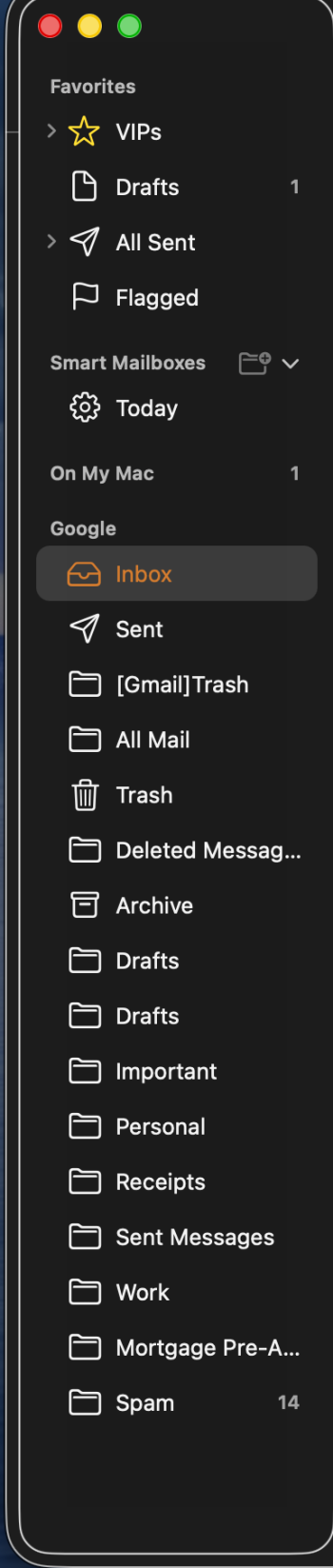
Due to a careless tap of a key, my All Mail folder vanished on my MacBook Air. How to recover it? Or how to set up All Mail once again?
 
Last edited:
Assuming we are talking about the same things, should be able to secondary click on favorites (where it was) and add 'All Mailboxes" from there....
 
I'm on Sequoia so stuff may have changed. For me there is a sidebar (menu bar at the top, View, Show Sidebar) and in the that is a favorites (menu bar at the top, Mailbox, Goto Favorite Mailbox)

Might want to get this moved to the MacOS forum....
 
Can't access that option on Tahoe, alas. (Or maybe I'm not seeing it, though I've looked.)
 
This thread is just screaming for a screenshot. To my knowledge, Favorites can't be deleted or hidden, only opened or closed using the little triangle that appears when you hover over it. You won't see "All Inboxes, "All Drafts", or "All Sent" though unless you have more than one email account set up. Show us what you're seeing.

Screenshot 2025-12-27 at 5.45.40 AM.png
 
Here's the screenshot (scroll down for full view). The "All Mail" is something I managed to add, to no effect whatever. And I don't see a Favorites option. I've read restoring the Mac, but that didn't change anything. I'm still receiving mail as I always did, but the search function for "All Mailboxes" would be immensely helpful to me.
 

Attachments

  • 1766781677523.png
    1766781677523.png
    125.5 KB · Views: 1
Register on MacRumors! This sidebar will go away, and you'll see fewer ads.