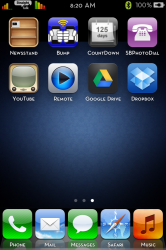
After weeks of searching and trying different methods, I finally have found a method that works!
First you will need to install a free package from Cydia called "Verizon Carrier Retina iOS 5"
After that you will need to SSH into your phone to System/Library/Carrier bundles/iPhone/Zeppelin_US.bundle
Edit the carrier.plist file.
Look for the line:
<key>StaticNATType</key>
<integer>448</integer>
In the next line insert:
<key>StatusBarImages</key>
<array>
<dict>
<key>AllowPrefixMatching</key>
<false/>
<key>CarrierName</key>
<string>Verizon</string>
<key>DefaultImage</key>
<string>Default_CARRIER_Zeppelin_US.png</string>
<key>FullScreenOpaqueImage</key>
<string>FSO_CARRIER_Zeppelin_US.png</string>
<key>StatusBarCarrierName</key>
<string>Verizon</string>
</dict>
</array>
**Keep this code handy, as the author claims you may need to re-edit the plist when you reboot your phone**
After that go to var/private/stash/themes.x/Verizon Carrier Retina iOS5.theme/Bundles/com.apple_US
make sure you have 3 copys of the carrier logo of your choice, and rename them exactly as the pngs in this file, then simply delete the 3 pngs in the file, and replace them with yours. Ensure you have the theme selected in Winterboard, Respring, and your custom carrier logo should appear 🙂
Enjoy! Let me know if you run into any problems, I'll try to help the best that I can.
First you will need to install a free package from Cydia called "Verizon Carrier Retina iOS 5"
After that you will need to SSH into your phone to System/Library/Carrier bundles/iPhone/Zeppelin_US.bundle
Edit the carrier.plist file.
Look for the line:
<key>StaticNATType</key>
<integer>448</integer>
In the next line insert:
<key>StatusBarImages</key>
<array>
<dict>
<key>AllowPrefixMatching</key>
<false/>
<key>CarrierName</key>
<string>Verizon</string>
<key>DefaultImage</key>
<string>Default_CARRIER_Zeppelin_US.png</string>
<key>FullScreenOpaqueImage</key>
<string>FSO_CARRIER_Zeppelin_US.png</string>
<key>StatusBarCarrierName</key>
<string>Verizon</string>
</dict>
</array>
**Keep this code handy, as the author claims you may need to re-edit the plist when you reboot your phone**
After that go to var/private/stash/themes.x/Verizon Carrier Retina iOS5.theme/Bundles/com.apple_US
make sure you have 3 copys of the carrier logo of your choice, and rename them exactly as the pngs in this file, then simply delete the 3 pngs in the file, and replace them with yours. Ensure you have the theme selected in Winterboard, Respring, and your custom carrier logo should appear 🙂
Enjoy! Let me know if you run into any problems, I'll try to help the best that I can.