
Got a tip for us?
Let us know
Become a MacRumors Supporter for $50/year with no ads, ability to filter front page stories, and private forums.
iOS 7 & iCloud Email
- Thread starter SBacklin
- Start date
- Sort by reaction score
You are using an out of date browser. It may not display this or other websites correctly.
You should upgrade or use an alternative browser.
You should upgrade or use an alternative browser.

Well, I'm glad Apple finally decided to give iOS users a way to mark email as SPAM so the server knows about it. I'm hoping that iOS Junk Filter isn't an independent one of the server like the Junk Filter in OSX Mail.app.Mail.app lets you move one or several emails to Junk folder.
There's no option to notify you of Junk mail.
I was hoping that iOS would finally allow notifications of incoming messages in other folders other then the inbox.
Well, I'm glad Apple finally decided to give iOS users a way to mark email as SPAM so the server knows about it. I'm hoping that iOS Junk Filter isn't an independent one of the server like the Junk Filter in OSX Mail.app.
I was hoping that iOS would finally allow notifications of incoming messages in other folders other then the inbox.
It actually can. You can subscribe to push updates from subfolders on iCloud mail.
Really? Is this something new that comes with iOS 7?It actually can. You can subscribe to push updates from subfolders on iCloud mail.

sniffies
macrumors 603
How exactly do you do that? I've been wanting this option for a while. Thanks.It actually can. You can subscribe to push updates from subfolders on iCloud mail.
I can't screen right now (don't have time to remove my corporate stuff from the images).How exactly do you do that? I've been wanting this option for a while. Thanks.
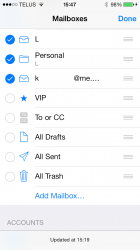
- In Mail.app back out to your top level mailbox view.
- Click Edit in the top right
- Click "Add Mailbox" at the bottom of the current options (above accounts).
- (If you have multiple accounts). Select the account you want the additional mailbox to.
- Select the Mailbox you want.
- Click Done.
The ability to do it on your main iCloud account is new. Previously you could add the folders in the account under Settings --> Mail, Contacts & Calendars.Really? Is this something new that comes with iOS 7?
That's just to add folders to iCloud. What me and the other poster is talking about is receiving notifications of incoming mail in folders other then the inbox.
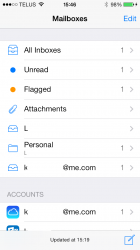
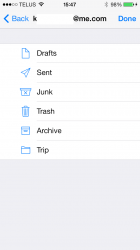
No, that's not what I was describing. This isn't creating a new folder, it is what is used to list existing folders nested under your inbox in mail.app. In my experience messages filtered to these folders will then hit notification center.
Attachments
Last edited:
Well if you select any current folders, you can either edit the name or delete the folder. Unless there's new options listed there that is new in iOS 7. When selecting any folders listed, what options are listedr? (Assuming you're using iOS 7) **I didn't see the attachments, lemme look**No, that's not what I was describing. This isn't creating a new folder, it is what is used to list existing folders nested under your inbox in mail.app. In my experience messages filtered to these folders will then hit notification center.
I added screens to my last post. In the third and final screen, if I put a check next to "Junk", it would be listed on my main mailbox scren (with unread, personal, attachments, flagged, etc.). Once it's there e-mails are pushed and hit notification center.Well if you select any current folders, you can either edit the name or delete the folder. Unless there's new options listed there that is new in iOS 7. When selecting any folders listed, what options are listed? (Assuming you're using iOS 7)
I went back to take a look. If that's the case, then I'm glad. I've been hounding Apple to get these features. 😉I added screens to my last post. In the third and final screen, if I put a check next to "Junk", it would be listed on my main mailbox scren (with unread, personal, attachments, flagged, etc.). Once it's there e-mails are pushed and hit notification center.
I went back to take a look. If that's the case, then I'm glad. I've been hounding Apple to get these features. 😉
Can't say it will hit the consumer release, but it's there in iOS7 B6! 🙂
What I would like is if the badge on Mail would get updated when new messages are read on my Mac.
If 3 new emails come in, iOS reports that in the badge. If I sit down and read them on my Mac instead, the badge is never cleared from the phone until I actually open Mail.
That functionality has been baked in since Mobile Me. Is your account on your phone still set to push?

jtfolden
macrumors 6502
That functionality has been baked in since Mobile Me. Is your account on your phone still set to push?
It's however iCloud set it up by default when I got the iPhone 5 last November...
Push is what it should be, correct? I just verified and it is.
Conversely, if I read/delete the emails on the iPhone then the mac is immediately updated.
Apple has already stated in a support article that read statuses aren't pushed to iOS devices if read from your computer. That's been a feature that multiple people want but for some reason it doesn't happen. I'm hoping Apple will update their services to allow it.That functionality has been baked in since Mobile Me. Is your account on your phone still set to push?

dictoresno
macrumors 601
What I would like is if the badge on Mail would get updated when new messages are read on my Mac.
If 3 new emails come in, iOS reports that in the badge. If I sit down and read them on my Mac instead, the badge is never cleared from the phone until I actually open Mail.
i have this issue with my icloud emails on my iphone 5, ipad mini and ipod 4. im running ios 7 on both the 5 and mini and emails never sync when checked on one device or another. i need to go into the inbox to make the new messages disappear on the device it wasnt originally checked on. i thought once i checked something on my phone, it would automatically mark it as read on my mini. and ive had icloud set up as my main email for awhile and its always been set on push. i dont have a mac computer, so this issue is plaguing me just across ios devices where i was under the impression it should be working.
Yeah, its very annoying that Apple doesn't upgrade their systems for the read/delete/moved statuses to be synced from Computer to iOS. If you do it from iOS, it syncs fine, just not the other way around.i have this issue with my icloud emails on my iphone 5, ipad mini and ipod 4. im running ios 7 on both the 5 and mini and emails never sync when checked on one device or another. i need to go into the inbox to make the new messages disappear on the device it wasnt originally checked on. i thought once i checked something on my phone, it would automatically mark it as read on my mini. and ive had icloud set up as my main email for awhile and its always been set on push. i dont have a mac computer, so this issue is plaguing me just across ios devices where i was under the impression it should be working.
Does it also update the badge icon counter?I can't screen right now (don't have time to remove my corporate stuff from the images).
- In Mail.app back out to your top level mailbox view.
- Click Edit in the top right
- Click "Add Mailbox" at the bottom of the current options (above accounts).
- (If you have multiple accounts). Select the account you want the additional mailbox to.
- Select the Mailbox you want.
- Click Done.
The ability to do it on your main iCloud account is new. Previously you could add the folders in the account under Settings --> Mail, Contacts & Calendars.
dictoresno
macrumors 601
Yeah, its very annoying that Apple doesn't upgrade their systems for the read/delete/moved statuses to be synced from Computer to iOS. If you do it from iOS, it syncs fine, just not the other way around.
what im saying is i do it from ios devices, my iphone 5 and mini, and nothing every syncs. if i check it on my phone, it doesnt update my ipad unless i open the app itself to refresh it.
Apple has already stated in a support article that read statuses aren't pushed to iOS devices if read from your computer. That's been a feature that multiple people want but for some reason it doesn't happen. I'm hoping Apple will update their services to allow it.
Weird. It works perfectly fine for me, my fiance and my parents. And has for years?
the-prophet
macrumors member
Yes. For the first time, you can actually send messages to the Junk folder.Does anyone testing out iOS 7 have/use iCloud email on their device? To those who do, what options does iOS 7 give for marking email messages as junk? Also, is there any notifications with your device with iOS 7 that mail has arrived in the Junk folder?
Don't know what was stopping us before.
jtfolden
macrumors 6502
Weird. It works perfectly fine for me, my fiance and my parents. And has for years?
I'm assuming your accounts are set to fetch then and not push.
That's what I was thinking when I read that.I'm assuming your accounts are set to fetch then and not push.