Become a MacRumors Supporter for $50/year with no ads, ability to filter front page stories, and private forums.

MacRumors

macrumors bot
Original poster
Apr 12, 2001
70,250
41,851


1Password today announced a redesigned unlock system for Mac and Windows that allows the app to open automatically when a user unlocks their device.
1password-deal-blue.jpg

The new setting lets 1Password unlock alongside the operating system when a user authenticates with Face ID, Touch ID, a PIN, or a system password. According to 1Password, this removes the repeated reauthentication many users encounter when returning to their computers after brief periods away, while still relying on the device's built-in authentication hardware to validate identity.

1Password said the feature is optional and forms part of a broader update introducing new security presets that define how frequently the app locks. The presets offer three default configurations ranging from automatic unlock with the device to more frequent password prompts. Each preset can be adjusted per device, and settings do not sync across platforms.

The update also introduces a security review prompt that explains how each preset works and, in some cases, recommends creating a recovery code. Recovery codes provide an additional fallback if users forget their password or lose access to a trusted device.

1Password said that mobile versions already support a similar device-based unlock, though the app will only reopen automatically if it was accessed within the previous 10 minutes.

The company said the new features are first rolling out to Individual and Family accounts. Business and Enterprise users will receive a separate update and no settings will change without administrator approval.

Article Link: 1Password Simplifies Access With New Unlock Setting
 
I'm finding 1Password less and less reliable these days. Very frequently I find passwords aren't synced properly between the Safari extension and the main app. The extension is reliable enough for filling in passwords, but when I go to save new ones, I always open the app itself and save there.
 
Last edited:
I've gleefully ditched 1Password for Apple's Passwords app, because this is not the kind of thing that should be managed by a third party app. I don't want to fight with glitchy extensions, pay a subscription, or deal with a master password anymore.

Passwords just works, and has enough features to satisfy the need.
 
Nice, this always annoys me on my work computer. Mostly because the Windows Hello unlock is just less smooth than on the Mac.

Don't think i will ever be able to use Apples Solution. I use too many different platforms and browsers, that 1Password just supports better and quicker.
 
At this point, for an Apple-only user I'd certainly just recommend using Apple Passwords, but as a cross-platform family (out of necessity, not choice), 1Password is a good option and worth the price. I'll have to see how these new features work, and how much control I have over the behavior.

I only wish my work laptop had some sort of biometric unlock, because I have to type my long password *all the time* to unlock it. Admittedly I'm very good at typing it at this point, but it sure does get tedious after a while. That is not 1Password's fault though.
 
I hope Apple Passwords gains the ability to add attachments so it really stuffs the 1Password subscription model that was a large nail in the coffin.

What Apple Passwords needs, for me, is the ability to lock it with a different password than the OS, be it macOS, or iOS, and no unlockable just my Apple ID and password.

I don't want my OS, or Apple password, to be the keys to the kingdom. I sill use 1password, for a couple reasons. 1) It's cross-platform, including linux, and without needing an admin-needed app to sync. 2) it has an independent password that I don't use anywhere else, and the OS can't unlock it without my master password.

I'm not loyal to any software of company, but Apple Passwords just isn't enough.
 
Last edited:
I've gleefully ditched 1Password for Apple's Passwords app, because this is not the kind of thing that should be managed by a third party app. I don't want to fight with glitchy extensions, pay a subscription, or deal with a master password anymore.

Passwords just works, and has enough features to satisfy the need.
Completely agree. This is the year I’m switching from 1Password to Apple Passwords as well. I’ve never loved relying on a third-party app for passwords either, and lately it’s felt increasingly glitchy. Autofill fails on a lot of sites, and it almost never works smoothly across macOS or iOS. At this point, Apple’s built-in option just feels simpler and more reliable.
 
I've gleefully ditched 1Password for Apple's Passwords app, because this is not the kind of thing that should be managed by a third party app. I don't want to fight with glitchy extensions, pay a subscription, or deal with a master password anymore.

Passwords just works, and has enough features to satisfy the need.
The big thing for me is the "all your eggs in one basket" issue. What would happen if you got locked out of your Apple ID? Would you still be able to get to your passwords?
 
I'm the opposite of many here I guess.

A huge feature, for me, of 1P is how it's totally separate from any of my Apple devices, accounts or logins and is fully cross platform.

This type of data is too important to be worrying about specific platform, device or OS requirements or issues.
 
Last edited:
$36 a year is entirely reasonable for such a useful program. I get people don't like subscriptions but 1Password is definitely worth it for me.

I see this feature as more for your desktop than mobile phone. That I would require faceID each time.
Same for me. I actually pay for the family subscription, and 1Password has really taken a lot of the friction out of getting the older and less techy members of my family comfortable with using a password manager. As far as the competitors go, I've tried LastPass, Keepass, and BitWarden; and none of them compare in functionality nor ease of use.

I understand why some would appreciate the convenience of the free, integrated solution Apple provides. But I think credential management is actually best served by a company whose primary focus is that product and separated from the OS and hardware. I appreciate that Apple hasn't abandoned Passwords (yet) and continues to slowly add functionality, but the big tech companies tend to be "jacks of all trades and masters of none" when it comes to products and services that don't contribute heavily to their bottom line.
 
This type of data is too important to be worrying about specific platform, device or OS requirements or issues.
Agree that is a concern.

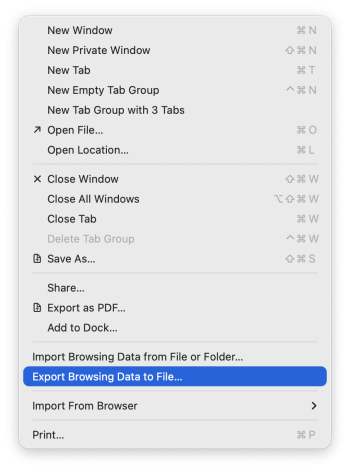
There is a fairly new Safari feature that allows you to export your bookmarks, browser history, and passwords to a zip file. Inside that zip file is a file named passwords.csv that contains all your passwords. I think most third party password utilities like 1PW can import that CSV file.

I've been exporting that data once a month or so then backing it up offsite.

Screenshot 2025-11-13 at 7.16.08 AM.png
 
Agree that is a concern.

There is a fairly new Safari feature that allows you to export your bookmarks, browser history, and passwords to a zip file. Inside that zip file is a file named passwords.csv that contains all your passwords. I think most third party password utilities like 1PW can import that CSV file.

I've been exporting that data once a month or so then backing it up offsite.

View attachment 2579148

👍

Certainly nice to have export features, but that doesn't at all compare to being able to log in to a totally 3rd party service, from any type of device on any major platform, to access and interact with my critical data.
 
  • Like
Reactions: Weaselboy
Considering that you can have secure notes to save documents, etc. the main thing that 1password still has is the ability to add custom entries like security questions. Once Apple adds that I will be fully ditching 1password.
 
  • Love
Reactions: parameter
discussion here seems to be basically people praising 1password or saying they use Apple Passwords instead, and not about the story.

using 1password, i'm just annoyed that this announcement (not just macrumors' copy, but the original) implies this is available now, and here i am on my mac with the current version, and no sign of it. because i would absolutely enable it, and wish i could on my linux systems too.

(those linux systems, to stray onto the topic people are mostly talking about, being why I can't use apple passwords, because honestly otherwise i probably would.)

Late update! The announced feature is now available! it wasn't earlier, *after* i'd run the latest update, but i guess it's doing some phased enablement thing.

i would probably do (am now doing) "convenient" for desktops at home (no-one else here) but "strict" for the laptop.
 
  • Love
Reactions: WaltCD
I just wish that using the MacOS <CTRL> + \ shortcut and authenticating with 1Password would unlock the 1Password Safari browser extension.

I also, at times, have the iOS safari extension just not load at all. When selecting a password field, instead of the site's password available above the keyboard, I get the iOS default "Passwords" link and after authenticating with FaceID, my password is then listed. Usually, this persists until I open the 1Password extension and authenticate.

I've been a 1Password user for a long time but there seems to be more emphasis on new features than perfecting the core UI.
 
Considering that you can have secure notes to save documents, etc. the main thing that 1password still has is the ability to add custom entries like security questions. Once Apple adds that I will be fully ditching 1password.
and credit cards, software licenses, ssh keys - in fact the whole ssh agent thing, although tbh after a while i stopped using that as it was annoying me for my use-case (can't remember the details), but for some it would surely suit.

(i think it was a bad interaction with ssh proxypass stuff, bouncing through an intermediate server)
 
  • Like
Reactions: parameter
I've gleefully ditched 1Password for Apple's Passwords app, because this is not the kind of thing that should be managed by a third party app. I don't want to fight with glitchy extensions, pay a subscription, or deal with a master password anymore.

Passwords just works, and has enough features to satisfy the need.
It's not cross-platform, however.
 
Register on MacRumors! This sidebar will go away, and you'll see fewer ads.