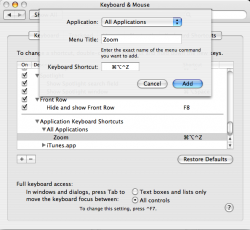
To set a keyboard hot key for the zoom menu option (which is the same as the green button):
System Preferences
-> Keyboard & Mouse
-> Keyboard Shortcuts
-> Click the +
-> Make sure it says All Applications in the dropdown.
-> In the menu title type in "Zoom" (Capitalization matters, I believe).
-> Click in the keyboard shortcut area and set the keyboard shortcut you want. I'd make it a cmd-opt-ctrl-z or something, so as not to have a chance of conflicting with any other program hotkeys.
It should take affect on the next application launch.
EDIT: And apparently this doesn't work for ALL applications. Some apps (Opera, TextWrangler, BBEdit) don't have a Window -> Zoom menu item, but most do.
Sadly, this won't work for some applications that DO have a Window/Zoom menu option, as far as I know: Firefox, Thunderbird, TextWrangler...
Works fine with Finder and others.
Yes, me too, but that's not a matter of shortcuts, but how Mac OS handles zooming/maximization.
The general idea is that the application should handle that action in the best way possible. For browsers, it's without doubt taking the whole screen, but some apps don't handle it the best they could.
The sizeup! app is great! You can Maximize your window and much more. It also allows you to tile two windows side by side for comparison. I really missed this option when I came to Mac from Windows.
There is a free version called 1UP with limited capabilities. You can download this app from this link.
The sizeup! app is great! You can Maximize your window and much more. It also allows you to tile two windows side by side for comparison. I really missed this option when I came to Mac from Windows.
There is a free version called 1UP with limited capabilities. You can download this app from this link.
What a douchy statement. Some of us don't want the clutter of a gazillion windows peeking out all over the screen when you can simply shortcut to get to whatever app you have running in the background.