
Got a tip for us?
Let us know
Become a MacRumors Supporter for $50/year with no ads, ability to filter front page stories, and private forums.
How to tell when Turbo Boost is activated?
- Thread starter csnplt
- Start date
- Sort by reaction score
You are using an out of date browser. It may not display this or other websites correctly.
You should upgrade or use an alternative browser.
You should upgrade or use an alternative browser.


JoshGlzBrk
macrumors 6502a
The only way I know of is using Intel's turbo boost monitor widget for windows. I have not been able to find a version for mac systems but maybe they will release those soon?
If you can boot up windows in bootcamp you will be able to install this:
http://downloadcenter.intel.com/Detail_Desc.aspx?agr=Y&DwnldID=18353
It doesn't seem to work in VM but works in bootcamp.
Looks like this:
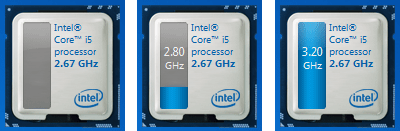
If you can boot up windows in bootcamp you will be able to install this:
http://downloadcenter.intel.com/Detail_Desc.aspx?agr=Y&DwnldID=18353
It doesn't seem to work in VM but works in bootcamp.
Looks like this:

ReallyBigFeet
macrumors 68030

Chupa Chupa
macrumors G5
The back of the hinge will open and the rear spoiler pops up on mine.
Ha. A MacBook Pro 911. I like.
The back of the hinge will open and the rear spoiler pops up on mine.
Good one🙂
NOTORIOUS187
macrumors member
The back of the hinge will open and the rear spoiler pops up on mine.
Lol.
Is there some way to tell when Turbo Boost is activated? I'd love to be able to know when my 2.66 GHz processor is actually running at a higher speed (or is slowed down by speedstep).
Is there any sort of menubar item to do this?
PCs have had utilities that do this for years, probably due to home-builds, and CPU overclocking. Now that variable speed CPUs are becoming the norm, I would assume that apps such as iStat will have CPU clock speeds added to their widgets.
Jonathon McMast
macrumors member
Hello. Anybody knows how to tell when Turbo Boost is activated under Mac OS? Is it possible to manually activate it? Thanks.
LOL
elfxmilhouse
macrumors 6502a

Jarooda
macrumors member

dsprimal
macrumors 6502a
The back of the hinge will open and the rear spoiler pops up on mine.
LMAO

SoCalRich
macrumors 6502
The back of the hinge will open and the rear spoiler pops up on mine.
its hard ot tell when the turbo is in use, it makes like a high pitched squeel, but its easier to tell when it just stopped boosting, you could definitely hear the blow off valve, sounds like a SWOOOSH noise.
there is a manual way to activate it:
http://www.youtube.com/watch?v=qcDztfFXPww
LMAO....

DAMNiatx
macrumors 6502a
Hello. Anybody knows how to tell when Turbo Boost is activated under Mac OS? Is it possible to manually activate it? Thanks.
Hello, anybody why this poster so dumb ? 😀

Hello, anybody why this poster so dumb ? 😀
Why dumb? Am I missing something?


aliensporebomb
macrumors 68000
One way to find out....
Check out Marcel Bresink's "Temperature Monitor" application.
Pull down under window and select "show system info".
On the system information pane select "more info"
You will see something like this:

That's while running BOINC / Seti @ Home in 8 threads (8 workunits crunching at once),.
I'm keeping an eye out for more utilities that recognize this feature but this
is the only one I'm aware of so far.
Check out Marcel Bresink's "Temperature Monitor" application.
Pull down under window and select "show system info".
On the system information pane select "more info"
You will see something like this:
That's while running BOINC / Seti @ Home in 8 threads (8 workunits crunching at once),.
I'm keeping an eye out for more utilities that recognize this feature but this
is the only one I'm aware of so far.
Check out Marcel Bresink's "Temperature Monitor" application.
Pull down under window and select "show system info".
On the system information pane select "more info"
You will see something like this:
That's while running BOINC / Seti @ Home in 8 threads (8 workunits crunching at once),.
I'm keeping an eye out for more utilities that recognize this feature but this
is the only one I'm aware of so far.
Thanks. For each core, is the clock frequency calculated based on the temperature within the corresponding core? If so, the results may not be accurate as the temperature can be affected by lots of other factors.

lpolarityl
macrumors 6502a
there is a manual way to activate it:
http://www.youtube.com/watch?v=qcDztfFXPww
That slayed me, LOL!!!!
Constantine1337
macrumors 6502
- This is my fav.The back of the hinge will open and the rear spoiler pops up on mine.
On the serious note, I'd also like to have a widget of some sort that can track CPU Speed. 😉
I'd also like to know if it's ever activated. I have encoded a lot of video on my i7 MBP and using MacCPUID I have never once seen it go above the base 2.66 GHz frequency.
I don't have Windows installed so I can't look there. Does it work under OS X?
Depending on your encoder, you might do better without turbo boost. IIRC, turbo boost turns off your second core.