Become a MacRumors Supporter for $50/year with no ads, ability to filter front page stories, and private forums.

contoursvt

macrumors 6502a
Original poster
Jul 22, 2005
832
0
I've got a client who's got thousands and thousands of files which are in subfolders that contain backslashes. He wants to either replace the slashes with another character or just remove them.

Can automator deal with multiple folders that contain folders in them ..etc..maybe 3-4 nests deep? If not, then maybe a free download that can do this?

Any suggestions welcome.
 
Name Mangler

Just do a search of the parent folder for all files. Then sort by kind and select the files (not folders) you want to change. Simple!
 
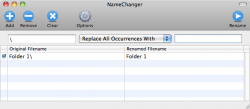
Best way to do this is with a free utility called NameChanger. Just get a list of the files in one place (best way is to search for them), and drag them into NameChanger. Then you can set NameChanger to replace certain characters in the filenames.
 

Attachments

  • NameChanger.png
    NameChanger.png
    37.1 KB · Views: 233
Here's one for the terminal. Open the Terminal application and go to the top directory where you want to rename the files.

To rename directories:

IFS=$'\n' find . -type d -name '*\\*' | while read -r NAME; do NEW=$(tr '\\' ' ' <<< "$NAME"); mv "$NAME" "$NEW"; done

To rename files:

IFS=$'\n' find . -type f -name '*\\*' | while read -r NAME; do NEW=$(tr '\\' ' ' <<< "$NAME"); mv "$NAME" "$NEW"; done

These commands replace the backslash with a normal space. As usual when using the terminal you should try it on some test files first.
 
NameMangler (or Fie List if you're still on Tiger or before; same developer) can deal with multiple nested folders and will do a find and replace on the backslash character just in the file names, all in one drag-and-drop.
 
Register on MacRumors! This sidebar will go away, and you'll see fewer ads.