
Become a MacRumors Supporter for $50/year with no ads, ability to filter front page stories, and private forums.

zoran

macrumors 601
Original poster
Jun 30, 2005
4,890
136
Now this is one of the strangest things ive ever encountered with my iMac and ipod Nano. The Nano is always synced with iTunes and all of the songs i have on the iMac are on the Nano as well.
How can it be that there is one song existing on the Nano that does not exist on the iMac? I can see it with iTunes but when i double click on it it cannot play it and ask me to locate it! Trying to locate it using TM but not even that will not do!
What am i doing wrong here?
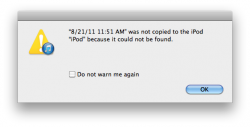
 
And it wasn't just this, now this came up when i tried to sync my Nano with iTunes. Nano will not sync!
 

Attachments

  • Screen shot 2014-10-19 at 9.39.56 AM.png
    Screen shot 2014-10-19 at 9.39.56 AM.png
    25.2 KB · Views: 92
Not sure this is the appropriate forum for your question but it sounds like you inadvertently deleted the file in question on your iMac. So the file is not invisible, it just doesn't exist on your system.
 
and what about the msg that popped up when i tried to sync the Nano?
 
and what about the msg that popped up when i tried to sync the Nano?
Maybe you don't understand the concept of syncing. iTunes cannot download a file from your Mac to your Nano if it doesn't exist on your Mac. This is what the message is trying to tell you.
 
Maybe you don't understand the concept of syncing. iTunes cannot download a file from your Mac to your Nano if it doesn't exist on your Mac. This is what the message is trying to tell you.
I used the "PodPhone to Mac" application and retrieved the song from Nano, nut this sg still appears! Can i at least get rid of it now that i got the song back?
 
I used the "PodPhone to Mac" application and retrieved the song from Nano, nut this sg still appears! Can i at least get rid of it now that i got the song back?
Delete the iTunes library entry for the song and then find where on your Mac the song is located and then add it back to your iTunes library.
 
Delete the iTunes library entry for the song and then find where on your Mac the song is located and then add it back to your iTunes library.
How do i find the songs entry to delete it?
 
Open your iTunes library on your Mac as if you were going to play a song. Find the song, right click on it and then select delete
 
Open your iTunes library on your Mac as if you were going to play a song. Find the song, right click on it and then select delete
I have already done this and the problem still perisists. Might my issue be something else different from that song?
 
Register on MacRumors! This sidebar will go away, and you'll see fewer ads.