

Got a tip for us?
Let us know
Become a MacRumors Supporter for $50/year with no ads, ability to filter front page stories, and private forums.
A super, super, basic question about Gatekeeper in Sequoia (and on)
- Thread starter seggy
- Start date
- Sort by reaction score
You are using an out of date browser. It may not display this or other websites correctly.
You should upgrade or use an alternative browser.
You should upgrade or use an alternative browser.
In Sequoia it's the same as before:
Disable Gatekeeper on macOS Catalina (10.15)
Permanently disable or bypass Gatekeeper by following the instructions on this website.
disable-gatekeeper.github.io
thanksIn Sequoia it's the same as before:
Disable Gatekeeper on macOS Catalina (10.15)
Permanently disable or bypass Gatekeeper by following the instructions on this website.disable-gatekeeper.github.io
wait no this is irrelevant where Sequoia is concerned
you can't do that anymore which is why i'm asking
Do you have some error? If it asks you to confirm your action in System Settings, you need to do steps 4 and 5 from this guide, opening Privacy & Security settings and select installing apps from "Anywhere". This is what i did. Do you have some other error or missed this part?thanks
wait no this is irrelevant where Sequoia is concerned
you can't do that anymore which is why i'm asking
No - Sequoia defeats the ability to get Anywhere back permanently by using the first option.Do you have some error? If it asks you to confirm your action in System Settings, you need to do steps 4 and 5 from this guide, opening Privacy & Security settings and select installing apps from "Anywhere". This is what i did. Do you have some other error or missed this part?
Are you using Sequoia?
Last edited:

That's not true. It's working in Sequoia and the latest Tahoe.No - Sequoia defeats the ability to get Anywhere back permanently by using the first option.
Are you using Sequoia?
After you run sudo spctl --master-disable, the message "Globally disabling the assessment system needs to be confirmed in System Settings" appears.
In System Settings - Privacy & Security you have to select Anywhere and confirm
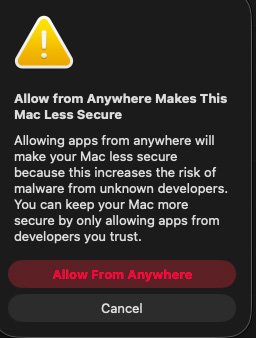
Have you modified GKAutoRearm from Terminal or with a configuration profile?
https://osxdaily.com/2015/11/05/stop-gatekeeper-auto-rearm-mac-os-x/
https://osxdaily.com/2015/11/05/stop-gatekeeper-auto-rearm-mac-os-x/
This is what i was considering but i was wondering if there was a less cumbersome optionHave you modified GKAutoRearm from Terminal or with a configuration profile?
https://osxdaily.com/2015/11/05/stop-gatekeeper-auto-rearm-mac-os-x/

The question:
"How do I completely disable it system-wide, and keep it disabled permanently?"
I'm amazed at the number of "non-answers" that follow the original post.
OP:
Here's your answer.
1. Open terminal
2. Enter:
sudo spctl --master-disable
(copy and paste this into terminal)
3. Terminal will ask for your password, so enter it. You WILL NOT see it as you type it, so you have to be correct
4. You'll now see a blurb in terminal that tells you "blah blah" (can't remember exactly). Just close terminal
5. Next, open the "privacy & security" settings pane. Scroll down towards the bottom.
6. Where it says "allow applications from"... choose "anywhere" from the popup menu
7. Once more, you may be asked to enter your password.
8. Close System Settings. All done.
Disabling Gatekeeper permanently is one of THE FIRST THINGS I DO with any OS install for myself. I don't want it bothering me!
(please come back and tell us if this worked for you. If not, there are "other ways"...)
"How do I completely disable it system-wide, and keep it disabled permanently?"
I'm amazed at the number of "non-answers" that follow the original post.
OP:
Here's your answer.
1. Open terminal
2. Enter:
sudo spctl --master-disable
(copy and paste this into terminal)
3. Terminal will ask for your password, so enter it. You WILL NOT see it as you type it, so you have to be correct
4. You'll now see a blurb in terminal that tells you "blah blah" (can't remember exactly). Just close terminal
5. Next, open the "privacy & security" settings pane. Scroll down towards the bottom.
6. Where it says "allow applications from"... choose "anywhere" from the popup menu
7. Once more, you may be asked to enter your password.
8. Close System Settings. All done.
Disabling Gatekeeper permanently is one of THE FIRST THINGS I DO with any OS install for myself. I don't want it bothering me!
(please come back and tell us if this worked for you. If not, there are "other ways"...)

You should read more carefully, the second reply has everything you described and more, the rest is about the setting not persisting.I'm amazed at the number of "non-answers" that follow the original post.
That's not true. It's working in Sequoia and the latest Tahoe.
After you run sudo spctl --master-disable, the message "Globally disabling the assessment system needs to be confirmed in System Settings" appears.
In System Settings - Privacy & Security you have to select Anywhere and confirm
View attachment 2567521
That's weird, after i was fiddling with profiles it worked the third time and this time it seems to have stuck.
Strange.
Register on MacRumors! This sidebar will go away, and you'll see fewer ads.