Become a MacRumors Supporter for $50/year with no ads, ability to filter front page stories, and private forums.

andy.barron

macrumors 6502
Original poster
Nov 30, 2006
443
0
Bedford, England
as why external drives would also have previously mounted icons now locked?
 

Attachments

  • Screen shot 2011-09-10 at 20.19.48.png
    Screen shot 2011-09-10 at 20.19.48.png
    136.8 KB · Views: 125
Try clicking "Get Info" on the drive, selecting the Icon and then pressing delete on your keyboard. That should remove any custom icon.
 
Hi & thanks for the reply.

The icon is of the same drive mounted (if you look at the names) but with a locked icon. I will try to explain what is happening a bit better...:

1. logged in as user with those 2 drives mounted (I have a script that automounts the drives)
2. Switch to another user.
3. Log back into original user & it attempts to auto mount the drives & you get as per the screen grab with locked icons from the previous session.

I hope I have explained this correctly!
 
Hi & thanks for the reply.

The icon is of the same drive mounted (if you look at the names) but with a locked icon. I will try to explain what is happening a bit better...:

1. logged in as user with those 2 drives mounted (I have a script that automounts the drives)
2. Switch to another user.
3. Log back into original user & it attempts to auto mount the drives & you get as per the screen grab with locked icons from the previous session.

I hope I have explained this correctly!

It sounds like your script might need to be modified to check if the drives are mounted before trying to mount them. Are you sure you need to have the script run again when you switch back to your user account? Your post is a bit confusing. You say "switch" to another user. This does not involve logging out so why does your step 3 say "log back in" when you really should have to simply "switch" back?
 
Sorry, yes I meant switch back & as the script activates as a 'login item' I guess this isn't the issue.

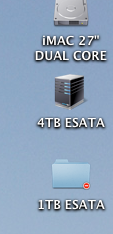
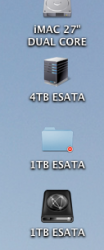
Interestingly I have just 'switched ' to my user & one of the drives is showing as this (not sure why)


& if I re-mount it is fine


So it seems that maybe the drives drop off after inactivity (I have been at work & just got back)?
 

Attachments

  • Screen shot 2011-09-12 at 17.41.57.png
    Screen shot 2011-09-12 at 17.41.57.png
    38.7 KB · Views: 66
  • Screen shot 2011-09-12 at 17.42.08.png
    Screen shot 2011-09-12 at 17.42.08.png
    52.5 KB · Views: 56
Register on MacRumors! This sidebar will go away, and you'll see fewer ads.