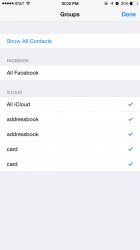
acblue94 macrumors 6502a Original poster Jul 26, 2011 576 1,003 New York, NY. Dec 1, 2014 #1 Take a look at the photo. I always have had just "all iCloud". Now I have these extra items on the list. Attachments image.jpg 133.5 KB · Views: 123
Take a look at the photo. I always have had just "all iCloud". Now I have these extra items on the list.
D dcharleyultra macrumors 6502 Sep 28, 2013 397 1 Dec 1, 2014 #2 They are contacts from other email accounts, etc. They should mate up with items under your Mail, Contacts and Calendar Settings.
They are contacts from other email accounts, etc. They should mate up with items under your Mail, Contacts and Calendar Settings.
acblue94 macrumors 6502a Original poster Jul 26, 2011 576 1,003 New York, NY. Dec 1, 2014 #3 dcharleyultra said: They are contacts from other email accounts, etc. They should mate up with items under your Mail, Contacts and Calendar Settings. Click to expand... I only have a gmail, iCloud mail, and work email. A total of three only
dcharleyultra said: They are contacts from other email accounts, etc. They should mate up with items under your Mail, Contacts and Calendar Settings. Click to expand... I only have a gmail, iCloud mail, and work email. A total of three only
xraydoc Contributor Oct 9, 2005 11,354 5,920 192.168.1.1 Dec 1, 2014 #4 Looks like you've made (perhaps inadvertently) some groups within your iCloud contacts. If you use a Mac, it's easy to remove the groups from the address book/contacts app.
Looks like you've made (perhaps inadvertently) some groups within your iCloud contacts. If you use a Mac, it's easy to remove the groups from the address book/contacts app.
N newagemac macrumors 68020 Mar 31, 2010 2,091 23 Dec 2, 2014 #5 Those are contact groups within iCloud. You can create groups on your Mac with the Contacts app and possibly also through the iCloud.com website.
Those are contact groups within iCloud. You can create groups on your Mac with the Contacts app and possibly also through the iCloud.com website.
gsmornot macrumors 68040 Sep 29, 2014 3,755 3,988 Dec 2, 2014 #6 Groups can be made through iCloud.com. That is where I make mine that later get used with Group Texting apps.
Groups can be made through iCloud.com. That is where I make mine that later get used with Group Texting apps.