
Become a MacRumors Supporter for $50/year with no ads, ability to filter front page stories, and private forums.

MacRumors

macrumors bot
Original poster


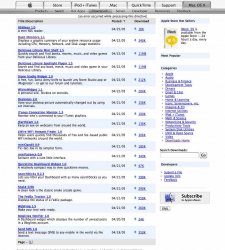
Apple has partially opened their Dashboard Widgets page in their Mac OS X Downloads Area.

At present the Download Page is only partially active with file names linking to missing pages, but download links for many of the widgets are presently available.

3rd party widgets include a mini RSS reader, solitaire, Send SMS, Quicktime player, FedEx tracker and more... Widgets are activated by simply double clicking on their icon in Mac OS X 10.4's Finder.
 

Attachments

  • Picture 8.jpg
    Picture 8.jpg
    88.7 KB · Views: 4,782
As a coder I plan to start to make some widgets. I hope others will do the same. The few that I have tested look promising, but we need more 🙂
 
Solitare!!

Yesss Solitare, every pc users dream!!
So did think secret get kicked off the internet? I can't load the page. Sorry to be off the topic a bit.

I am very excited about this widgets page, however I will be more excited on friday when I can use this widgets page.
 
Removing widgets?

Okay, so I've tried a couple widgets - and some I don't like. How do you uninstall them? I understand how to remove them from your dashboard or whatever, but how do you get them removed from the available ones in the, emm, whatever you call it - a tray?
 
dimer0 said:
Okay, so I've tried a couple widgets - and some I don't like. How do you uninstall them? I understand how to remove them from your dashboard or whatever, but how do you get them removed from the available ones in the, emm, whatever you call it - a tray?

Library/widgets
 
so if u got tiger these things are gonna be free right? please apple.. don't bust a 99 cents on us here... 😱
 
Spotlight doesn't work?!

dimer0 said:
Okay, so I've tried a couple widgets - and some I don't like. How do you uninstall them? I understand how to remove them from your dashboard or whatever, but how do you get them removed from the available ones in the, emm, whatever you call it - a tray?

You can't use Spotlight to find 'em?! Pah...
 
RSS feed for widgets

Based on the styling of other RSS feed URLs for Apple Mac OS X Downloads categories, I determined correctly the one for Dashboard Widgets. It's not showing anything yet; I assume functionality will arrive soon.
 
My favorites are the FedEx tracker, SMS messenger, and the wifi locater. I'm going to be developing some widgets as soon as Tiger is released.
 
Pismo said:
My favorites are the FedEx tracker, SMS messenger, and the wifi locater. I'm going to be developing some widgets as soon as Tiger is released.

Be sure to post them. Also it would be cool to make a thread of just members widgets that they have developed. Maybe I'll do that ...
 
Mr. Anderson said:
So tell me, what's the difference between a widget and an app?D
Widgets are mostly HTML/XML based with style sheets. Some widgets will actually work in a browser. There might be other ways to make widgets also. Apps should be self explanatory.
 
I have mixed feelings about widgets and dashboard. Nothing dashboard offers is new it is just how to get the information that is. Sherlock is like the old dashboard in a lot of ways. The internet and full apps provide much more information than dashboard does. However, to have all this information so quick and easy with preset information like city for weather and translation language is really nice. I can see how having a small screen and lots of widgets is going to be a problem. I think dashboard needs to have an expose like feature where you can set up your widgets in groups and at the touch of a button show those grouped widgets and hide the rest. These new widgets are making me like dashboard a lot more. On kind of a side note it would be great to be able to put in any carriers tracking number and have it figure out which carrier it belongs to and track the package instead of just having one for fed ex. Anyway a lot of good stuff and a lot of potential too.
 
Disappointment?

Am I the only person just a little disappointed with Tiger? I mean - there are some cool things in it but it didn't make my 1GHz Powerbook feel any faster. It didn't add any really cool functionality. Maybe there was some tinkering under the hood but I don't see it at all. This really does feel like it should have been a free upgrade - almost like they were REALLY trying to make it worth the money but just couldn't come up with enough new features.
 
Dashboard SDK

Does the Dashboard SDK come with Tiger and do you have to install XCode? From what I read the SDK has a lot more documentation than Apple has on their site for creating widgets.
 
crees! said:
Does the Dashboard SDK come with Tiger and do you have to install XCode? From what I read the SDK has a lot more documentation than Apple has on their site for creating widgets.

Haha the tiger dev tools come with a fortune cookie widget
 
swissman: if you put the number into google it will figure out which it is for you. i am sure that there is a google widget (if not apple then someone else) and that will do that for you and much more.
 
Register on MacRumors! This sidebar will go away, and you'll see fewer ads.