Become a MacRumors Supporter for $50/year with no ads, ability to filter front page stories, and private forums.

MacRumors

macrumors bot
Original poster


No, you aren't going crazy – Apple has quietly made a backend change to the App Store app in iOS that switches the location of the Updates tab and renames it to make it more prominent.

iOS-App-Store-General-Feature-Dock.jpg

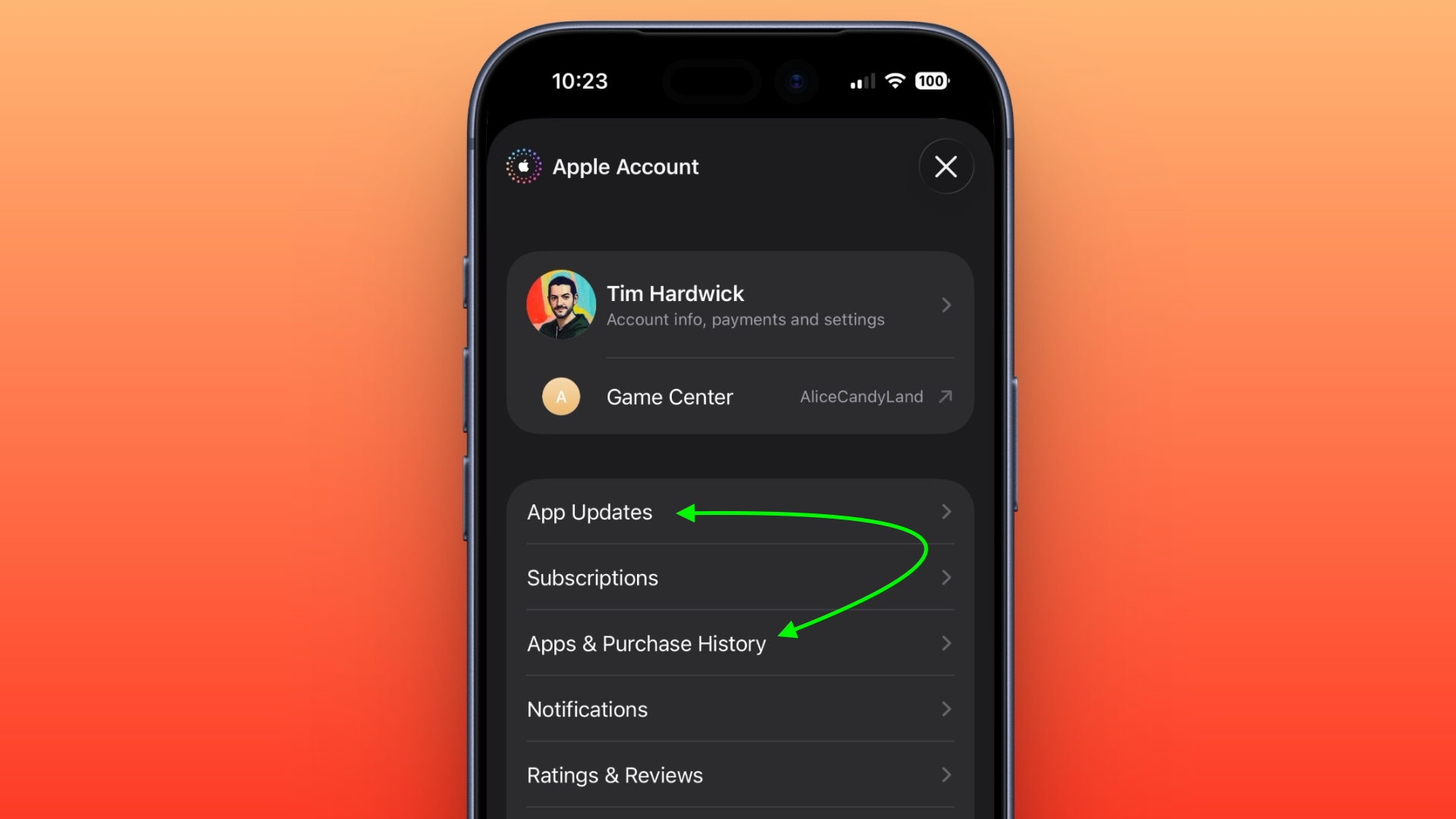
In the App Store app, you can see the change by tapping your profile picture in the top-right corner. The "Apps & Purchase History" tab used to be at the top the list, but it has switched places with "Updates," which is now called "App Updates."

The change was made by Apple without issuing a software update and is evident on both iOS 26.4.1 and the iOS 26.5 beta.
app-updates-app-store-ios.jpeg

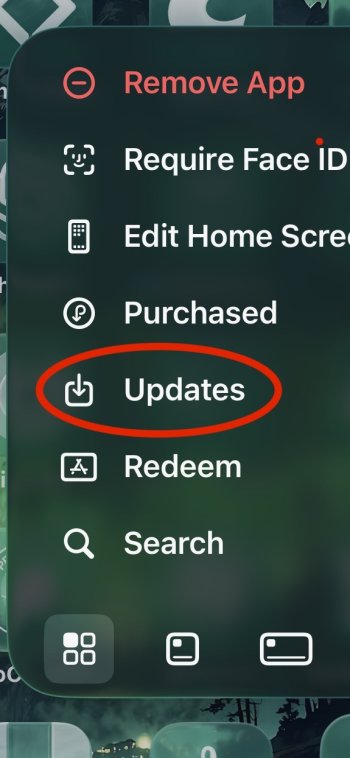
There's actually a faster way to access the App Updates page in iOS 26.4 that was recently highlighted by Daring Fireball's John Gruber: Simply long-press on the App Store app on your Home Screen and you can jump straight to it from the contextual menu.

Article Link: Apple Quietly Tweaked the iOS App Store App – Here's What's Changed
 
And yet they had to make it an extra menu-tap away anyways to check for updates, which is really kinda annoying in the first place...

... as an aside, I really wish there was a goddamn setting to just give me app updates as they come in. I'm tired of checking for updates and finding out Apple was holding my phone back from updates 3-4 days ago from some apps.
 
I've always used the long press method.. But I have to say, I wish they had a feature like with TestFlight where it updates right away when its power.. I usually update at least once or more a day.. We can't even make a shortcut to do this action.. I would just prefer the option to update straight away when I charge it..
 
It appears to be more aggressive about keeping apps auto updated too. My OCD is still not relieved
 
And yet they had to make it an extra menu-tap away anyways to check for updates, which is really kinda annoying in the first place...

... as an aside, I really wish there was a goddamn setting to just give me app updates as they come in. I'm tired of checking for updates and finding out Apple was holding my phone back from updates 3-4 days ago from some apps.
True story: I reported this extra tap on the beta feedback app and they responded “working as intended” and closed my ticket. I guess I’ll take the long press on the App Store icon as an olive branch. I’m still a little salty that Updates was removed from the bottom bar a decade ago.
 
I've always used Screen Time restriction to disable "account" modification (Settings -> Screen Time -> Restriction -> Account).
In that way you cannot modify any settings related to Apple ID etc.
With that restriction in the "App Store" app you could only access to the "Updates" section.
Since 26.4 instead in the "App Store" app you have full unrestricted access to the account.
I've tried to disable->re-enable the restriction in Screen Time with no luck.
I hope this is a bug and not a "feature".
 
Speaking of App updates: can one disable the blue dot next to updated apps? Sorry, but it is my biggest pet peeve ☺️

I don't think so, but perhaps if/when this changes Apple may also pay attention to how much it stands out (🕶️) when running with tinted app icons in a muted colour.
 
  • Love
Reactions: LucM1974
Register on MacRumors! This sidebar will go away, and you'll see fewer ads.