

I have a Mac Pro 7,1 with Win11 via bootcamp and Sonoma MacOS. The Apple SSD will not boot my Mac Pro 7,1. Events proceeding this are:
Booted up in MacOS, then changed the startup disk to Win11 and logged into Win11, did a few things then noticed I had pending Windows update. Ran the update but it didn't reboot after the update. Restarted Win11 via the boot option menu, no problems. From windows restarted back to the Sonoma MacOS, it started to boot at the Apple screen then shutdown, after a minute it rebooted, then failed to the black screen of death, boot panic screen.
It will only boot via a backup Catalina internal drive and my Win11 drive. The internal Apple drive partition now looks odd.
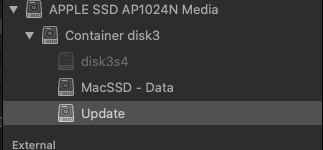
Here are the contents of the Update Volume:
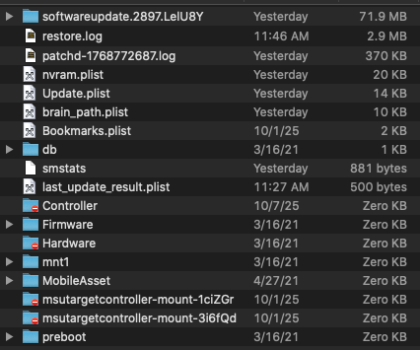
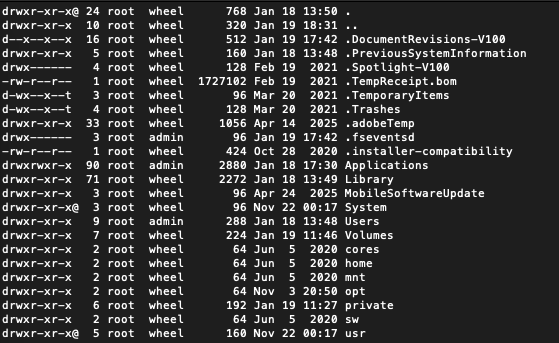
The Contents of MacSSD - Data:
Booted into Catalina and ran disk first aid.
Running First Aid on “Container disk3”:
The repair cannot be performed because one or more volumes are mounted. : (-69566)
Operation failed…
Running First Aid on "disk3s4":
warning: container has been mounted by APFS version 2632.40.17, which is newer than 1412.141.3.7.2
warning: disabling overallocation repairs by default; use -o to override
Checking the EFI jumpstart record.
Checking the space manager.
Checking the space manager free queue trees.
Checking the object map.
Checking volume.
Checking the APFS volume superblock.
The volume MacSSD was formatted by storagekitd (2236.141.1) and last modified by apfs_kext (2332.140.13).
error: apfs_sb at apfs_fs_index (3): apfs_incompatible_features has unsupported flags: (0x20)
Volume superblock is invalid.
The volume /dev/rdisk3s4 could not be verified completely.
File system check exit code is 0.
Restoring the original state found as unmounted.
Running First Aid on "MacSSD - Data":
Checking snapshot 1 of 1 (com.apple.TimeMachine.2026-01-19-181357.local)
.
.
.
.
warning: xattr_val: object (oid 0x243ddb5): invalid flags (0x6), given name (com.apple.fs.graft-vol-uuid)
warning: inode_val: object (oid 0x2466154): invalid internal_flags (0x2008000 / valid-flags are: 0x3fffdf)
Too many warnings of this type generated; suppressing subsequent ones.
Checking the extent ref tree.
Checking the fsroot tree.
warning: xattr_val: object (oid 0x243ddb5): invalid flags (0x6), given name (com.apple.fs.graft-jobj-id-base)
warning: xattr_val: object (oid 0x243ddb5): invalid flags (0x6), given name (com.apple.fs.graft-jobj-id-len)
.
.
Verifying allocated space.
The volume /dev/rdisk3s1 appears to be OK.
File system check exit code is 0.
Restoring the original state found as unmounted.
Operation successful.
I'm not really sure what happen or how to proceed. Any suggestions or explains are welcome.
Booted up in MacOS, then changed the startup disk to Win11 and logged into Win11, did a few things then noticed I had pending Windows update. Ran the update but it didn't reboot after the update. Restarted Win11 via the boot option menu, no problems. From windows restarted back to the Sonoma MacOS, it started to boot at the Apple screen then shutdown, after a minute it rebooted, then failed to the black screen of death, boot panic screen.
It will only boot via a backup Catalina internal drive and my Win11 drive. The internal Apple drive partition now looks odd.
Here are the contents of the Update Volume:
The Contents of MacSSD - Data:
Booted into Catalina and ran disk first aid.
Running First Aid on “Container disk3”:
The repair cannot be performed because one or more volumes are mounted. : (-69566)
Operation failed…
Running First Aid on "disk3s4":
warning: container has been mounted by APFS version 2632.40.17, which is newer than 1412.141.3.7.2
warning: disabling overallocation repairs by default; use -o to override
Checking the EFI jumpstart record.
Checking the space manager.
Checking the space manager free queue trees.
Checking the object map.
Checking volume.
Checking the APFS volume superblock.
The volume MacSSD was formatted by storagekitd (2236.141.1) and last modified by apfs_kext (2332.140.13).
error: apfs_sb at apfs_fs_index (3): apfs_incompatible_features has unsupported flags: (0x20)
Volume superblock is invalid.
The volume /dev/rdisk3s4 could not be verified completely.
File system check exit code is 0.
Restoring the original state found as unmounted.
Running First Aid on "MacSSD - Data":
Checking snapshot 1 of 1 (com.apple.TimeMachine.2026-01-19-181357.local)
.
.
.
.
warning: xattr_val: object (oid 0x243ddb5): invalid flags (0x6), given name (com.apple.fs.graft-vol-uuid)
warning: inode_val: object (oid 0x2466154): invalid internal_flags (0x2008000 / valid-flags are: 0x3fffdf)
Too many warnings of this type generated; suppressing subsequent ones.
Checking the extent ref tree.
Checking the fsroot tree.
warning: xattr_val: object (oid 0x243ddb5): invalid flags (0x6), given name (com.apple.fs.graft-jobj-id-base)
warning: xattr_val: object (oid 0x243ddb5): invalid flags (0x6), given name (com.apple.fs.graft-jobj-id-len)
.
.
Verifying allocated space.
The volume /dev/rdisk3s1 appears to be OK.
File system check exit code is 0.
Restoring the original state found as unmounted.
Operation successful.
I'm not really sure what happen or how to proceed. Any suggestions or explains are welcome.