Become a MacRumors Supporter for $50/year with no ads, ability to filter front page stories, and private forums.

MBP123

macrumors regular
Original poster
May 26, 2006
192
0
I have a folder on my computer where files are automatically added, but I only care about seeing ~ 1% of them. Is there a way (via automator or some other tool) to either delete the files I don't want, or move the ones I do want to a separate folder automatically without me having to manually run a script every time?

Basically, I get these files automatically generated every minute of every day, and I would like to have them there for reference. But I really only want to check on them every 3 hours or so. So for the 1440 files (# of minutes in a day) that are created each day, I really only care about 8 of them.

Any ideas?
 
A lot depends on the criteria you need to determine the value of the files. Folder Actions (part of OS X) might support what you need. Or you could give Hazel a look. It's a very good (but expensive) automation tool that works with Folder Actions to do just about anything you might want.

http://www.noodlesoft.com/hazel.php
 
I would like to have only the files generated at 12am, 4am, 8am, 12pm, 4pm, 8pm moved to a different folder/preserved. Do you think that is achievable?
 
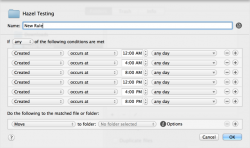
I've not much experience with Folder Actions proper, so this might be easily doable without Hazel, but a Hazel rule on the creation folder like this might work. There are numerous other criteria than creation occurrence that might work in the event this approach fails.
 

Attachments

  • 2014-01-14_20-16-17.png
    2014-01-14_20-16-17.png
    113.1 KB · Views: 144
Alright cool, I'll check this out and keep you posted on if it succeeds.

I'm using IFTTT to take the files and put them into a Dropbox folder. From there I'll give Hazel a shot and hopefully it only leaves me with those 6 files per day.
 
Register on MacRumors! This sidebar will go away, and you'll see fewer ads.