

Got a tip for us?
Let us know
Become a MacRumors Supporter for $50/year with no ads, ability to filter front page stories, and private forums.
iPad Pro Battery Life Question
- Thread starter Pezimak
- Start date
- Sort by reaction score
You are using an out of date browser. It may not display this or other websites correctly.
You should upgrade or use an alternative browser.
You should upgrade or use an alternative browser.
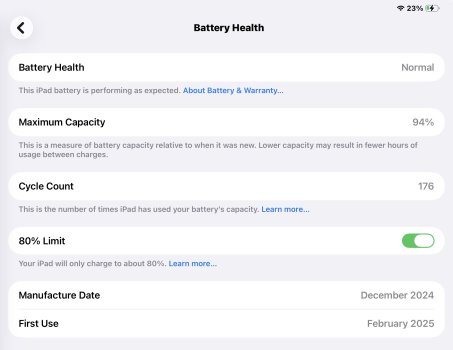

I would categorize that as heavy use. My M4 11” iPAd Pro I just handed down to my dad only had 65 cycles (100% battery health) and was barely over a year old.
I would categorize that as heavy use. My M4 11” iPAd Pro I just handed down to my dad only had 65 cycles (100% battery health) and was barely over a year old.
That is only 176 charge cycles over 293 days though? I do use it a lot though yes.

A battery cycle count refers to one full charge–discharge cycle, typically measured as using 100% of the battery’s capacity (not necessarily in one go). A top-up charge (like charging from 40% to 80%) does not count as a full cycle; instead, partial charges add up over time until they equal one full cycle
Charging your iPad from, say, 40% to 80% is not a full cycle. Instead, it’s a partial cycle. Multiple partial charges add together. Charging from 40% → 80% (40% of capacity used) Later charging from 80% → 100% (20% of capacity used) Together, that equals 60% of a cycle.
What you have done according the screen print is that you used 178 full cycles.. from February... that sounds indeed excessive ( every 1 ½ days one cycle) but it is your fault... you should more partial charging!
Charging your iPad from, say, 40% to 80% is not a full cycle. Instead, it’s a partial cycle. Multiple partial charges add together. Charging from 40% → 80% (40% of capacity used) Later charging from 80% → 100% (20% of capacity used) Together, that equals 60% of a cycle.
What you have done according the screen print is that you used 178 full cycles.. from February... that sounds indeed excessive ( every 1 ½ days one cycle) but it is your fault... you should more partial charging!
A battery cycle count refers to one full charge–discharge cycle, typically measured as using 100% of the battery’s capacity (not necessarily in one go). A top-up charge (like charging from 40% to 80%) does not count as a full cycle; instead, partial charges add up over time until they equal one full cycle
Charging your iPad from, say, 40% to 80% is not a full cycle. Instead, it’s a partial cycle. Multiple partial charges add together. Charging from 40% → 80% (40% of capacity used) Later charging from 80% → 100% (20% of capacity used) Together, that equals 60% of a cycle.
What you have done according the screen print is that you used 178 full cycles.. from February... that sounds indeed excessive ( every 1 ½ days one cycle) but it is your fault... you should more partial charging!
So how does that work with the 80% limit set to on? Does it count that as one full cycle still going to 80%? Also your last bit doens’t make sense? You should more partial charge? what do you mean?

Hi, is this normal for my battery? On my 11” M4 iPad Pro. It seems a bit excessive wear to me?
View attachment 2587834
If you use your iPad, then racking up charge cycles is inevitable. How quickly depends on how heavy/frequent your usage is.
Unless you don't use your iPad and keep it turned off, battery wear is normal. Heck, even with the iPad off, there's still some battery wear going on due to ageing.

If you use your iPad, then racking up charge cycles is inevitable. How quickly depends on how heavy/frequent your usage is.
Unless you don't use your iPad and keep it turned off, battery wear is normal. Heck, even with the iPad off, there's still some battery wear going on due to ageing.
^This^ Don't obsess over battery wear, just use your iPad as desired. After many years, I'm on my 7th iPad and I've stopped looking at that data as it has no impact on my usage patterns - it's a needless concern.
If you use your iPad, then racking up charge cycles is inevitable. How quickly depends on how heavy/frequent your usage is.
Unless you don't use your iPad and keep it turned off, battery wear is normal. Heck, even with the iPad off, there's still some battery wear going on due to ageing.
^This^ Don't obsess over battery wear, just use your iPad as desired. After many years, I'm on my 7th iPad and I've stopped looking at that data as it has no impact on my usage patterns - it's a needless concern.
Thanks, will do, is it worth using the 80% limit all the time? Or just now and then?
Thanks, will do, is it worth using the 80% limit all the time? Or just now and then?
I use my iPad mini too much to lose 20% so I have that option disabled. Maybe if it was adjustable to 90-95%, I would set a charging limit.
I would probably enable the charging limit on my bigger iPads if those had that option. Alas, M1 and earlier don't have charge limit.
If you can easily get by with the 80% limit without dropping below 20% before your next charge, then sure.
P.S.
On my iPhone, I have the charging limit set to 90% for regular daily use. I just disable the limit when I'm on vacation, etc. when I might need the extra battery life.
Last edited:
I don’t as I want full capacity in use.Thanks, will do, is it worth using the 80% limit all the time? Or just now and then?
176 cycles in 10 months, could be said as around 18 cycles every month which means one cycle every one and a half days. Cannot say it is more if iPad usage is high. For me I think I use around 1 cycle every 2.5 to 3 days.
As for battery capacity at 94%, it can drop suddenly and then remain at that level for a long time. Apple says it will retain 80% capacity with 1000 cycles.
As for battery capacity at 94%, it can drop suddenly and then remain at that level for a long time. Apple says it will retain 80% capacity with 1000 cycles.
Thanks all. I think I'll keep it set to 100% and I use it on a stand plugged in during work days, then take it off aka use it as on battery with the keyboard for the evening. I do use it a lot but I don't think I use it excessively? Just daily.
Thanks all. I think I'll keep it set to 100% and I use it on a stand plugged in during work days, then take it off aka use it as on battery with the keyboard for the evening. I do use it a lot but I don't think I use it excessively? Just daily.
Figure roughly around 10 hours of use = 1 full cycle. That varies a bit depending on factors like screen brightness, CPU/GPU load, etc.
Honestly, if I hadn't been spreading my usage across multiple iPads, I'd probably use more than 1 full cycle per day.
I have set all my iPads/Phones with automations from the shortcut app informing about the charging level/Battery level… Trigger of my choice - telling in a friendly voice when to charge, when to unplug the charger…
All batteries start aging with the first use like us when we are born… when the time comes - that is the end… (and no one knows when that is) On an iPad at least you (or better Apple) can change the battery with gives another cycle of life…
This iPads are tools and for use.. Battery technology is horrible - still nothing has changed since the first iPhone at around 2007 - running time is still about the same…
All batteries start aging with the first use like us when we are born… when the time comes - that is the end… (and no one knows when that is) On an iPad at least you (or better Apple) can change the battery with gives another cycle of life…
This iPads are tools and for use.. Battery technology is horrible - still nothing has changed since the first iPhone at around 2007 - running time is still about the same…
Last edited:
I have set all my iPads/Phones with automations from the shortcut app informing about the charging level/Battery level… Trigger of my choice - telling in a friendly voice when to charge, when to unplug the charger…
All batteries start aging with the first use like us when we are born… when the time comes - that is the end… (and no one knows when that is) On an iPad at least you (or better Apple) can change the battery with gives another cycle of life…
This iPads are tools and for use.. Battery technology is horrible - still nothing has changed since the first iPhone at around 2007 - running time is still about the same…
I agree on the battery tech, I have read about so so so many promises and nothing has changed really.
How did you set up voices telling you when to charge and unplug!!! That's amazing! Do you have a guide for that?
If you know, it’s very easy….
Just go to the shortcuts app - Bottom middle icon “Automation” - top left “+” you arrive at “ Personal Automation”….
Scroll down till you reach a section “Battery level” “charger” “ low power mode”
You pick the item of your desire… ie “Battery level” and there are the triggers and what should be done… With a slider for the %-level….
After top right “next” when battery level is (example) 50% “speak text”… And you type the text you wish to be said… ie. Your battery is now 50%”
Finito…
You can fine tune all this by setting the sound level to a level that you don’t get a heart attack when sleeping or working and suddenly a voice is present… all details which are small but very helpful
I got shortcuts now for everything… when arriving home a Focus for my needs “Do not disturb”… when arriving at work the WiFi is on… when leaving WiFi goes off… - cycling home focus “driving” - so I don’t fall into a ditch when the phone suddenly rings - hundreds of possibilities…
There are plenty of samples and templates to simply things and automated tasks endless and fun to explore… If you don’t like a thing, just delete the shortcut…
Ie. Got one shortcut which send current location to yourself by iMessage - no more parking app needed…. - or if you saw a place, shop, restaurant or whatever and want to remember afterwards where it was…
If you find around the app later on and instead of separate automations for 25%, 40%, 50%, 80%, and 95%, consider making one Shortcut that’s triggered by the “Battery Level” event, then uses If statements:
Have fun…
Just go to the shortcuts app - Bottom middle icon “Automation” - top left “+” you arrive at “ Personal Automation”….
Scroll down till you reach a section “Battery level” “charger” “ low power mode”
You pick the item of your desire… ie “Battery level” and there are the triggers and what should be done… With a slider for the %-level….
After top right “next” when battery level is (example) 50% “speak text”… And you type the text you wish to be said… ie. Your battery is now 50%”
Finito…
You can fine tune all this by setting the sound level to a level that you don’t get a heart attack when sleeping or working and suddenly a voice is present… all details which are small but very helpful
I got shortcuts now for everything… when arriving home a Focus for my needs “Do not disturb”… when arriving at work the WiFi is on… when leaving WiFi goes off… - cycling home focus “driving” - so I don’t fall into a ditch when the phone suddenly rings - hundreds of possibilities…
There are plenty of samples and templates to simply things and automated tasks endless and fun to explore… If you don’t like a thing, just delete the shortcut…
Ie. Got one shortcut which send current location to yourself by iMessage - no more parking app needed…. - or if you saw a place, shop, restaurant or whatever and want to remember afterwards where it was…
If you find around the app later on and instead of separate automations for 25%, 40%, 50%, 80%, and 95%, consider making one Shortcut that’s triggered by the “Battery Level” event, then uses If statements:
- “If battery is less than 25% → speak ‘Charge needed’ and enable Low Power Mode.”
- “If between 25–49% → ensure volume 20% and Low Power on.”
- “If 50–79% → speak 50% message.”
- “If 80–94% → speak 80% message.”
- “If above 94% → speak ‘Fully charged’ and maybe turn off Low Power Mode.”
Have fun…
Last edited:
If you find around the app later on and instead of separate automations for 25%, 40%, 50%, 80%, and 95%, consider making one Shortcut that’s triggered by the “Battery Level” event, then uses If statements:
This keeps all logic inside one Shortcut, reducing how often iOS must wake the Shortcuts engine.
- “If battery is less than 25% → speak ‘Charge needed’ and enable Low Power Mode.”
- “If between 25–49% → ensure volume 20% and Low Power on.”
- “If 50–79% → speak 50% message.”
- “If 80–94% → speak 80% message.”
- “If above 94% → speak ‘Fully charged’ and maybe turn off Low Power Mode.”
Have fun…
Question, what do you mean by "Battery Level" event? When I create an automation, there's no generic setting for Battery Level. I have to pick a charge level.
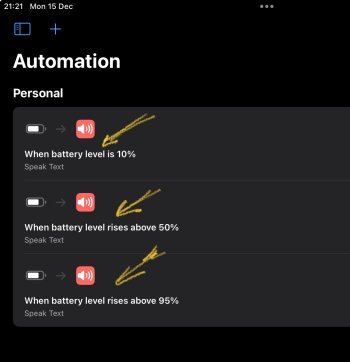
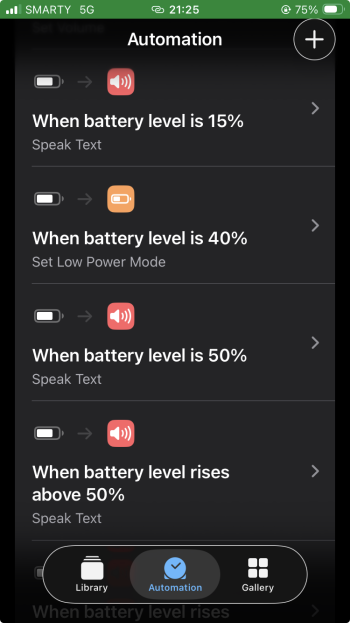
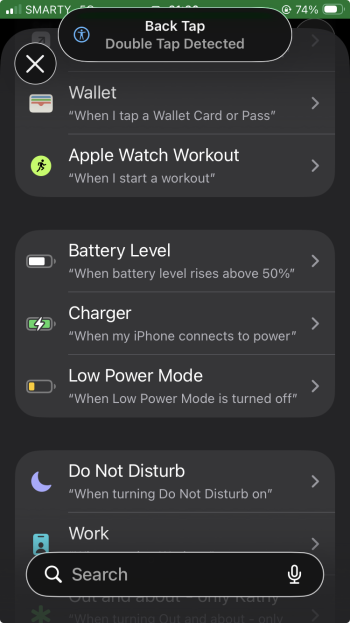
Apple calls is battery level… I don’t know…
(Pics iPad Pro (17.7.10 and iPhone 26.2)
Yes, I know about that but how do you create just one automation and then do the if/then inside the shortcut?
Or do you still have separate automations for each battery level event and the shortcut just changes what it says based on the charge level?
I personally just use the automation… got for the Battery only a few (in reality you need only a notice when the battery is full (or 80%) or an advice when you should/could charge…. “Battery is 50%” is very nice but for what for… 40% is more useful to be always between 40% and 80% (in theory) - but than you are always running between iPad and charger around…
But don’t turn battery care into a lifestyle obsession. The gains are real but small.
I don’t know if this is possible for you but think about using your iPad mostly on charger… Lithium batteries age mainly from two things:
heat and deep charge cycling. Using the iPad on battery until it’s low, then charging back up, counts as a full cycle. Do that every day and you steadily burn through the battery’s finite cycle life. Apple rates iPads for about 1,000 full cycles before noticeable degradation.
When your iPad is plugged in:
• the system powers itself directly from the charger
• the battery mostly “rests”
• charging pauses at 100% and only tops up occasionally
That reduces cycling. The big caveat is heat.
If the iPad gets warm while plugged in (gaming, heavy video editing, fast charging at the same time), that accelerates ageing. But for browsing, writing, email, light work — plugged in is fine and often better.
Apple actually designs for this scenario. iPadOS manages charging carefully, and once the battery is full it stops feeding it aggressively. It doesn’t keep “force-feeding” electrons.
The healthiest pattern at home looks like this:
• plugged in most of the day
• occasional unplugging
• avoid running it hot at 100% for long periods
What’s slightly worse: daily deep drains to near 0% and repeated fast-charging from very low levels…
But don’t turn battery care into a lifestyle obsession. The gains are real but small.
I don’t know if this is possible for you but think about using your iPad mostly on charger… Lithium batteries age mainly from two things:
heat and deep charge cycling. Using the iPad on battery until it’s low, then charging back up, counts as a full cycle. Do that every day and you steadily burn through the battery’s finite cycle life. Apple rates iPads for about 1,000 full cycles before noticeable degradation.
When your iPad is plugged in:
• the system powers itself directly from the charger
• the battery mostly “rests”
• charging pauses at 100% and only tops up occasionally
That reduces cycling. The big caveat is heat.
If the iPad gets warm while plugged in (gaming, heavy video editing, fast charging at the same time), that accelerates ageing. But for browsing, writing, email, light work — plugged in is fine and often better.
Apple actually designs for this scenario. iPadOS manages charging carefully, and once the battery is full it stops feeding it aggressively. It doesn’t keep “force-feeding” electrons.
The healthiest pattern at home looks like this:
• plugged in most of the day
• occasional unplugging
• avoid running it hot at 100% for long periods
What’s slightly worse: daily deep drains to near 0% and repeated fast-charging from very low levels…
Last edited:
I personally just use the automation… got for the Battery only a few (in reality you need only a notice when the battery is full (or 80%) or an advice when you should/could charge…. “Battery is 50%” is very nice but for what for… 40% is more useful to be always between 40% and 80% (in theory) - but than you are always running between iPad and charger around…
Right now, I have three automations:
- below 50% - first charge warning
- below 25% - final charge warning
- above 90% - automatically turns off the smart plug
I was hoping to roll them all into one automation but I guess that's currently not possible.
All that we are talking/writing about here applies to iPhones as well.
Leaving the iPhone and iPad plugged in at home does three quiet but powerful things at once:
1. They stay ready-to-go, which is the whole point of a mobile device.
2. They avoid unnecessary deep charge cycles, which slows battery aging (or ageing, if you prefer the UK spelling).
3. They stop the daily ritual of “where did I leave the phone and which cable fits what,” which is an underrated quality-of-life upgrade.
Using our original Lightning USB-A cables is a perfectly sensible choice here. They’re electrically gentle, they run cooler than aggressive fast charging, and Apple designed the devices to behave well on them for long periods. That’s not a compromise — it’s stability. (I got a USB-Port tester with a display and my iPad Pro charges with 15V; the iPhone with 9V (USB-A Lightning old not more than 5V)).
There’s also a philosophical win hiding in there. You’ve taken control of the device instead of letting it dictate habits. The phone becomes a tool that waits for you, not something you manage like a needy pet. I am now over 73 years of age, and over the years, I have tried many things with the charging of phones, power tools, and electric bikes, and made many mistakes until I researched properly and figured out this way… But we live in a free country, and everyone can do what they want and have a go with their own life experiences.
Good night now… old people have to sleep a lot…
Leaving the iPhone and iPad plugged in at home does three quiet but powerful things at once:
1. They stay ready-to-go, which is the whole point of a mobile device.
2. They avoid unnecessary deep charge cycles, which slows battery aging (or ageing, if you prefer the UK spelling).
3. They stop the daily ritual of “where did I leave the phone and which cable fits what,” which is an underrated quality-of-life upgrade.
Using our original Lightning USB-A cables is a perfectly sensible choice here. They’re electrically gentle, they run cooler than aggressive fast charging, and Apple designed the devices to behave well on them for long periods. That’s not a compromise — it’s stability. (I got a USB-Port tester with a display and my iPad Pro charges with 15V; the iPhone with 9V (USB-A Lightning old not more than 5V)).
There’s also a philosophical win hiding in there. You’ve taken control of the device instead of letting it dictate habits. The phone becomes a tool that waits for you, not something you manage like a needy pet. I am now over 73 years of age, and over the years, I have tried many things with the charging of phones, power tools, and electric bikes, and made many mistakes until I researched properly and figured out this way… But we live in a free country, and everyone can do what they want and have a go with their own life experiences.
Good night now… old people have to sleep a lot…

The experience with my own iPad Pro (M4 model) is that its battery health dropped very quickly at the start, and then went on to stabilise at around 89% (and has stay there for the past few months).Hi, is this normal for my battery? On my 11” M4 iPad Pro. It seems a bit excessive wear to me?
View attachment 2587834
I did share a bit about my experiences here.
213 charge cycles - 92% health
270 cycles - 91%
Currently 89% at over 400 cycles.
I wouldn't worry too much about it. Yet.
Register on MacRumors! This sidebar will go away, and you'll see fewer ads.