

Got a tip for us?
Let us know
Become a MacRumors Supporter for $50/year with no ads, ability to filter front page stories, and private forums.
Blurry Fonts, only on iMac?
- Thread starter MorganX
- Start date
- Sort by reaction score
You are using an out of date browser. It may not display this or other websites correctly.
You should upgrade or use an alternative browser.
You should upgrade or use an alternative browser.


What are you talking about, iMacs render fonts fine. If your fonts are blurry you should change your display settings, there is a setting for Color LCD in there so try it, or clean your screen.

Re: Blurry Fonts, only on iMac?
My iMac displays fonts and pictures just fine. Under System Preferences,Displays, there is a color display profile for the iMac. Under the general preference there is a selection for font smoothing for a flat panel display. That should do it for you.
Originally posted by MorganX
Just curious, are PowerMacs also unable to render sharp font smoothing or is it only iMacs?
Wasn't so bad until I started web browsing. Spend 2k on a PC and you do want to be able to read everything.
My iMac displays fonts and pictures just fine. Under System Preferences,Displays, there is a color display profile for the iMac. Under the general preference there is a selection for font smoothing for a flat panel display. That should do it for you.

And even on the worse setting the picture/text here is perfect.
Time to get (if you have, stronger) glasses.
Time to get (if you have, stronger) glasses.
Re: Re: Blurry Fonts, only on iMac?
No, none of the setting render fonts as sharply as a PC. I guess I'll just have to get used to it like most iMac users until Apple decides to fix it.
Originally posted by pivo6
My iMac displays fonts and pictures just fine. Under System Preferences,Displays, there is a color display profile for the iMac. Under the general preference there is a selection for font smoothing for a flat panel display. That should do it for you.
No, none of the setting render fonts as sharply as a PC. I guess I'll just have to get used to it like most iMac users until Apple decides to fix it.
Re: Re: Re: Blurry Fonts, only on iMac?
What do you mean by "like most iMac users"? Before I switched to a Mac I bought myself a nice 21" ViewSonic monitor for my PC, to go along with the lovely GeForce 3 video card. I loved the display on that PC--absolutely incredible clarity and sharpness. As a developer and writer I work with text all day, every day. Clarity and sharpness is absolutely paramount to my work.
I now use the Mac almost exclusively, but still log into the PC every so often. My wife is the opposite--she prefers the PC, but will log into the Mac every once in awhile. Every time she logs onto the Mac she comments on how much sharper and clearer the text is than on the PC. I feel the same way--font rendering on the PC is nowhere near as clear as it is on the Mac.
I don't know how you're seeing blurry text, but no matter how hard I try I can't get text on either my iMac or my iBook to show up as blurry or fuzzy. If it's a very noticeable difference, consider bringing your Mac in for repair--you may have a defective screen.
Originally posted by MorganX
No, none of the setting render fonts as sharply as a PC. I guess I'll just have to get used to it like most iMac users until Apple decides to fix it.
What do you mean by "like most iMac users"? Before I switched to a Mac I bought myself a nice 21" ViewSonic monitor for my PC, to go along with the lovely GeForce 3 video card. I loved the display on that PC--absolutely incredible clarity and sharpness. As a developer and writer I work with text all day, every day. Clarity and sharpness is absolutely paramount to my work.
I now use the Mac almost exclusively, but still log into the PC every so often. My wife is the opposite--she prefers the PC, but will log into the Mac every once in awhile. Every time she logs onto the Mac she comments on how much sharper and clearer the text is than on the PC. I feel the same way--font rendering on the PC is nowhere near as clear as it is on the Mac.
I don't know how you're seeing blurry text, but no matter how hard I try I can't get text on either my iMac or my iBook to show up as blurry or fuzzy. If it's a very noticeable difference, consider bringing your Mac in for repair--you may have a defective screen.

Re: Re: Re: Blurry Fonts, only on iMac?
turn down your anti-alaising. pcs don't do this, so the font looks sharp, but blocky.
the imac screen is one of the best lcds available. period.
run the lcd at its native resolution. if you down the resolution, it will always look blurry. this is a fact of all lcds.
Originally posted by MorganX
No, none of the setting render fonts as sharply as a PC. I guess I'll just have to get used to it like most iMac users until Apple decides to fix it.
turn down your anti-alaising. pcs don't do this, so the font looks sharp, but blocky.
the imac screen is one of the best lcds available. period.
run the lcd at its native resolution. if you down the resolution, it will always look blurry. this is a fact of all lcds.
Re: Re: Re: Re: Blurry Fonts, only on iMac?
PCs support font anti-aliasing. I forget which version of Windows this was introduced in, thought (I believe Win98 and WinNT 4.0). Windows XP includes ClearType anti-aliasing for better clarity on LCD screens.
As far as resolutions go, running an LCD screen capable of 1024x768 resolution down at 800x600 (or even 640x480) will not make things more blurry by default. This is not a "fact" of all LCDs. The reason you get blurriness on lower resolutions is because the anti-aliasing is more evident. You're still using all of the pixels of the LCD screen, it's just that an image will use *more* of the screen's pixels at a lower resolution than at a higher resolution. At low resolutions you can reduce the blurriness (but increase the blockiness) by reducing your antialiasing.
The original poster also never mentioned which model of iMac they were on. If they're using one of the CRT models then you don't really have a choice--CRT users should only use "Standard" font smoothing. The other settings won't do anything bad, but they could be the cause for a degraded image. You see, "Standard" smoothing does normal, every day, plain-Jane anti-aliasing. The other options on the menu are made for LCD users and enables various strengths of sub-pixel anti-aliasing--turning on/off individual red, green, or blue crystals on both the pixel in question and surrounding pixels in order to get a smoother effect. The LCD crystals are well ordered and it's possible to enforce that sort of individual control. That's simply not possible on a standard CRT display.
Originally posted by idkew
turn down your anti-alaising. pcs don't do this, so the font looks sharp, but blocky.
the imac screen is one of the best lcds available. period.
run the lcd at its native resolution. if you down the resolution, it will always look blurry. this is a fact of all lcds.
PCs support font anti-aliasing. I forget which version of Windows this was introduced in, thought (I believe Win98 and WinNT 4.0). Windows XP includes ClearType anti-aliasing for better clarity on LCD screens.
As far as resolutions go, running an LCD screen capable of 1024x768 resolution down at 800x600 (or even 640x480) will not make things more blurry by default. This is not a "fact" of all LCDs. The reason you get blurriness on lower resolutions is because the anti-aliasing is more evident. You're still using all of the pixels of the LCD screen, it's just that an image will use *more* of the screen's pixels at a lower resolution than at a higher resolution. At low resolutions you can reduce the blurriness (but increase the blockiness) by reducing your antialiasing.
The original poster also never mentioned which model of iMac they were on. If they're using one of the CRT models then you don't really have a choice--CRT users should only use "Standard" font smoothing. The other settings won't do anything bad, but they could be the cause for a degraded image. You see, "Standard" smoothing does normal, every day, plain-Jane anti-aliasing. The other options on the menu are made for LCD users and enables various strengths of sub-pixel anti-aliasing--turning on/off individual red, green, or blue crystals on both the pixel in question and surrounding pixels in order to get a smoother effect. The LCD crystals are well ordered and it's possible to enforce that sort of individual control. That's simply not possible on a standard CRT display.
Re: Re: Re: Re: Blurry Fonts, only on iMac?
Font smoothing and ClearType do just that.
There's nothing wrong with the LCD and I only run native.
I found an AppleCare Doc:
Mac OS X: Fonts on the Screen Look Fuzzy Article ID:61341
Created:1/29/02
Modified:1/29/02
Hopefully, the will continue to improve this.
Originally posted by idkew
turn down your anti-alaising. pcs don't do this, so the font looks sharp, but blocky.
the imac screen is one of the best lcds available. period.
run the lcd at its native resolution. if you down the resolution, it will always look blurry. this is a fact of all lcds.
Font smoothing and ClearType do just that.
There's nothing wrong with the LCD and I only run native.
I found an AppleCare Doc:
Mac OS X: Fonts on the Screen Look Fuzzy Article ID:61341
Created:1/29/02
Modified:1/29/02
Hopefully, the will continue to improve this.
Re: Re: Re: Re: Blurry Fonts, only on iMac?
The problem was negligible for me until I switched to browsing with my new Mac, and until I installed Excel and worked with one of my large spreadsheets. (BTW, once I solve the font display issue, the widescreen is fantastic for big spreadsheets.)
I found an AppleCare Doc:
Mac OS X: Fonts on the Screen Look Fuzzy Article ID:61341
Created:1/29/02
Modified:1/29/02
http://discussions.info.apple.com/WebX?50@206.Tb0JaucNiyI.1@.3bbbd5b1
Originally posted by cnladd
What do you mean by "like most iMac users"? Before I switched to a Mac I bought myself a nice 21" ViewSonic monitor for my PC, to go along with the lovely GeForce 3 video card. I loved the display on that PC--absolutely incredible clarity and sharpness. As a developer and writer I work with text all day, every day. Clarity and sharpness is absolutely paramount to my work.
I now use the Mac almost exclusively, but still log into the PC every so often. My wife is the opposite--she prefers the PC, but will log into the Mac every once in awhile. Every time she logs onto the Mac she comments on how much sharper and clearer the text is than on the PC. I feel the same way--font rendering on the PC is nowhere near as clear as it is on the Mac.
I don't know how you're seeing blurry text, but no matter how hard I try I can't get text on either my iMac or my iBook to show up as blurry or fuzzy. If it's a very noticeable difference, consider bringing your Mac in for repair--you may have a defective screen.
The problem was negligible for me until I switched to browsing with my new Mac, and until I installed Excel and worked with one of my large spreadsheets. (BTW, once I solve the font display issue, the widescreen is fantastic for big spreadsheets.)
I found an AppleCare Doc:
Mac OS X: Fonts on the Screen Look Fuzzy Article ID:61341
Created:1/29/02
Modified:1/29/02
http://discussions.info.apple.com/WebX?50@206.Tb0JaucNiyI.1@.3bbbd5b1
Re: Re: Re: Re: Re: Blurry Fonts, only on iMac?
Why dont you take a screenshot of your problem so we can see these "blurry fonts?"Originally posted by MorganX
The problem was negligible for me until I switched to browsing with my new Mac, and until I installed Excel and worked with one of my large spreadsheets. (BTW, once I solve the font display issue, the widescreen is fantastic for big spreadsheets.)
I found an AppleCare Doc:
Mac OS X: Fonts on the Screen Look Fuzzy Article ID:61341
Created:1/29/02
Modified:1/29/02
http://discussions.info.apple.com/WebX?50@206.Tb0JaucNiyI.1@.3bbbd5b1
Re: Re: Re: Re: Re: Re: Blurry Fonts, only on iMac?
I have Apple's solution and see that's it's an OS X problem and all I can do is wait for a fix. But I will post some comparison pics for you; at work right now, no Macs.
Originally posted by medea
Why dont you take a screenshot of your problem so we can see these "blurry fonts?"
I have Apple's solution and see that's it's an OS X problem and all I can do is wait for a fix. But I will post some comparison pics for you; at work right now, no Macs.

clear type on xp looks like crap. i just hooked my 20 inch cinema display and no matter what i did the fonts looked like trash. im sure there was something i was doing wrong but i did everything to my knowledge and things juts looked blurry. it may have been because windows doesnt reconize apples goofy resolutions.
iJon
iJon
Re: Re: Re: Re: Re: Re: Blurry Fonts, only on iMac?
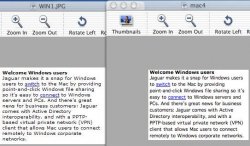
Windows is on the left, OS X on the right. I chose the best setting I could get in OS X (Off for 12 and under, light) and the worst for XP (Cleartype)
I'm not as upset as I was previously, because at 12 and under on light, my spreadsheets work fine. Web browsing still sucks in Safari (uses antialiasing, IE:mac does not). At all settings system menu fonts are blurry also, but not as bad as the attached screenshot.
I would like the antialiasing could be improved enough for me to use a setting of Off for 9 and under, light. Maybe by 10.2.5.
Except for Web Browsing, the Light setting at 12 is soemthing I can live with. The LCD setting suggested by AppleCare is not acceptable, it's worse than the screenshot.
edit: enjoy the weekend. I'm going out then I need to setup my new desk and laser printer I bought to go with my iMac.
Originally posted by medea
Why dont you take a screenshot of your problem so we can see these "blurry fonts?"
Windows is on the left, OS X on the right. I chose the best setting I could get in OS X (Off for 12 and under, light) and the worst for XP (Cleartype)
I'm not as upset as I was previously, because at 12 and under on light, my spreadsheets work fine. Web browsing still sucks in Safari (uses antialiasing, IE:mac does not). At all settings system menu fonts are blurry also, but not as bad as the attached screenshot.
I would like the antialiasing could be improved enough for me to use a setting of Off for 9 and under, light. Maybe by 10.2.5.
Except for Web Browsing, the Light setting at 12 is soemthing I can live with. The LCD setting suggested by AppleCare is not acceptable, it's worse than the screenshot.
edit: enjoy the weekend. I'm going out then I need to setup my new desk and laser printer I bought to go with my iMac.
Attachments
I agree with MorganX
I bought the Flat Panel iMac in Jan. last year (2002) - spent about $2k as well.
I have noticed exactly the same problem you are describing with the blurry fonts.
After awhile you will get used to it, and I am sure that Apple is working to fix the problem.
As you may have already noticed from several of these responses that there are people that will blindly support Apple and miss the entire point of what we are saying.
Every company, including Apple, has and needs feedback from customers to continue to improve on their already awesome products.
MorganX, when you post on these message boards, be prepared to see all the totally biased responses.
I have and will continue to buy Apple products - I have over $150k invested in Apple stock, so I want them to succeed. But to be successful, people have to be honest and supply proper criticism.
I applaud you, MorganX, for doing just that. It didn't come across in a negative way at all and was clearly a legitimate question and concern.
Go Apple!
Quark
I bought the Flat Panel iMac in Jan. last year (2002) - spent about $2k as well.
I have noticed exactly the same problem you are describing with the blurry fonts.
After awhile you will get used to it, and I am sure that Apple is working to fix the problem.
As you may have already noticed from several of these responses that there are people that will blindly support Apple and miss the entire point of what we are saying.
Every company, including Apple, has and needs feedback from customers to continue to improve on their already awesome products.
MorganX, when you post on these message boards, be prepared to see all the totally biased responses.
I have and will continue to buy Apple products - I have over $150k invested in Apple stock, so I want them to succeed. But to be successful, people have to be honest and supply proper criticism.
I applaud you, MorganX, for doing just that. It didn't come across in a negative way at all and was clearly a legitimate question and concern.
Go Apple!
Quark
Originally posted by MrMacman
... I see both fine and the clarity lookd sharper on the right.
The one on the right is definitely blurrier. It's a much smoother font, but it's not as clear--precisely because of the smoothing.
I misunderstand what he was talking about at first--I thought it was just a general statement about fonts on the Mac in general. Specific to browsing, though--he's right, the text isn't as sharp. For me, it appears to be hit-and-miss. Take the form I'm using to fill out this post, for example. Most of the text on the page is a bit blurred. However, the bold text, all text inside buttons (and other controls), menu text--even the text inside the form itself--appear just fine. Since I use Safari as my primary browser, I chalked that up to it still being in beta. As for IE, like many other Carbon apps I'm not overly impressed with its support for Quartz text smoothing.
Re: I agree with MorganX
I didn't notice any blind support for Apple in any of the responses here ("blind"? No pun intended -- we are talking about font blurriness here!) At worst I witness some ignorance towards the PC world (such as the supposed lack of anti-aliased fonts on the PC.) Like you mentioned in your post, some people have gotten used to any differences they may see. And, as always, the perception of blurriness is definitely relative.
As for my previous post, it supports MorganX (and you). I had gotten used to seeing blurry text in my web browser and assumed it was a browser shortcoming, not the OS (I'm starting to dislike "blurry"... I believe that "fuzzy" is more acurrate...) Like a small crack in a windshield, though, once you notice it, that's all you see. Damn, you!
Originally posted by Quark
As you may have already noticed from several of these responses that there are people that will blindly support Apple and miss the entire point of what we are saying.
I didn't notice any blind support for Apple in any of the responses here ("blind"? No pun intended -- we are talking about font blurriness here!) At worst I witness some ignorance towards the PC world (such as the supposed lack of anti-aliased fonts on the PC.) Like you mentioned in your post, some people have gotten used to any differences they may see. And, as always, the perception of blurriness is definitely relative.
As for my previous post, it supports MorganX (and you). I had gotten used to seeing blurry text in my web browser and assumed it was a browser shortcoming, not the OS (I'm starting to dislike "blurry"... I believe that "fuzzy" is more acurrate...) Like a small crack in a windshield, though, once you notice it, that's all you see. Damn, you!

I have a friend who recently bought a 17" iMac, having gotten fed up with Windows. His only complaint was that he didn't like the font-smoothing. It has now been 2 months since he switched, and he likes it. He is also enamored with his Mac. He rebooted today for the first time in a week--something he can't get away with on his Win2k PC at work.
It's funny, though; I was ecstatic to switch from OS 9 to OS X. I thought the font anti-aliasing was really cool. I don't remember ever being bothered by the difference. I think a lot of "switchers" want their Macs to be more stable versions of their PCs--identical in most ways to the experience they were used to. They seem to view differences as flaws.
I'd encourage you to embrace the differences, friend. While the fonts are different, I can read both with ease. Perhaps this difference is a flaw to you. To many, it is not.
This is not "blind" following of Apple. I have criticized them many times for true problems (e.g., slow hardware, mediocre support with some issues). This is not one to me.
Welcome. I hope you're pleased with the overall experience.
Chris
It's funny, though; I was ecstatic to switch from OS 9 to OS X. I thought the font anti-aliasing was really cool. I don't remember ever being bothered by the difference. I think a lot of "switchers" want their Macs to be more stable versions of their PCs--identical in most ways to the experience they were used to. They seem to view differences as flaws.
I'd encourage you to embrace the differences, friend. While the fonts are different, I can read both with ease. Perhaps this difference is a flaw to you. To many, it is not.
This is not "blind" following of Apple. I have criticized them many times for true problems (e.g., slow hardware, mediocre support with some issues). This is not one to me.
Welcome. I hope you're pleased with the overall experience.
Chris
Re: Re: Re: Re: Re: Blurry Fonts, only on iMac?
well, you may have me in the first question. i was unaware of the cleartype.
for the lcd part, if you do not go on exactly size deductions on the lcd, you get blurryness. just as a 33% sized image looks weird on a screen, an odd number looks weird also, to a different way though. they do not scale anywhere near as well at a crt monitor. and i guarentee that is a fact.
Originally posted by cnladd
PCs support font anti-aliasing. I forget which version of Windows this was introduced in, thought (I believe Win98 and WinNT 4.0). Windows XP includes ClearType anti-aliasing for better clarity on LCD screens.
As far as resolutions go, running an LCD screen capable of 1024x768 resolution down at 800x600 (or even 640x480) will not make things more blurry by default. This is not a "fact" of all LCDs. The reason you get blurriness on lower resolutions is because the anti-aliasing is more evident. You're still using all of the pixels of the LCD screen, it's just that an image will use *more* of the screen's pixels at a lower resolution than at a higher resolution. At low resolutions you can reduce the blurriness (but increase the blockiness) by reducing your antialiasing.
The original poster also never mentioned which model of iMac they were on. If they're using one of the CRT models then you don't really have a choice--CRT users should only use "Standard" font smoothing. The other settings won't do anything bad, but they could be the cause for a degraded image. You see, "Standard" smoothing does normal, every day, plain-Jane anti-aliasing. The other options on the menu are made for LCD users and enables various strengths of sub-pixel anti-aliasing--turning on/off individual red, green, or blue crystals on both the pixel in question and surrounding pixels in order to get a smoother effect. The LCD crystals are well ordered and it's possible to enforce that sort of individual control. That's simply not possible on a standard CRT display.
well, you may have me in the first question. i was unaware of the cleartype.
for the lcd part, if you do not go on exactly size deductions on the lcd, you get blurryness. just as a 33% sized image looks weird on a screen, an odd number looks weird also, to a different way though. they do not scale anywhere near as well at a crt monitor. and i guarentee that is a fact.
Register on MacRumors! This sidebar will go away, and you'll see fewer ads.