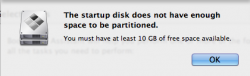
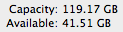
I have recently installed an Intel SSD 120GB and upgraded to OS X Mountain Lion and am trying to use the bootcamp assistant but it says the startup disk does not have enough free space, but i have 41Gb free. What can i do to get it to work?


Got a tip for us?
Let us know
Become a MacRumors Supporter for $50/year with no ads, ability to filter front page stories, and private forums.
Bootcamp Issues
- Thread starter billybob0413
- Start date
- Sort by reaction score