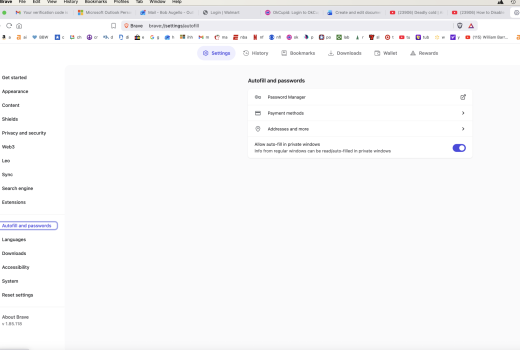
S surfbug6 macrumors member Original poster Feb 23, 2022 32 2 Dec 25, 2025 #1 I just installed the brave browser but I clicked on the page when I see the save password. I tried to turn off on the setting but Ididn't see the save password anywhere. Can someone help me? Hap;py Chrx Attachments Screenshot 2025-12-25 at 10.48.08 AM.png 253.5 KB · Views: 18
I just installed the brave browser but I clicked on the page when I see the save password. I tried to turn off on the setting but Ididn't see the save password anywhere. Can someone help me? Hap;py Chrx
Boppi macrumors member Oct 16, 2025 70 81 Dec 25, 2025 #2 Hi Bob, You're question isn't clear, but I want to mention your picture shows some identifiable information. You should consider cropping the top part out, and rephrasing your question for clarity.
Hi Bob, You're question isn't clear, but I want to mention your picture shows some identifiable information. You should consider cropping the top part out, and rephrasing your question for clarity.
M Mr.Ben macrumors member Apr 17, 2022 93 118 Dec 26, 2025 #3 You can turn off 'offer to save passwords' in the password manager: brave://password-manager/settings. Guessing that's what you're after? (Where you are in that screenshot, click to open password manager. Then on the left side there's a settings tab.) Reactions: Agile55
You can turn off 'offer to save passwords' in the password manager: brave://password-manager/settings. Guessing that's what you're after? (Where you are in that screenshot, click to open password manager. Then on the left side there's a settings tab.)