Become a MacRumors Supporter for $50/year with no ads, ability to filter front page stories, and private forums.

Son of Bronson

macrumors newbie
Original poster
Oct 14, 2015
2
0
My problem is this: I'm on the verge of buying a late 2007 Macbook Pro 17". The seller is not able to answer whether it has a 1680x1050 or 1920x1200 resolution.

The Mac is in a setup assistant stage, where system specs can't be checked.
So, how should one pursue this?
 
My problem is this: I'm on the verge of buying a late 2007 Macbook Pro 17". The seller is not able to answer whether it has a 1680x1050 or 1920x1200 resolution.

The Mac is in a setup assistant stage, where system specs can't be checked.
So, how should one pursue this?

You could ask for the serial number and then go here to see the specs of that machine.
http://www.everymac.com/ultimate-mac-lookup/
 
You could ask for the serial number and then go here to see the specs of that machine.
http://www.everymac.com/ultimate-mac-lookup/
Thanks, I did. The result looks like this:

MacBook Pro "Core 2 Duo" 2.4 17" (SR) 2.4 GHz Core 2 Duo (T7700)
Intro. June 5, 2007 Disc. February 26, 2008
Order MA897LL/A
Model A1229 (EMC 2137)
Family Mid/Late 2007, 2.4GHz* ID MacBookPro3,1
RAM 2 GB VRAM 256 MB
Storage 160 GB (5400 RPM) Optical 8X DL "SuperDrive"

Does any of this help in determening the resolution? If it does, I sure wouldn't know.
 
Thanks, I did. The result looks like this:

MacBook Pro "Core 2 Duo" 2.4 17" (SR) 2.4 GHz Core 2 Duo (T7700)
Intro. June 5, 2007 Disc. February 26, 2008
Order MA897LL/A
Model A1229 (EMC 2137)
Family Mid/Late 2007, 2.4GHz* ID MacBookPro3,1
RAM 2 GB VRAM 256 MB
Storage 160 GB (5400 RPM) Optical 8X DL "SuperDrive"

Does any of this help in determining the resolution? If it does, I sure wouldn't know.

Sorry, I thought inputting the serial number would give exact results for that particular machine but it looks like it gives the same info as just asking about the mid 2007 mbp which shows the native resolution and the caveat that some custom ordered machines had higher resolution (see below). You could ask the seller if it was a custom order. If not, it probably is the native resolution.

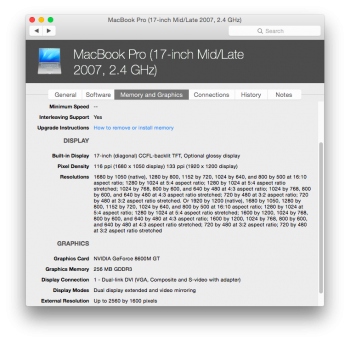
Built-in Display: 17.0" Widescreen Native Resolution: 1680x1050*
Details: 17.0" color "matte" or "glossy" widescreen TFT active-matrix display with a 1680 by 1050 native resolution. Apple reports that the default display also supports "1280 by 800, 1152 by 720, 1024 by 640, and 800 by 500 at 16:10 aspect ratio; 1280 by 1024 at 5:4 aspect ratio; 1280 by 1024 at 5:4 aspect ratio stretched; 1024 by 768, 800 by 600, and 640 by 480 at 4:3 aspect ratio; 1024 by 768, 800 by 600, and 640 by 480 at 4:3 aspect ratio stretched; 720 by 480 at 3:2 aspect ratio; 720 by 480 at 3:2 aspect ratio stretched".

*A higher-resolution 1920x1200 display also was available by custom order. Apple reports that this display additionally supports "1680 by 1050, 1280 by 800, 1152 by 720, 1024 by 640, and 800 by 500 at 16:10 aspect ratio; 1280 by 1024 at 5:4 aspect ratio; 1280 by 1024 at 5:4 aspect ratio stretched; 1600 by 1200, 1024 by 768, 800 by 600, and 640 by 480 at 4:3 aspect ratio; 1600 by 1200, 1024 by 768, 800 by 600, and 640 by 480 at 4:3 aspect ratio stretched; 720 by 480 at 3:2 aspect ratio; 720 by 480 at 3:2 aspect ratio stretched".
 
The serial number doesn't show all upgrades from Apple. For example, mine shows the upgraded CPU but it doesn't have the ram or SSD upgrade. If you can't determine the screen from the serial number, then you will need to open up display settings.
 
What? He can't click on the Apple logo and choose 'About this Mac'? It will show what resolution the screen has.
 
What? He can't click on the Apple logo and choose 'About this Mac'? It will show what resolution the screen has.

The Mac is in a setup assistant stage, where system specs can't be checked.

So the seller has done a clean install and left it at the setup assistant ready to sell. They will just have to go through the setup assistant, get the system report, then re-install OS X to get it back to the setup assistant (or google a shortcut). Annoying, but not really the moon on a stick. (or they might be able to boot from recovery or - for a machine that old - from an OS X DVD to get the info).

So, how should one pursue this?

Unless the seller is a recently bereaved and technically inept relative selling off their departed loved one's prize possession - or other similar mitigating situation - politely suggest that they lift their finger and find the answer to your question, or take your money elsewhere.
 
Are you sure it supports 1920?
 

Attachments

  • Screen Shot 2015-10-16 at 7.31.39 AM.png
    Screen Shot 2015-10-16 at 7.31.39 AM.png
    177.1 KB · Views: 153
Are you sure it supports 1920?
According to the website everymac.com, Apple sold a custom upgrade for that Macbook that did support the higher res. Here is a quote from them:
*A higher-resolution 1920x1200 display also was available by custom order. Apple reports that this display additionally supports "1680 by 1050, 1280 by 800, 1152 by 720, 1024 by 640, and 800 by 500 at 16:10 aspect ratio; 1280 by 1024 at 5:4 aspect ratio; 1280 by 1024 at 5:4 aspect ratio stretched; 1600 by 1200, 1024 by 768, 800 by 600, and 640 by 480 at 4:3 aspect ratio; 1600 by 1200, 1024 by 768, 800 by 600, and 640 by 480 at 4:3 aspect ratio stretched; 720 by 480 at 3:2 aspect ratio; 720 by 480 at 3:2 aspect ratio stretched".
I think the OP should just count on the Macbook being the original video and not the upgraded one, and make his purchase decisions based on that. If he decides to get it, and it does have the upgrade, then he is ahead in the game.
 
Register on MacRumors! This sidebar will go away, and you'll see fewer ads.