

Got a tip for us?
Let us know
Become a MacRumors Supporter for $50/year with no ads, ability to filter front page stories, and private forums.
Cannot change sound.
- Thread starter applecrag
- Start date
- Sort by reaction score
You are using an out of date browser. It may not display this or other websites correctly.
You should upgrade or use an alternative browser.
You should upgrade or use an alternative browser.
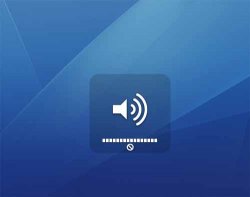
But do volume increase/decrease?
I never get that sign that is below the volume bar.
As for the semitransparent pic you get, that is normal. The only strange thing is that symbol at the bottom of the pic.
no the volume does not change. i know the transparent window is normal but im wondering about that "not permitted" symbol.

I don't think I've seen this before...interesting.
What happens if you try to change the volume from the menu bar? What about through System Preferences --> Sound? Does anything look funny in that preference pane? What about your Audio MIDI Setup (in Applications --> Utilities)? What does that look like?
What happens if you try to change the volume from the menu bar? What about through System Preferences --> Sound? Does anything look funny in that preference pane? What about your Audio MIDI Setup (in Applications --> Utilities)? What does that look like?
hmmmm
I was having this problem too but then it magically disappeared after 2 days. I'm still curious how to fix it if it comes up, how do i find my audio midi settings?
I was having this problem too but then it magically disappeared after 2 days. I'm still curious how to fix it if it comes up, how do i find my audio midi settings?
Audio MIDI Setup is in Applications --> Utilities. I really have no idea whether the solution is in there, but I wondered if it would show anything out of the ordinary.
More symptom details
I'm getting the same not permitted symbol. But here's some more symptoms:
1. Sound works fine with headphones attached.
2. Without headphones attached, I get the not-permitted symbol too, and the volume will not go up or down.
2. Headphone jack lights up red (freaky) from within when headphones are not attached.
3. Sound preferences: device chosen for output is "Digital Out" and I'm given no other options to switch this setting to.
Any help would be VERY appreciated. Thanks.
-Shaun
shaunfanmail@bellsouth.net
I'm getting the same not permitted symbol. But here's some more symptoms:
1. Sound works fine with headphones attached.
2. Without headphones attached, I get the not-permitted symbol too, and the volume will not go up or down.
2. Headphone jack lights up red (freaky) from within when headphones are not attached.
3. Sound preferences: device chosen for output is "Digital Out" and I'm given no other options to switch this setting to.
Any help would be VERY appreciated. Thanks.
-Shaun
shaunfanmail@bellsouth.net

It means your Mac thinks it has an optical cable attached to it. It's sending audio signals with a laser, thats why it's red.

Fixed!
A friend who had this issue told me to plug my headphones into the jack over and over and it would stop. It did. After nine insertions the red light went away and everything's OK.
A friend who had this issue told me to plug my headphones into the jack over and over and it would stop. It did. After nine insertions the red light went away and everything's OK.
I had this same problem with my old MacBook. Unfortunately for me, putting headphones in and out did not fix the problem. I ultimately had to take it to the Apple Store and had to send it away to be repaired.
Same Problem 
Hey, did u get ant solution to this problem ? If yes, then can u please post it here so that it could help me as well as others who have this problem.
And yea when I restart my mac then it goes away but thats another problem, restarting your mac every time you see this
Hey all I was just wondering how I can make this sound thing go away. every time i try to change my volume i get this picture. whats it mean and how can i fix it? thanks in advance!
Hey, did u get ant solution to this problem ? If yes, then can u please post it here so that it could help me as well as others who have this problem.
And yea when I restart my mac then it goes away but thats another problem, restarting your mac every time you see this
Register on MacRumors! This sidebar will go away, and you'll see fewer ads.