> About This Mac:
> About This Mac > More Info > Hardware Overview:
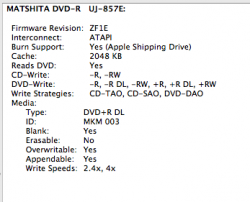
Go to Applications / Utilities / System Profiler > Hardware > Disc Burning and make a screenshot and attach it to your next post.
And what kind of DVD media do you use?
And what exact Mac do you use?
To find out what Mac OS X version you run, click> About This Mac:
To find out, what exact Mac model you use, click> About This Mac > More Info > Hardware Overview:
i am using a macbook 3.1 and os x 10.5.8
screenshot is attached
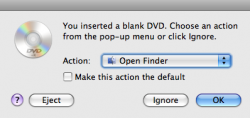
And what DVD media do you use? What happens if you insert an empty DVD-/+R/W disc into the ODD? Does Finder ask you what to do (System Preferences > CDs & DVDs)?
what do yoz mean by dvd media? heres another screen shot after entering the dvd
DVD-media = what kind of DVD is it, is it a DVD-R, a DVD+R, is it a DVD+RW, is it a DVD-RW or is it a Single Layer DVD or a Dual Layer DVD
Since your Mac seems to recognise the DVD media, why do you not use Finder and its Burn Folder to burn the data onto the DVD? Or do you need Disk Utility or the unmentioned burning application?
"How to maximise your MacRumors troubleshooting experience" created by mad jew in 2006